



Microsoft is bringing AI into everyday business operations through Microsoft 365 Copilot, Microsoft Foundry, and AI agents. But adopting these technologies involves more than learning how to use an AI assistant. Organisations also need to understand where AI creates business value, how to build useful agents, and how to manage identities, permissions, and sensitive information.
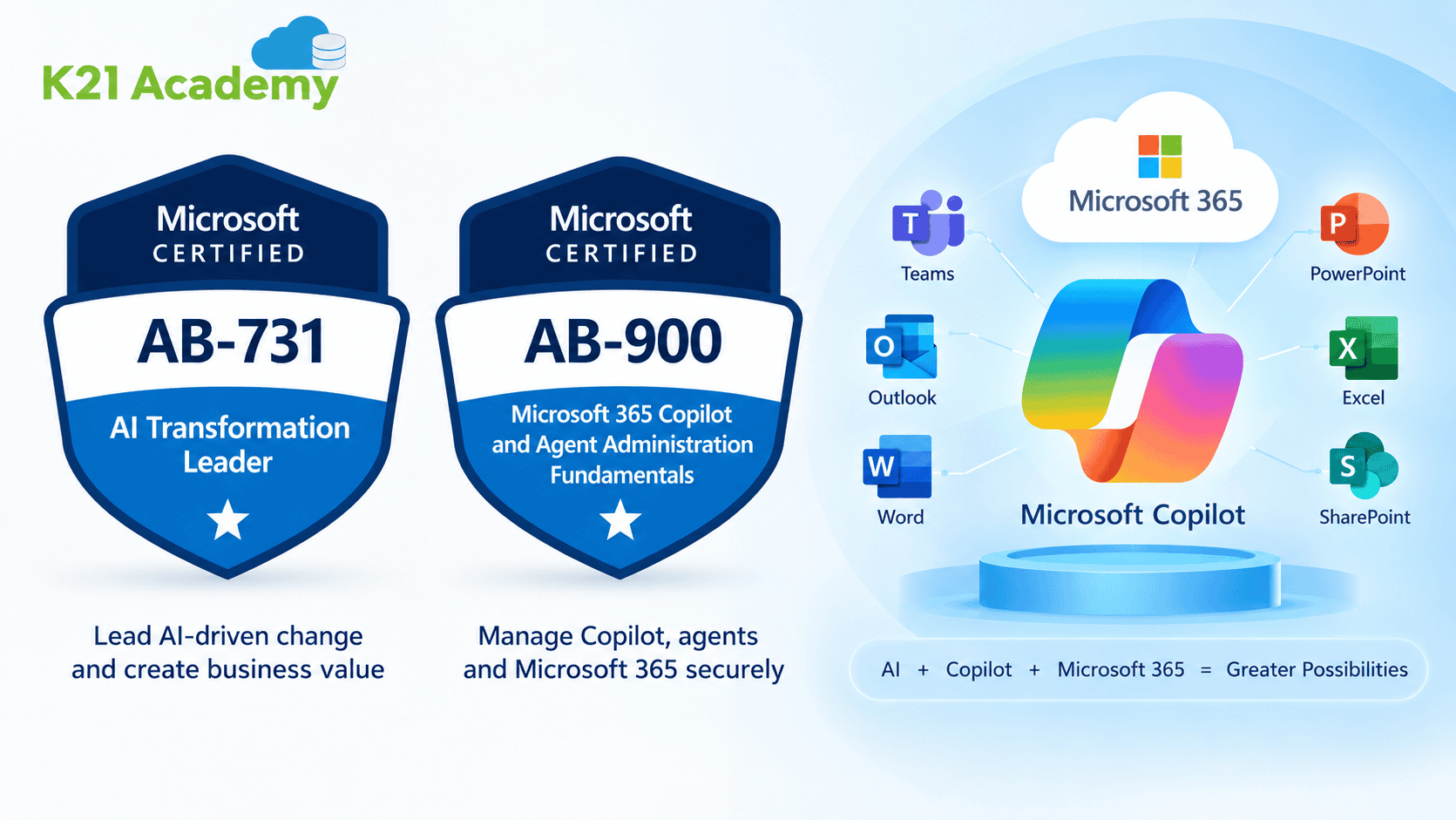
This is where the Microsoft Certified AI Transformation Leader (AB-731) and Microsoft 365 Copilot and Agent Administration Fundamentals (AB-900) certifications become relevant.
AB-731 focuses on identifying AI opportunities, selecting suitable AI solutions, and planning adoption across business processes. AB-900 focuses on the Microsoft 365 administration, security, compliance, and governance concepts that support Copilot and AI agents.
In this guide, we combine 14 hands-on labs across both certifications. You’ll compare generative AI tools, build a custom Copilot agent, explore Azure AI services, configure Microsoft 365 administration settings, investigate data protection controls, and learn how organisations manage AI agents.
The objective is simple: connect the concepts covered in these certifications with practical scenarios you can explore in an appropriate test environment.

What You’ll Build and Explore
14 practical labs across two certification learning paths
AB-731: AI Transformation Leader
| No. | Hands-On Lab |
|---|---|
| 1 | Prompt Engineering Showdown |
| 2 | Build a Custom Copilot Agent |
| 3 | Claude as Your AI Work Assistant |
| 4 | Microsoft AI Foundry: Language, Voice, and Content Safety |
| 5 | Microsoft 365 Copilot Deep Dive |
AB-900: Copilot and Agent Administration
| No. | Hands-On Lab |
|---|---|
| 1 | Admin Center, Users, Groups, and Licensing |
| 2 | Exchange, SharePoint, and Teams Objects |
| 3 | Entra ID, MFA, Conditional Access, and SSO |
| 4 | Purview Sensitivity Labels and Classification |
| 5 | Data Loss Prevention (DLP) |
| 6 | Insider Risk, Communication Compliance, and eDiscovery |
| 7 | DSPM for AI, Compliance Manager, and Oversharing |
| 8 | Copilot Licensing, Analytics, and Prompts |
| 9 | Create, Approve, and Monitor an Agent |
What Is the Microsoft Certified AI Transformation Leader Certification AB-731?
The role-based Microsoft Certified AI Transformation Leader Certification AB-731 is intended for strategic decision-makers who are in charge of directing AI innovation and adoption throughout enterprises utilising Microsoft’s AI tools, including Microsoft Foundry, Azure AI, and Microsoft 365 Copilot. It assesses your capacity to lead AI-driven business change rather than coding, in contrast to many other IT certifications.
Executives, directors, transformation leads, consultants, and anybody else in charge of AI strategy, adoption, governance, and ROI-driven AI efforts would find this certification appropriate.
Who Should Take AB-731 Certification?
The Microsoft Certified: AI Transformation Leader certification is designed for business decision-makers at all levels who are responsible for guiding AI transformation and innovation across their teams or organizations. It is particularly relevant for professionals who:
- Are responsible for guiding AI transformation and innovation
- Identify opportunities to apply AI to business processes and organizational needs
- Guide AI adoption and establish governance principles within teams or organizations
- Evaluate AI capabilities and align AI investments with business goals
- Champion responsible AI practices and support organization-wide AI adoption
- Have AI fluency and strategic vision but are not expected to write code
The AB-731 certification is designed for business decision-makers who want to guide AI transformation, identify AI opportunities, support adoption, and make informed decisions about Microsoft AI apps and services. Coding skills are not expected for this certification.
Related Readings: Why Responsible AI is a Game-Changer for Your Career and Certifications?
AB-731 Exam Overview
Here’s what to expect on the exam day:
| Delivery method | Online-proctored |
| Passing Score | 700 |
| Time | 45 minutes |
| Cost | 99 USD |
| Language | English, Arabic, Chinese (Simplified/Traditional), French, German, Indonesian, Italian, Japanese, Korean, Portuguese (Brazil), Russian, Spanish |
Key Skills Measured in the AB-731 Exam
The percentage of questions from each domain that will be on the test is shown in the following table.
![Microsoft Certified AI Transformation Leader Certification [AB-731]](https://k21academy.com/wp-content/uploads/2026/03/Microsoft-Certified-AI-Transformation-Leader-Certification-AB-731-1.png)
AB-731 AI Transformation Leader Hands-On Labs
AB-731 is designed for professionals who need to understand how AI can improve business processes, support decision-making, and deliver measurable value. The practical exercises focus on AI tools, prompting, agents, Microsoft AI services, and Copilot adoption.
Lab 1: Prompt Engineering Showdown
Estimated time: 25 minutes | Difficulty: Beginner
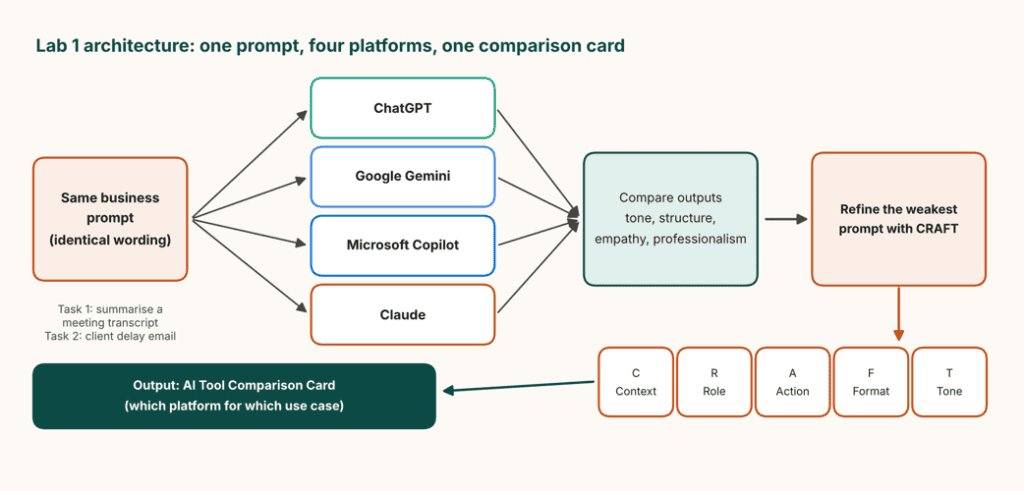
Objective: Compare AI platforms using the same business tasks and understand how prompt quality influences the results. In this lab, you’ll work with ChatGPT, Google Gemini, Microsoft Copilot, and Claude. Instead of judging the tools by their features alone, you’ll compare their responses to identical prompts.
Architecture
What you’ll do
- Open all four AI platforms in separate browser tabs.
- Submit the same meeting-summary prompt and ask each platform to identify three key decisions, their owners, and deadlines.
- Ask each platform to draft a professional, empathetic email explaining a two-week project delay in fewer than 150 words.
- Compare the outputs for accuracy, tone, clarity, and completeness.
- Select the weakest output and improve the prompt using the CRAFT framework.
The CRAFT framework stands for Context, Role, Action, Format, and Tone. It helps you provide the background, define the AI’s role, specify the task, control the output structure, and set the desired communication style.
Finally, create an AI Tool Comparison Card that maps each platform to business tasks such as meeting summaries, client emails, research, and document analysis.
Key concepts you’ll learn
- Generative AI platform comparison.
- Prompt engineering and CRAFT.
- AI tool selection for business use cases.
- Evaluating AI output quality.
AB-731 exam alignment:
- Domain 1: Describe differences between GenAI models
- Domain 1: Understand prompt engineering techniques
- Domain 2: Map business processes to AI apps
Expected outcome: A practical comparison of four AI platforms and a reusable framework for improving prompts.
Related Readings:- Claude Code Career Roadmap: Skills Developers and AI Engineers Need in 2026
Lab 2: Build a Custom Copilot Agent
Estimated time: 25 minutes | Difficulty: Beginner
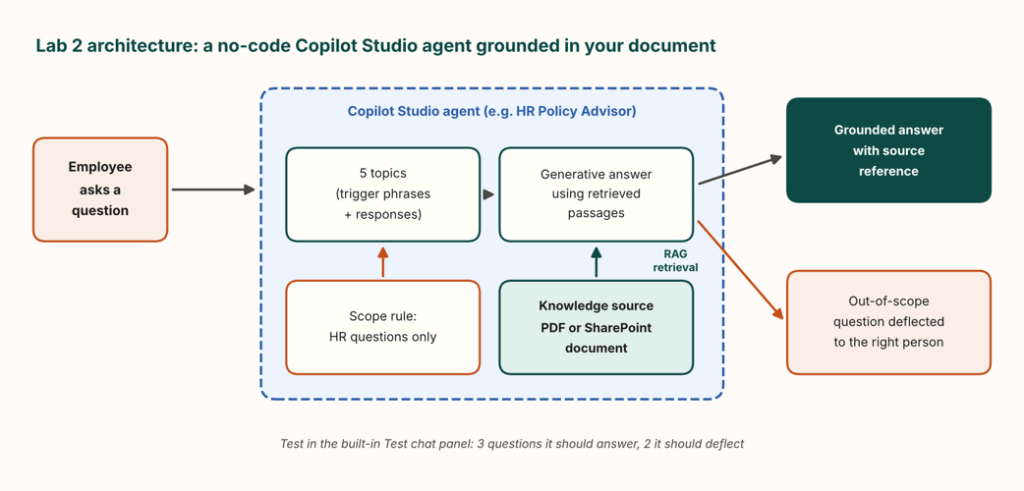
Objective: Create a no-code AI agent that answers questions using configured topics and organisational knowledge. Imagine that an HR department receives repeated questions about leave policies, employee benefits, and internal procedures. A custom agent could help employees find relevant answers without requiring HR staff to respond to every basic query.
Architecture
What you’ll do
- Open Microsoft Copilot Studio in an eligible environment and create a new agent.
- Choose a focused use case, such as an HR Policy Advisor, IT Helpdesk FAQ, or Customer Onboarding Guide.
- Create five topics with trigger phrases and corresponding responses.
- Connect a suitable sample policy document or SharePoint knowledge source.
- Test the agent with three questions it should answer and two questions outside its intended scope.
The knowledge-source exercise introduces retrieval-augmented generation (RAG). Rather than relying entirely on information learned during model training, the agent retrieves relevant content from a connected source to help ground its answers.
Review the responses and check whether the agent uses the source correctly or needs additional instructions.
Key concepts you’ll learn
- Copilot Studio’s visual agent designer.
- Topics and trigger phrases.
- Knowledge sources and RAG.
- Testing agent responses and boundaries.
- Build-versus-buy decisions.
AB-731 exam alignment:
- Domain 2: Understand Copilot Studio capabilities
- Domain 2: Identify when to build, buy, or extend
- Domain 3: Empower business users with AI
Expected outcome: A working prototype of a business-focused agent that can answer questions using a connected knowledge source.
Related Readings:- Claude Code for AI/ML Engineers: Should You Invest the Time? Honest 2026 Worth-It Breakdown
Lab 3: Claude as Your AI Work Assistant
Estimated time: 20 minutes | Difficulty: Beginner
Objective: Use generative AI for document analysis, meeting intelligence, and business communication. This lab demonstrates how an AI assistant can support leadership and operational work without requiring programming.
Architecture
What you’ll do
Task 1: Document intelligence
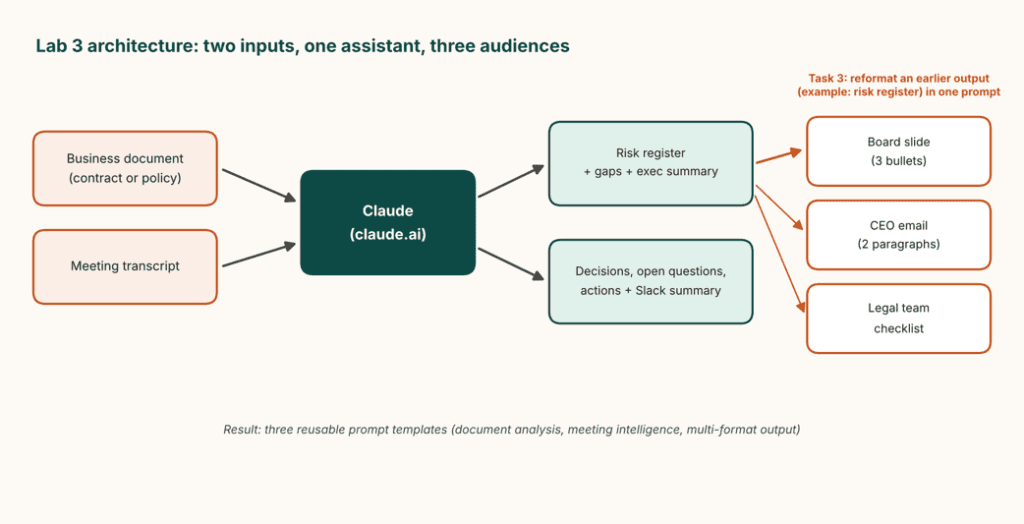
Upload a suitable sample business document, such as a contract or policy. Ask Claude to identify five key risks, rate their probability and impact as High, Medium, or Low, identify potential gaps, and prepare an executive summary.
Task 2: Meeting intelligence
Provide a meeting transcript and request a summary of decisions, open questions, action items, owners, and due dates. Also request a three-line summary suitable for sharing with a team.
Task 3: Multi-format output
Take one of the previous outputs and reformat it for three audiences:
- A three-bullet executive presentation.
- A two-paragraph email to a CEO with a recommended action.
- A verification checklist for a legal team.
Review each result against the original source material before using it.
Key concepts you’ll learn
- Document analysis and risk identification.
- Meeting summaries and action items.
- Prompt reuse and output formatting.
- AI-assisted business productivity.
AB-731 exam alignment:
- Domain 1: Identify when GenAI provides business value
- Domain 1: Understand prompt engineering impact
- Domain 2: Map business processes to AI apps
Expected outcome: Three reusable prompt patterns for document analysis, meeting intelligence, and multi-format communication.
Related Readings: Top 10 Claude Code Use Cases Every Developer Should Know
Lab 4: Microsoft AI Foundry – Language, Voice, and Content Safety
Estimated time: 25 minutes | Difficulty: Beginner to intermediate
Objective: Explore language model configuration, speech-to-text transcription, and content moderation through three short exercises. This lab introduces three ways AI services can be used in business applications.
Architecture
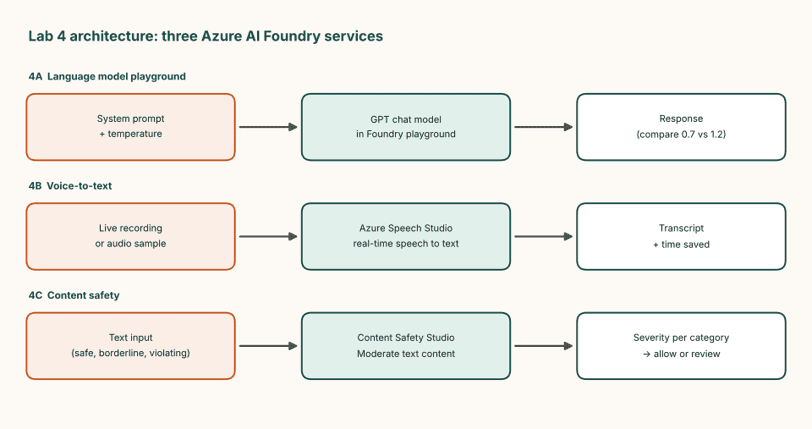
Sub-lab 4.1: Language model playground – 10 minutes
Open the Microsoft AI Foundry environment and select an available chat model. Configure a system prompt that asks the model to act as an executive communications advisor and respond in concise bullet points.
Ask it to summarise quarterly business challenges in three bullets. If the selected model supports temperature settings, compare outputs at 0.7 and 1.2.
Observe how the results may vary. Temperature influences response variability, although the effect depends on the model and its configuration.
Sub-lab 4.2: Voice-to-text for business – 8 minutes
Open Azure Speech Studio or the corresponding available speech-to-text experience. Record a short business briefing or use an approved sample recording.
Generate a transcript, review its accuracy, and compare the time required for manual transcription with automated transcription and review.
Sub-lab 4.3: Content safety and moderation – 7 minutes
Open the available Azure AI Content Safety experience. Test a safe business email, a borderline example, and a sample that violates the applicable content policy.
Review the moderation results and explore the available severity thresholds. Consider why a children’s educational platform may need different moderation settings from an internal enterprise application.
Key concepts you’ll learn
- Language model playgrounds and system prompts.
- Temperature and response variability.
- Speech-to-text transcription.
- Content moderation and responsible AI.
- Business applications of AI services.
AB-731 exam alignment:
- Domain 2: Identify capabilities of Azure AI services
- Domain 2: Understand benefits of Microsoft Foundry
- Domain 1: Understand secure and responsible AI
Expected outcome: Practical familiarity with language models, speech services, and content safety controls.
Related Readings:- Comparing the Best AI Chatbots for Your Business: What’s Best for You?
Lab 5: Microsoft 365 Copilot Deep Dive
Estimated time: 25 minutes | Difficulty: Beginner
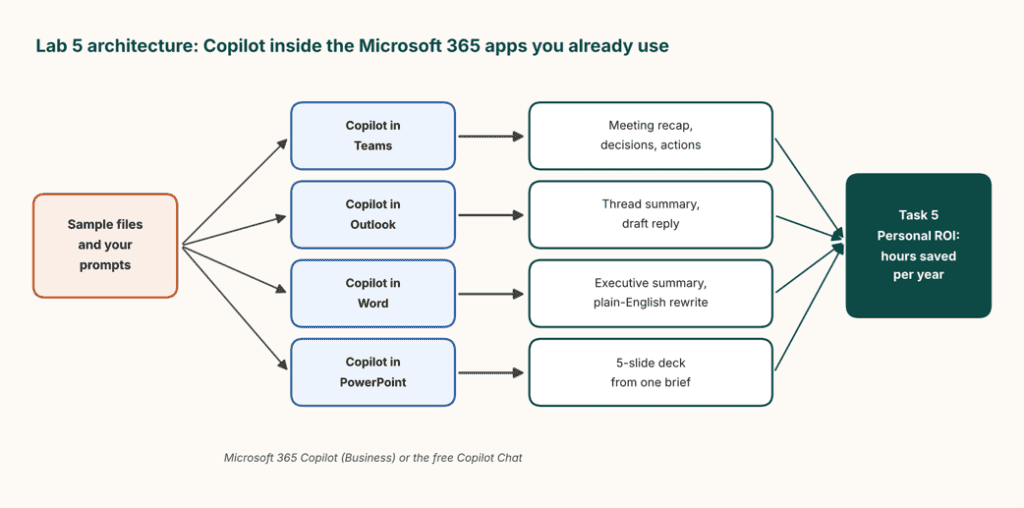
Objective: Explore Copilot across Microsoft 365 applications and estimate potential productivity gains. This lab focuses on practical tasks that employees perform regularly.
Architecture
What you’ll do
Task 1: Copilot in Teams
Use an available meeting transcript to generate a recap, identify decisions, and extract action items. Compare the results with manual note-taking.
Task 2: Copilot in Outlook
Summarise a sample email thread and draft a professional response requesting written confirmation of a proposed vendor timeline.
Task 3: Copilot in Word
Create a three-sentence executive summary of a report and rewrite a technical paragraph in plain English using fewer than 60 words.
Task 4: Copilot in PowerPoint
Use a business brief to generate a five-slide presentation covering the rationale for AI adoption, priority use cases, an implementation roadmap, governance, and success metrics.
Task 5: Estimate time savings
Calculate the potential annual time saved across these activities.
Use the following formula:
Annual hours saved = Time saved per task × Tasks per week × Working weeks per year.
Base the calculation on your own estimates and account for the time needed to review the generated content.
Key concepts you’ll learn
- Copilot across Teams, Outlook, Word, and PowerPoint.
- AI-assisted writing and summarisation.
- Business productivity measurement.
- Human review of generated content.
AB-731 exam alignment:
- Domain 2: Understand capabilities of M365 Copilot in various apps
- Domain 2: Map business processes to Copilot
- Domain 3: Understand Copilot license types and adoption strategy
Expected outcome: Experience with Copilot-supported workflows and an estimate of potential annual time savings.
What These AB-731 Labs Cover
After completing the five labs, you’ll have explored AI platform selection, prompt engineering, custom agents, document analysis, Microsoft AI services, and Copilot productivity.
The exercises align with the three main areas identified in Microsoft’s AB-731 certification objectives:
- Identify the business value of generative AI solutions.
- Identify benefits, capabilities, and opportunities for Microsoft’s AI applications and services.
- Identify an implementation and adoption strategy for Microsoft’s AI applications and services.
Related Readings:- 7 System Design Patterns Every Cloud AI Engineer Should know
What is the AB-900 Certification?
The AB-900 certification validates foundational knowledge of managing Microsoft 365 environments with AI-powered tools like Copilot and agents.
It focuses on the azure administrative, security, and governance aspects of AI-powered productivity platforms rather than deep development or machine learning.
The exam tests whether candidates understand how to:
• Manage Microsoft 365 services
• Administer Copilot and AI agents
• Implement identity and access control
• Protect organizational data
• Apply governance and compliance policies
Professionals who pass the exam show they can support modern AI-enabled workplaces securely and efficiently.
Certification Overview
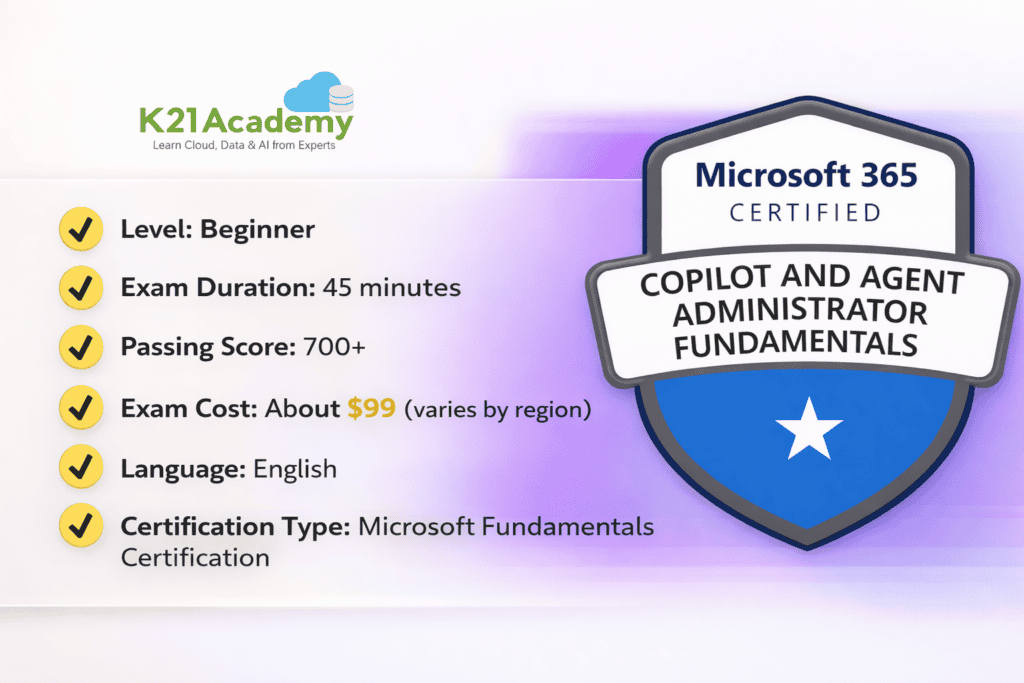
This certification is designed as an entry-level credential for IT administrators and professionals starting their journey with AI-powered Microsoft services.
Who Should Take the AB-900 Certification?
The AB-900 certification is ideal for professionals who want to understand how AI tools work inside Microsoft 365 environments.
It is especially useful for:
1. IT Administrators
Professionals managing user access, security policies, and Microsoft 365 services.
2. Beginner AI or Cloud Professionals
Individuals looking to understand how AI integrates with enterprise productivity platforms.
3. Microsoft 365 Support Engineers
Professionals responsible for managing user environments, permissions, and productivity tools.
4. Technology Consultants
Consultants who advise organizations on AI adoption, collaboration tools, and digital transformation strategies.
5. Students and Beginners
Anyone looking to build foundational knowledge of AI-powered enterprise tools.
The certification does not require prior AI or development experience, making it accessible to beginners.
Related Readings: Choosing the Best Cloud Providers for AI workloads.
Why Should You Consider the AB-900 Certification?
AI is fast turning into one of the main elements of workplace productivity platforms.
Businesses are equipping email documents collaboration tools, and workflows with AI assistants. Therefore, employees capable of handling AI securely within the enterprise systems are getting more and more valuable.
1. Increasing Requirement for AI-Enabled Administrators
Organizations require administrators capable of operating AI tools such as Copilot yet guaranteeing security and compliance.
2. Excellent Base for AI Careers
AB-900 offers a great starting point for careers in AI, cloud administration, and enterprise technology management.
3. Industry-Recognized Credential
Microsoft certifications are very well known in the enterprise IT and cloud ecosystem.
4. Facilitates AI-Driven Digital Transformation
Companies integrating AI-based productivity tools require people who know governance, access control, and AI data protection.
Related Readings: Claude Code vs GitHub Copilot vs Cursor: Which AI Coding Assistant Should You Learn?
Key Skills Measured in the AB-900 Exam
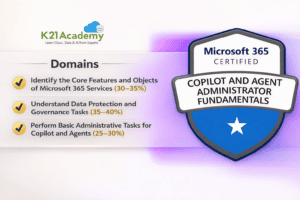
The AB-900 exam measures knowledge across three major domains.
AB-900 Copilot and Agent Administration Fundamentals Hands-On Labs
While AB-731 focuses on AI transformation and business adoption, AB-900 introduces the administration and governance concepts that support Microsoft 365, Copilot, and agents.
These nine labs cover user management, identity security, information protection, compliance, Copilot administration, and the agent lifecycle.
Core Microsoft 365 Administration
The first three labs introduce Microsoft 365 administration centres, licensing, collaboration resources, and identity controls.
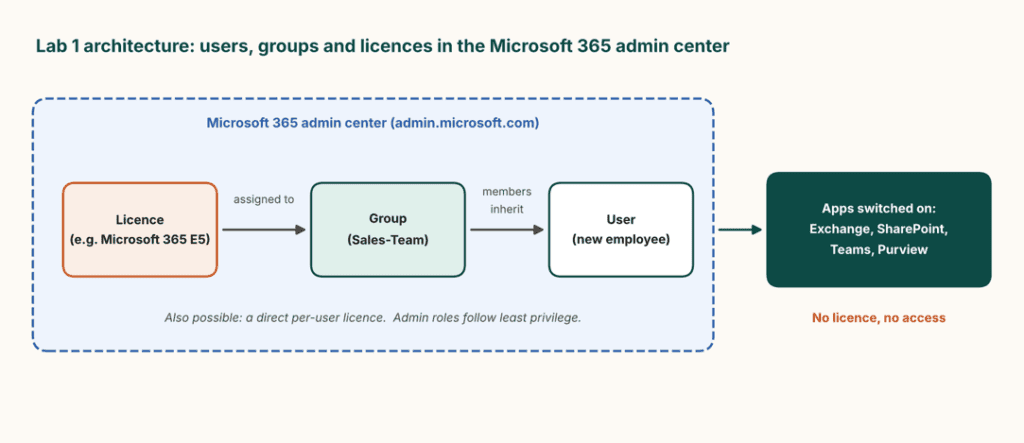
Lab 1: Admin Center, Users, Groups, and Licensing
Objective: Create a test user and group, assign a licence, and understand how licensing affects access to Microsoft 365 services.
Scenario: A new employee joins Contoso and needs an account, group membership, and access to Outlook and Teams.
Architecture
What you’ll do
- Open the Microsoft 365 admin center and create a test user.
- Assign an eligible Microsoft 365 licence and inspect the applications it provides access to.
- Create a security group named
Sales-Teamand add the user. - Where supported, assign a licence to the group and inspect the user’s licence details.
- Review organisation settings and domain information.
Key concepts: User management, groups, licence assignment, group-based licensing, and least privilege.
Expected outcome: Understand how Microsoft 365 accounts, group membership, and licences work together.
Related Readings: Master Azure AI Fundamentals with 13+ Hands-On Labs
Lab 2: Exchange, SharePoint, and Teams Objects
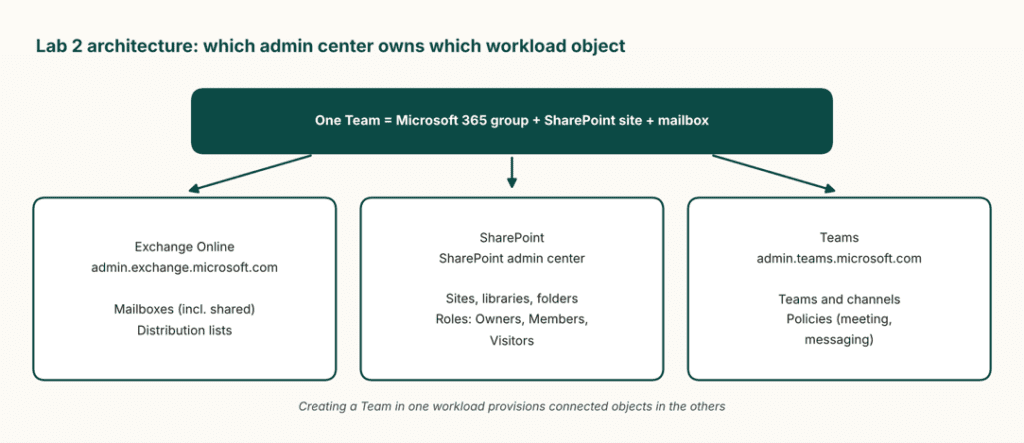
Objective: Explore the administration centres responsible for email, document collaboration, and team communication.
Scenario: The Sales team needs a shared mailbox, a proposal document library, and a dedicated workspace.
Architecture
What you’ll do
- In the Exchange admin center, create a test shared mailbox named
Sales Enquirieswhere permitted and review distribution lists. - In SharePoint, inspect sites and document libraries, create a
Proposalsfolder, and review Owners, Members, and Visitors permissions. - In Microsoft Teams, create a private Team named
SaleswithProposalsandCustomerschannels. - Review the connected SharePoint site and explore an available Teams meeting policy.
Key concepts: Exchange mailboxes, SharePoint libraries, Teams channels, permissions, and administration responsibilities.
Expected outcome: Identify which Microsoft 365 administration centre manages each type of object and understand how collaboration resources connect.
Related Readings: AI-103: 30+ Hands-On Labs to Build AI Apps & Agents
Lab 3: Entra ID, MFA, Conditional Access, and SSO
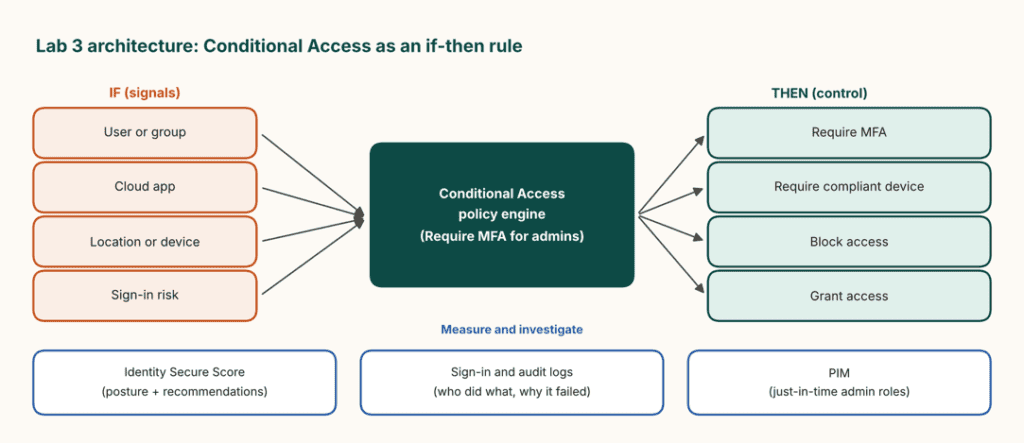
Objective: Explore identity management and the security controls used to protect Microsoft 365 sign-ins.
Scenario: After a phishing incident, Contoso wants stronger authentication for administrators and a reliable way to investigate failed sign-ins.
Architecture
What you’ll do
- Open the Microsoft Entra admin center and review users, groups, and authentication methods.
- In an eligible test environment, configure a Conditional Access policy named
Require MFA for admins. - Start in Report-only mode where supported, and follow Microsoft’s guidance for emergency-access exclusions and safe testing.
- Review Identity Secure Score and its recommendations.
- Explore sign-in logs, audit logs, PIM, application registrations, enterprise applications, and SSO.
Key concepts: Multifactor authentication, Conditional Access, Zero Trust, sign-in troubleshooting, PIM, and SSO.
Expected outcome: Understand how identity controls protect an organisation and how administrators investigate authentication issues.
Related Readings: Azure AI Foundry vs. Azure Machine Learning: Key Differences Explained by K21 Academy
Data Protection and Governance
These four labs focus on classifying sensitive information, preventing inappropriate sharing, investigating compliance risks, and preparing data for AI adoption.
Lab 4: Purview Sensitivity Labels and Classification
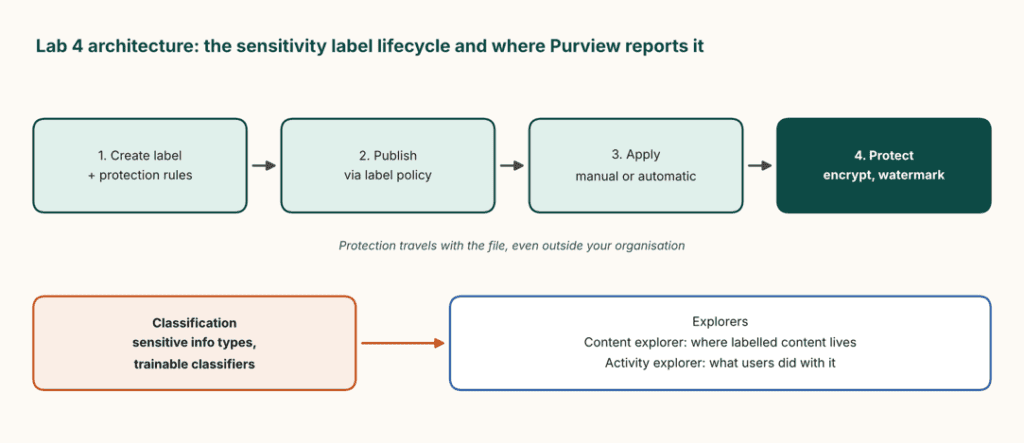
Objective: Create a sensitivity label and explore how Microsoft Purview identifies and protects organisational data.
Scenario: Contoso needs to classify confidential contracts and customer records.
Architecture
What you’ll do
- Open Microsoft Purview and create a label named
Confidential. - Where supported, configure protection settings such as encryption, a footer, or a watermark.
- Publish the label through an appropriate label policy.
- Apply it to a permitted test document in Word.
- Explore the Credit Card Number sensitive information type, Content explorer, and Activity explorer.
Key concepts: Sensitivity labels, classification, label policies, encryption, and information protection.
Expected outcome: Understand the process of creating, publishing, applying, and monitoring sensitivity labels.
Related Readings:- Top 15 Python IDEs and Code Editors for 2026 (Free & Paid)
Lab 5: Create and Test a Data Loss Prevention Policy
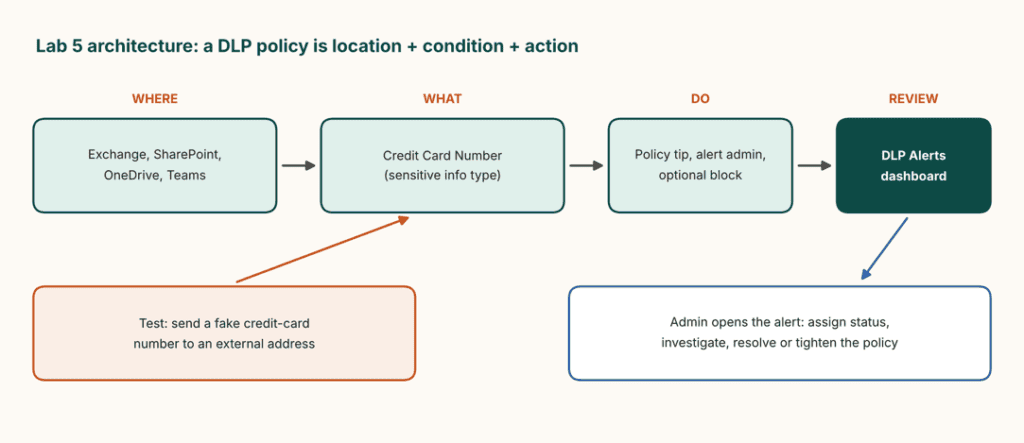
Objective: Configure a DLP policy to detect potentially inappropriate sharing of sensitive information.
Scenario: An employee is about to send a spreadsheet containing customer payment information to an external recipient.
Architecture
What you’ll do
- Open Microsoft Purview and create a test policy named
Protect Credit Card Data. - Select the appropriate financial information template or classification.
- Configure supported locations, such as Exchange, SharePoint, OneDrive, and Teams.
- Set up a rule to detect credit-card-number patterns being shared outside the organisation.
- Review available policy tips, alerts, and blocking options.
- Test the policy using synthetic data in an authorised environment and inspect the resulting notification or alert.
Key concepts: DLP policies, sensitive information detection, policy conditions, actions, and alerts.
Expected outcome: Understand how DLP can detect and control the sharing of sensitive information across supported Microsoft 365 workloads.
Related Readings: The Best Chatbot Development Tools
Lab 6: Insider Risk, Communication Compliance, and eDiscovery
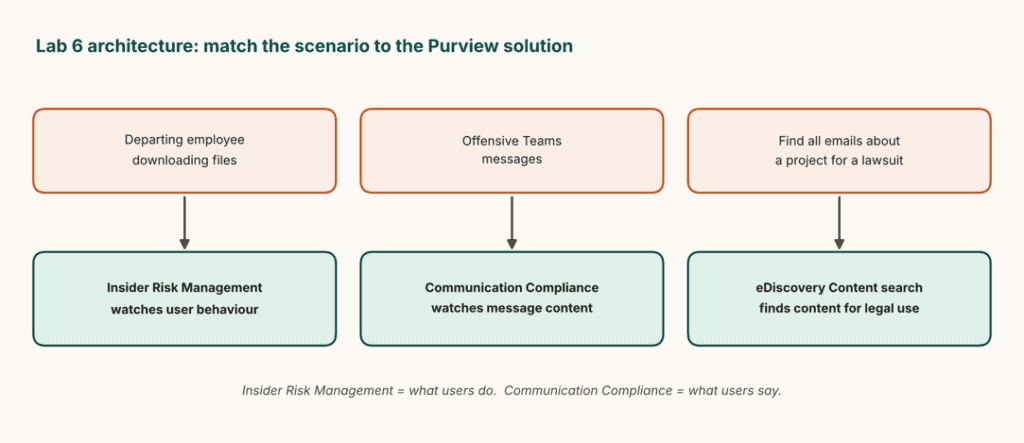
Objective: Explore Microsoft Purview tools for investigating risky behaviour, reviewing communications, and locating information for legal or compliance requirements.
Scenario: Contoso suspects that a departing employee may be taking company data, while its legal team needs emails related to a business dispute.
Architecture
What you’ll do
- Open Insider Risk Management and review templates related to departing users and potential data leaks.
- Explore available privacy settings, including pseudonymisation where supported.
- Open Communication Compliance and review the available policy options.
- Create or open an authorised eDiscovery test case.
- Run a Content search using a sample keyword such as
Project Falconand a suitable date range. - Review the search results and available hold-management features.
Key concepts: Insider risk, communication monitoring, eDiscovery cases, Content search, and privacy-aware investigations.
Expected outcome: Understand which Microsoft Purview solution is appropriate for different investigation and compliance scenarios.
Related Readings:- Claude Code vs ChatGPT Plus
Lab 7: DSPM for AI, Compliance Manager, and Oversharing
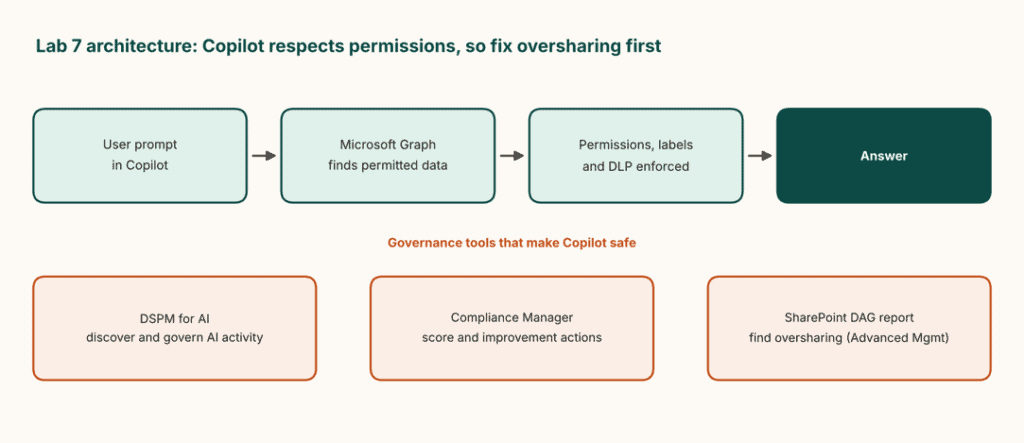
Objective: Explore AI-related data security posture management, compliance recommendations, and SharePoint data access governance.
Scenario: Before deploying Copilot, Contoso wants to identify overshared files and reduce unnecessary exposure of organisational information.
Architecture
What you’ll do
- Open the available DSPM for AI dashboard and review its recommendations.
- Explore Compliance Manager and inspect its compliance score and improvement actions.
- Open the SharePoint admin center and generate an available data access governance report, such as a sharing-links report.
- Review sites flagged for potential oversharing.
- Explore restricted site access and Data Lifecycle Management retention policies where available.
Key concepts: DSPM for AI, compliance posture, data access governance, oversharing, and retention.
Expected outcome: Understand why organisations should review permissions and data-sharing practices before deploying Copilot.
Related Readings: Generative AI vs Agentic AI: Key Differences
Copilot and Agent Administration
The final two labs cover Copilot access, usage analytics, prompt management, and the administration lifecycle of AI agents.
Lab 8: Copilot Licensing, Analytics, and Prompts
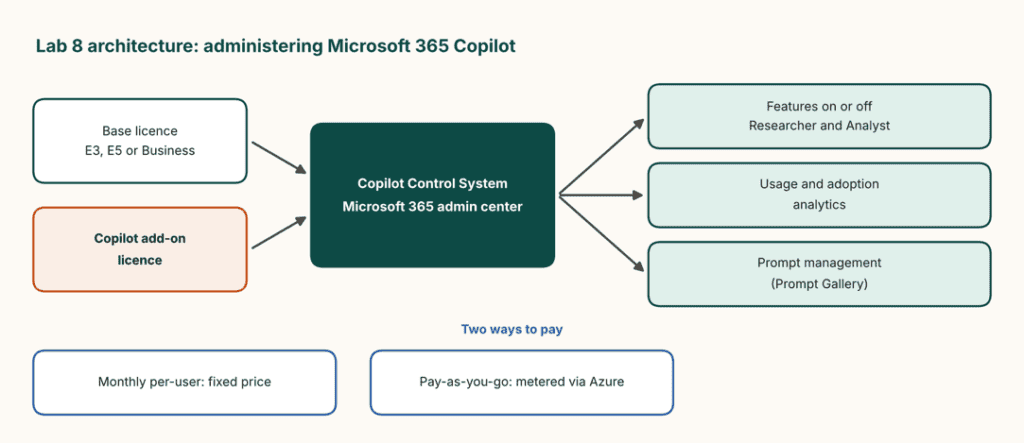
Objective: Explore Copilot licence administration, billing models, usage analytics, and prompt management.
Scenario: Contoso has introduced Microsoft 365 Copilot for its Sales team and wants to understand how to manage access and track adoption.
Architecture
What you’ll do
- Open the Copilot administration area in the Microsoft 365 admin center.
- Review licence assignment and, where supported, assign a Copilot licence to an eligible test user.
- Compare the fixed monthly per-user licence model with supported pay-as-you-go arrangements.
- Explore available feature controls and usage and adoption reports.
- Review the use cases for Researcher and Analyst where available.
- Open the available Prompt Gallery, save a prompt, and explore the supported management and sharing options.
Key concepts: Copilot licences, base-licence prerequisites, billing models, analytics, adoption, and prompt management.
Expected outcome: Understand how administrators manage Copilot access and monitor usage across the organisation.
Related Readings:- How to Build Your Own AI Bot in 2026: A Complete Guide
Lab 9: Create, Approve, and Monitor an Agent
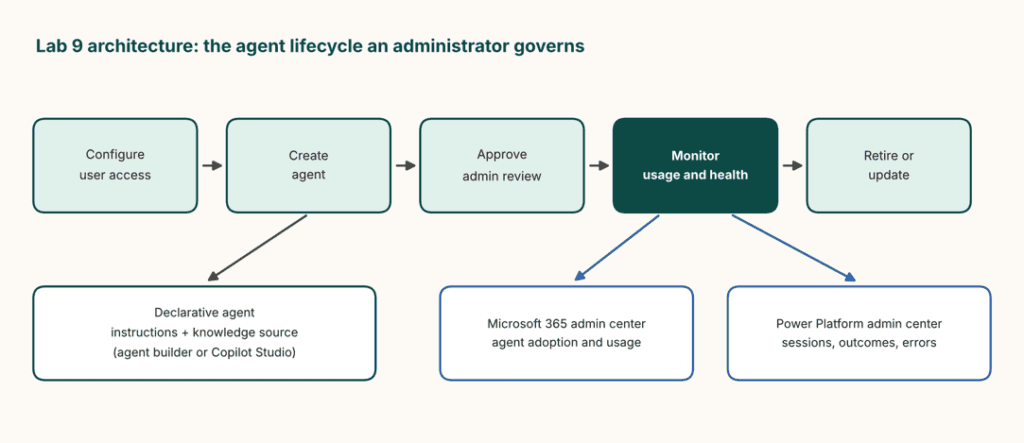
Objective: Explore agent access controls, creation, approval, deployment, and monitoring.
Scenario: Contoso’s HR team wants an assistant that answers employee questions using an approved policy document. Administrators need to manage who can build and use the agent.
Architecture
What you’ll do
- Open the available Copilot administration area and review settings for agent creation and access.
- Use the Microsoft 365 Copilot agent builder or an eligible Copilot Studio environment to create a basic agent.
- Configure its instructions and knowledge source, then test the responses in the preview experience.
- Explore the available organisational approval workflow and the steps involved in reviewing, approving, or denying an agent.
- Review usage information in the Microsoft 365 admin center and operational insights in the Power Platform admin center.
- Consider how the agent should be updated, monitored, or retired when it is no longer needed.
Key concepts: Agent access, declarative agents, knowledge sources, approval workflows, monitoring, and lifecycle management.
Expected outcome: Understand how organisations can control the deployment and ongoing management of AI agents.
Related Readings: Learn about Claude Certified Architect Certificate
What These AB-900 Labs Cover
The nine exercises take you through the core administrative and governance areas described in the supplied AB-900 lab guide:
- Microsoft 365 administration and licensing.
- Exchange, SharePoint, and Teams resources.
- Microsoft Entra identity and authentication.
- Microsoft Purview information protection.
- DLP and compliance investigations.
- AI-related data governance and oversharing.
- Copilot licensing, analytics, prompts, and agent administration.
Together, the labs help connect Microsoft 365 administration with the governance requirements of an AI-enabled workplace.
Related Readings: Azure AI/ML Certifications: Step-by-Step Guide to Succeed in 2026
How to Practise These Labs
Before starting, prepare an appropriate test environment and confirm which services and features your account can access.
For AB-731: Keep sample business documents and meeting transcripts ready. Use the available AI tools to compare outputs, create an agent, and evaluate practical business use cases.
For AB-900: Use an authorised Microsoft 365 test tenant where possible. Some identity, compliance, and Copilot features require specific licences or administrative permissions. If a feature is unavailable, review its administration interface and official documentation instead of attempting to bypass the requirement.
For every lab, record three things:
- What you configured or tested.
- What result you observed.
- What the result tells you about the underlying service or business scenario.
This gives you a practical revision record to use alongside the official exam objectives.
Related Readings: AI-901 in 2026: Master Azure AI Fundamentals with 13+ Hands-On Labs
Want to Build Practical AI and Microsoft 365 Skills with K21 Academy?
Reading about AI certifications is a good starting point, but applying what you learn through hands-on labs can help you build a stronger understanding of real-world scenarios.
At K21 Academy, you can explore instructor-led training and practical learning opportunities across cloud computing, AI, Agentic AI, AWS, Azure, AIPM and Claude. Whether you’re learning about AI transformation with AB-731 or exploring Microsoft 365 Copilot, security, and agent administration with AB-900, focus on connecting certification concepts with practical applications.
Ready to take the next step?
- Explore the AB-731 AI Transformation Leader guide.
- Read the AB-900 certification guide.
- Visit the K21 Academy for more learning resources, technical guides, and hands-on tutorials.
Build your knowledge one lab at a time and keep experimenting with the tools and technologies shaping the future of AI.
Conclusion
Building useful AI solutions requires an understanding of both business needs and the environment in which those solutions operate.
The AB-731 labs help you explore generative AI tools, prompt engineering, custom agents, Microsoft AI services, and Copilot productivity. The AB-900 labs extend that learning into Microsoft 365 administration, identity security, information protection, compliance, and agent management.
By completing these 14 exercises, you’ll have a practical starting point for understanding how AI tools and administrative controls fit together in a Microsoft environment.
Use the labs to experiment, document your findings, and revisit the concepts that need more attention. Most importantly, connect every exercise to the real question it is designed to answer: How can an organisation use AI effectively while managing access, protecting information, and maintaining appropriate oversight?