


Are you worried AI skills are becoming mandatory… but you don’t know where to start?
Or maybe you’ve gone through AI theory but still feel stuck when it comes to applying it in real-world scenarios.
Here’s the reality:
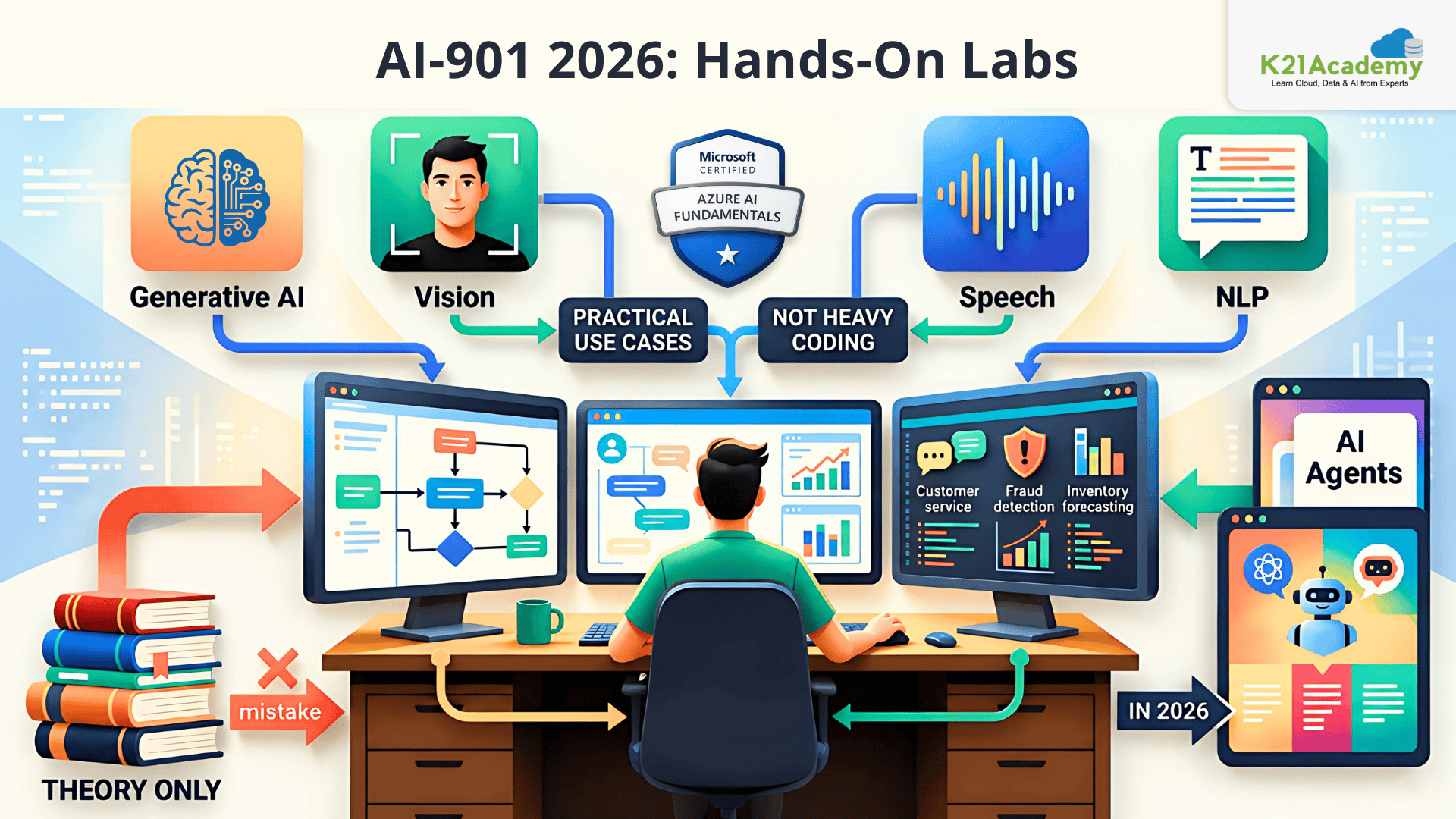
AI-901: Microsoft Azure AI Fundamentals is not about coding heavy models, it’s about understanding and applying AI in practical business use cases.
And the biggest mistake most learners make?
They only study theory.
But AI-901: Microsoft Azure AI Fundamentals (especially in 2026 with Generative AI & agents) expects you to understand how AI actually works in real environments.
That’s where hands-on labs change everything.
These labs help you:
- Turn AI concepts into real applications
- Work with Generative AI, NLP, Vision, and Speech
- Understand Microsoft Foundry (modern AI platform)
- Build confidence for the AI-901: Microsoft Azure AI Fundamentals exam
In this guide, you’ll find 13 hands-on labs that will take you from beginner → confident AI practitioner.

An Overview of AI-901 [Azure AI Fundamentals]
What is AI-901? (Azure AI Fundamentals)
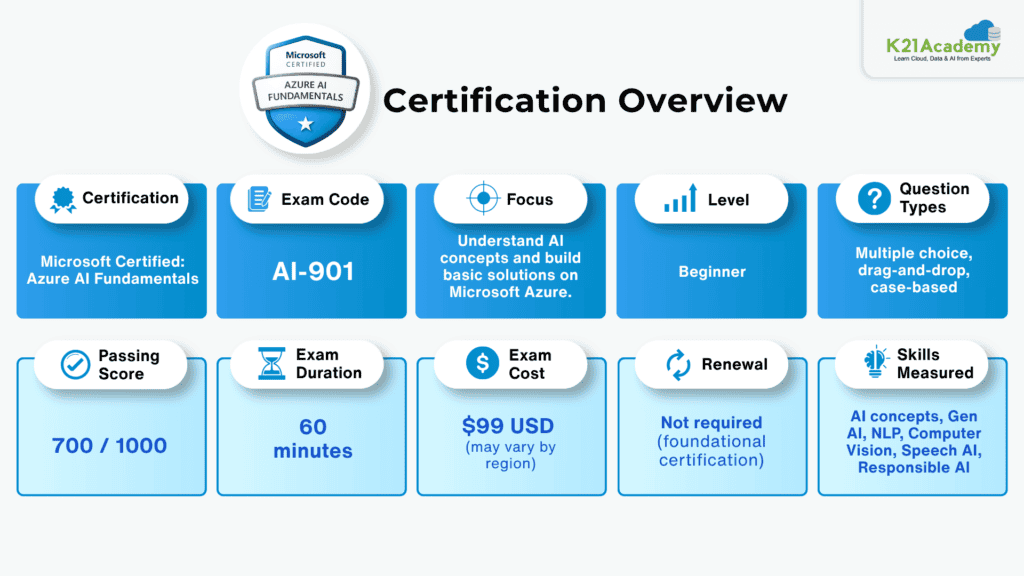
The AI-901: Microsoft Azure AI Fundamentals certification is designed to help you understand the core concepts of Artificial Intelligence (AI) and how these concepts are applied using Microsoft Azure AI services.
Unlike advanced AI certifications, AI-901: Microsoft Azure AI Fundamentals does not focus on heavy coding or model development. Instead, it emphasizes:
- Understanding how AI works
- Identifying different AI workloads
- Applying AI in real-world business scenarios
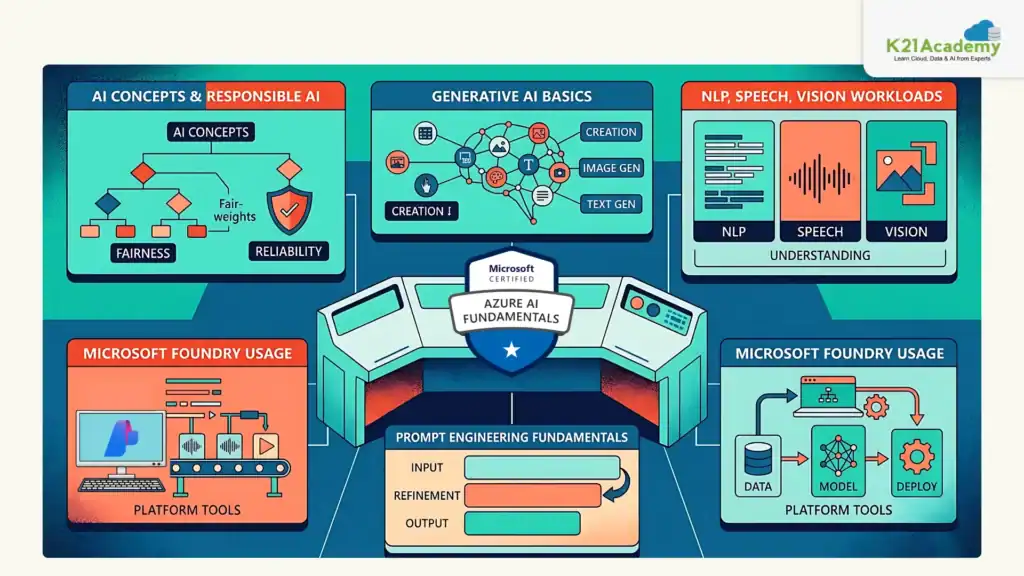
This certification introduces you to key AI domains such as:
- Generative AI (chatbots, content generation, AI agents)
- Natural Language Processing (NLP) (text analysis, sentiment detection, entity recognition)
- Computer Vision (image analysis, object detection)
- Speech AI (speech-to-text and text-to-speech systems)
- Responsible AI (fairness, transparency, accountability)
In the 2026 update, AI-901: Microsoft Azure AI Fundamentals has evolved to include modern AI capabilities like Generative AI, agents, and Microsoft Foundry, making it highly relevant for today’s AI-driven job market.
Related Readings: Azure AI/ML Certifications: Step-by-Step Guide to Succeed in 2026
What Makes AI-901 Unique?
In Simple Terms:
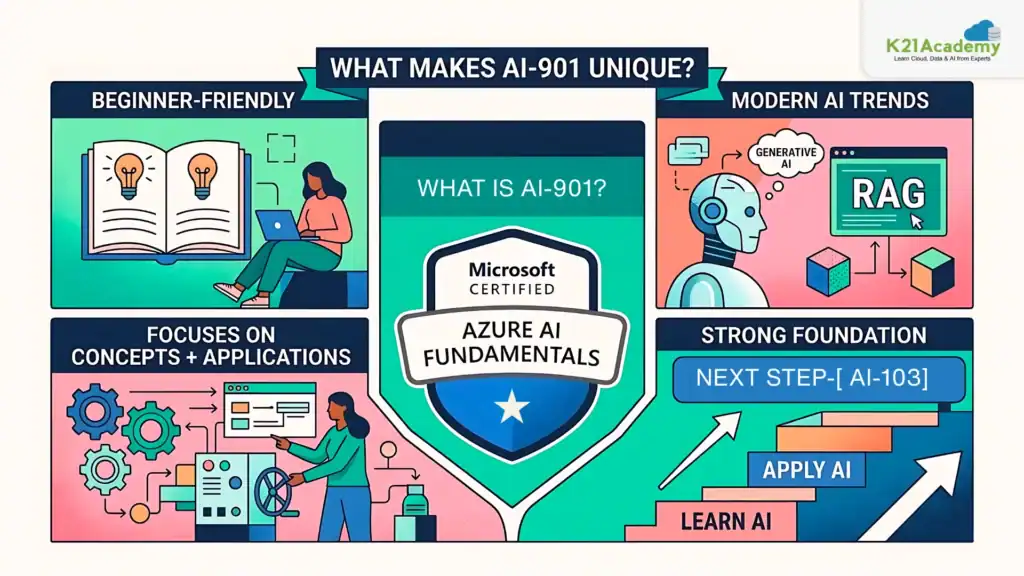
AI-901: Microsoft Azure AI Fundamentals teaches you what AI is, how it works, and where to use it, without needing to build complex models.
Why Most Candidates Struggle with AI-901: Microsoft Azure AI Fundamentals ?
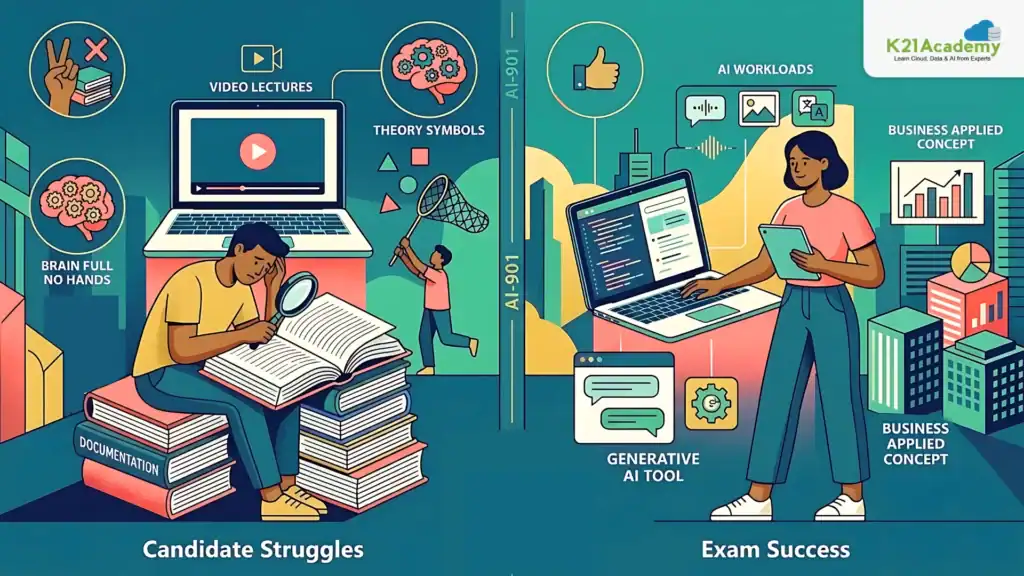
Most candidates fail because they:
- Only read documentation
- Watch videos without practice
- Memorize theory
But the exam actually checks if you can:
- Understand AI workloads in real scenarios
- Work with Generative AI tools
- Apply AI concepts in business use cases
Without hands-on labs, everything feels abstract.
Related Readings: Azure AI Foundry vs. Azure Machine Learning: Key Differences Explained by K21 Academy
Who Should Take AI-901: Microsoft Azure AI Fundamentals ?
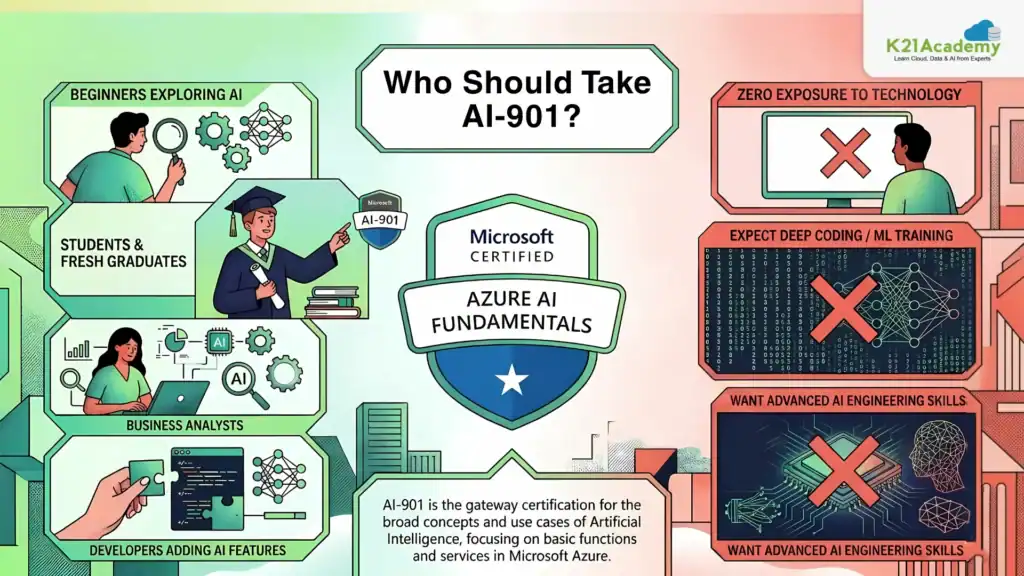
Not Ideal For
This certification is NOT ideal if you:
- Have zero exposure to technology
- Expect deep coding/ML model training
- Want advanced AI engineering skills
Related Readings: What is a Large Language Model (LLM)?
Key Skills Tested in AI-901: Microsoft Azure AI Fundamentals
AI-901 vs AI-103 Comparison
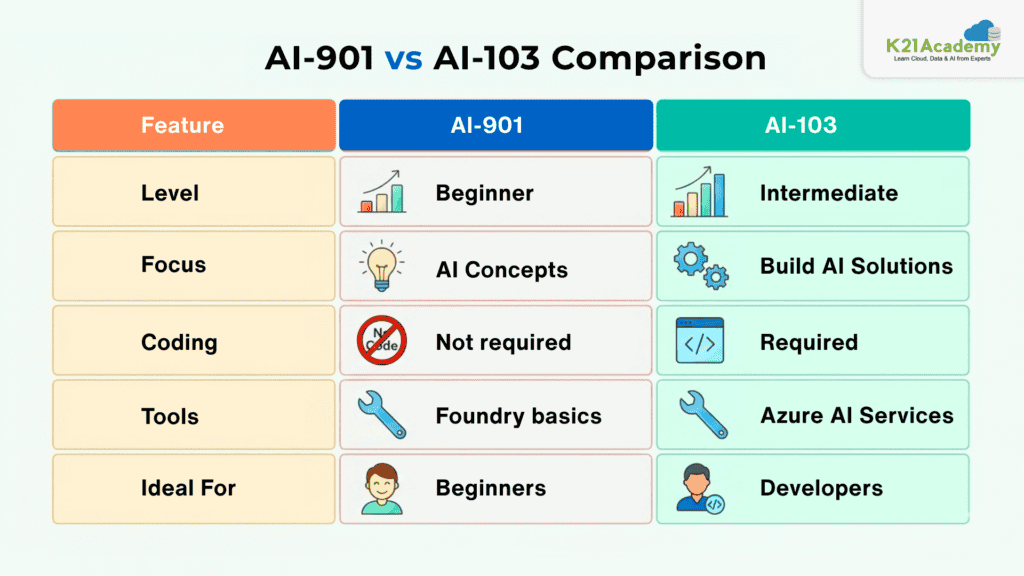
Which Should You Take First?
- Start with AI-901 → if you’re new
- Move to AI-103 → for building real AI apps
Many professionals eventually pursue both certifications.
Related Readings: Microsoft Azure Machine Learning Service Workflow: Overview for Beginners
Hands-On Labs for AI-901: Microsoft Azure AI Fundamentals
Hands-on labs are the most effective way to master the skills required for the AI-901: Microsoft Azure AI Fundamentals certification, as they allow you to apply AI concepts in real-world scenarios. These labs help you work with Generative AI, NLP, computer vision, and speech services on Azure, giving you practical exposure beyond theory. By interacting with real AI tools and workflows, you gain a deeper understanding of how AI solutions are built and used. This hands-on experience ultimately boosts your confidence for both the AI-901: Microsoft Azure AI Fundamentals exam and real-world AI applications.

Lab 1: Explore a Simple AI Agent
AI agents are intelligent systems that enable chat-based interactions by combining language models with knowledge sources. In this lab, you’ll interact with the Ask Anton AI agent to understand how prompts, context, and retrieval mechanisms work together to generate meaningful conversational responses using the retrieval-augmented generation (RAG) approach.
Key Concepts
- AI Agents: Intelligent software systems that understand user input, process information, and generate responses for applications like customer support and conversational assistants.
- Small Language Models (SLM): Compact versions of large language models that require fewer computational resources and can run locally in a browser.
- Chat-based Interaction: Natural language interfaces that allow users to ask questions and receive contextual responses from AI systems.
- Retrieval-Augmented Generation (RAG): A design pattern where the AI retrieves relevant information from a knowledge source and uses it to generate grounded, accurate responses.
In this lab, you will explore a simple AI agent using the Ask Anton chat interface. You will interact with the agent by asking questions related to AI concepts, observe how prompts influence responses, and understand how the agent retrieves information from its knowledge base to generate contextual answers. You will also review the high-level RAG architecture that powers real-world conversational AI solutions.
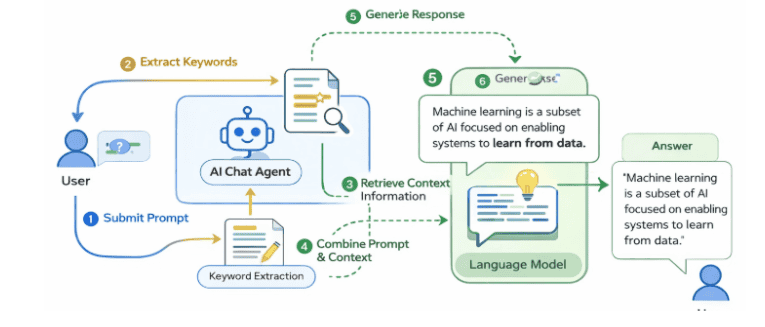
Estimated Time: 20–25 minutes
Difficulty Level: Easy
Exam Relevance Note: Helps understand AI agents, prompts, and RAG core concepts in AI-901: Microsoft Azure AI Fundamentals
By completing this guide, you will be able to understand how AI agents generate contextual responses using RAG.
Lab 2: Explore Generative AI
Generative AI models create text and content based on user prompts, and their outputs can be shaped using system instructions, model parameters, and grounding data. In this lab, you’ll interact with a chat playground to understand how prompts, conversation context, and the retrieval-augmented generation (RAG) approach work together to produce customized, accurate responses.
Key Concepts
- Generative AI: AI models that create text, images, or other content based on user prompts, widely used in chatbots, content creation, and knowledge retrieval systems.
- System Prompts: Instructions that guide the tone, format, and behavior of AI responses (e.g., concise answers or bullet-point formatting).
- Model Parameters: Settings like Temperature (controls creativity and randomness) and Max Tokens (controls response length) that customize model output.
- Retrieval-Augmented Generation (RAG): A design pattern where the AI retrieves relevant information from a knowledge source to generate grounded, accurate responses.
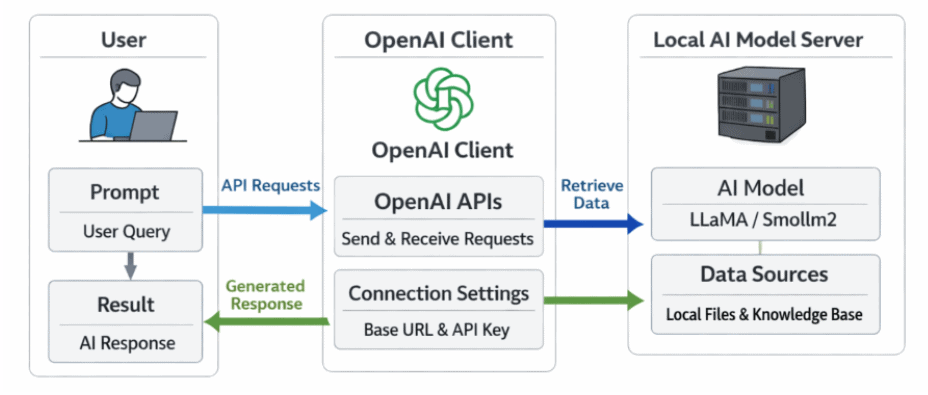
In this lab, you will explore generative AI using a chat playground. You will interact with a language model, submit prompts, and observe how conversation context is maintained across messages. You will then experiment with system prompts and model parameters to influence response style, creativity, and length, and ground the model with external expense policy data to see how RAG improves accuracy. Finally, you will explore how developers use the OpenAI Python SDK and Responses API to build real-world generative AI applications.
Estimated Time: 20–25 minutes
Difficulty Level: Easy
Exam Relevance Note: Covers Generative AI fundamentals and prompt engineering
By completing this guide, you will be able to control AI outputs using prompts and parameters.
Lab 3: Explore Text Analytics
Text analytics is a widely used AI application that focuses on extracting meaning and useful information from written language. It helps organizations analyze customer reviews, process support tickets, summarize meeting transcripts, detect sensitive information, and route multilingual content to the right workflows.
Key Concepts
- Natural Language Processing (NLP): A field of AI that enables computers to understand, interpret, and process human language for tasks like chatbots, document search, and translation.
- Sentiment Analysis: Identifies whether text expresses a positive, neutral, or negative opinion, useful for reviews, feedback, and social media analysis.
- Named Entity Extraction: Identifies important real-world items in text such as people, places, organizations, dates, and quantities.
- Text Summarization: Reduces longer text into a shorter version that preserves the main idea, useful for meeting notes, reports, and transcripts.
- Language Detection: Identifies the primary language of a piece of text, often the first step in multilingual processing workflows.
- Personally Identifiable Information (PII) Detection: Identifies sensitive details like names, phone numbers, and addresses to support privacy and compliance requirements.
Chat Playground and Language Playground
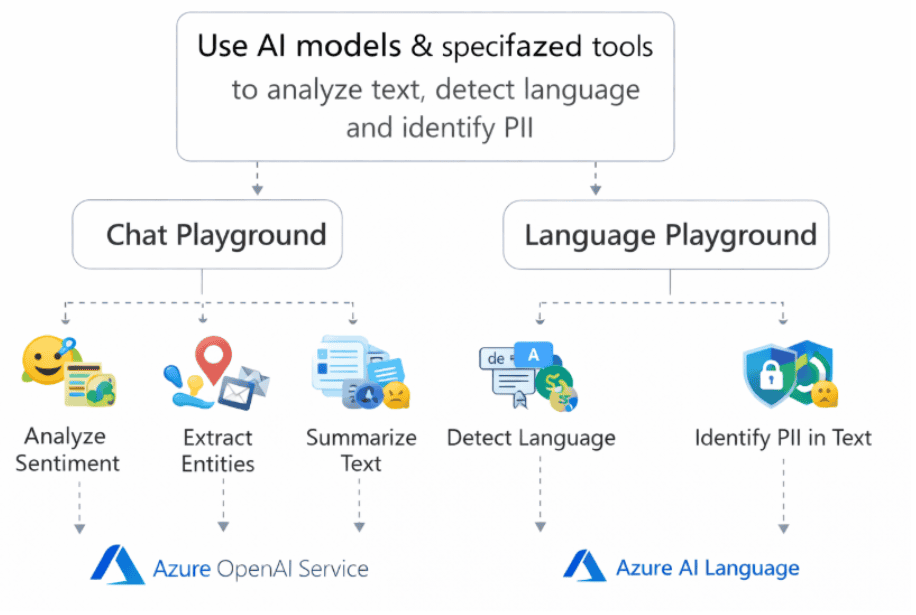
In this lab, you will explore text analytics using both a generative AI model and a specialized language analysis tool. You will begin with the Chat Playground to perform sentiment analysis on hotel reviews, extract named entities from event announcements, and summarize meeting transcripts using natural language prompts. You will then use the Language Playground to detect the language of sample text and identify PII such as names, phone numbers, and addresses. By the end, you’ll understand when to use a general-purpose generative AI model versus a specialized language analysis tool for real-world NLP & ML workflows.
Estimated Time: 30–35 minutes
Difficulty Level: Moderate
Exam Relevance Note: Important for NLP-related exam questions
By completing this guide, you will be able to extract insights from text data.
Lab 4: Explore AI Speech
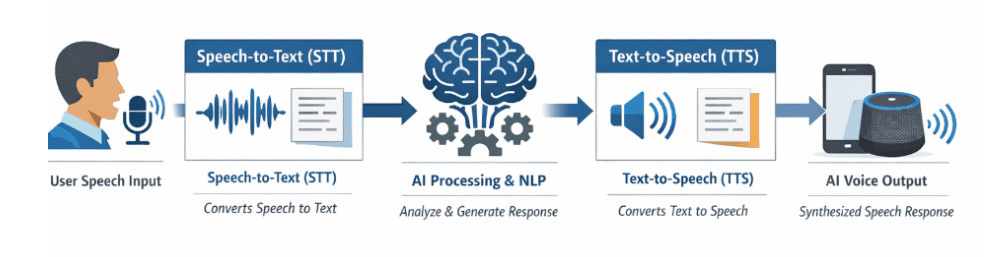
AI speech service enable natural voice-based interactions with generative AI models by converting spoken language into text and AI-generated responses back into audio. In this lab, you’ll use a browser-based chat playground to explore how speech-to-text (STT) and text-to-speech (TTS) work together to power voice assistants, accessibility tools, and conversational agents.
Key Concepts
- Speech-to-Text (STT): Converts spoken language into written text, allowing AI systems to interpret voice input as prompts. Used in voice assistants, transcription tools, and accessibility apps.
- Text-to-Speech (TTS): Converts written text into natural-sounding spoken language. Used in navigation systems, audiobooks, virtual assistants, and customer support bots.
- Voice Mode Configuration: Enables interaction with AI models using spoken commands, with selectable voices that control tone, pronunciation, and speaking style.
- Natural Language Processing (NLP): A branch of AI that helps computers understand, interpret, and respond to human language in both spoken and written form.
Chat Playground with Voice Mode
In this lab, you will explore AI speech capabilities using a browser-based chat playground that supports voice interaction. You will enable voice mode, configure voice settings such as tone and pronunciation, and preview different voices available in your browser. You will then use your microphone to have a voice-based conversation with the AI model, observing how spoken input is converted into prompts via speech-to-text, processed by the model, and returned as natural-sounding audio using text-to-speech. By the end, you’ll understand how speech-enabled AI powers real-world applications like virtual assistants, accessibility tools, and smart devices.
Estimated Time: 25–30 minutes
Difficulty Level: Moderate
Exam Relevance Note: Covers Speech AI concepts (STT & TTS)
By completing this guide, you will be able to build voice-enabled AI applications.
Related Readings:- Learn about conversational bot
Lab 5: Explore Computer Vision
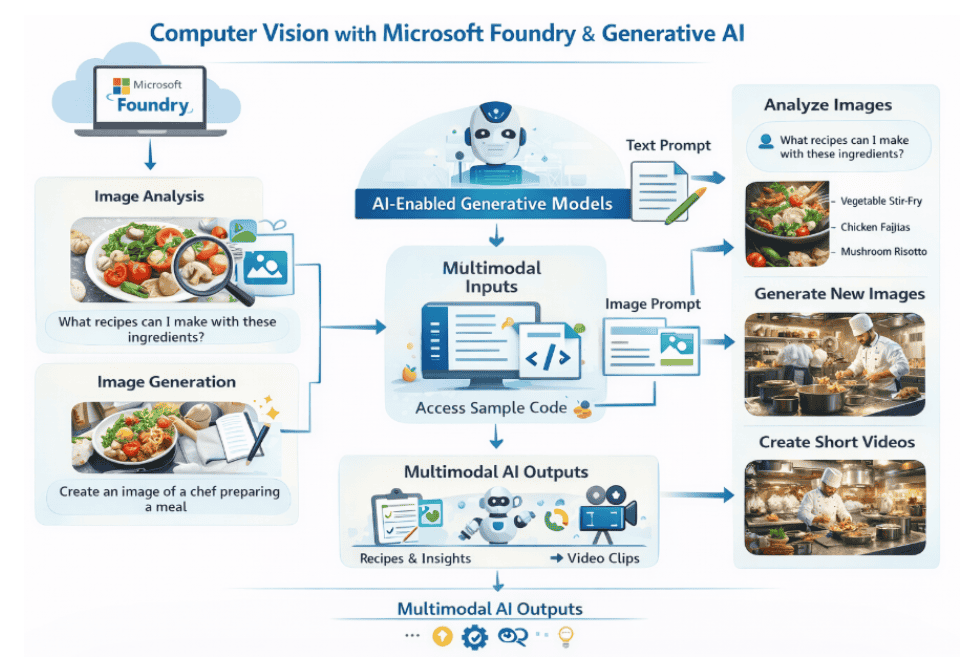
Computer vision enables AI systems to analyze and interpret images and video, powering applications like image classification, object detection, facial recognition, and quality inspection. In this lab, you’ll explore how computer vision can be combined with a generative AI language model to interpret uploaded images and respond to image-based prompts through a multimodal workflow.
Key Concepts
- Computer Vision: A field of AI that enables systems to analyze and interpret images and video, used in applications like image classification, object detection, OCR, and healthcare imaging.
- Multimodal AI: AI systems that work with multiple input types such as text, images, audio, or video to generate context-aware responses.
- Small Language Models (SLM): Compact AI models that require fewer computational resources, suitable for lightweight, browser-based scenarios.
- Image Classification: The process of identifying the main subject or category in an image, such as recognizing a fruit, dish, or object.
- Image-Grounded Prompting: A workflow where information derived from an image is added to a prompt so a text-based language model can respond using visual context.
Chat Playground with Image Analysis
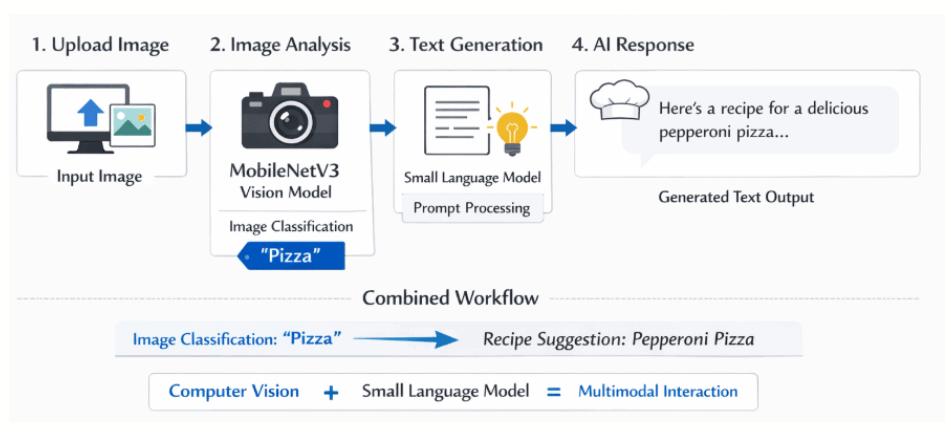
In this lab, you will explore computer vision by combining a small language model with an image classification model in a browser-based chat playground. You will download sample images, enable image analysis, and upload images to the chat interface. You will then submit prompts such as “Suggest a recipe for this” or “How should I cook this?” and observe how the MobileNetV3 model classifies the image and passes the result as context to the Phi-3-mini language model. By the end, you’ll understand how image-grounded prompting simulates a multimodal workflow and how this lightweight approach differs from true multimodal large language models.
Estimated Time: 30–40 minutes
Difficulty Level: Moderate
Exam Relevance Note: Covers image analysis and multimodal AI
By completing this guide, you will be able to analyze and interpret images using AI.
Related Readings:- The Future of AI Agents
Lab 6: Explore AI Information Extraction
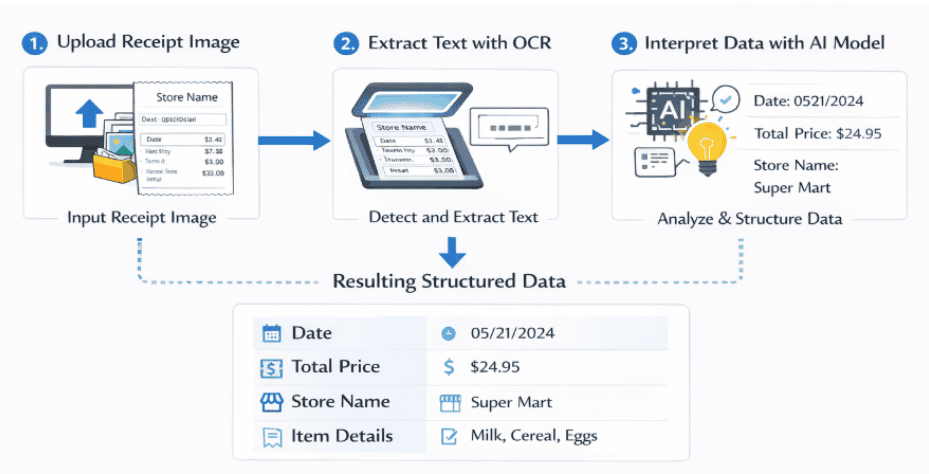
AI-powered information extraction combines Optical Character Recognition (OCR) with generative AI to convert unstructured content in images and documents into structured, usable data. In this lab, you’ll use the Information Extractor web app to analyze receipt images, extract text through OCR, and automatically identify key business fields like dates, totals, and store names for use in workflows such as expense claims and invoice processing.
Key Concepts
- Optical Character Recognition (OCR): Technology that converts text from images into machine-readable text, enabling data extraction from scanned documents and receipts.
- Information Extraction: The process of identifying and extracting structured data such as dates, names, amounts, and payment terms from unstructured sources like images and PDFs.
- Generative AI for Interpretation: Uses semantic analysis to interpret extracted text and associate values with specific data fields like store name, total price, or purchase date.
- Field Extraction: Maps OCR-detected text to meaningful business fields, turning raw image data into structured, actionable insights.
- Microsoft Marketplace Information Extract: A cloud-based platform that provides AI-driven tools for extracting structured data from documents, images, and PDFs for invoices, contracts, and financial records.
In this lab, you will explore AI information extraction using the Information Extractor web app. You will download sample receipt images, upload them into the app, and run OCR analysis to identify text regions on the scanned receipts. You will then observe how the field extraction process uses generative AI to interpret the extracted text and automatically populate structured fields such as purchase date, total amount, and store name. By the end of the lab, you’ll understand how OCR and AI work together to automate data entry workflows, reduce manual effort, and turn unstructured documents into actionable business insights.
Estimated Time: 30–35 minutes
Difficulty Level: Moderate
Exam Relevance Note: Important for document intelligence & OCR
By completing this guide, you will be able to extract structured data from documents.
Lab 7: Get Started with Microsoft Foundry
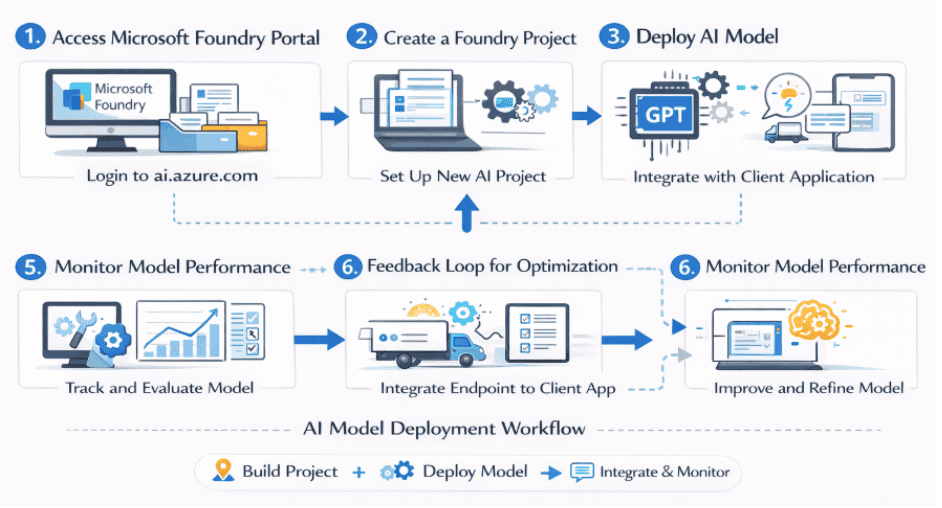
Microsoft Foundry is a cloud-based AI platform that simplifies the process of building, deploying, and managing AI projects and models. It provides a unified environment where AI engineers, data scientists, and developers can create projects, deploy language models, and integrate them into client applications without dealing with complex infrastructure.
Key Concepts
- Azure AI Foundry Portal: A cloud-based platform for creating, deploying, and managing AI models and applications, streamlining the entire AI lifecycle from experimentation to production.
- Azure Portal: The web-based interface for managing Azure services, used to monitor Foundry resources, track performance, and configure permissions.
- Foundry Projects: Organizational units that group models, resources, data, and assets used to develop an AI solution, each associated with a parent Foundry resource.
- GPT-4.1-mini: A compact and efficient version of GPT-4 optimized for speed and resource efficiency, capable of text generation, summarization, question answering, and conversational AI.
- Model Deployment & Endpoints: Projects expose API keys and endpoints that allow secure access to deployed models from client applications and agents.
Microsoft Foundry Portal
In this lab, you will get started with Microsoft Foundry by creating a new AI Foundry project and exploring its structure in both the Foundry portal and the Azure portal. You will navigate through the Discover, Build, and Operate pages, use the built-in AI chat assistance, and deploy the GPT-4.1-mini model from the model catalog. You will then test the model in the playground, retrieve your project endpoint and API key, and connect the deployed model to the Ask Anton client application to chat with your own deployed AI model. By the end, you’ll understand how Foundry streamlines AI workflows and how to integrate deployed models into real-world applications.
Estimated Time: 35–40 minutes
Difficulty Level: Moderate
Exam Relevance Note: Core platform for AI-901: Microsoft Azure AI Fundamentals
By completing this guide, you will be able to deploy AI models using Foundry.
Related Readings:- Claude Code vs GitHub Copilot vs Cursor: Which AI Coding Assistant Should You Learn?
Lab 8: Generative AI & Agents in Foundry
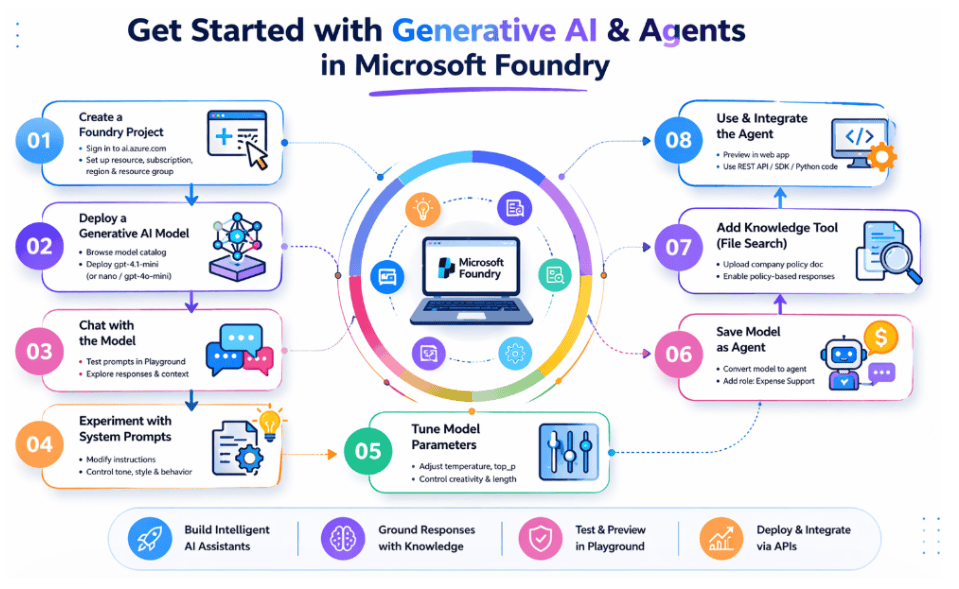
Microsoft Foundry allows you to go beyond simply deploying language models , you can transform them into intelligent agents enhanced with custom instructions and knowledge tools. In this lab, you’ll build an enterprise-ready AI agent(steps to build ai agents) that helps employees with expense claims by grounding its responses in company policy documents.
Key Concepts
- Microsoft Foundry: A centralized platform for discovering, deploying, testing, and managing Azure AI models through projects, playgrounds, and APIs.
- Generative AI Models: Advanced language models that understand prompts and generate human-like responses, used to power chat applications and intelligent automation systems.
- Model Playground: An interactive, no-code interface within Foundry used to test deployed AI models, submit prompts, and observe responses in real time.
- AI Agents: Encapsulated configurations of a model, its instructions, and tools that together provide an agentic AI experience tailored to specific business needs.
- Knowledge Tools (File Search): Tools that allow agents to retrieve information from uploaded documents, enabling grounded responses based on organizational rules rather than generic answers.
- Responses API Integration: A newer OpenAI API syntax used by Microsoft Foundry that offers greater flexibility for building applications that interact with both standalone models and agents.
Microsoft Foundry Agent Playground
In this lab, you will create a Microsoft Foundry project and deploy the GPT-4.1-mini generative AI model, then explore it in the playground by experimenting with system prompts and model parameters to control response style and creativity. You will review sample Python code using the OpenAI Responses API to understand how client applications integrate with deployed models. Next, you will save the model configuration as an AI agent, customize its instructions to support expense-related queries, and attach a company expense policy document as a knowledge tool using file search. You will test the agent with grounded prompts, preview it as a web application, and explore options to publish and consume it in enterprise applications. By the end, you’ll have hands-on experience building real-world agentic AI solutions on Microsoft Foundry.
Estimated Time: 40–45 minutes
Difficulty Level: Moderate
Exam Relevance Note: Covers AI agents and enterprise AI solutions
By completing this guide, you will be able to build AI agents using Foundry.
Related Readings: Generative AI vs Agentic AI: Key Differences
Lab 9: Text Analysis in Foundry
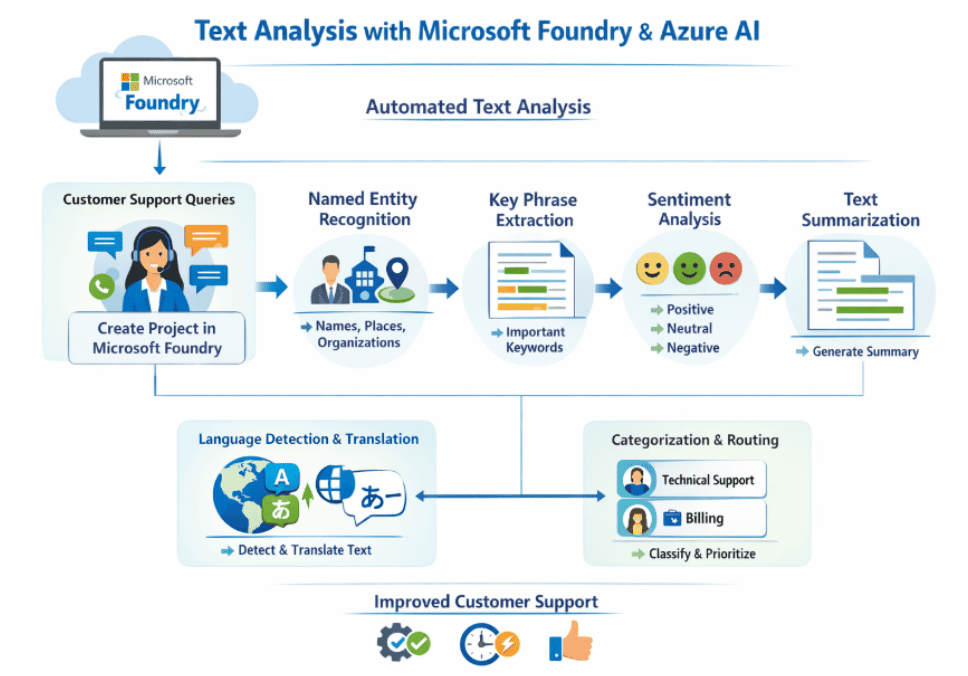
Text analysis powered by Azure AI Language enables businesses to automate the processing of customer queries, reviews, and feedback at scale. In this lab, you’ll use the Microsoft Foundry portal and the Language playground to perform sentiment analysis, extract key phrases and named entities, and summarize text, turning unstructured written data into actionable business insights.
Key Concepts
- Microsoft Foundry Portal: A cloud-based Azure platform for building, training, and deploying AI models, with integrated playgrounds for testing language capabilities without writing code.
- Azure AI Language: A collection of Natural Language Processing services that support sentiment analysis, entity recognition, key phrase extraction, summarization, language detection, and translation.
- Sentiment Analysis: Determines whether text conveys a positive, neutral, or negative sentiment, useful for analyzing reviews, social media posts, and customer feedback.
- Key Phrase Extraction: Identifies the most important pieces of information in text, highlighting phrases that contribute most to the overall meaning.
- Named Entity Recognition: Extracts words that describe people, places, organizations, and objects with proper names, along with type and confidence scores.
- Text Summarization: Distills the main points of a long document into a shorter version, using extractive summarization to rank and select the most salient sentences.
Microsoft Foundry Language Playground
In this lab, you will create a project in the Microsoft Foundry portal and explore Azure AI Language capabilities through the Language playground. You will download sample text documents and run sentiment analysis to classify reviews as positive, neutral, or negative, along with sentence-level sentiment scores. You will then extract key phrases to identify the main concepts in each document, perform named entity recognition to pull out people, places, and organizations with confidence scores, and summarize lengthy text into concise, ranked sentences. Finally, you will review sample Python code that uses the Azure AI Language SDK to integrate these capabilities into applications. By the end, you’ll understand how to automate text analysis workflows to improve decision-making, customer support, and operational efficiency.
Estimated Time: 35–40 minutes
Difficulty Level: Moderate
By completing this guide, you will be able to automate text analysis workflows.
Related Readings:- Comparing Copilot (Azure) Vs Amazon Q Vs Gemini
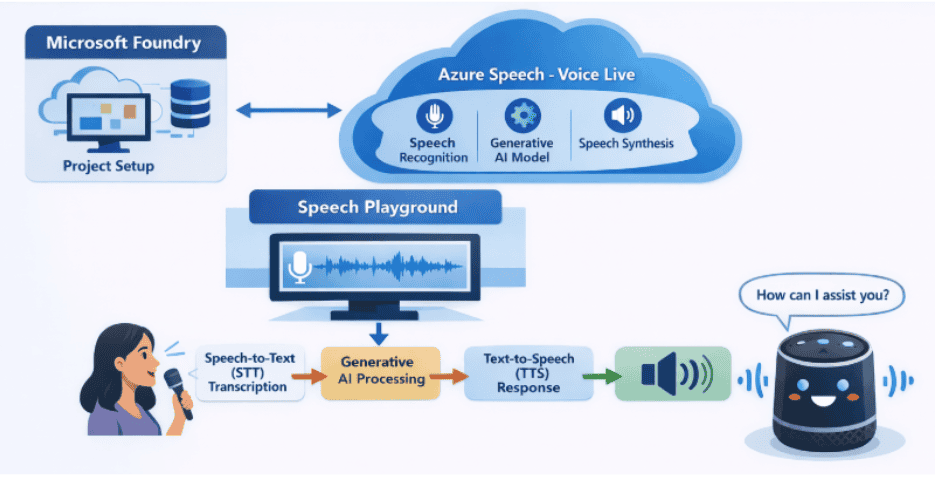
Lab 10: Speech in Foundry
Azure Speech – Voice Live enables real-time voice conversations between users and AI agents by combining speech recognition, speech synthesis, and generative AI. In this lab, you’ll use Microsoft Foundry to build and test a voice-enabled assistant that captures spoken input and responds with natural-sounding speech.
Key Concepts
- Microsoft Foundry: A centralized Azure platform for deploying and testing AI models through projects and interactive playgrounds.
- Azure Speech – Voice Live: A real-time speech service that integrates STT, TTS, and generative AI for conversational voice interactions.
- Speech-to-Text (STT): Converts spoken language into text prompts for AI processing.
- Text-to-Speech (TTS): Converts written responses into natural-sounding audio output.
- Speech Playground: A no-code interface to configure voice settings and test real-time speech interactions with AI models.
Microsoft Foundry Speech Playground
In this lab, you will create a Microsoft Foundry project and explore Azure Speech tools. You will configure Voice Live with the GPT-4.1 Mini model, select a voice for your assistant, and use your microphone to have real-time voice conversations with the AI. You will experiment with advanced settings such as audio enhancement, voice temperature, and end-of-utterance detection, and review the underlying Python code that powers the VoiceLive SDK. By the end, you’ll understand how to build intelligent voice-based applications using real-time speech processing and generative AI.
Estimated Time: 30–35 minutes
Difficulty Level: Moderate
By completing this guide, you will be able to build real-time voice AI apps.
Related Readings: MLOps, AIOps and different -Ops frameworks
Lab 11: Computer Vision in Foundry
Azure Speech – Voice Live enables real-time voice conversations between users and AI agents by combining speech recognition, speech synthesis, and generative AI. In this lab, you’ll use Microsoft Foundry to build and test a voice-enabled assistant that captures spoken input and responds with natural-sounding speech.
Key Concepts
- Microsoft Foundry: A centralized Azure platform for deploying and testing AI models through projects and interactive playgrounds.
- Azure Speech – Voice Live: A real-time speech service that integrates STT, TTS, and generative AI for conversational voice interactions.
- Speech-to-Text (STT): Converts spoken language into text prompts for AI processing.
- Text-to-Speech (TTS): Converts written responses into natural-sounding audio output.
- Speech Playground: A no-code interface to configure voice settings and test real-time speech interactions with AI models.
Microsoft Foundry Speech Playground
In this lab, you will create a Microsoft Foundry project and explore Azure Speech tools. You will configure Voice Live with the GPT-4.1 Mini model, select a voice for your assistant, and use your microphone to have real-time voice conversations with the AI. You will experiment with advanced settings such as audio enhancement, voice temperature, and end-of-utterance detection, and review the underlying Python code that powers the VoiceLive SDK. By the end, you’ll understand how to build intelligent voice-based applications using real-time speech processing and generative AI.
Estimated Time: 40–50 minutes
Difficulty Level: High
By completing this guide, you will be able to build multimodal AI applications.
Related Readings:- Top 15 Python IDEs and Code Editors for 2026 (Free & Paid)
Lab 12: Information Extraction in Foundry
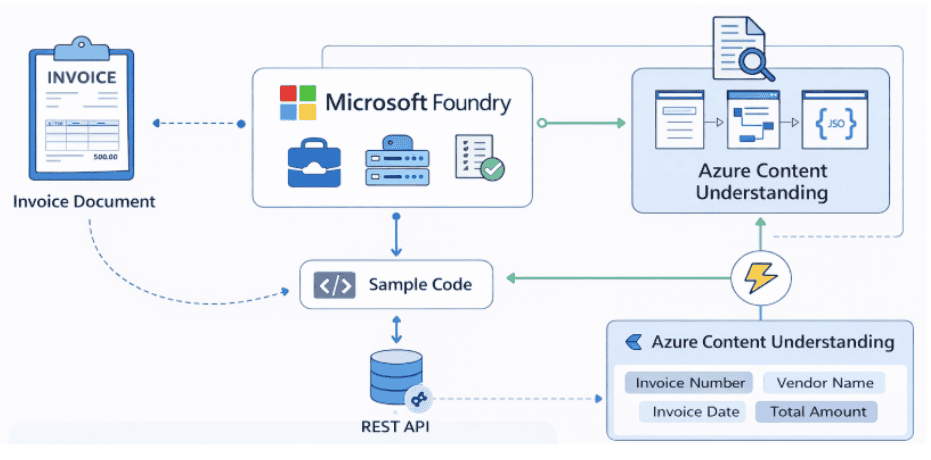
Azure Content Understanding in Microsoft Foundry uses AI to convert unstructured documents like invoices and PDFs into structured, machine-readable data. In this lab, you’ll build an AI-powered document intelligence solution that automatically extracts key fields such as invoice numbers, dates, vendor details, and totals.
Key Concepts
- Microsoft Foundry: A centralized Azure platform for deploying and testing AI models through projects and interactive playgrounds.
- Azure Content Understanding: An AI-powered service that performs multi-modal analysis on documents, images, audio, and video to extract structured information.
- Document Intelligence: The use of AI to convert unstructured documents into structured JSON data by detecting text, understanding layout, and identifying key-value pairs.
- Analyzer: A predefined AI configuration designed to extract specific information from documents, such as the Invoice Data Extraction analyzer.
- REST API Integration: Enables developers to programmatically submit documents for asynchronous analysis and retrieve structured results.
Azure Content Understanding Portal
In this lab, you will create a Microsoft Foundry project for Content Understanding in a supported region. You will use the built-in Invoice Data Extraction analyzer to process a sample invoice, then upload a custom PDF invoice with a different format to see how the analyzer adapts. You will review the structured JSON output containing extracted fields and explore REST API calls that submit documents via POST requests and retrieve asynchronous results via GET requests. By the end, you’ll understand how to automate invoice processing and integrate document intelligence into real-world business applications.
Estimated Time: 35–45 minutes
Difficulty Level: High
By completing this guide, you will be able to automate document processing systems.
Related Readings: Top AI Tools for Analyzing Big Data in 2026 | K21 Academy
Lab 13: Foundry IQ
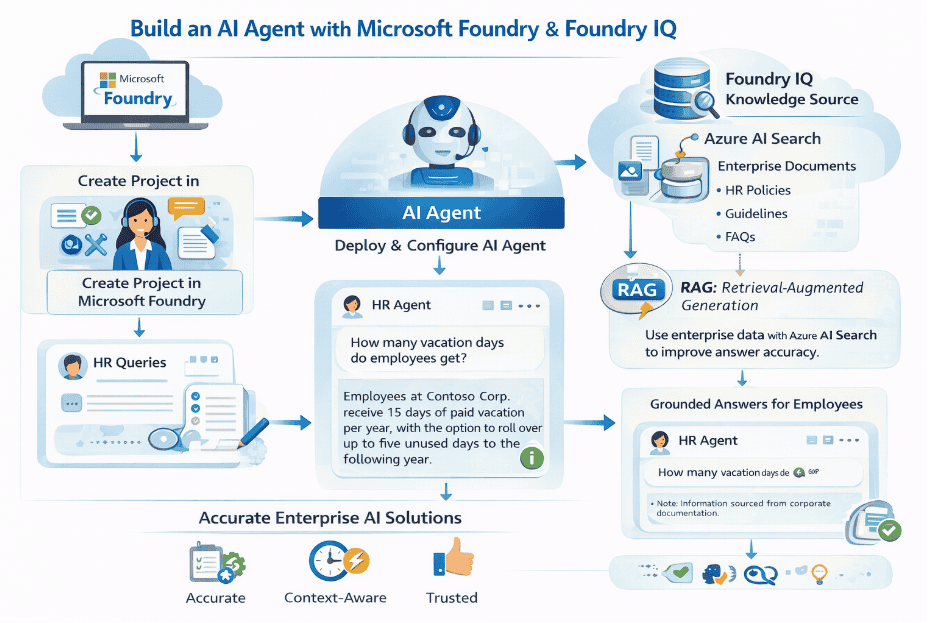
Foundry IQ enables AI agents to connect with enterprise data sources, grounding their responses in accurate, context-aware information through the retrieval-augmented generation (RAG) approach. In this lab, you’ll build an HR AI agent in Microsoft Foundry that answers employee queries by combining a generative AI model with an Azure AI Search knowledge base.
Key Concepts
- Microsoft Foundry: A unified Azure platform for creating, deploying, and managing AI models and agents through projects, playgrounds, and integrations.
- Generative AI Models: Models like GPT-4.1 that understand prompts and generate human-like responses, forming the core of AI agents.
- Foundry IQ: A central connection point for data sources that agents can use as knowledge bases, enabling shared knowledge across multiple agents without custom code.
- Retrieval-Augmented Generation (RAG): A design pattern where the AI retrieves relevant information from a knowledge source and uses it to generate accurate, grounded responses.
- Azure AI Search: Used to index and manage enterprise documents that act as a knowledge base, queried by the agent through Foundry IQ.
Microsoft Foundry Agent Playground with Foundry IQ
In this lab, you will set up an enterprise data source by deploying Azure AI Search through the Azure Cloud Shell and indexing HR policy documentation for Contoso Corp. You will then create a Microsoft Foundry project, build an HR AI agent powered by the GPT-4.1 model, and configure agent instructions that restrict responses to HR-related topics. Next, you will connect Foundry IQ to your Azure AI Search resource and create a knowledge base with answer synthesis and retrieval instructions. You will attach the knowledge store to your agent and test grounded responses to employee queries such as vacation policies, PTO requests, and remote work guidelines. Finally, you will preview the agent UI as employees would experience it in a real enterprise application. By the end, you’ll have hands-on experience building RAG-based AI solutions that deliver accurate, context-aware answers.
Estimated Time: 40–50 minutes
Difficulty Level: High
Exam Relevance Note: Covers RAG + enterprise AI
By completing this guide, you will be able to build RAG-based AI solutions.
Related Readings: The Best Chatbot Development Tools
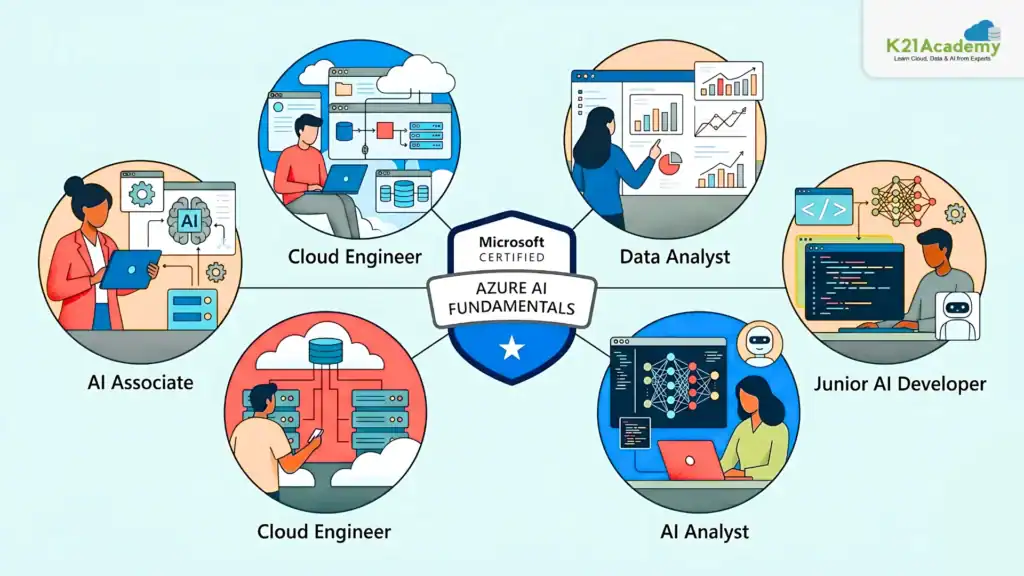
Career Opportunities After AI-901
Companies Hiring AI Skills
Many leading global organizations are actively hiring professionals with Artificial Intelligence and Azure AI skills. Companies such as Microsoft, Accenture, Deloitte, Infosys, Tata Consultancy Services, and Amazon are increasingly looking for professionals who understand AI fundamentals and can work with modern AI solutions on cloud platforms like Azure.
As organizations rapidly adopt Generative AI, Agentic AI, automation, and intelligent applications, professionals with AI-901: Microsoft Azure AI Fundamentals level knowledge are becoming valuable for:
- Understanding AI-driven business use cases
- Supporting AI-powered applications and chatbots
- Working with NLP, computer vision, and speech solutions
- Assisting in building scalable Multi agent systems
This growing demand makes AI-901: Microsoft Azure AI Fundamentals a strong starting point for entering the AI job market and transitioning into advanced AI roles.
Salary Insights
India: ₹4 LPA – ₹12 LPA
Global: $70K – $110K
LinkedIn Demand Insight
Demand for AI + Generative AI professionals is growing rapidly across industries.
8-Week AI-901: Microsoft Azure AI Fundamentals Study Plan
Week 1–2 → AI fundamentals + workspace setup
Week 3–4 → Generative AI & NLP
Week 5 → Vision + Speech
Week 6 → Foundry Labs
Week 7 → Practice Tests
Week 8 → Revision
Related Readings: Comparing the Best AI Chatbots for Your Business: What’s Best for You?
Conclusion
AI-901: Microsoft Azure AI Fundamentals is your entry point into the AI world.
But clearing the exam is not about theory.
It’s about understanding how AI works in real scenarios.
These 13 labs give you exactly that.
If you practice them properly, you won’t just pass, you’ll actually understand AI.
You can also check out free exam question guide on AI-901.
Frequently Asked Questions:-
Q1. Is AI-901 difficult?
It’s beginner-friendly, but without practice, some concepts may feel confusing at first. Consistent revision and hands-on exposure can make it much easier to understand.
Q2. Is AI-901 worth it?
Yes, it helps build a strong foundation in artificial intelligence and can open up better career opportunities in the evolving job market.
Q3. Do I need coding?
No, coding is not required. A basic understanding of concepts and familiarity with AI fundamentals is sufficient.
Q4. What is the passing score?
The passing score for the AI-901 exam is 700 out of 1000.
Q5. AI-901 vs AI-103?
AI-901 focuses on basic AI concepts, while AI-103 is more advanced and involves building and implementing AI solutions.
Q6. What is RAG?
Retrieval-Augmented Generation (RAG) is a technique that combines information retrieval (search) with AI-generated responses to provide more accurate and context-aware answers.
Q7. What is Foundry?
Foundry refers to Microsoft’s modern AI platform used for building, deploying, and managing AI applications efficiently.
Q8. Why do hands-on labs matter?
Hands-on labs are important because they help convert theoretical knowledge into practical, real-world skills, making it easier to understand and apply AI concepts.