




Developer’s code writing, debugging and optimizing have been dramatically impacted by Agentic AI. AI coding assistants are not only able to complete functions but also generate entire applications, and they are considered essential rather than optional.
It is very important to pick the right AI coding tool if you want to remain competitive or become a Claude Certified Architect.
This blog will introduce three of the most widely used AI coding assistants: Claude Code, GitHub Copilot and Cursor, and guide you toward the right one to learn.
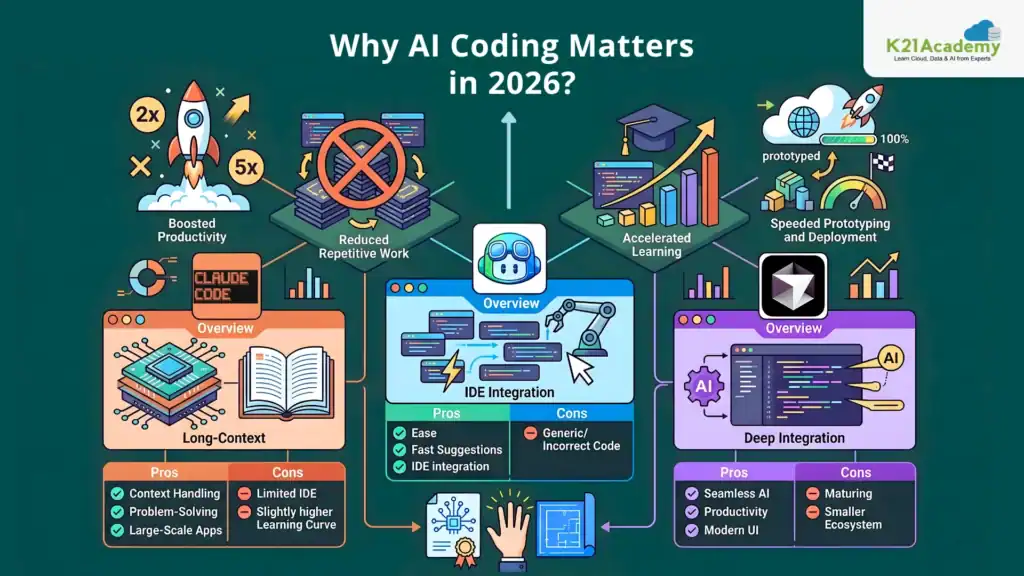
Why AI Coding Assistants Matter in 2026 ?
Before we get our hands into comparison, how about a quick glance at the bigger picture, why does it matter?
AI tools:-
- Raise developer productivity by a whopping 2-5 times
- Cut down on monotonous programming work
- Allow beginners to up their learning curve
- Make prototype and deployment time shorter
Especially for those planning to become AI Engineers, getting proficient in AI-assisted development is not just an advantage, but a necessity.

1. Claude Code (by Anthropic)
Overview
Advanced AI engines support Claude Code capabilities for great reasoning, context over large periods of time, and producing high-quality programming using llm.
Key Features
- Effortlessly manage huge codebases
- Great at breaking down complex logic
- Highly capable in reasoning as well as debugging
- Produce safer and more aligned outputs
Great For
- System design
- Backend architecture
- AI-powered apps
- Developers who want to be a Claude Certified Architect
Advantages
- Excellent contextual awareness
- Very helpful for complex problem-solving
- Very suitable for large enterprise applications
Drawbacks
- It is a bit less integrated with IDEs than other products
- For beginners, there is a small learning curve
Related Readings:- Comparing Copilot (Azure) Vs Amazon Q Vs Gemini
2. GitHub Copilot (by Microsoft & OpenAI)
Overview
GitHub Copilot is a very popular AI coding assistant and one of the things that makes it stand out is that it can be used directly on very famous IDEs like VS Code.
Key Features
- Code suggestions while you type
- More than one programming language supported
- Developer workflows greatly supported
Great For
- Daily programming
- Frontend and backend development
- Junior and mid-level developers
Advantages
- User-friendly
- Generations are fast
- Very good integration with the IDE
Drawbacks
- More intellectual capabilities somewhat limited
- Can generate incorrect or generic code
Related Readings:- Top 15 Python IDEs and Code Editors for 2026 (Free & Paid)
3. Cursor (AI-Powered Code Editor)
Overview
Cursor is a new-generation code editor focused on AI, designed to embed AI naturally into the programming work process.
Key Features
- Dialogue with AI directly in the code editor
- Suggestions that understand your whole codebase
- Modify several files at once via AI commands
Great For
- Developers working on full-stack
- Quickly launching new ideas or products
- Changing to AI-native software development workflows
Advantages
- Effective merging of AI and editor
- Helpful in boosting productivity
- Interface is aesthetically pleasing and very updated
Drawbacks
- Still evolving
- Smaller ecosystem compared to Copilot
AI Coding Skills Salary Impact: Market Data vs Real Career Outcomes
Salary benchmarks show the broader market opportunity, but individual career outcomes depend on experience, location, technical depth, and the ability to apply AI tools in real-world engineering environments.
In 2026, the general market ranges look like this:
| Role | Typical Salary Range (Global Market) | Skills Expected |
|---|---|---|
| Software Developer | $90K–$130K | Programming fundamentals, application development |
| AI-Assisted Developer | $110K–$160K | AI coding tools, automation workflows, faster delivery |
| AI Engineer | $130K–$200K+ | LLM applications, RAG, AI agents, cloud deployment |
| Senior AI Engineer / AI Architect | $180K–$300K+ | Enterprise AI systems, architecture, agentic workflows |
However, market averages only tell part of the story.
The bigger career impact comes when developers combine AI coding assistants with practical skills such as:
- Cloud engineering
- System design
- AI agent development
- DevOps automation
- LLM application development
- Production deployment experience
For example, developers who transition from traditional software roles into AI-focused engineering roles have reported significant compensation growth after building hands-on expertise with AI tools and real-world projects.
At K21 Academy, learners have shared career transformation outcomes after building skills in cloud, AI engineering, and modern automation workflows.
One example:
A learner transitioned from an $85K role and achieved offers in the $185K–$190K range after developing practical expertise in AI engineering workflows, cloud technologies, and industry-relevant projects.
The important takeaway:
AI coding assistants like Claude Code, GitHub Copilot, and Cursor do not directly create salary increases.
They increase your ability to build valuable skills faster.
The engineers who combine these tools with strong fundamentals are the ones positioning themselves for higher-paying AI engineering and architecture roles.
Global Salary Comparison Table (USA, UK, India)
| Role | USA (Annual) | UK (Annual) | India (Annual) |
|---|---|---|---|
| Software Developer | $90K–$130K | £45K–£80K | ₹8L–₹20L |
| AI-Assisted Developer | $110K–$160K | £60K–£100K | ₹15L–₹35L |
| AI Engineer | $130K–$200K+ | £80K–£140K | ₹25L–₹60L+ |
| Senior AI Engineer | $180K–$250K+ | £120K–£180K | ₹50L–₹1Cr+ |
| AI Architect | $220K–$300K+ | £150K–£220K | ₹75L–₹1.5Cr+ |
Claude Code vs GitHub Copilot vs Cursor: Quick Comparison
| Feature | Claude Code (Anthropic) | GitHub Copilot (Microsoft/GitHub) | Cursor |
|---|---|---|---|
| Primary Focus | Agentic coding assistant for complex engineering workflows | AI pair programmer integrated into developer workflows | AI-first code editor with built-in coding agents |
| Pricing (2026) | Subscription/API-based plans (usage depends on plan and limits) | Individual and business subscription plans | Subscription-based plans with individual and team options |
| Best For | AI engineers, backend developers, architects, DevOps engineers, large-scale projects | Daily coding, enterprise developers, VS Code users, teams | Full-stack developers, startups, rapid prototyping |
| Interface | Terminal-based AI coding environment | Integrated directly inside IDEs like VS Code, Visual Studio, JetBrains | Dedicated AI-native code editor based on VS Code |
| Codebase Context Understanding | ⭐⭐⭐⭐⭐ Excellent for large repositories and architecture-level reasoning | ⭐⭐⭐⭐ Strong, especially with GitHub ecosystem integration | ⭐⭐⭐⭐ Strong with project indexing and AI code navigation |
| Large Repository Handling | Excellent for monorepos, enterprise applications, complex systems | Good for normal application repositories | Very good for medium-to-large projects |
| File Reading Capability | Can inspect and reason across multiple files in a repository | Can analyze open files, workspace context, and project files depending on setup | Can index and understand entire projects |
| File Editing / Modification | Advanced multi-file edits, refactoring, and workflow-based changes | Generates suggestions and can modify code through IDE workflows | Strong multi-file editing through AI commands |
| Autonomous Coding Ability | ⭐⭐⭐⭐⭐ High agentic capability | ⭐⭐⭐⭐ Growing agent features with Copilot agents | ⭐⭐⭐⭐ Strong AI editing and agent workflows |
| Terminal Command Execution | Strong terminal-first workflow with command execution | Available through IDE integrations and extensions | Available through integrated workflows |
| Git Operations | Strong Git workflow support: commits, changes, repository analysis | Excellent GitHub integration, pull requests, code review workflows | Good Git integration through editor workflows |
| Pull Request Review | Strong reasoning-based code review capability | Excellent GitHub-native PR review workflows | Good AI-assisted review capabilities |
| Debugging Capability | ⭐⭐⭐⭐⭐ Strong at tracing complex bugs and system issues | ⭐⭐⭐⭐ Good for common debugging tasks | ⭐⭐⭐⭐ Good interactive debugging assistance |
| Refactoring Ability | Excellent for architecture-level refactoring | Good for incremental code improvements | Excellent for fast code modifications |
| MCP Support (Model Context Protocol) | Strong MCP support for connecting external tools, APIs, databases, and workflows | Expanding ecosystem through GitHub and Microsoft integrations | Growing support through AI tool integrations |
| Cloud / DevOps Support | Excellent for Terraform, Kubernetes, CI/CD, AWS, Azure workflows | Strong with enterprise development workflows | Good for application development workflows |
| Infrastructure as Code (IaC) | Excellent for Terraform, CloudFormation, Kubernetes YAML, automation scripts | Good for scripts and configuration assistance | Good for infrastructure-related coding tasks |
| Multi-Agent Workflow Support | ⭐⭐⭐⭐⭐ Strong focus on agentic workflows | ⭐⭐⭐⭐ Developing agent capabilities | ⭐⭐⭐⭐ Supports AI-assisted workflows |
| Learning Curve | Medium: requires understanding of AI workflows and terminal usage | Easy: familiar IDE experience | Easy to Medium: requires adapting to AI-native workflows |
| Enterprise Adoption | Growing rapidly among AI engineering teams | Very strong enterprise adoption through GitHub ecosystem | Growing among startups and AI-first companies |
| Documentation Generation | Excellent technical explanations and architecture documentation | Good documentation generation | Good documentation assistance |
| Best Strength | Deep reasoning + autonomous engineering workflows | IDE integration + enterprise ecosystem | AI-native coding experience |
| Main Limitation | Less traditional IDE integration | Less powerful for deep architecture reasoning | Smaller ecosystem compared with GitHub Copilot |
| Ideal User | AI Engineer, Cloud Architect, Senior Developer | Software Developer, Team Developer, Enterprise Engineer | Full-stack Developer, Startup Engineer |
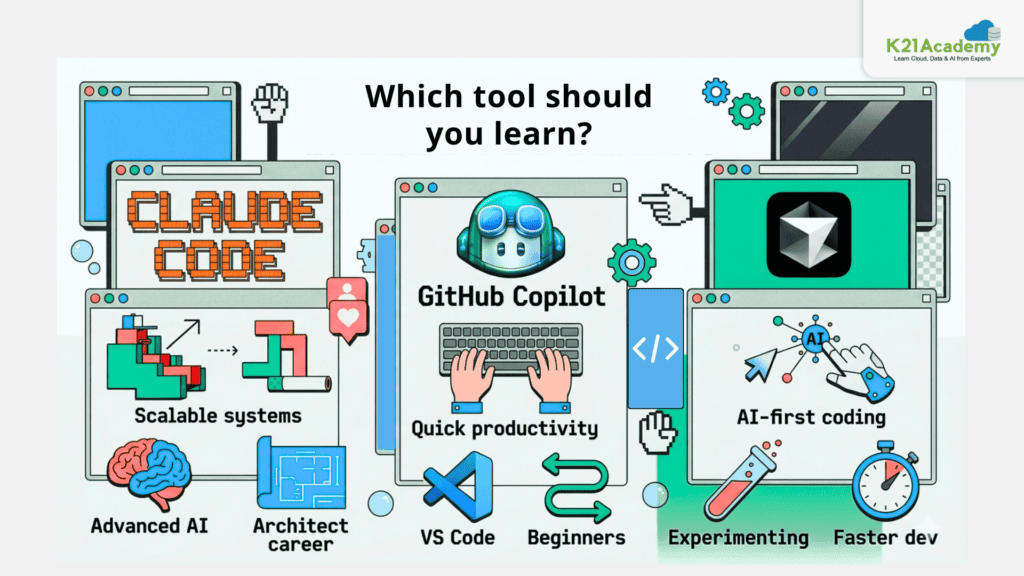
Which One Should You Learn?
Choose Claude Code if:
- You want to build scalable systems
- You’re targeting advanced AI roles
- You aim to become a Claude Certified Architect

Choose GitHub Copilot if:
- You are a beginner
- You want quick productivity gains
- You work heavily in VS Code
Related Readings:- What is Generative AI & How It Works?
Choose Cursor if:
- You want an AI-first coding experience
- You like experimenting with new tools
- You want faster development workflows
There is not one single answer for everyone but here is a practical way:-
- First, try GitHub Copilot for your utmost convenience
- Look into Cursor if you want to enhance your productivity
- Become a proficient Claude Code user if your aim is to be a qualified Claude Certified Architect.
Tool Learning vs Career Outcome Table (Best Fit for This Blog)
| Skill Path | Typical Role Outcome | Salary Potential (2026) |
|---|---|---|
| GitHub Copilot + Programming Fundamentals | Junior/Mid Developer | $90K–$150K |
| Cursor + Full-Stack AI Development | AI Application Developer | $120K–$180K |
| Claude Code + Agentic AI Workflows | AI Engineer | $160K–$250K+ |
| Claude Code + Cloud + MLOps | AI Platform Engineer | $200K–$300K+ |
| Claude Certified Architect + Enterprise AI Skills | AI Solutions Architect | $250K+ |
Real Productivity Benchmarks: Do AI Coding Assistants Actually Make Developers Faster?
AI coding assistants are not just hype. Multiple studies show measurable productivity improvements, although results vary depending on developer experience, task complexity, and workflow quality.
| Tool / Study | Productivity Finding | Source |
|---|---|---|
| GitHub Copilot controlled study | Developers completed a coding task approximately 55% faster when using Copilot compared with developers without it | GitHub/Microsoft Research study |
| GitHub Copilot developer research | Developers reported higher confidence and improved workflow flow while using AI assistance | GitHub research |
| AI-assisted coding workflows | Productivity gains are strongest for repetitive tasks such as documentation, testing, boilerplate code, and debugging support | Research studies on AI-assisted development |
| Claude Code / Cursor style agent workflows | Benefits are highest for complex repository work, but require strong engineering review and validation | Industry comparisons and developer evaluations |
Future of AI Coding Assistants
The developers who will thrive in the future are the ones who will work side by side with AI, rather than view it as a competitor.
Take it seriously if you are thinking about your career:-
- Find out how these tools operate
- Get trained on prompt engineering
- Develop projects for the real world
It’s because leading developers of the future will not only be those who write code, they will be those who coordinate with AI Agents.
Related Readings: Top 10 Claude Code Use Cases Every Developer Should Know
Final Thoughts
Deciding among Claude Code, GitHub Copilot, and Cursor is really a matter of what you want to achieve. However, if your dream is to be one of the top people in the AI world and get your name out there as a Claude Certified Architect (check out this free guide), then spending some time and effort on learning how to use advanced AI tools like Claude is quite a wise decision.
Frequently Asked Questions (FAQs)
1. What if I ignore AI coding assistants, will I fall behind other developers?
Yes, that’s a real risk. As AI tools can boost productivity by 2–5x, developers who don’t adopt them may struggle to keep up with faster-moving teams and AI-augmented workflows. Over time, this gap can affect hiring, promotions, and relevance in the industry.
2. Can relying on tools like Copilot or Claude Code make my core coding skills weaker?
It can, if used passively. Developers who blindly accept AI-generated code without understanding it may lose problem-solving depth. The danger isn’t the tools themselves, but overdependence without learning.
3. What if the AI generates incorrect or insecure code and I don’t catch it?
This is one of the biggest concerns. Tools like Copilot and Cursor can sometimes produce generic or flawed code. If you don’t review outputs carefully, you could introduce bugs, security vulnerabilities, or performance issues into production systems.
4. Is choosing the wrong AI coding tool a long-term career mistake?
Potentially, yes. Investing time in a tool that doesn’t align with your goals (e.g., using only Copilot when aiming for advanced AI architecture roles) could slow your growth. The ecosystem you learn shapes your opportunities.
5. Could using AI coding assistants reduce my originality or creativity as a developer?
It’s possible. If you rely heavily on AI-generated patterns, your code may become standardized and less inventive. While that’s not always bad (consistency is useful), it can limit your ability to design unique solutions or think outside typical patterns.
6. What if companies start expecting developers to work at AI-accelerated speeds all the time?
That’s already happening in some teams. As tools increase output, expectations can rise too. This can create pressure to deliver more in less time, making it important to balance productivity with code quality and personal sustainability.
7. Will tools like Claude Code or GitHub Copilot eventually replace junior developers?
They’re more likely to reshape entry-level roles than eliminate them. Routine coding tasks may shrink, but demand for developers who can review, guide, and integrate AI outputs will grow. Junior developers will need to ramp up faster and demonstrate higher-level thinking earlier in their careers.