


Do you know, Why Most AI Professionals Will Struggle in the Next 3 Years ?
AI is evolving faster than most professionals can keep up.
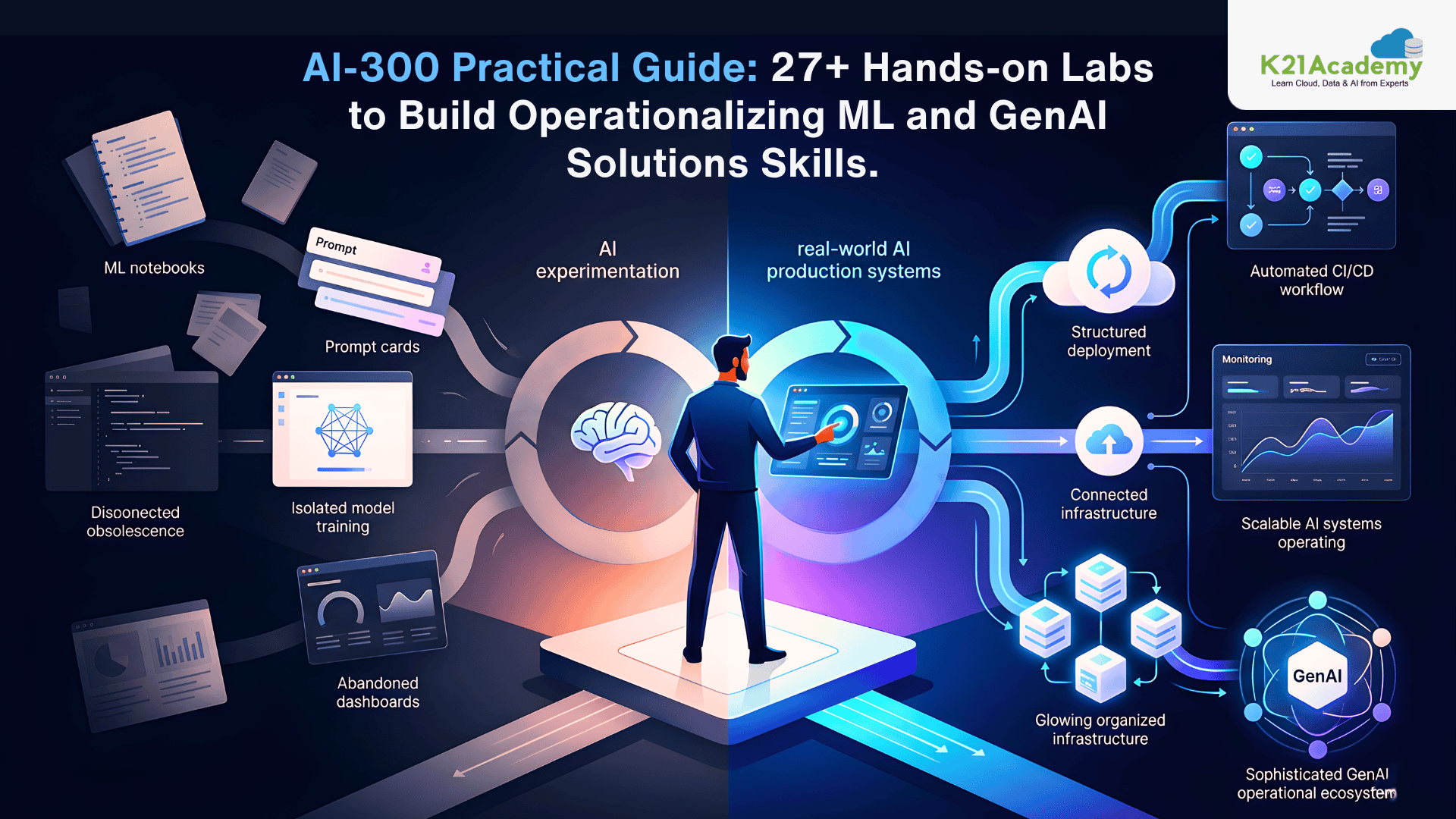
Companies are no longer looking for people who can only train a machine learning model or write prompts for ChatGPT. Organizations now want professionals who can operationalize AI systems at scale, deploy them, monitor them, automate retraining, manage infrastructure, optimize costs, secure pipelines, and continuously improve production AI systems.
That is exactly where the Microsoft Certified: Operationalizing Machine Learning and Generative AI Solutions (AI-300) certification becomes important.
The Microsoft Certified Operationalizing Machine Learning and Generative AI Solutions certification validates your ability to implement MLOps and GenAIOps practices on Azure. It focuses on real-world operational AI skills including:
Machine Learning Operations (MLOps), Generative AI Operations (GenAIOps), Azure Machine Learning, Azure AI Foundry, GitHub Actions, CI/CD automation, Model monitoring and observability, Prompt versioning and optimization, AI deployment and governance.
Most AI learners focus only on model creation.
Very few know how to move AI systems into production environments.
That is why organizations are actively hiring professionals who understand:
- AI deployment pipelines
- Model lifecycle management
- AI monitoring
- Infrastructure automation
- Production-grade AI engineering
- Responsible AI implementation
- Generative AI optimization
The AI-300 certification is designed exactly for those production-focused AI engineering skills.
AI-300 Certification Overview
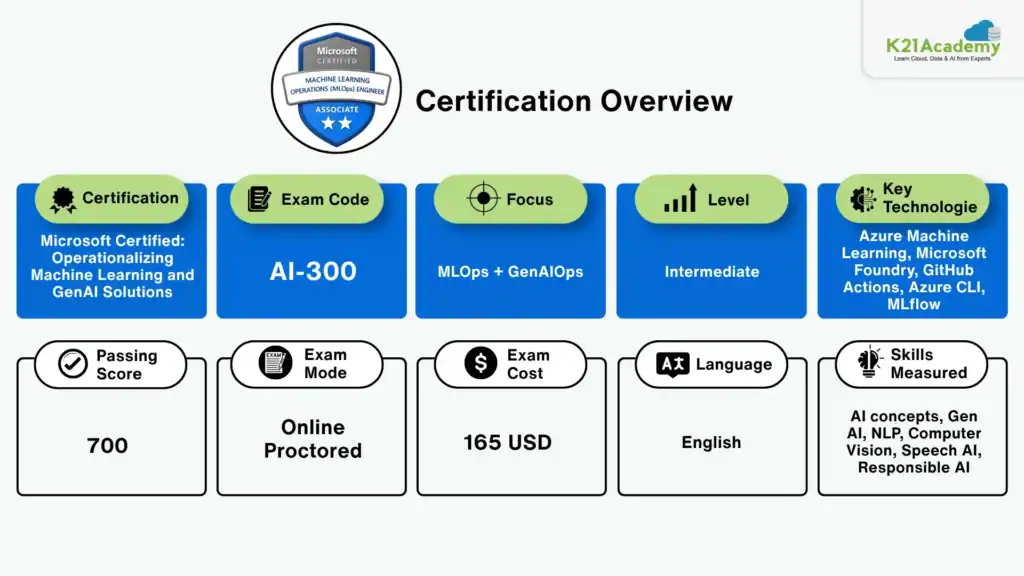
What is the Microsoft Certified: Operationalizing Machine Learning and Generative AI Solutions (AI-300) Certification?
The Microsoft Certified Operationalizing Machine Learning and Generative AI Solutions (AI-300) certification is designed for professionals who want to operationalize machine learning and generative AI workloads using Azure services.
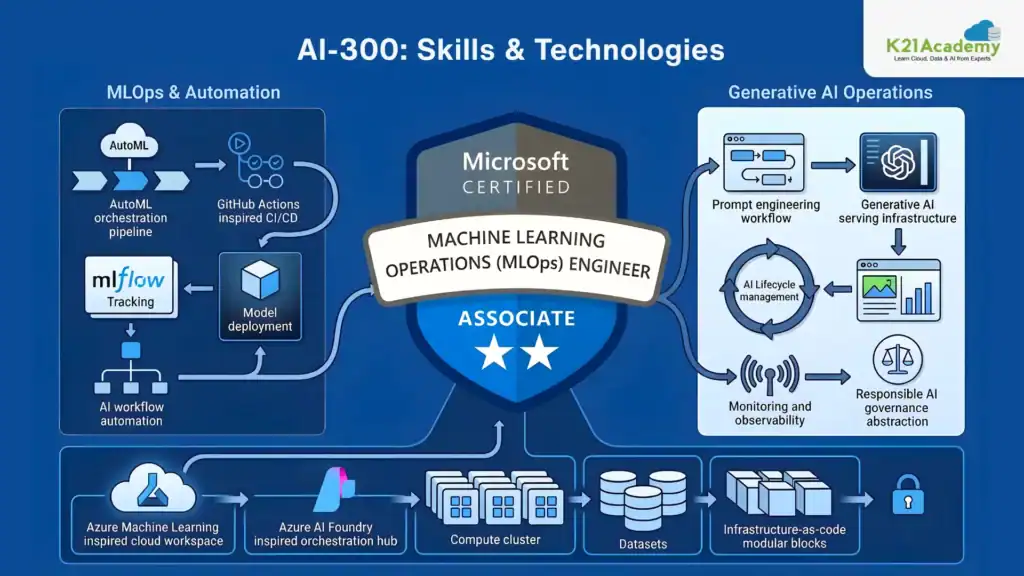
The certification focuses heavily on:
- Production AI systems
- AI lifecycle management
- MLOps automation
- GenAIOps workflows
- AI observability
- Prompt engineering operations
- Model deployment and monitoring
- CI/CD for AI systems
Unlike beginner AI certifications, AI-300 focuses on real-world implementation.
It validates your ability to:
- Build scalable AI infrastructure
- Deploy AI models securely
- Automate machine learning workflows
- Monitor AI systems in production
- Manage prompt versions
- Optimize generative AI systems
- Implement Responsible AI practices
The certification uses services like:
- Azure Machine Learning
- Microsoft Foundry
- Azure AI Services
- GitHub Actions
- Azure CLI
- Bicep
- MLflow
- Application Insights
Related Readings: Azure AI/ML Certifications: Step-by-Step Guide to Succeed in 2026
Why Engineers Struggle with AI-300 Certification ?
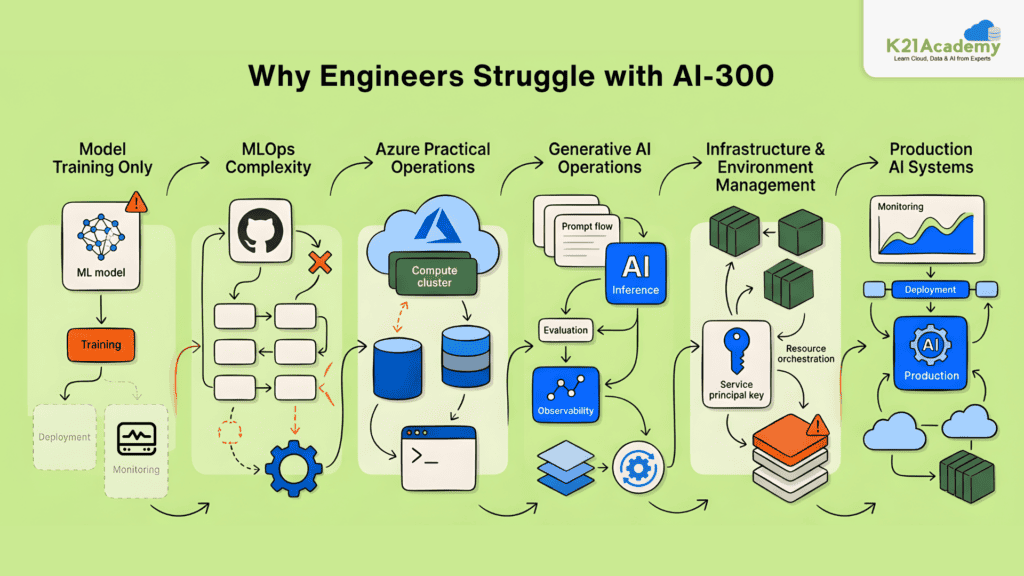
1. They Only Know Model Training
Most professionals know how to train a model but do not understand deployment, monitoring, automation, and scaling.
2. Lack of MLOps Experience
AI-300 heavily focuses on CI/CD pipelines, GitHub Actions, infrastructure automation, and model lifecycle management.
3. No Hands-on Azure Experience
The certification is practical. Reading theory alone is not enough.
4. Generative AI Operations are New
Prompt versioning, observability, evaluation pipelines, and GenAIOps workflows are still new for most professionals.
5. Weak Infrastructure Knowledge
Many AI learners struggle with:
- Azure CLI
- Compute resources
- IaC tools
- Service principals
- Environment management
6. Lack of Production AI Exposure
The exam focuses on operational AI systems instead of research-based machine learning.
Who Should Take AI-300 Certification?
This certification is ideal for professionals working with AI, cloud, DevOps, and machine learning systems.
Recommended For
- AI Engineers
- Machine Learning Engineers
- MLOps Engineers
- Cloud Engineers
- DevOps Engineers working with AI workloads
- AI Architects
- Data Scientists transitioning into production AI
- Generative AI Engineers
- Azure AI Professionals
Recommended Skills Before Starting
- Python programming
- Machine learning fundamentals
- Azure basics
- GitHub basics
- CI/CD understanding
- Cloud concepts
Who Should NOT Take AI-300 Certification?
AI-300 may not be ideal for:
- Complete beginners with no cloud knowledge
- Professionals with no Python experience
- Candidates without Azure exposure
- Students expecting theory-only learning
- Professionals looking only for data science concepts
- Candidates without interest in deployment or automation
If you are completely new to AI or Azure, starting with AI-901 or AI-103 is a better path.
AI-300 vs AI-103 Certification
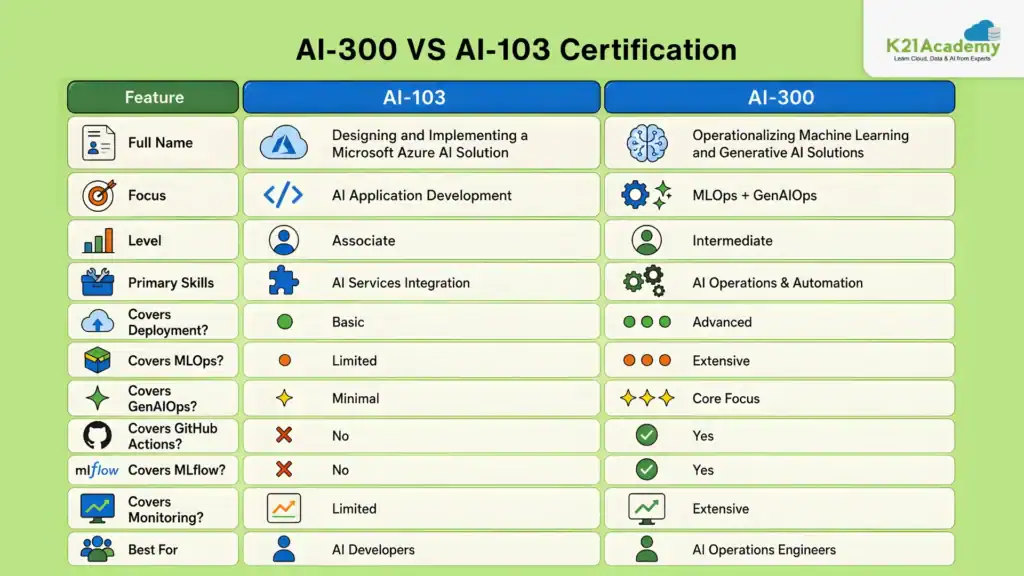
Which Certification Should You Take First AI-103 or AI-300?
Start with AI-103 If:
- You are new to Azure AI
- You want foundational Azure AI skills
- You are learning AI services for the first time
- You need understanding of Azure Cognitive Services
- You have never deployed AI workloads before
Start with AI-300 If:
- You already know Azure basics
- You already work with ML workflows
- You want MLOps or GenAIOps roles
- You understand machine learning fundamentals
- You want production AI engineering skills
Recommended Learning Path
- AI-901 (Optional Foundation)
- AI-103
- AI-300
This path builds both AI development and AI operationalization expertise.
Top AI-300 Hands-on Labs
The Microsoft Certified: Operationalizing Machine Learning and Generative AI Solutions (AI-300) certification is highly practical.
Hands-on experience is absolutely critical.
The following 27 labs cover:
- Azure Machine Learning
- MLOps workflows
- MLflow
- Deployment pipelines
- GitHub Actions
- Generative AI Operations
- Microsoft Foundry
- Prompt engineering
- AI monitoring
- Fine-tuning
- Responsible AI

Lab 1. Find the Best Classification Model with Azure Machine Learning
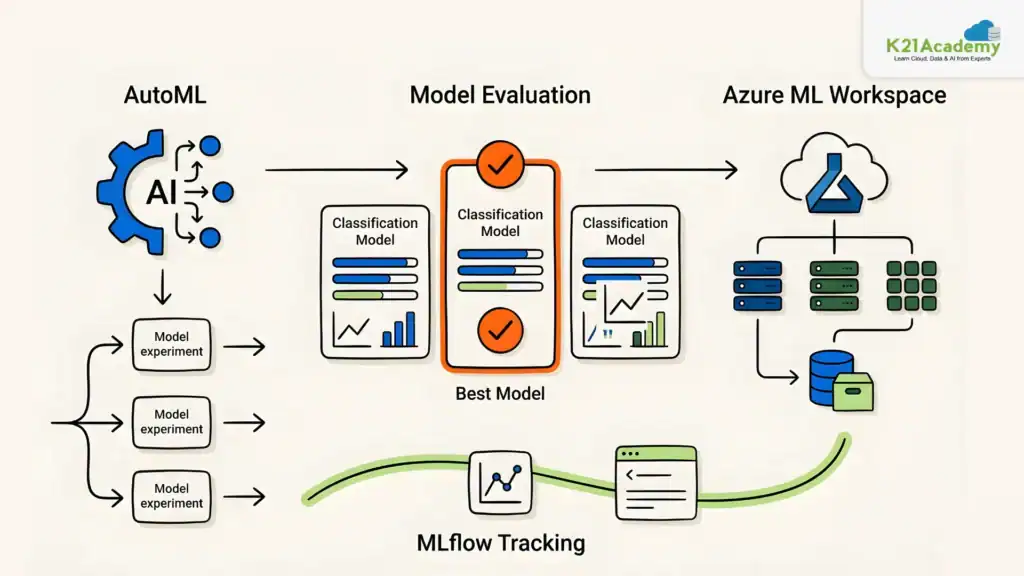
Finding the right algorithm and preprocessing steps for model training requires experimentation. In this lab, you’ll explore multiple approaches to identify the best classification model using Azure Machine Learning tools.
Key Concepts
- Automated Machine Learning (AutoML): Runs multiple training jobs in parallel to find the optimal algorithm and preprocessing steps
- Azure Machine Learning Workspace: A central hub for managing all resources, assets, and compute needed for model training
- MLflow Tracking: A tool to log and track parameters, metrics, and artifacts during interactive notebook-based training
- Compute Resources: Compute instances and clusters used to run training jobs within the workspace
Azure Environment Setup
In this lab, you will provision an Azure Machine Learning workspace using the Azure CLI, set up compute resources, and clone the required lab materials. You will then train a classification model using Automated Machine Learning by running multiple parallel jobs, and further experiment using an interactive notebook with MLflow to manually track your training runs.
Estimated Time: 60–90 minutes.
Difficulty Level: Beginner to Intermediate.
Exam Relevance: High relevance for AI-300 exam objectives covering Azure Machine Learning workspaces, AutoML, experiment tracking, and model training workflows.
By the end of this lab, you’ll have hands-on experience with both AutoML and MLflow-based model training, giving you a strong foundation for building and evaluating classification models on Azure Machine Learning.
Lab 2. Explore the Azure Machine Learning Workspace
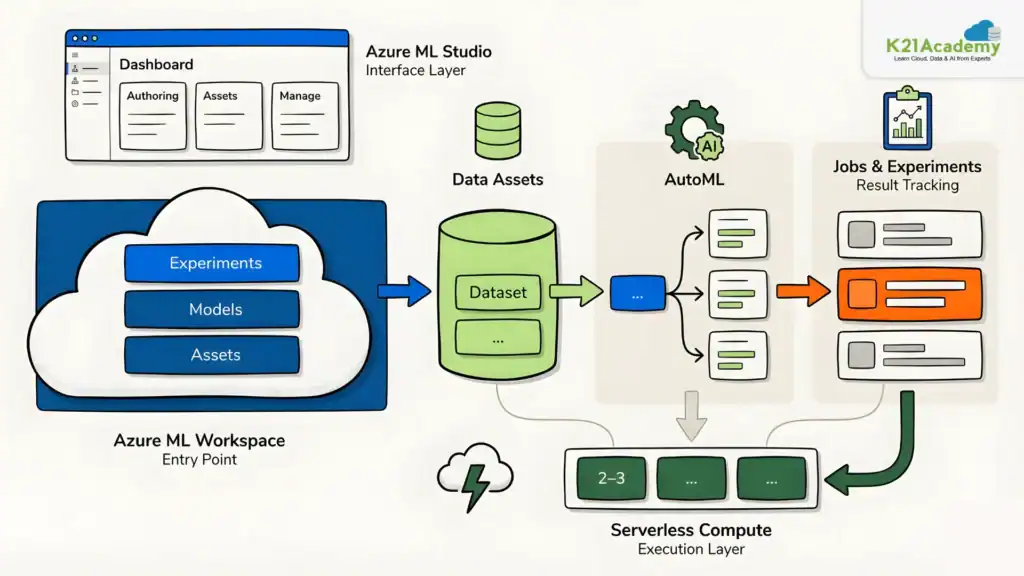
Understanding how Azure Machine Learning is structured is essential before diving into advanced model development. In this lab, you’ll explore the Azure Machine Learning workspace, its studio interface, and core components by provisioning resources, creating data assets, and training a classification model using AutoML.
Key Concepts
- Azure Machine Learning Workspace: The central resource for managing machine learning assets, workloads, and supporting infrastructure
- Azure Machine Learning Studio: A web-based interface for exploring workspace capabilities, submitting jobs, and reviewing results
- Data Assets: Managed references to training or inference data stored within or connected to the workspace
- Automated Machine Learning (AutoML): A feature that trains and compares candidate models automatically for a given machine learning task
- Jobs & Experiment History: Tracked workloads grouped into experiments to monitor training status, execution history, and run details
- Serverless Compute: Allows running jobs without manually managing a dedicated compute cluster
Azure Environment Setup
In this lab, you will provision an Azure Machine Learning workspace through the Azure portal, explore the studio’s Authoring, Assets, and Manage sections, upload training data as a data asset, and configure an AutoML classification job using serverless compute.
Estimated Time: 45–60 minutes.
Difficulty Level: Beginner.
Exam Relevance: Strongly aligned with workspace management, Studio navigation, AutoML configuration, and Azure Machine Learning asset management objectives.
By the end of this lab, you’ll have a solid foundational understanding of how Azure Machine Learning workspaces, assets, and jobs are structured and managed.
Lab 3. Explore Developer Tools for Workspace Interaction
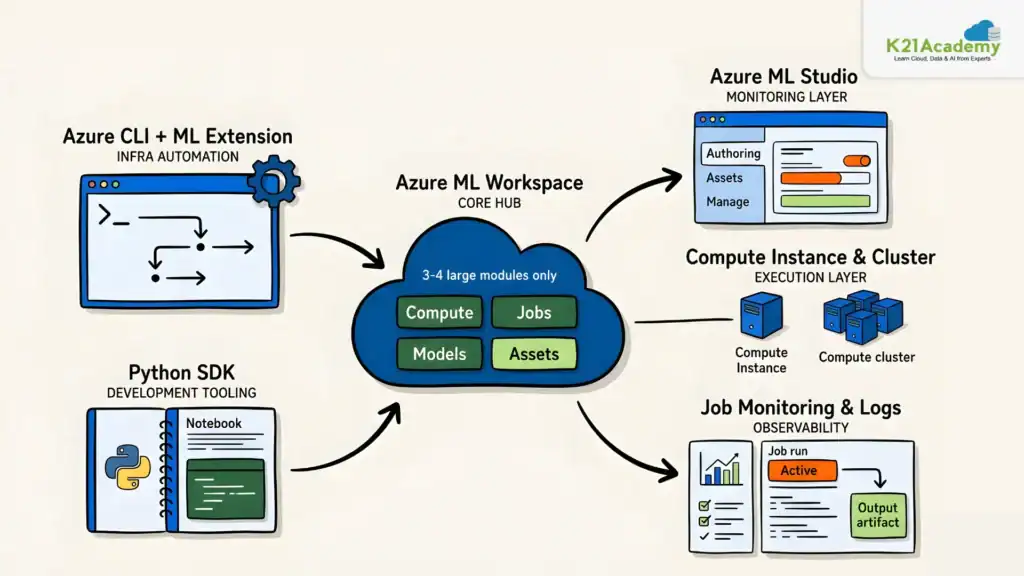
Working with Azure Machine Learning involves multiple developer tools, each suited for different tasks. In this lab, you’ll explore how the Azure CLI, Azure Machine Learning Studio, and the Python SDK work together to support infrastructure setup, resource validation, and model training workflows.
Key Concepts
- Azure CLI with ML Extension: A command-line tool used to automate workspace and infrastructure provisioning tasks
- Azure Machine Learning Workspace: The central environment for managing machine learning assets, compute, and jobs
- Compute Instance & Compute Cluster: Managed cloud resources used for interactive development and scalable model training respectively
- Azure Machine Learning Studio: A browser-based interface for inspecting workspace resources and reviewing submitted jobs
- Azure Machine Learning Python SDK: Enables programmatic job submission and model management from notebooks
- Job Monitoring & Logs: Tracks submitted job status, outputs, logs, and code artifacts in the studio
Azure Environment Setup
In this lab, you will use Azure Cloud Shell and the Azure CLI to provision the workspace, compute instance, and compute cluster. You will then verify these resources in Azure Machine Learning Studio, install the Python SDK on the compute instance, and submit a training job from a cloned notebook. Finally, you will review the job’s status, logs, and outputs in the studio.
Estimated Time: 60–75 minutes.
Difficulty Level: Intermediate.
Exam Relevance: Important for AI-300 exam topics related to Azure CLI automation, Python SDK workflows, compute management, and job monitoring.
By the end of this lab, you’ll have a practical understanding of how the Azure CLI, Studio, and Python SDK complement each other to support real-world Azure Machine Learning workflows.
Lab 4. Make Data Available in Azure Machine Learning
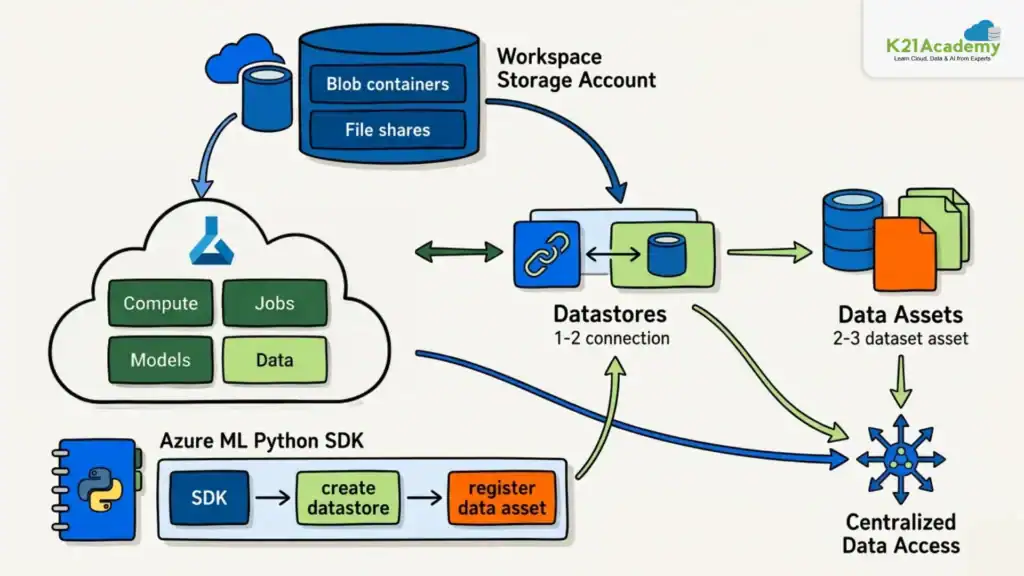
In collaborative machine learning environments, data should be centrally accessible rather than stored on individual machines. In this lab, you’ll explore how Azure Machine Learning uses datastores and data assets to provide centralized, reusable access to data across workloads and users.
Key Concepts
- Azure Machine Learning Workspace: The central environment for managing machine learning assets, compute, data references, and jobs
- Datastores: Named connections to storage services that Azure Machine Learning uses to access data programmatically
- Data Assets: Reusable and versionable references to data consumed consistently across machine learning workflows
- Workspace Storage Account: A storage account automatically connected to the workspace, supporting blob containers and file shares
- Azure Machine Learning Python SDK: Used to programmatically create and register datastores and data assets from a notebook
- Data Availability for ML Workloads: Centralized data access through datastores and data assets enables multiple users and jobs to reuse the same source data consistently
Azure Environment Setup
In this lab, you will provision an Azure Machine Learning workspace and compute resources, inspect the connected storage account and its default blob containers and file shares, copy the storage access credentials, clone the lab materials, and run a notebook using the Python SDK to create a datastore and data assets. Optionally, you can review the created data assets in the studio and trace them back to their underlying storage location.
Estimated Time: 60 minutes.
Difficulty Level: Beginner to Intermediate.
Exam Relevance: Covers important AI-300 objectives around datastores, data assets, storage integration, and centralized data management.
By the end of this lab, you’ll have a solid understanding of how Azure Machine Learning abstracts data access through datastores and data assets to support centralized and collaborative machine learning workflows.
Related Readings: Claude Code vs GitHub Copilot vs Cursor: Which AI Coding Assistant Should You Learn?
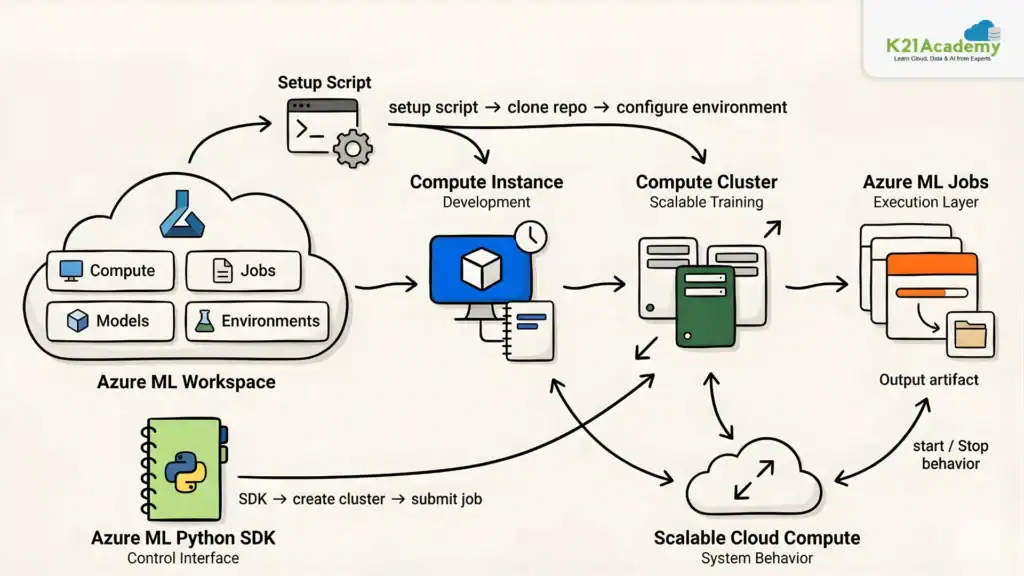
Lab 5. Work with Compute Resources in Azure Machine Learning
Machine learning experiments and production jobs should not depend on a local machine. In this lab, you’ll explore how Azure Machine Learning uses cloud compute resources to support both interactive development and scalable job execution.
Key Concepts
- Azure Machine Learning Workspace: The central environment for managing compute resources, notebooks, jobs, models, and other machine learning assets
- Compute Instance: A managed cloud workstation used for interactive development, notebook execution, and experimentation
- Compute Cluster: A scalable group of virtual machines used to run production-style training jobs on demand
- Setup Script: A script that runs automatically when a compute instance is created to configure the development environment
- Azure Machine Learning Python SDK: Used programmatically to create compute clusters and submit scripts as jobs
- Azure Machine Learning Jobs: Managed executions of code that run on workspace compute resources
- Scalable Cloud Compute: Allows compute resources to be allocated when needed and released when the workload is complete
Azure Environment Setup
In this lab, you will provision an Azure Machine Learning workspace using the Azure CLI, create a setup script that automatically clones the lab repository, and configure a compute instance with an automatic stop schedule. You will then install the Python SDK, and run a notebook to create a compute cluster and submit a script as a job.
Estimated Time: 75 minutes.
Difficulty Level: Intermediate.
Exam Relevance: High relevance for compute instance setup, compute clusters, job execution, and scalable Azure Machine Learning infrastructure management.
By the end of this lab, you’ll have a clear understanding of when to use compute instances for development and compute clusters for scalable job execution in Azure Machine Learning.
Related Readings:- Claude Code for AI/ML Engineers: Should You Invest the Time? Honest 2026 Worth-It Breakdown
Lab 6. Work with Environments in Azure Machine Learning
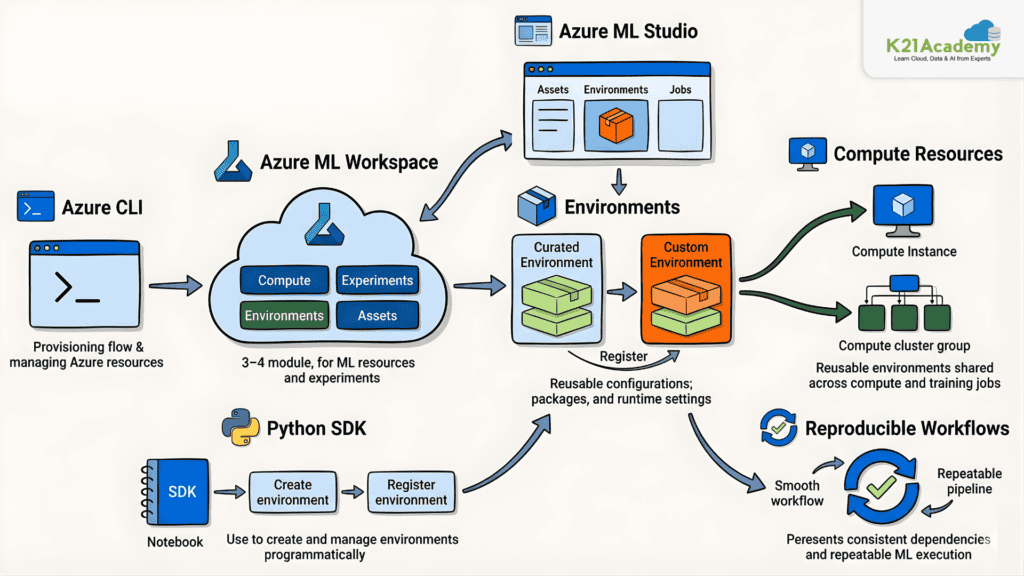
Managing dependencies and configurations consistently is critical for reproducible machine learning workflows. In this lab, you’ll explore how Azure Machine Learning environments allow you to create isolated, reusable settings that ensure consistent execution of training scripts across different project stages.
Key Concepts
- Azure Machine Learning Workspace: A centralized hub for managing and developing machine learning models, experiments, compute, and environments
- Azure Machine Learning Studio: A web-based interface for building, managing, and deploying machine learning models and environments
- Environments: Configurations that define the dependencies, packages, and runtime settings required for consistent and reproducible machine learning workloads
- Azure CLI: A command-line tool for managing Azure resources and automating infrastructure tasks
- Python SDK: A collection of libraries that enables programmatic creation and management of Azure Machine Learning environments and workspace assets
Azure Environment Setup
In this lab, you will provision an Azure Machine Learning workspace through the Azure portal, create compute resources, clone the lab materials into the workspace, and run a notebook using the Python SDK to create and manage both curated and custom environments. You will also register environments for reuse across compute instances and training jobs.
Estimated Time: 60–75 minutes.
Difficulty Level: Intermediate.
Exam Relevance: Important for environment management, dependency handling, reproducible ML workflows, and Python SDK configuration topics.
By the end of this lab, you’ll have a solid understanding of how Azure Machine Learning environments help manage dependencies, ensure reproducibility, and streamline collaboration across machine learning workflows.
Related Readings: Master Azure AI Fundamentals with 13+ Hands-On Labs
Lab 7. Train a Model with the Azure Machine Learning Designer
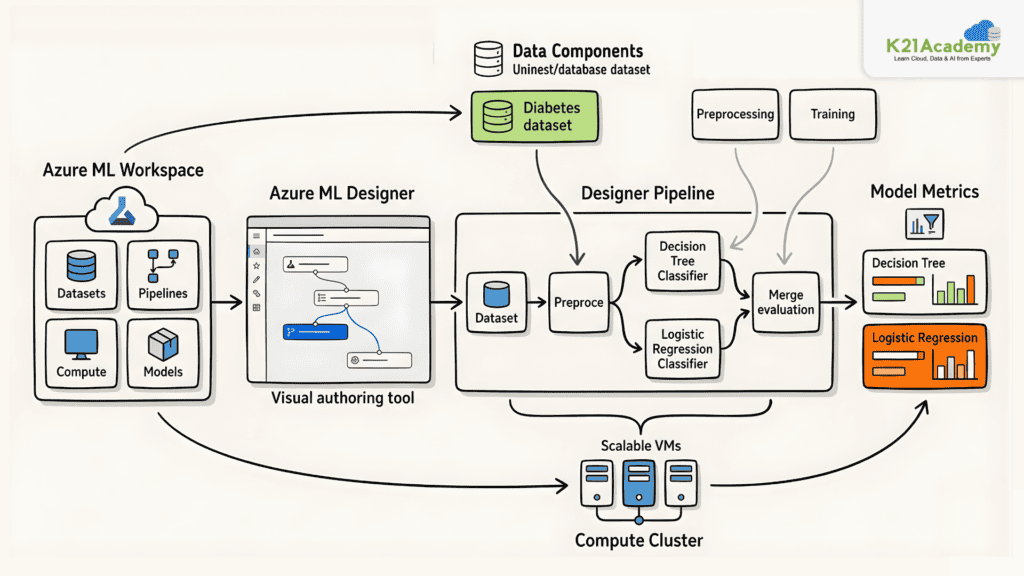
Building machine learning workflows doesn’t always require writing full training code manually. In this lab, you’ll explore how Azure Machine Learning Designer provides a drag-and-drop visual interface to prepare data, train models, and compare classification algorithms.
Key Concepts
- Azure Machine Learning Workspace: The central environment for managing pipelines, data assets, compute resources, models, and experiments
- Azure Machine Learning Designer: A visual drag-and-drop interface for creating machine learning training workflows without writing full code
- Designer Pipeline: A visual workflow of connected components defining steps for data loading, preprocessing, and model training
- Data Component: Represents the dataset used as input for the pipeline
- Custom Components: Reusable pipeline steps such as Remove Empty Rows, Normalize Numerical Columns, and model training components created during workspace setup
- Compute Cluster: A scalable group of virtual machines used to run Designer pipeline jobs
- Model Metrics and Comparison: Evaluation results used to compare the performance of different classification algorithms
Azure Environment Setup
In this lab, you will provision an Azure Machine Learning workspace and compute cluster using a CLI setup script, then open Designer in the studio to create a pipeline named Train-Diabetes-Classifier. You will build a visual workflow using diabetes data, add preprocessing and training components for a Decision Tree classifier, then extend the pipeline with a Logistic Regression classifier and compare both models using the Metrics tab.
Estimated Time: 75–90 minutes.
Difficulty Level: Beginner.
Exam Relevance: Covers Designer pipelines, visual ML workflows, data preprocessing, and model comparison scenarios commonly tested in AI-300.
By the end of this lab, you’ll have a practical understanding of how Azure Machine Learning Designer can be used to visually build, run, and compare machine learning training workflows.
Related Readings: AI-103: 30+ Hands-On Labs to Build AI Apps & Agents
Lab 8. Track Model Training in Notebooks with MLflow
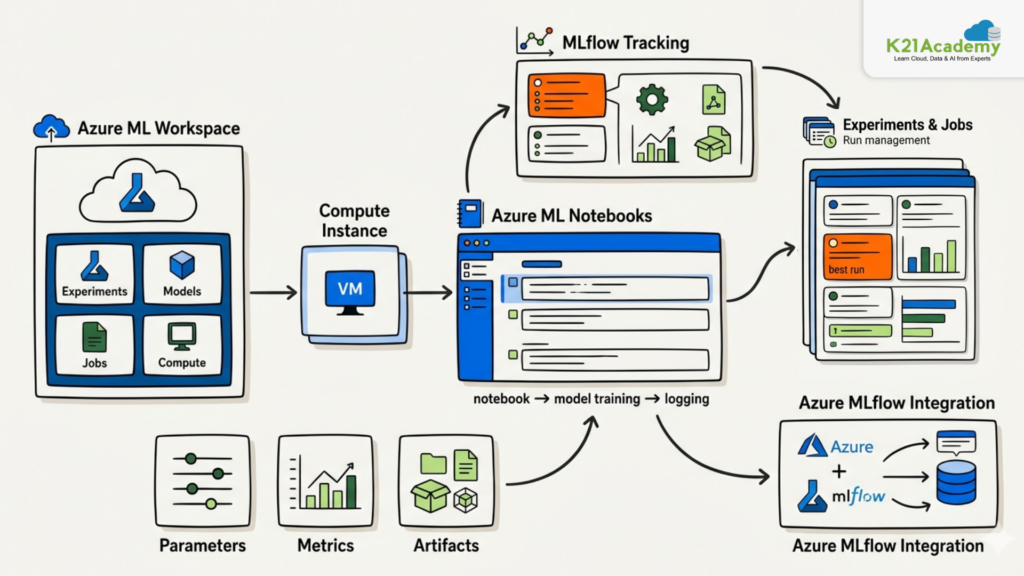
Manually recording parameters, metrics, and model outputs across multiple training runs is inefficient and error-prone. In this lab, you’ll explore how MLflow tracking integrated with Azure Machine Learning helps you log, monitor, and compare model training runs directly from a notebook.
Key Concepts
- Azure Machine Learning Workspace: The central environment for managing compute resources, notebooks, jobs, models, and experiment tracking information
- Compute Instance: A managed cloud workstation used for installing packages, cloning lab materials, and running notebook-based training code
- Azure Machine Learning Notebooks: An interactive development environment inside the workspace for training models and configuring MLflow tracking
- MLflow Tracking: Records experiment information including parameters, metrics, and artifacts from each model training run
- Experiments and Jobs: Each training run creates a job in Azure Machine Learning, grouped under an experiment for organized tracking and comparison
- Parameters, Metrics, and Artifacts: Configuration values, performance results, and output files logged during training to support run comparison
- Azure MLflow Integration: Connects notebook-based MLflow tracking to Azure Machine Learning jobs for centralized experiment management
Azure Environment Setup
In this lab, you will provision an Azure Machine Learning workspace and compute resources using a CLI setup script, then install the Python SDK, MLflow, and related packages on the compute instance. You will clone the lab materials, open the MLflow tracking notebook, and run all cells to train models and log tracking data. Finally, you will review the jobs created during training to inspect logged parameters, metrics, and artifacts.
Estimated Time: 60–75 minutes.
Difficulty Level: Intermediate.
Exam Relevance: Strong focus on MLflow tracking, experiment management, notebook workflows, and Azure Machine Learning integrations.
By the end of this lab, you’ll have a practical understanding of how MLflow tracking helps organize notebook-based experiments and how Azure Machine Learning stores and displays those tracked training runs.
Related Readings: Azure AI Foundry vs. Azure Machine Learning: Key Differences Explained by K21 Academy
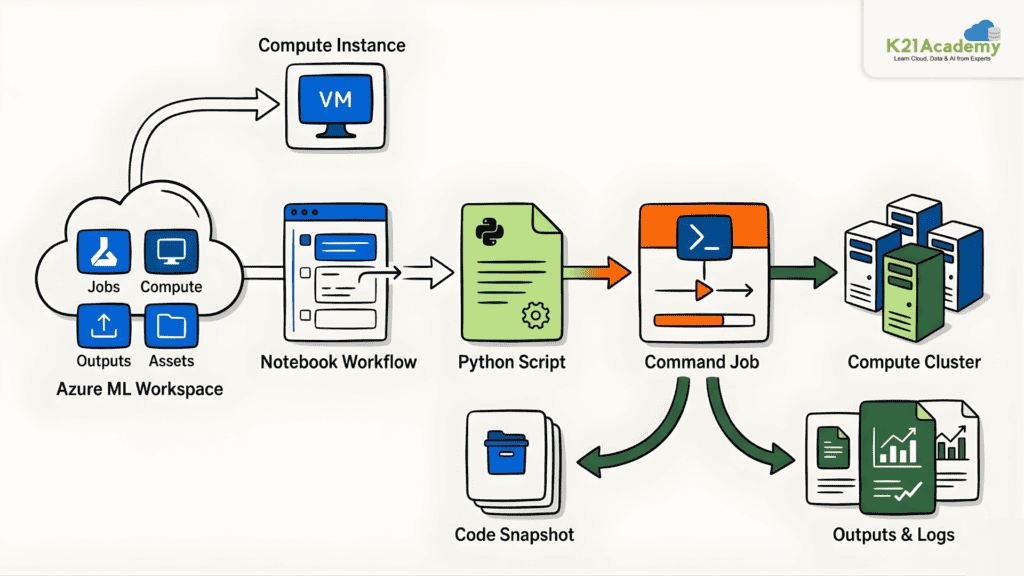
Lab 9. Run a Training Script as a Command Job in Azure Machine Learning
Notebooks are great for experimentation, but production-ready machine learning workflows require scripts that are repeatable and trackable. In this lab, you’ll explore how to convert notebook-based training code into a Python script and run it as a managed command job in Azure Machine Learning.
Key Concepts
- Azure Machine Learning Workspace: The central environment for managing jobs, compute, code snapshots, outputs, logs, and related assets
- Compute Instance: A managed cloud workstation used for installing packages, running notebooks, exporting scripts, and testing code in the terminal
- Compute Cluster: A scalable group of virtual machines used to run the training script as a managed command job
- Notebook-to-Script Workflow: The process of converting interactive notebook code into a reusable and parameterized Python script
- Command Job: An Azure Machine Learning job that runs a Python script on a specified compute target with tracked inputs and outputs
- Job Code Snapshot: A copy of the submitted source code stored within the job record for review and auditing
- Outputs and Logs: Job execution details including script output and error messages accessible from the studio
Azure Environment Setup
In this lab, you will provision an Azure Machine Learning workspace, compute instance, and compute cluster using a CLI setup script, then install the Python SDK and clone the lab materials. You will open a training notebook, run all cells, and export it as a Python script. You will then test the parameterized script in the terminal, submit it as a command job using a notebook, and review the job’s code snapshot, logs, and outputs in the studio.
Estimated Time: 75–90 minutes.
Difficulty Level: Intermediate.
Exam Relevance: Covers command jobs, notebook-to-script workflows, compute clusters, and production ML execution scenarios.
By the end of this lab, you’ll have a clear understanding of how to move from notebook experimentation to production-style script execution using Azure Machine Learning command jobs.
Related Readings:- Top 15 Python IDEs and Code Editors for 2026 (Free & Paid)
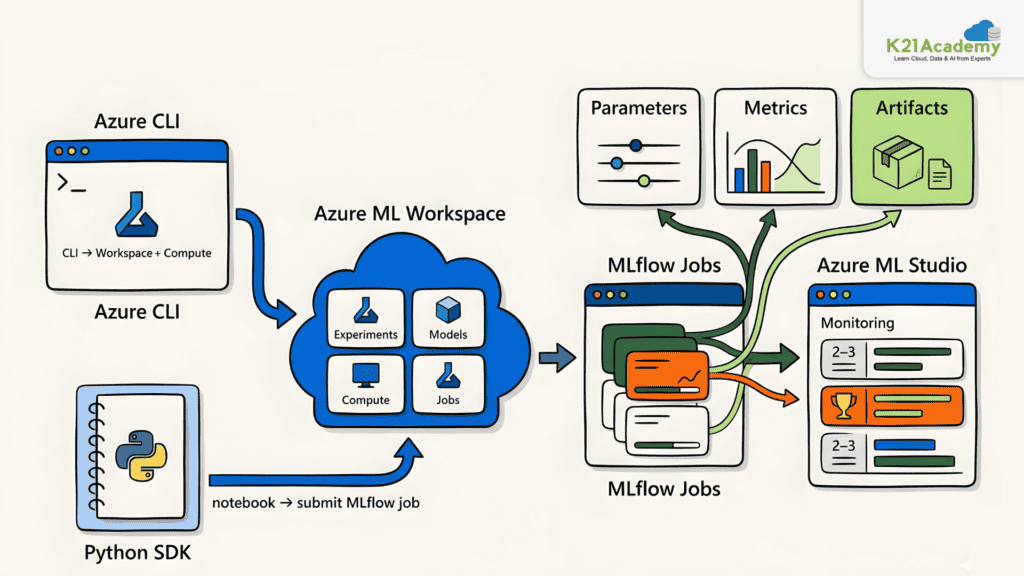
Lab 10. Use MLflow to Track Training Jobs
Tracking experiment runs, metrics, and model versions manually is time-consuming and error-prone. In this lab, you’ll explore how MLflow integrates with Azure Machine Learning to automatically log and track training jobs, enabling better model comparison and data-driven decisions.
Key Concepts
- Azure Machine Learning Workspace: A centralized hub for managing experiments, compute, model versions, and training jobs
- MLflow Jobs: Training workflows that automatically log hyperparameters, evaluation metrics, and output artifacts for each run
- Azure CLI: A command-line tool for provisioning Azure resources and automating infrastructure tasks
- Python SDK: Used to interact with Azure Machine Learning services and submit MLflow-tracked training jobs from notebooks
Azure Environment Setup
In this lab, you will provision an Azure Machine Learning workspace, compute instance, and compute cluster through the Azure portal, clone the lab materials, install the Python SDK, and run the MLflow tracking notebook to submit a command job. You will then review the logged parameters, metrics, and artifacts in the Jobs section of Azure Machine Learning Studio.
Estimated Time: 60 minutes.
Difficulty Level: Intermediate.
Exam Relevance: Important for MLflow integration, job tracking, metrics logging, and experiment lifecycle management.
By the end of this lab, you’ll understand how MLflow tracking in Azure Machine Learning helps organize, compare, and manage training job history efficiently.
Related Readings: MLOps, AIOps and different -Ops frameworks
Lab 11. Create and Explore the Responsible AI Dashboard
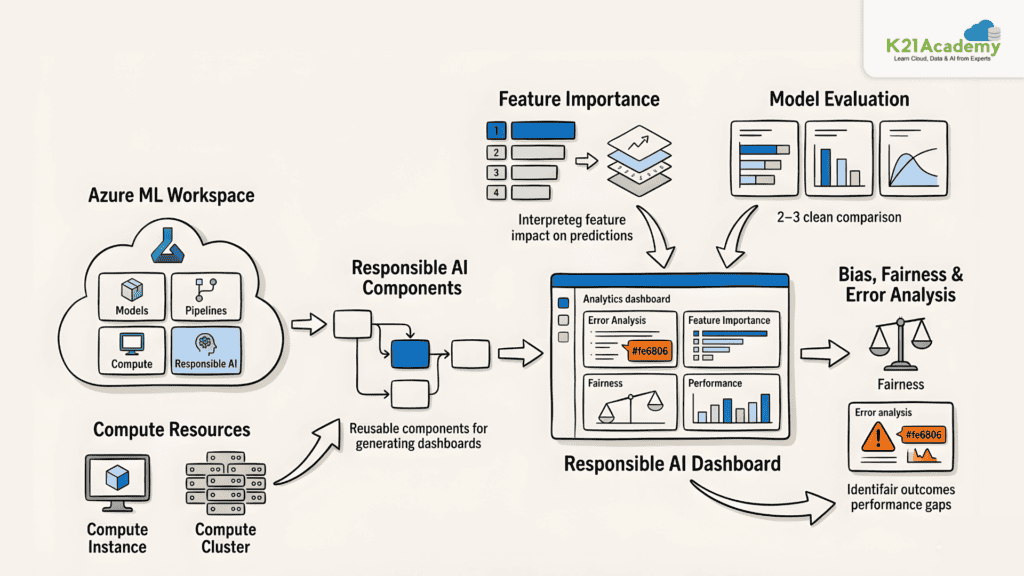
Accuracy alone is not enough to evaluate a model’s real-world behavior. In this lab, you’ll explore how Azure Machine Learning’s Responsible AI dashboard helps you analyze model errors, feature influence, bias, and fairness across different data segments.
Key Concepts
- Azure Machine Learning Workspace: Central environment for managing pipelines, models, compute, and Responsible AI dashboard assets
- Responsible AI Dashboard: A tool for evaluating trained models beyond standard metrics using multiple analysis views
- Responsible AI Components: Reusable Azure Machine Learning components used to build and generate the dashboard through a pipeline
- Model Evaluation: Assessing model behavior, errors, and prediction patterns across different data groups
- Bias, Fairness & Error Analysis: Identifying performance differences across data segments and understanding where and why the model makes mistakes
- Compute Instance & Compute Cluster: Used for notebook execution and running the Responsible AI pipeline respectively
Azure Environment Setup
In this lab, you will provision an Azure Machine Learning workspace and compute resources using a CLI setup script, install the Python SDK, clone the lab materials, and run the Responsible AI notebook to create and submit a pipeline. Once the pipeline completes, you will explore the generated dashboard in Azure Machine Learning Studio.
Estimated Time: 90 minutes.
Difficulty Level: Intermediate to Advanced.
Exam Relevance: Covers Responsible AI, fairness analysis, error analysis, and explainability concepts important for enterprise AI governance.
By the end of this lab, you’ll understand how Responsible AI dashboards support thorough model evaluation before deploying models in real-world scenarios.
Related Readings:- Comparing Copilot (Azure) Vs Amazon Q Vs Gemini
Lab 12. Log and Register Models with MLflow
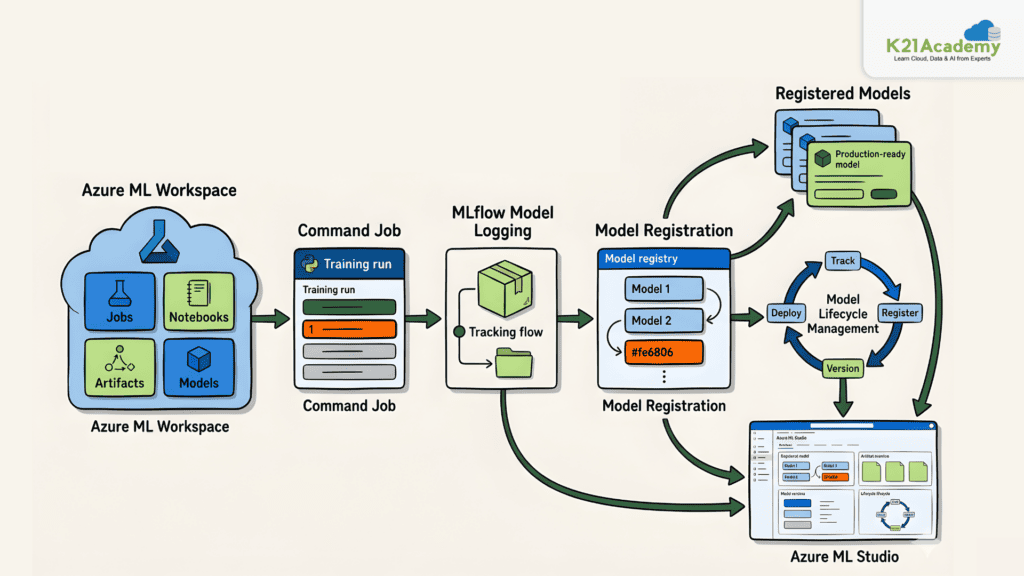
Saving model files manually makes it difficult to track, version, and reuse models across environments. In this lab, you’ll explore how MLflow integrates with Azure Machine Learning to log, package, and register models in a standard format for reliable lifecycle management.
Key Concepts
- Azure Machine Learning Workspace: Central environment for managing jobs, notebooks, logged artifacts, and registered models
- MLflow Model Logging: Stores trained models in a standard MLflow format for portability across platforms and workloads
- Model Registration: Adds a logged model to the workspace registry for versioning, governance, and deployment preparation
- Command Job: Runs a Python training script on a compute target with tracked inputs and outputs
- Model Lifecycle Management: Covers tracking, registering, versioning, and preparing models for deployment using MLflow and Azure Machine Learning
Azure Environment Setup
In this lab, you will provision an Azure Machine Learning workspace and compute resources using a CLI setup script, install the Python SDK, clone the lab materials, and run the MLflow model logging notebook. After training, you will review the logged model artifacts and registered model in the Models section of Azure Machine Learning Studio.
Estimated Time: 60–75 minutes.
Difficulty Level: Intermediate.
Exam Relevance: Important for model registration, MLflow model logging, versioning, and MLOps lifecycle management.
By the end of this lab, you’ll understand how MLflow model logging and Azure Machine Learning’s model registry support a reliable and reusable MLOps workflow.
Related Readings: Top AI Tools for Analyzing Big Data in 2026 | K21 Academy
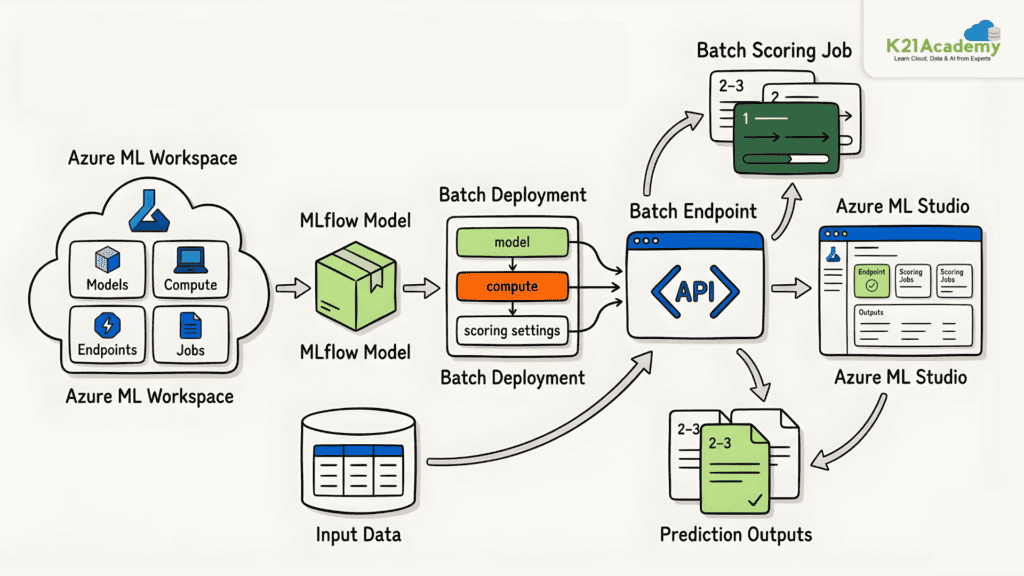
Lab 13. Deploy a Model to a Batch Endpoint
Real-time endpoints are not always the right choice when scoring large volumes of data. In this lab, you’ll explore how Azure Machine Learning batch endpoints support large-scale, asynchronous inferencing by deploying an MLflow model and submitting a batch scoring job.
Key Concepts
- Azure Machine Learning Workspace: Central environment for managing compute, models, endpoints, deployments, and scoring jobs
- MLflow Model: A portable model format deployed to the batch endpoint for offline scoring
- Batch Endpoint: An Azure Machine Learning endpoint designed for asynchronous, large-scale inferencing workloads
- Batch Deployment: Defines how a model runs behind a batch endpoint, connecting the model, compute, and scoring configuration
- Batch Scoring Job: Created when the batch endpoint is invoked with input data, producing prediction outputs after completion
Azure Environment Setup
In this lab, you will provision an Azure Machine Learning workspace and compute resources using a CLI setup script, install the Python SDK, clone the lab materials, and run the batch endpoint notebook to deploy an MLflow model, configure the endpoint and deployment, and invoke it with sample data. You will then review the batch scoring job and its outputs in Azure Machine Learning Studio.
Estimated Time: 75 minutes.
Difficulty Level: Intermediate.
Exam Relevance: Covers batch inferencing, endpoint deployment, and asynchronous scoring workflows in Azure Machine Learning.
By the end of this lab, you’ll understand when and how to use batch endpoints for scalable offline inferencing in Azure Machine Learning.
Related Readings: The Best Chatbot Development Tools
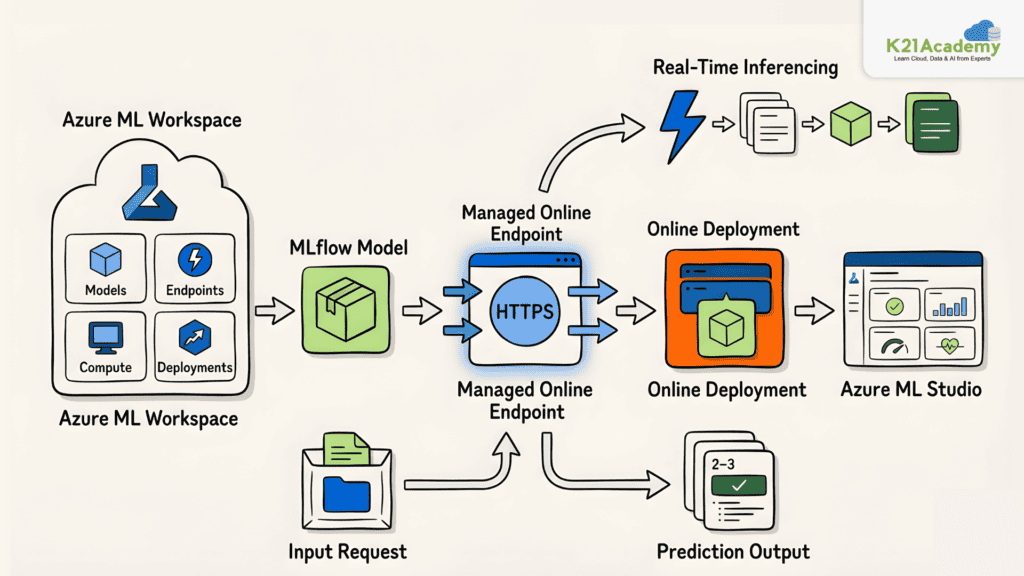
Lab 14. Deploy a Model to a Managed Online Endpoint
Applications requiring real-time predictions need a live endpoint rather than batch processing. In this lab, you’ll explore how to deploy an MLflow model to a managed online endpoint in Azure Machine Learning and test it with sample data for immediate predictions.
Key Concepts
- Azure Machine Learning Workspace: Central environment for managing compute, models, endpoints, and deployments
- MLflow Model: A portable model format deployed without requiring a manual scoring script or custom environment
- Managed Online Endpoint: A fully managed HTTPS endpoint for real-time model inferencing
- Online Deployment: Connects the MLflow model to the managed online endpoint to serve predictions
- Real-Time Inferencing: Returns predictions immediately after input data is sent to the endpoint
Azure Environment Setup
In this lab, you will provision an Azure Machine Learning workspace and compute resources using a CLI setup script, install the Python SDK, clone the lab materials, and run the online endpoint notebook to create a managed endpoint, deploy the MLflow model, and test it with sample input data.
Estimated Time: 75 minutes.
Difficulty Level: Intermediate.
Exam Relevance: High relevance for managed online endpoints, real-time inferencing, and production deployment topics.
By the end of this lab, you’ll understand how managed online endpoints enable real-time model serving without requiring manual infrastructure or environment management.
Related Readings: Comparing the Best AI Chatbots for Your Business: What’s Best for You?
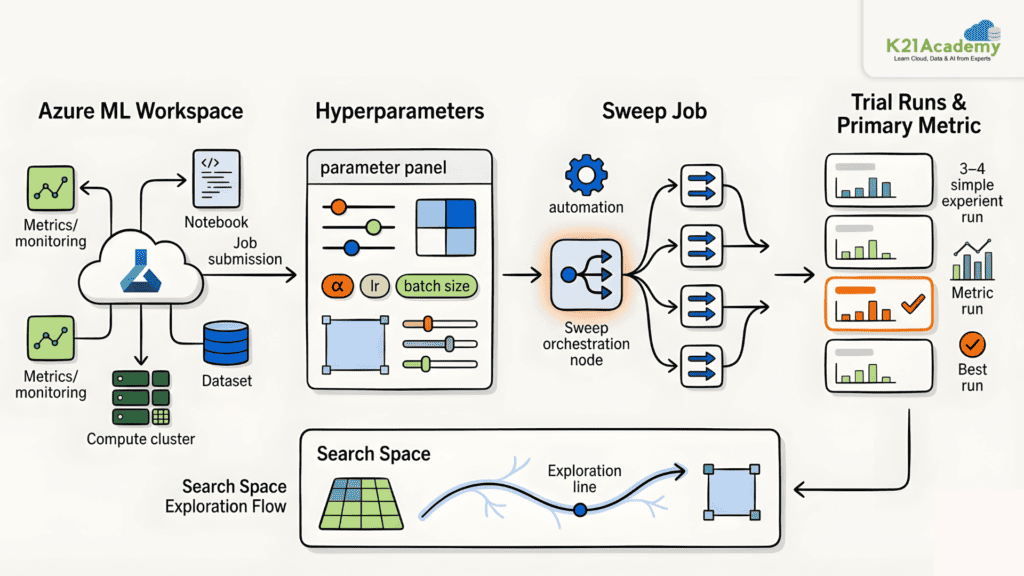
Lab 15. Perform Hyperparameter Tuning with a Sweep Job
Manually testing hyperparameter combinations is time-consuming and difficult to manage at scale. In this lab, you’ll explore how Azure Machine Learning sweep jobs automate trial-based hyperparameter tuning by running multiple training configurations in parallel and identifying the best-performing values.
Key Concepts
- Azure Machine Learning Workspace: Central environment for managing compute, notebooks, sweep jobs, trial runs, and metrics
- Hyperparameters: Training configuration values that control model behavior and must be tuned for optimal performance
- Sweep Job: An Azure Machine Learning job that automatically runs multiple trials across different hyperparameter combinations
- Search Space: Defines the range of hyperparameter values the sweep job will explore
- Trial Runs & Primary Metric: Individual training jobs created by the sweep, compared using a chosen performance metric to identify the best configuration
Azure Environment Setup
In this lab, you will provision an Azure Machine Learning workspace and compute resources using a CLI setup script, install the Python SDK, clone the lab materials, and run the hyperparameter tuning notebook to submit a sweep job. Once complete, you will review trial results and accuracy scores across different configurations in Azure Machine Learning Studio.
Estimated Time: 90 minutes.
Difficulty Level: Intermediate to Advanced.
Exam Relevance: Covers sweep jobs, search spaces, parallel training, and hyperparameter optimization objectives.
By the end of this lab, you’ll understand how sweep jobs help optimize model training by automating hyperparameter search across parallel trial runs.
Related Readings: Top 10 Claude Code Use Cases Every Developer Should Know
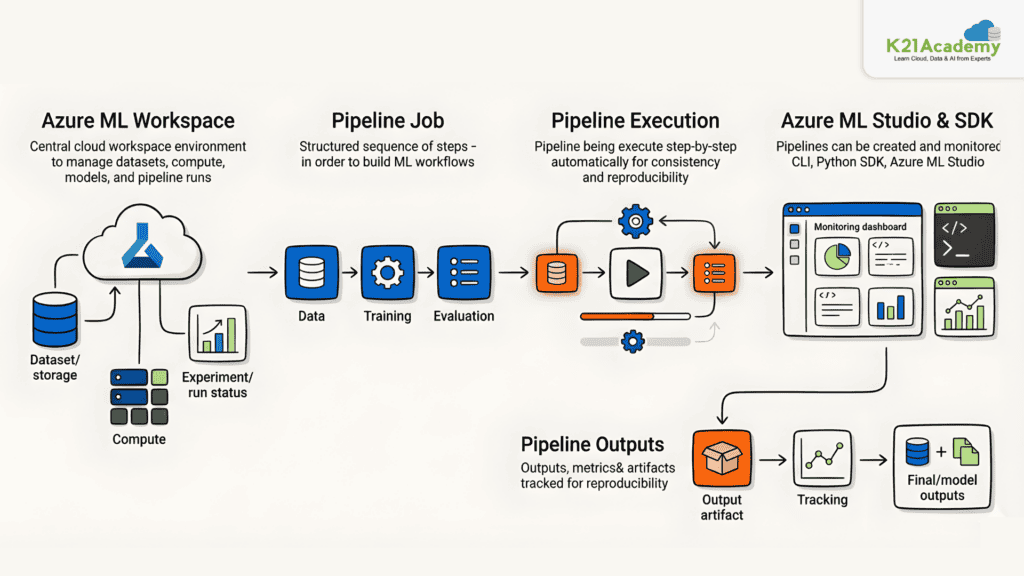
Lab 16. Run Pipelines in Azure Machine Learning
Managing complex machine learning workflows step by step can be inefficient and difficult to reproduce. In this lab, you’ll explore how Azure Machine Learning pipelines help automate and orchestrate data preparation, model training, and deployment tasks in a scalable and modular way.
Key Concepts
- Azure Machine Learning Workspace: Centralized hub for managing datasets, compute, experiments, pipelines, and models
- Pipeline Job: A sequence of automated steps covering data preparation, training, and evaluation that run in a defined and reproducible order
- Azure CLI & Python SDK: Used to provision infrastructure and programmatically build and submit pipeline jobs
- Azure Machine Learning Studio: A web-based interface for monitoring pipeline execution and managing workspace assets
Azure Environment Setup
In this lab, you will provision an Azure Machine Learning workspace and compute resources through the Azure portal, upload a training data asset, install the Python SDK, clone the lab materials, and run the pipeline notebook to build and submit a multi-step pipeline job. You will then monitor the pipeline run in Azure Machine Learning Studio.
Estimated Time: 75–90 minutes.
Difficulty Level: Intermediate.
Exam Relevance: Important for pipeline orchestration, workflow automation, and reproducible ML processes.
By the end of this lab, you’ll understand how Azure Machine Learning pipelines enable reproducible, automated, and scalable machine learning workflows.
Related Readings:- Is Claude Code Worth Learning for Cloud Engineers? Salary Impact, Time-to-ROI, and Best Resources
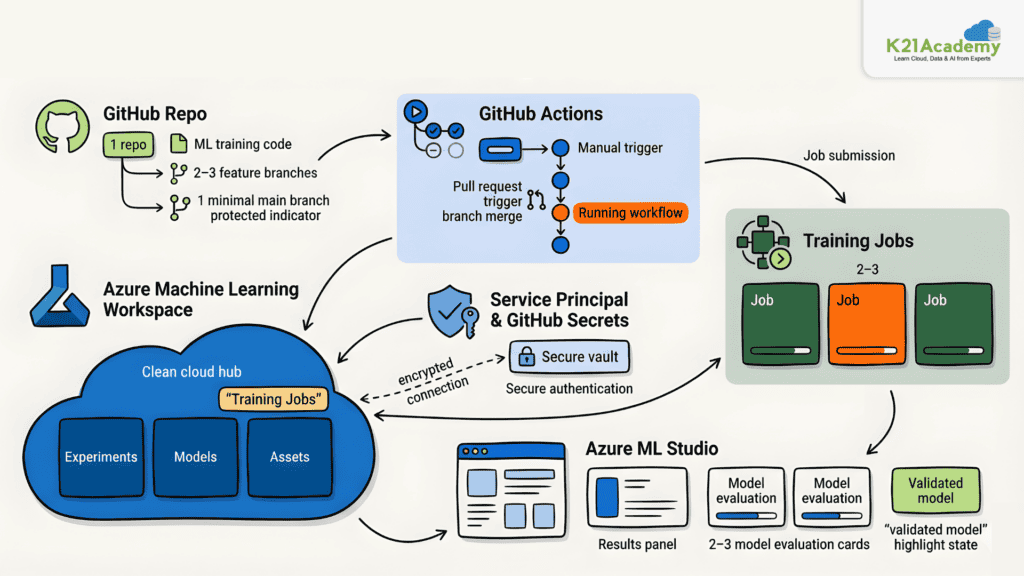
Lab 17. Automate Model Training with GitHub Actions
As machine learning solutions mature, ad-hoc experiments need to evolve into automated, repeatable workflows. In this lab, you’ll explore how GitHub Actions can trigger Azure Machine Learning training jobs securely using service principals, GitHub secrets, and pull request–based workflows.
Key Concepts
- Azure Machine Learning Workspace: Central environment for managing compute, jobs, and training workflows triggered from GitHub
- Service Principal & GitHub Secrets: Provide secure, encrypted authentication between GitHub Actions and Azure Machine Learning
- GitHub Actions Workflow: Automates model training by submitting Azure Machine Learning command jobs on manual triggers or pull requests
- Feature-Based Development: Uses feature branches and branch protection rules to control when training workflows run
- Branch Protection & Pull Request Triggers: Ensure training automation is tied to controlled, reviewed changes in source control
Azure Environment Setup
In this lab, you will provision an Azure Machine Learning workspace using a CLI setup script, create a GitHub repository from a template, configure a service principal with Contributor access, store credentials as GitHub secrets, and update the workflow file to submit a command job. You will then test manual and pull request–triggered workflows and review the resulting jobs in Azure Machine Learning Studio.
Estimated Time: 90–120 minutes.
Difficulty Level: Advanced.
Exam Relevance: Covers CI/CD automation, GitHub Actions integration, service principals, and secure ML workflow automation.
By the end of this lab, you’ll understand how to securely automate model training using GitHub Actions integrated with Azure Machine Learning.
Related Readings:- Claude Code Career Roadmap: Skills Developers and AI Engineers Need in 2026
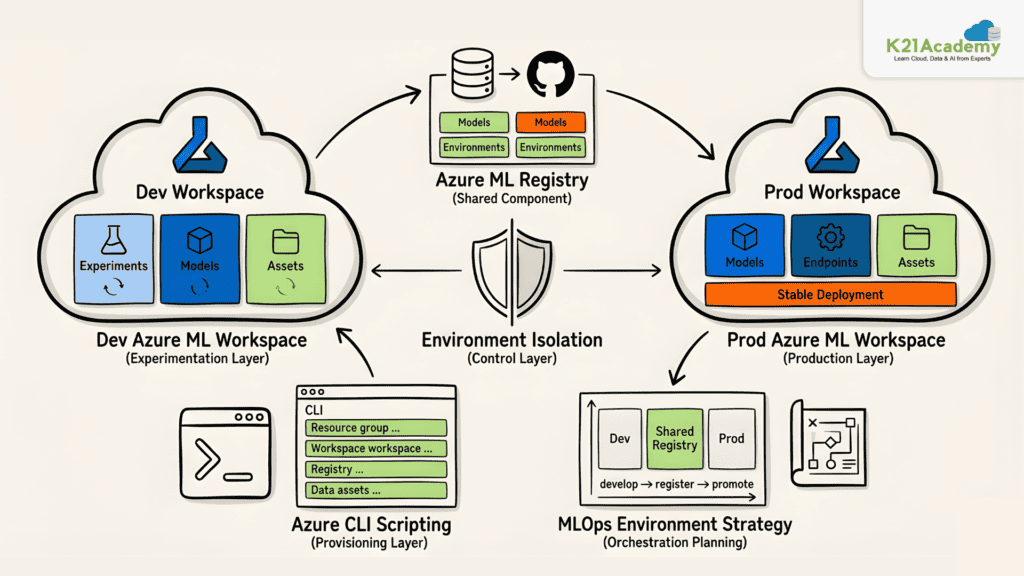
Lab 18. Plan and Prepare an MLOps Solution with Azure Machine Learning
Moving from one-off experiments to a repeatable MLOps process requires a well-planned environment strategy and automated infrastructure provisioning. In this lab, you’ll explore how to design and script separate dev and prod environments with a shared Azure Machine Learning registry using Azure CLI.
Key Concepts
- Azure Machine Learning Workspace: Separate workspaces for dev and prod isolate experiments from production workloads
- Azure Machine Learning Registry: A shared registry for storing and promoting reusable models and environments across workspaces
- Environment Isolation: Dev and prod data assets are kept separate to prevent production data from appearing in the development environment
- Azure CLI Shell Scripting: Automates provisioning of resource groups, workspaces, registries, and data assets using parameterized scripts
- MLOps Environment Strategy: A structured approach to managing dev, prod, and shared resources for repeatable and scalable ML workflows
Azure Environment Setup
In this lab, you will review an existing CLI setup script, design a target architecture with dev and prod workspaces and a shared registry, plan the corresponding Azure CLI commands, and optionally run the extended script to validate the design. You will also explore how the script can be parameterized to provision the right environment on demand.
Estimated Time: 60–90 minutes.
Difficulty Level: Advanced.
Exam Relevance: Strongly aligned with MLOps architecture, environment isolation, registries, and infrastructure automation.
By the end of this lab, you’ll have a clear understanding of how to structure Azure CLI automation to support a real-world MLOps environment strategy.
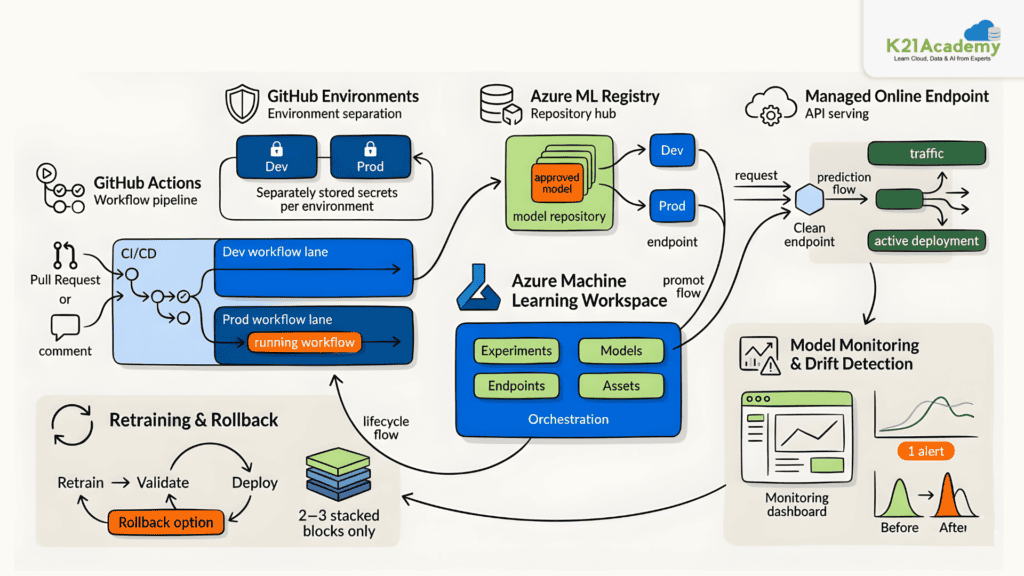
Lab 19. Deploy and Monitor a Model in Azure Machine Learning
Training a model is only the beginning of the machine learning lifecycle. In this lab, you’ll explore how to move models from development into production using GitHub Actions, monitor for data drift, retrain through a pull request workflow, and roll back deployments when needed.
Key Concepts
- GitHub Actions Environments: Separate dev and prod environments with scoped credentials control when and where training and deployment jobs run
- Azure Machine Learning Registry: A shared registry for storing and promoting reusable model assets across workspaces
- Managed Online Endpoint: A live HTTPS endpoint serving real-time predictions from the deployed model
- Model Monitoring & Drift Detection: Tracks production data distribution against training data to detect degradation
- PR-Based MLOps Workflow: A pull request–driven process for dev training, prod validation, deployment, retraining, and rollback
Azure Environment Setup
In this lab, you will provision an Azure Machine Learning workspace with dev and prod data assets, create a GitHub repository from a template, configure service principals and environment secrets, and run training workflows triggered by pull requests and comment commands. You will then deploy the model to a managed online endpoint, enable data collection, configure a drift monitor, simulate retraining through the PR workflow, and optionally roll back to a previous deployment.
Estimated Time: 120 minutes.
Difficulty Level: Advanced.
Exam Relevance: Covers deployment automation, monitoring, retraining workflows, model drift, and rollback strategies.
By the end of this lab, you’ll understand how to implement an end-to-end MLOps process covering training, deployment, monitoring, and controlled model promotion in Azure Machine Learning.
Related Readings:- 7 System Design Patterns Every Cloud AI Engineer Should know
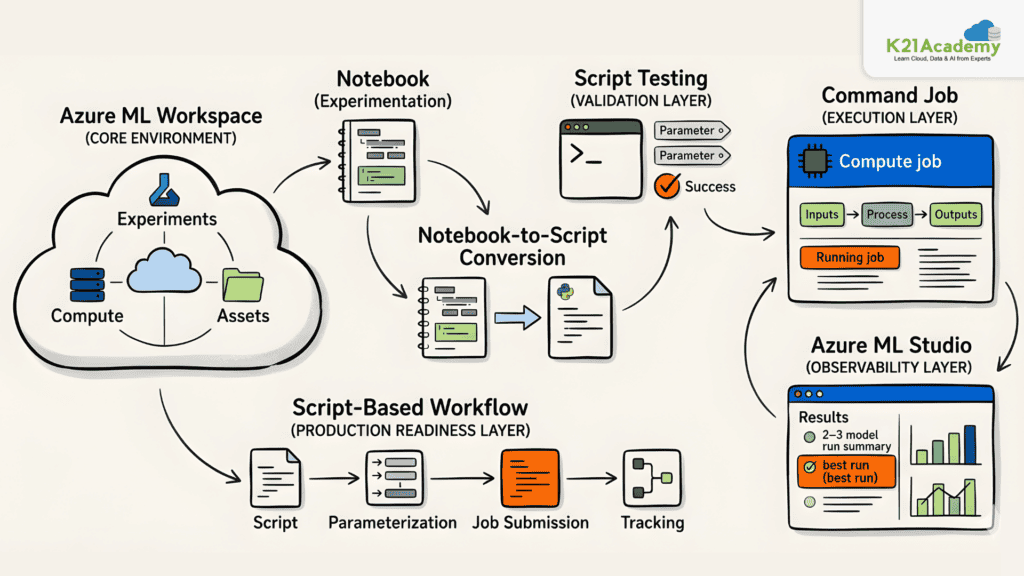
Lab 20. Optimize Model Training in Azure Machine Learning
Notebooks are great for experimentation, but production model training requires scripts that are testable, parameterized, and trackable. In this lab, you’ll explore how to convert a notebook into a Python script, test it in the terminal, and run it as a command job in Azure Machine Learning.
Key Concepts
- Azure Machine Learning Workspace: Central environment for managing compute, notebooks, scripts, and command jobs
- Notebook-to-Script Conversion: Exports interactive notebook code into a reusable, parameterized Python script
- Script Testing: Validates training logic and input parameters directly in the compute instance terminal before job submission
- Command Job: Runs a Python training script as a managed, trackable Azure Machine Learning job with logged inputs, outputs, and logs
Azure Environment Setup
In this lab, you will provision an Azure Machine Learning workspace and compute resources using a CLI setup script, clone the lab materials, convert a training notebook to a Python script, test it in the terminal with input parameters, and submit it as a command job. You will then review the job’s code snapshot, logs, and outputs in Azure Machine Learning Studio.
Estimated Time: 75 minutes.
Difficulty Level: Intermediate.
Exam Relevance: Important for script-based training, command jobs, and transitioning from experimentation to production ML.
By the end of this lab, you’ll understand how to move from notebook-based experimentation to production-ready script execution using Azure Machine Learning command jobs.
Related Readings:- 10 Best ChatGPT Alternatives in 2026
Lab 21. Prerequisites for GenAIOps Labs
Prerequisites for GenAIOps Labs
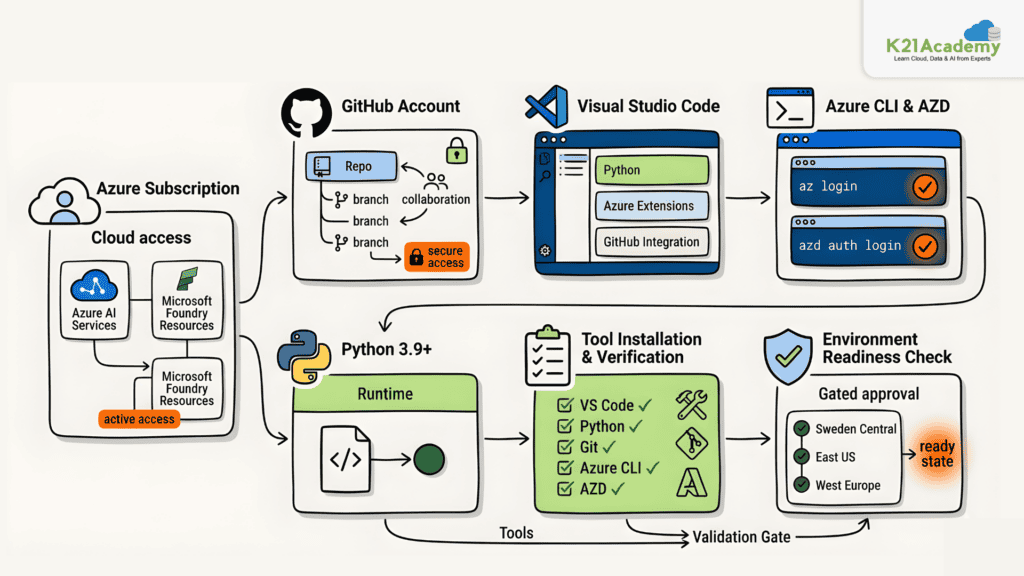
Before starting the GenAIOps labs, you need to set up the required accounts, tools, and development environment. This guide covers everything needed to get started successfully.
Key Concepts
- Azure Subscription: Required to access Microsoft Foundry and Azure OpenAI services for all lab resources
- GitHub Account: Used for version control, repository management, and collaboration across all labs
- Visual Studio Code: The primary code editor used throughout the labs, with recommended Python, Azure, and GitHub extensions
- Azure CLI & Azure Developer CLI (azd): Used to authenticate, provision Azure infrastructure, and manage deployments from the command line
- Python 3.9+: Required for all agent development and scripting tasks in the labs
Azure Environment Setup
To prepare for the labs, install Visual Studio Code, Python 3.9 or later, Git, Azure CLI, and the Azure Developer CLI. After installation, verify all tools using the provided version check commands, then authenticate both the Azure CLI and Azure Developer CLI using az login and azd auth login. Note that some Microsoft Foundry services have regional availability constraints, recommended regions include Sweden Central, East US, and West Europe.
Once all prerequisites are verified, you are ready to begin with Lab 01: Infrastructure Setup.
Estimated Time: 45–60 minutes.
Difficulty Level: Beginner.
Exam Relevance: Covers foundational tooling, authentication, Azure CLI, azd, and environment preparation for GenAI workflows.
By the end of this lab, You will successfully configure all required tools and services needed for GenAIOps labs.
Related Readings:- Claude Code vs ChatGPT Plus
Lab 22. Set Up Your Microsoft Foundry Project
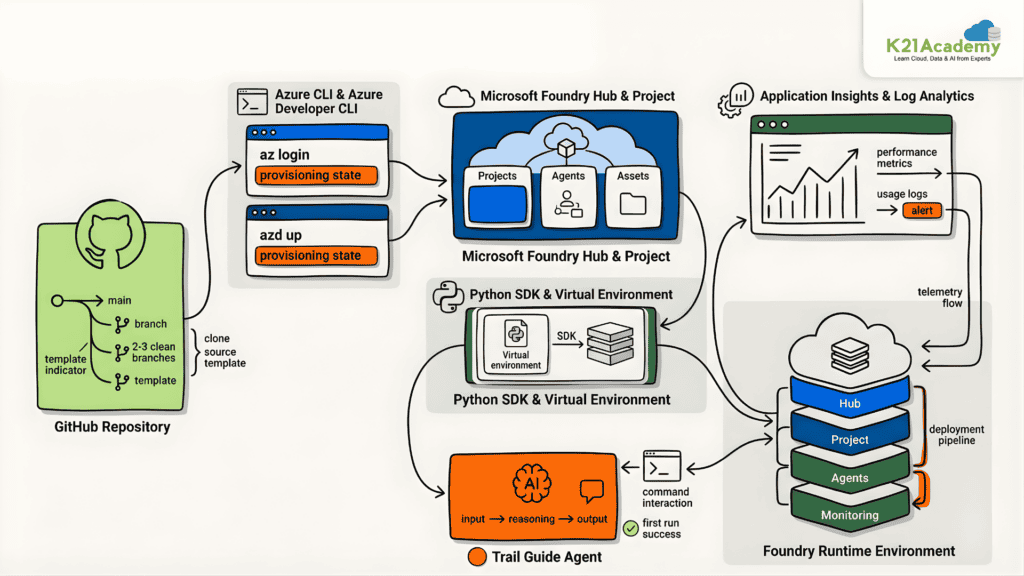
Building generative AI applications requires a properly configured cloud environment with the right tools and resources. In this lab, you’ll set up the foundational infrastructure for GenAIOps by provisioning a Microsoft Foundry hub and project using the Azure Developer CLI, and deploy your first AI agent.
Key Concepts
- Microsoft Foundry Hub & Project: The central workspace for creating, managing, and deploying AI agents and generative AI applications
- Azure Developer CLI (azd): Used to provision all required Azure infrastructure from pre-configured Bicep templates
- Application Insights & Log Analytics: Monitor agent performance, usage, and telemetry across the deployed environment
- Python SDK & Virtual Environment: Used to install dependencies and interact programmatically with Microsoft Foundry agents
- Trail Guide Agent: The first AI agent deployed in this lab to validate the environment setup
Azure Environment Setup
In this lab, you will create a GitHub repository from the template, clone it in VS Code, authenticate with Azure CLI and azd, and run azd up to provision the Foundry hub, project, Application Insights, and Log Analytics workspace. You will then generate a .env file, install Python dependencies, configure agent settings, deploy the Trail Guide Agent, and test it interactively from the terminal.
Estimated Time: 90 minutes.
Difficulty Level: Intermediate.
Exam Relevance: Covers Microsoft Foundry provisioning, Azure Developer CLI, AI agent deployment, and monitoring setup.
By the end of this lab, you’ll have a fully configured Microsoft Foundry environment ready for building and deploying generative AI applications in subsequent labs.
Lab 23. Develop Prompt and Agent Versions
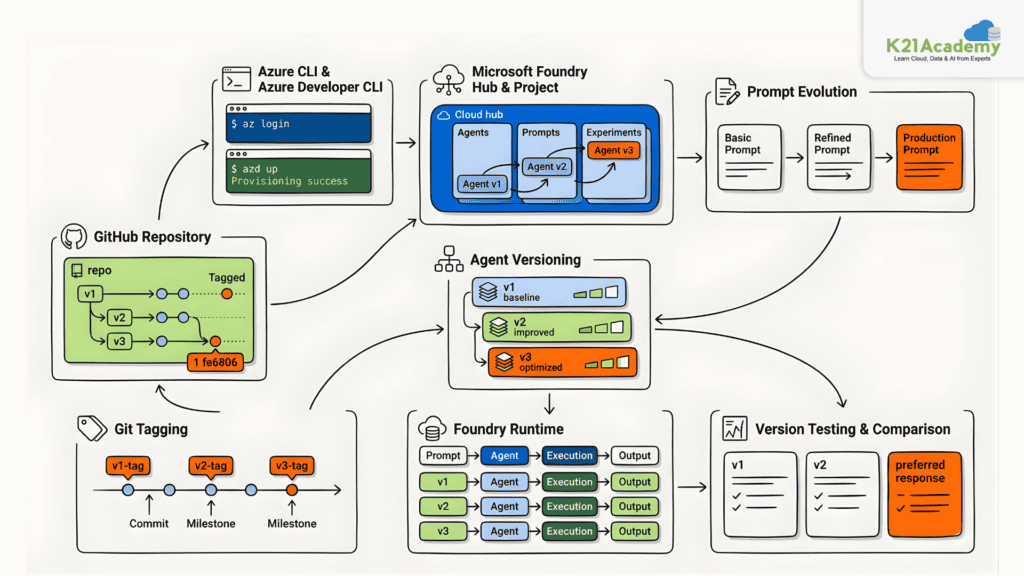
Evolving an AI agent’s capabilities requires systematic versioning of prompts and deployments. In this lab, you’ll deploy three progressively enhanced versions of a Trail Guide Agent to Microsoft Foundry, compare their behavior, and understand how prompt evolution impacts agent performance.
Key Concepts
- Microsoft Foundry Hub & Project: The workspace for creating, managing, and testing versioned AI agents
- Agent Versioning: Deploying multiple agent versions with different system prompts to track capability improvements
- Prompt Evolution: Progressively enhancing agent instructions from basic functionality to production-ready features
- Git Tagging: Used to mark each agent deployment milestone for version tracking and comparison
- Azure Developer CLI (azd): Provisions all required infrastructure using infrastructure-as-code templates
Azure Environment Setup
In this lab, you will create a GitHub repository from the template, authenticate with Azure CLI and azd, provision the Foundry hub and project, generate the .env file, and install Python dependencies. You will then deploy three agent versions by updating the prompt file path in the creation script, committing and tagging each version, and testing them in the Microsoft Foundry portal to observe behavioral differences across versions.
Estimated Time: 75–90 minutes.
Difficulty Level: Intermediate.
Exam Relevance: Important for prompt engineering, version management, Git workflows, and AI agent lifecycle management.
By the end of this lab, you’ll understand how prompt versioning and Git-based deployment management support structured AI agent development in Microsoft Foundry.
Lab 24. Design and Optimize Prompts
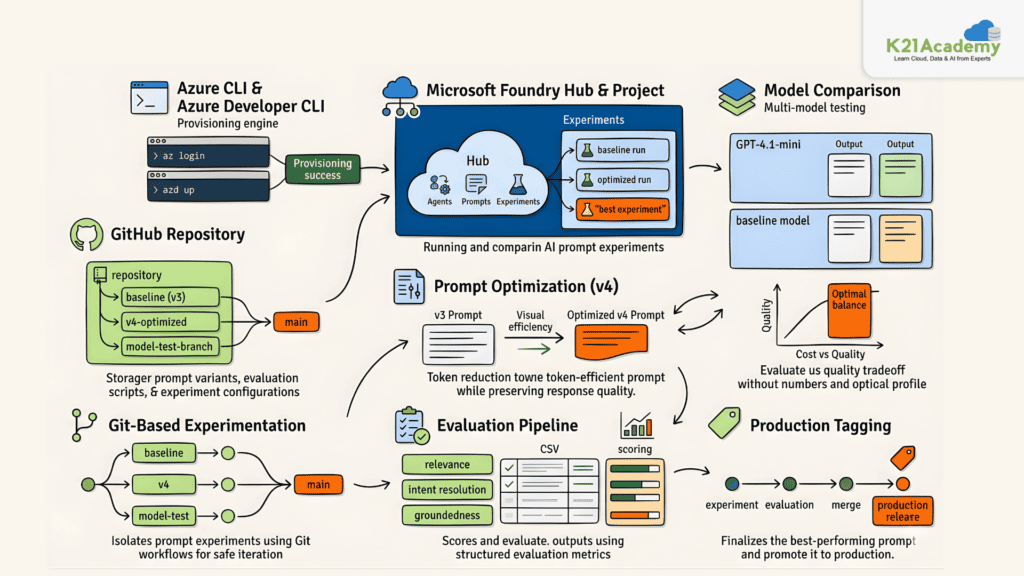
Optimizing AI agent prompts requires a structured, evidence-based workflow. In this lab, you’ll establish a baseline for the Trail Guide Agent, test token-optimized and model-comparison variants using Git branches, score responses manually, and merge the winning experiment to production.
Key Concepts
- Baseline Evaluation: Quantifies current agent performance before testing any optimization to provide a reference point for comparison
- Git-Based Experimentation: Each prompt variant is tested on a separate branch, keeping experimental changes isolated from production
- Prompt Optimization (v4): A token-optimized prompt designed to reduce costs by 40-50% while maintaining response quality
- Model Comparison: Testing the same optimized prompt with GPT-4.1-mini to evaluate cost vs. quality tradeoffs
- Manual Scoring: Evaluating agent responses using intent resolution, relevance, and groundedness criteria across standardized test prompts
Azure Environment Setup
In this lab, you will create a GitHub repository from the template, provision Microsoft Foundry resources using azd up, install Python dependencies, and deploy the baseline agent with the v3 prompt. You will then create experiment branches for the v4 optimized prompt and GPT-4.1-mini model, run batch tests, score responses in evaluation CSVs, compare results, and merge the winning experiment back to main with a production release tag.
Estimated Time: 90–120 minutes.
Difficulty Level: Advanced.
Exam Relevance: Covers prompt optimization, model comparison, evaluation methodologies, and Git-based experimentation.
By the end of this lab, you’ll understand how to use Git-based prompt experimentation and manual evaluation to make evidence-based optimization decisions for AI agents in Microsoft Foundry.
Related Readings: Generative AI vs Agentic AI: Key Differences
Lab 25. Automated Evaluation with Cloud Evaluators
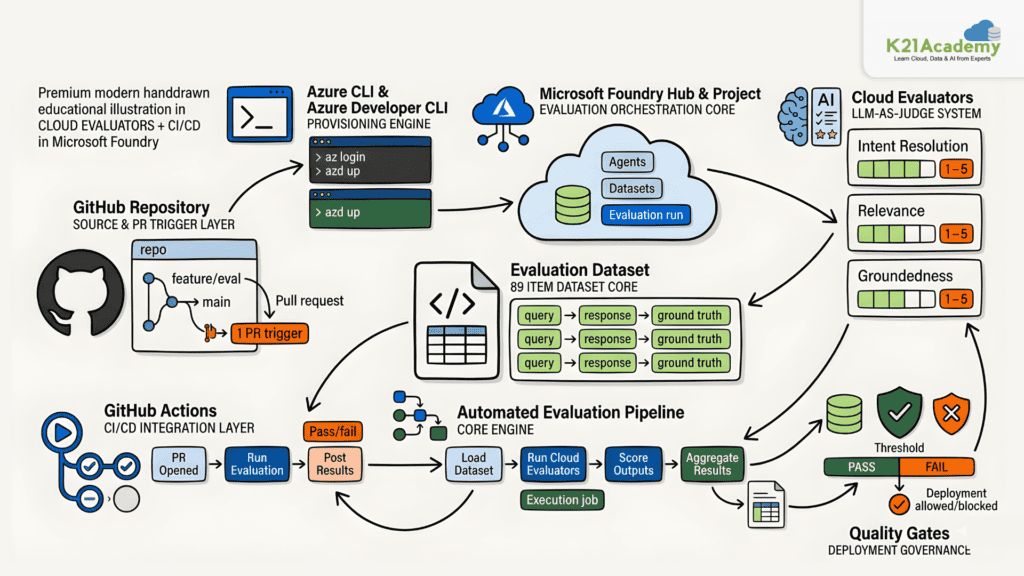
Manual evaluation does not scale as agent datasets grow. In this lab, you’ll use Microsoft Foundry’s cloud evaluators to automatically assess the Trail Guide Agent across 89 query-response pairs, establish a quality baseline, and integrate automated evaluation into a GitHub Actions CI/CD pipeline.
Key Concepts
- Cloud Evaluators: Microsoft Foundry’s built-in LLM-judge evaluators that score responses on Intent Resolution, Relevance, and Groundedness using a 1-5 scale
- Evaluation Dataset: A pre-prepared JSONL file containing 89 query-response-ground_truth pairs covering diverse hiking scenarios
- Automated Evaluation Pipeline: A single Python script that uploads the dataset, creates the evaluation definition, runs the cloud evaluation, and retrieves scored results
- GitHub Actions Integration: Automatically triggers evaluation on pull requests that modify agent code and posts results as PR comments
- Pass/Fail Thresholds: Configurable score thresholds used to gate deployments based on quality criteria
Azure Environment Setup
In this lab, you will create a GitHub repository from the template, provision Microsoft Foundry resources using azd up, install Python dependencies, and run the evaluation script against the 89-item dataset. You will then review results in the Microsoft Foundry portal, configure GitHub Actions with a service principal and federated credentials, and test automated evaluation on a pull request.
Estimated Time: 90 minutes.
Difficulty Level: Advanced.
Exam Relevance: Covers automated evaluation pipelines, cloud evaluators, GitHub Actions integration, and AI quality governance.
By the end of this lab, you’ll understand how to scale agent quality assessment using cloud evaluators and integrate automated evaluation into a repeatable CI/CD workflow.
Related Readings:- How to Build Your Own AI Bot in 2026: A Complete Guide
Lab 26. Monitor and Trace Your Generative AI Agent
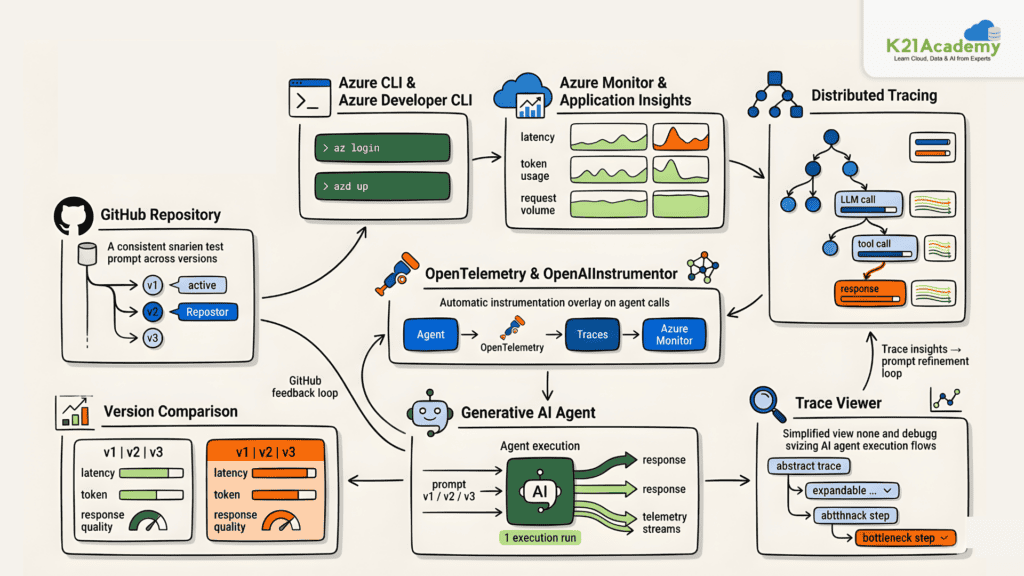
Deploying prompt versions without observing their runtime behavior leaves cost and performance questions unanswered. In this lab, you’ll use Application Insights and distributed tracing to measure token usage, latency, and response behavior across three Trail Guide Agent prompt versions.
Key Concepts
- Application Insights: Collects and aggregates runtime telemetry including token usage, latency, and request counts across agent versions
- Distributed Tracing: Produces nested span trees per prompt version showing per-prompt timing, token attributes, and LLM call chains
- OpenTelemetry & OpenAIInstrumentor: Automatically instruments chat completion calls to create child spans without additional code
- Azure Monitor: Provides aggregated metrics for comparing prompt token counts, completion token counts, and total requests across versions
- Version Comparison: Running the same five test prompts across v1, v2, and v3 provides a consistent and reproducible performance baseline
Azure Environment Setup
In this lab, you will create a GitHub repository from the template, provision Microsoft Foundry resources using azd up, install Python dependencies including Azure Monitor and OpenTelemetry packages, and run the monitoring script to generate traces across all three prompt versions. You will then use the local trace viewer and Azure Monitor to compare token usage and latency across versions.
Estimated Time: 75–90 minutes.
Difficulty Level: Advanced.
Exam Relevance: Covers Application Insights, distributed tracing, OpenTelemetry, and runtime monitoring for AI agents.
By the end of this lab, you’ll understand how to use Application Insights and distributed tracing to make evidence-based decisions about prompt version performance in production.
Related Readings: Overview of RAG (Retrieval-Augmented Generation)
Lab 27. Optimize AI Agents with Fine-Tuning
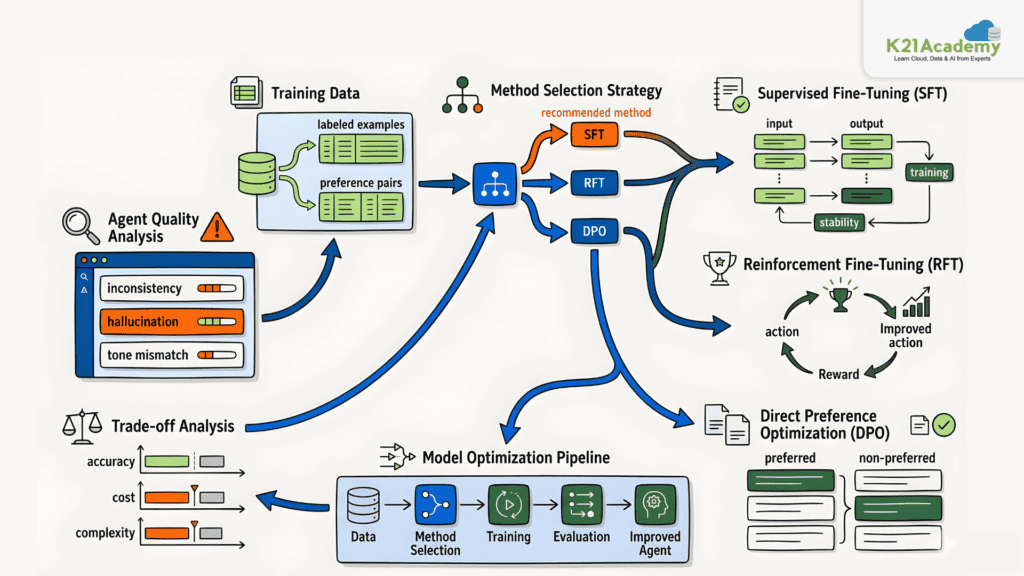
Prompt engineering alone cannot solve every agent quality problem. In this lab, you’ll analyze real agent quality issues at Adventure Works and select the right fine-tuning method to address each one by understanding the trade-offs between three key approaches.
Key Concepts
- Supervised Fine-Tuning (SFT): Trains the model on labeled input-output pairs to teach consistent behavior and domain-specific responses
- Reinforcement Fine-Tuning (RFT): Uses reward signals to optimize agent behavior toward desired outcomes, suited for complex decision-making tasks
- Direct Preference Optimization (DPO): Trains the model using human preference comparisons between response pairs, ideal for improving response quality and tone
- Fine-Tuning Method Selection: Choosing the right method depends on the type of quality problem, available data, and cost considerations
Azure Environment Setup
This is an interactive scenario-based lab. You will work through multiple agent quality problem scenarios, each presenting evaluation metrics and asking you to match the problem to the most appropriate fine-tuning method. Each scenario explains why the selected method fits the root cause of the quality issue.
Estimated Time: 60–75 minutes.
Difficulty Level: Advanced.
Exam Relevance: Covers supervised fine-tuning, reinforcement fine-tuning, DPO, and AI model optimization strategies.
By the end of this lab, you’ll understand when and why to apply SFT, RFT, or DPO to solve specific AI agent quality problems in Microsoft Foundry.
Related Readings: What is NLP?
What You Will Achieve After Completing All 27 Labs ?
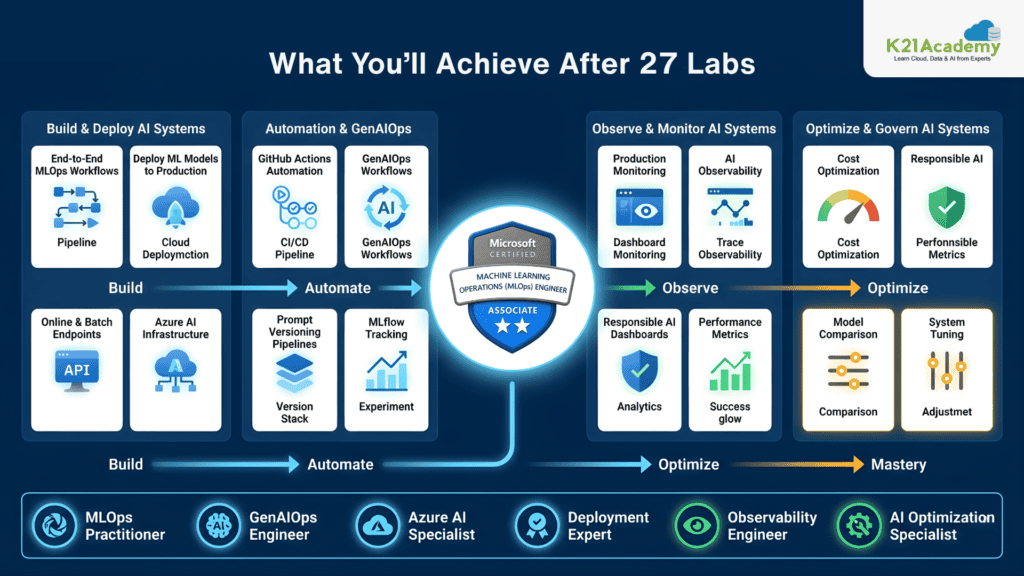
By completing all AI-300 labs, you will be able to:
- Build end-to-end MLOps workflows
- Deploy machine learning models into production
- Automate training using GitHub Actions
- Implement GenAIOps workflows
- Monitor AI systems in production
- Build prompt versioning pipelines
- Optimize AI systems for cost and performance
- Configure Responsible AI dashboards
- Use MLflow professionally
- Deploy online and batch endpoints
- Implement AI observability
- Build enterprise AI infrastructure on Azure
Related Readings: Learn about Claude Certified Architect Certificate
Job Opportunities After AI-300 Certification
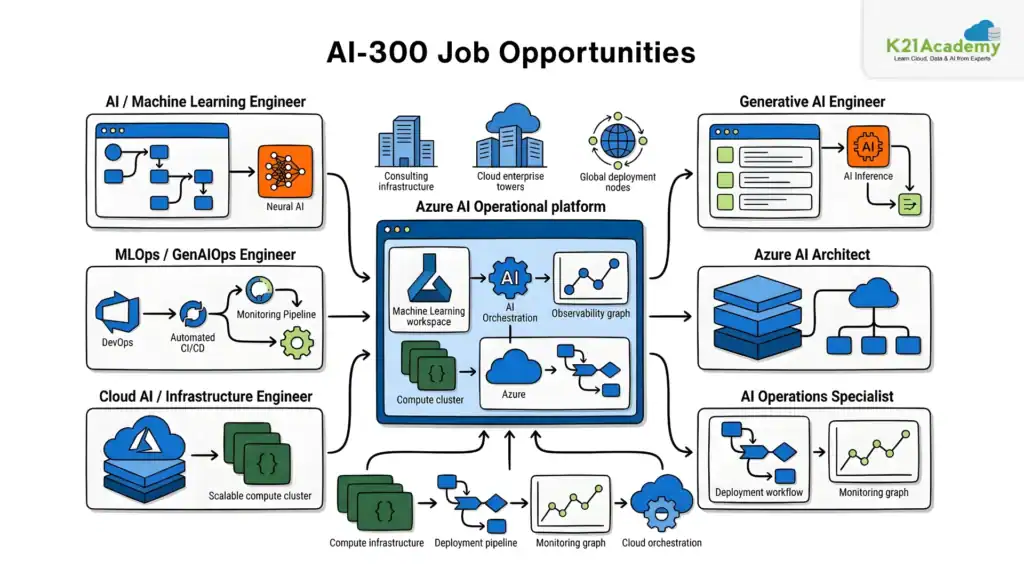
The Microsoft Certified Operationalizing Machine Learning and Generative AI Solutions certification prepares professionals for high-demand AI operational roles.
Most In-Demand Roles Include:
- AI Engineer
- MLOps Engineer
- GenAIOps Engineer
- Machine Learning Engineer
- Cloud AI Engineer
- AI Platform Engineer
- AI Infrastructure Engineer
- Azure AI Architect
- AI Operations Specialist
- Generative AI Engineer
Companies Hiring AI-300 Skilled Professionals:
- Microsoft
- Accenture
- Deloitte
- Infosys
- TCS
- Cognizant
- Capgemini
- IBM
- Google Cloud Partners
- Azure Consulting Firms
- Product-based AI startups
Related Readings: What is Agentic AI?
Salary Insights: India and Global
| Role | India Salary Range | Global Salary Range |
|---|---|---|
| AI Engineer | ₹10–25 LPA | $110K–$180K |
| MLOps Engineer | ₹12–30 LPA | $120K–$190K |
| GenAIOps Engineer | ₹15–35 LPA | $130K–$220K |
| Azure AI Architect | ₹25–50 LPA | $150K–$250K |
Salary depends heavily on:
- Hands-on project experience
- Azure expertise
- Deployment knowledge
- MLOps implementation skills
- Generative AI operational experience
LinkedIn Demand Insights for AI-300 Skills
Current hiring demand strongly favors professionals skilled in:
- Azure Machine Learning
- MLflow
- GitHub Actions
- Prompt Engineering
- Azure AI Foundry
- Model Deployment
- AI Monitoring
- GenAIOps
- Infrastructure Automation
Recruiters are actively searching for professionals who understand operational AI systems instead of only theoretical machine learning.
Related Readings: What is LLMOps (large language model operations)?
Current Market Trends Around AI-300 Skills
1. Massive Growth in Generative AI
Organizations are rapidly deploying enterprise generative AI applications.
2. MLOps is Becoming Mandatory
Companies now require scalable deployment and monitoring pipelines.
3. AI Governance is Critical
Responsible AI and observability are becoming standard enterprise requirements.
4. Prompt Engineering Alone is Not Enough
Operational GenAI skills are now more valuable than basic prompt engineering.
5. Azure AI Adoption is Growing Rapidly
Enterprises heavily invested in Microsoft ecosystems are adopting Azure AI services quickly.
8-Week Study Plan for AI-300 Certification
Week 1
- Azure Machine Learning fundamentals
- Workspaces
- Compute resources
- Data assets
Week 2
- MLflow
- Experiment tracking
- AutoML
- Model training
Week 3
- Command jobs
- Pipelines
- Environments
- Hyperparameter tuning
Week 4
- Model registration
- Batch endpoints
- Online endpoints
- Deployment strategies
Week 5
- Responsible AI
- Monitoring
- Drift detection
- Observability
Week 6
- GitHub Actions
- CI/CD pipelines
- MLOps architecture
- IaC concepts
Week 7
- Microsoft Foundry
- Prompt engineering
- Agent versioning
- Automated evaluations
Week 8
- Fine-tuning
- Agent optimization
- Full revision
- Practice labs
- Mock scenarios
Related Readings: ChatGPT Vs Copilot (Azure) Vs Amazon Q Vs Gemini
Final Conclusion
The Microsoft Certified: Operationalizing Machine Learning and Generative AI Solutions (AI-300) certification is one of the most practical AI certifications available today.
Unlike traditional AI certifications that focus only on model building, AI-300 focuses on what organizations actually need:
- Production AI systems
- MLOps automation
- GenAIOps implementation
- Monitoring and observability
- Deployment pipelines
- Responsible AI
- Enterprise-scale AI operations
The combination of:
- Azure Machine Learning
- MLflow
- GitHub Actions
- Microsoft Foundry
- Generative AI operations
- AI deployment strategies
makes AI-300 extremely valuable for modern AI engineering careers.
If you complete all 27 labs properly and gain real hands-on experience, you will build skills that are directly aligned with current enterprise AI hiring requirements.
For professionals serious about AI engineering, MLOps, and operational generative AI systems, AI-300 can become a major career accelerator.
Related Readings: Hugging Face: Revolutionizing NLP and Beyond