




Agentic AI or AI Agent has become the centre of attention in almost every serious cloud and AI conversation in 2026. And for good reason. But when you actually sit down to build one, especially on AWS cloud, the number of moving parts can feel paralyzing. Bedrock, SageMaker, Agent Core, Lambda, Cognito, CloudWatch. Where do you even start?
From what I’ve seen in the industry, most professionals understand the concept of agentic AI but struggle to connect the architecture dots when it comes to real-world deployment. This article walks you through a complete, production-ready agentic AI customer service agent built entirely on AWS, broken down into a five-lab plan that takes you from a basic prototype all the way to a live, user-facing application.
Whether you’re a developer, architect, AI engineer, DevOps engineer, or someone exploring AWS AI/ML for the first time, this breakdown will give you the full picture.
The Business Problem: Why Traditional Customer Service Needs an Upgrade
Before getting into architecture, it helps to understand why this matters as a real-world use case, not just a technical exercise.
Here’s what traditional customer service typically looks like:-
- Customers wait 8 to 10 minutes on average before getting a response
- Around 40% of tickets get transferred to another team before resolution
- Support is only available during business hours
- It costs businesses $15 to $30 per ticket to resolve a query
- 70% of those queries are repetitive and follow predictable patterns
Now here’s what a well-built agentic AI customer service agent delivers instead:-
- Responses in under 30 seconds, around the clock
- 85 to 95% of queries resolved on first contact, without escalation
- Cost per interaction drops to $2 to $5
- Human support agents become 2 to 3 times more productive because they focus only on genuinely complex cases
When you understand these numbers, you can explain this project in terms that hiring managers, clients, and stakeholders actually care about, not just the tech stack you used.
Related Readings:- Comparing the Best AI Chatbots for Your Business: What’s Best for You?
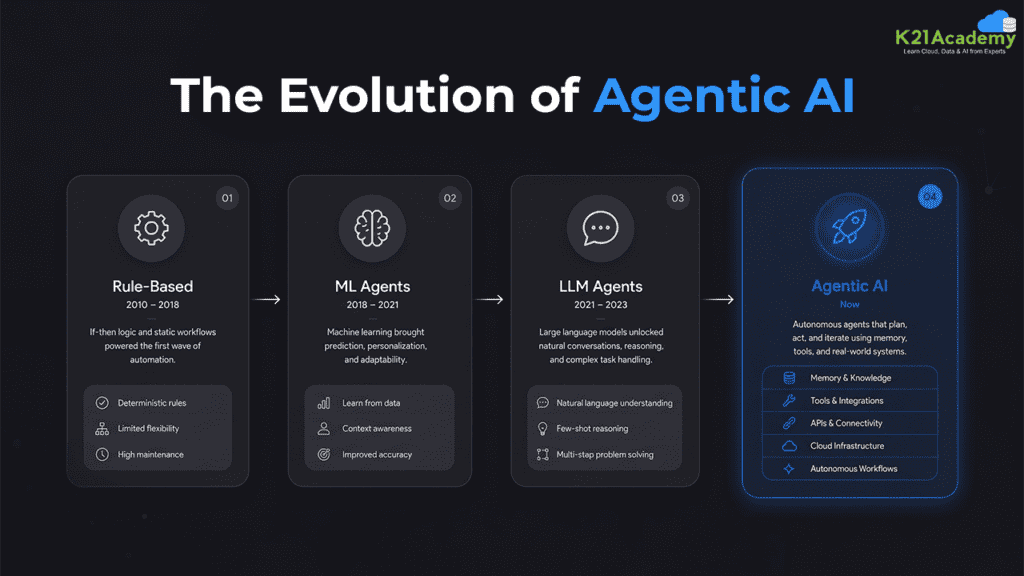
How Agentic AI Got Here: A Quick Evolution Map
If you’re newer to this space, here’s the context that makes this project make sense.
- Rule-based systems (2010-2018): Rigid, scripted responses that broke the moment a user deviated from an expected input. These worked at a surface level but could not scale or adapt.
- Machine learning agents (2018-2021): More flexible, but still limited in their ability to reason, remember, or interact naturally with users over a conversation.
- LLM-based agents (2021-2023): Large language models brought a real jump in quality. Agents could now understand context, handle variation, and generate natural responses. But they lacked tool integration, persistent memory, and proper authentication.
- Agentic AI (now): AI agents today have their own autonomy, reason through situations, act using tools and external services, carry memory across sessions, and include authentication and authorization controls that make them safe to deploy in production environments.
An AI agent is not a chatbot or a workflow automation tool. A chatbot follows scripted paths. A workflow automates fixed sequences. An agent reasons through a situation, chooses which tools to call, remembers what has already happened in the conversation, and adjusts based on what the user needs.
Related Readings:- How to Use Claude AI in Your CI/CD Pipeline
The Full Architecture: AWS Services You Will Use
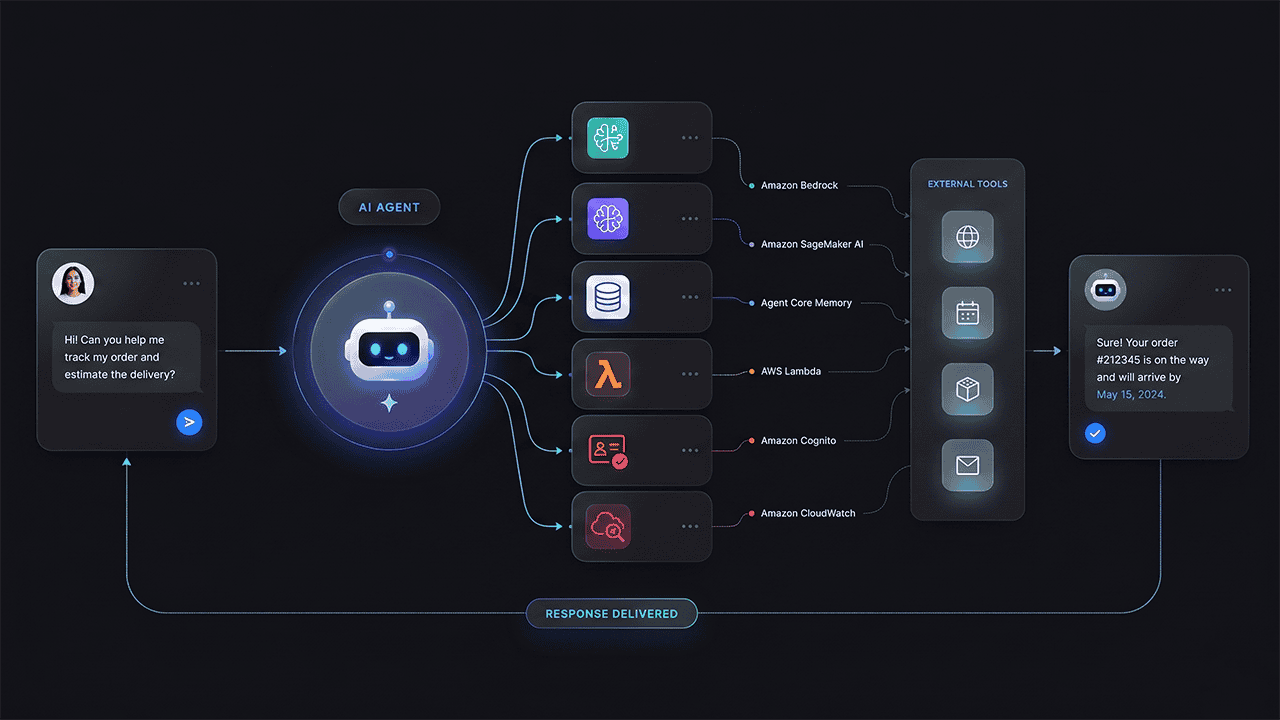
This entire project runs inside AWS cloud. Here is what each service does and why it is in the stack.
- AWS Bedrock: This is the core service for building generative AI and agentic AI applications on AWS. Through Bedrock, your agent can interface with any large language model, including Claude from Anthropic, Amazon Nova, or other models available as an AWS LLM service. You can also configure an LLM router, which means your agent is not locked to any single model, a practical design choice when models update frequently.
- Amazon SageMaker AI: Amazon SageMaker for machine learning is where you do your development work. Instead of setting anything up locally, you spin up a Jupyter notebook inside SageMaker, which becomes your entire development environment in the cloud. You just need a browser. All your Python code, testing, and prototyping happens here before deployment.
- Agent Core (four components): Agent Core sits inside Bedrock and has four distinct components.
Agent Core Runtime: This is where your agent is deployed and actually runs. It handles execution, session isolation, and continuity.
Agent Core Memory: Manages both short-term memory (within a session) and long-term memory (across multiple sessions and users). This is what gives your agent the ability to recall previous interactions and maintain context.
Agent Core Identity: Handles authentication and authorization using Amazon Cognito. This covers user-level access (who is this user and what can they see) and agent-level access (what is the agent itself allowed to do).
Agent Core Gateway: Exposes tools and external services to the agent. This is the bridge between your agent and the outside world.
- Amazon Cognito: Used by Agent Core Identity for user authentication, session tokens, role-based access policies, and authorization rules. Before the agent pulls any user-specific data, it verifies who the user is. You also control what the agent itself can access, not just the user.
- AWS Lambda: Serverless functions that handle interactions with external services. In this project, Lambda functions handle web search and warranty lookups from an external database. These are triggered through the Agent Core Gateway.
- Amazon CloudWatch: Observability and monitoring. CloudWatch receives traces, logs, and metrics from your agent so you can track performance, debug issues, and set billing alerts. This is non-negotiable for any production deployment.
- Streamlit: A Python-based framework for building web applications. This is your front end, the interface your end users actually interact with. It connects to the Agent Core Runtime and handles the conversation flow between user and agent.
What This AI Agent Can Actually Do: The Five Tool Functions
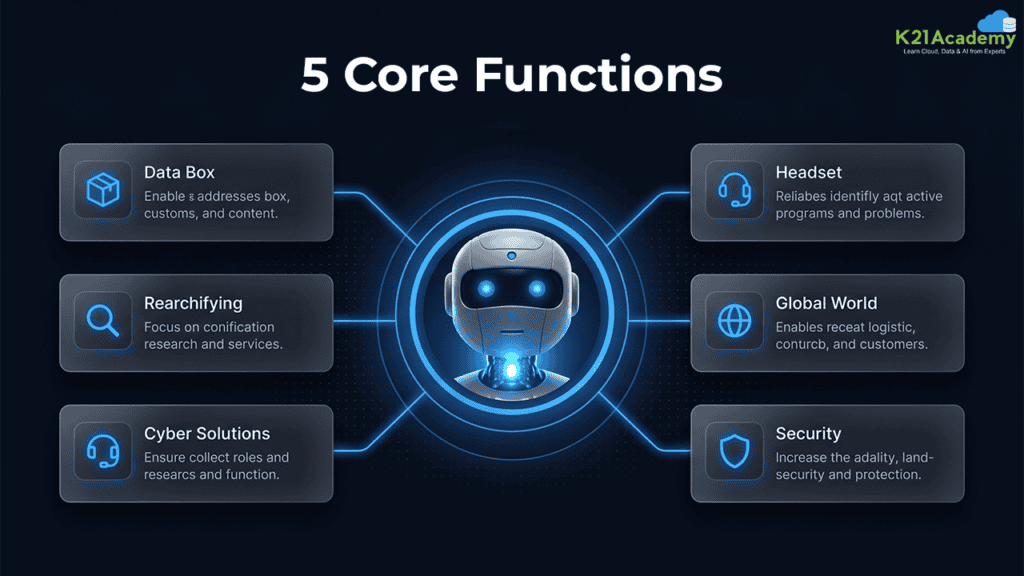
When a customer interacts with this agent, here is what it is capable of:-
- Return policy retrieval: The agent pulls return policy information directly from a knowledge base using RAG (Retrieval-Augmented Generation). The customer asks, the agent queries the knowledge base, and returns a precise, relevant answer.
- Product information lookup: Product details are stored in the knowledge base. The agent retrieves and presents product-specific information on demand, without hallucinating or guessing.
- Technical support escalation: For queries that exceed the agent’s scope, it routes to a human support agent through the technical support function. The agent knows when to hand off.
- Web search: Through the Agent Core Gateway and an AWS Lambda function, the agent can search the web in real time for information not in its knowledge base.
- Warranty check: The agent queries an external database to verify warranty status for a specific product. This is a real-world integration, not a mocked example.
RAG (Retrieval-Augmented Generation) is how you give your agent access to specific company knowledge, product data, policies, customer records, without baking that data into the model itself. The agent retrieves the relevant chunk of information at query time and uses it to generate an accurate response. This is what makes the agent reliable for business-specific queries.
The Five-Lab Build Plan: From Prototype to Production
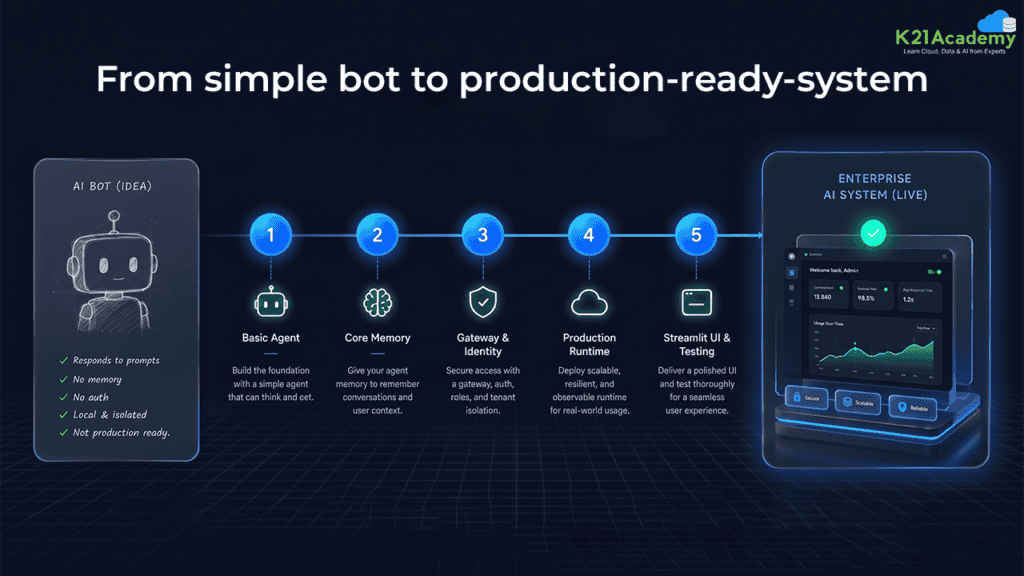
This project is structured across five labs so you build incrementally and understand each layer before adding the next. Here is what each lab covers:-
Lab 1: Build a Basic Strands Agent
Start with a simple agent using the Strands framework, which is a Python-based agentic AI framework developed for building and deploying agents on AWS. You build a working agent that can respond to queries, but it has no memory attached. It works well in the moment but forgets everything between turns. This is your baseline.
Strands is used here because of its native integration with AWS deployment. If you prefer working with an open source agentic framework like LangChain or LangGraph, those are valid alternatives for the development and reasoning layer. The deployment approach remains the same.
Lab 2: Add Agent Core Memory
Extend the basic agent with Agent Core memory. Now it has both short-term memory (within a session) and long-term memory (across sessions). The agent can recall what it discussed with a user earlier in the same conversation, and also reference interactions from previous sessions. At the same time, this is where you start to see the difference between a stateless model call and a true agent.
Lab 3: Gateway, Identity, and External Tools
Connect the agent to the real world. Add Amazon Cognito for user and agent authentication. Wire up the Agent Core Gateway and deploy AWS Lambda functions for web search and the warranty database lookup. Configure shared access tokens. This lab is where your agent stops being a standalone system and starts behaving as a production-capable service.
Related Readings:- Claude Code for AI/ML Engineers: Should You Invest the Time? Honest 2026 Worth-It Breakdown
Lab 4: Production Deployment on Agent Core Runtime
Deploy the agent to Agent Core Runtime with session continuity and session isolation across multiple users. Set up CloudWatch for observability, traces, and billing alerts. If you have not already configured CloudWatch in your AWS account, do that before starting this lab. This is not optional for a production deployment.
Lab 5: Streamlit UI and End-to-End Testing
Build the Streamlit web application front end and connect it to your deployed agent. Run full end-to-end tests covering the complete flow: user query in Streamlit → Agent Core Runtime → LLM via Bedrock → tool call via Lambda → response back to user. Once this works cleanly, you have a complete, production-ready agentic AI application.
Related Readings: Top 10 Claude Code Use Cases Every Developer Should Know
Authentication and Security: Why This Layer Cannot Be Skipped
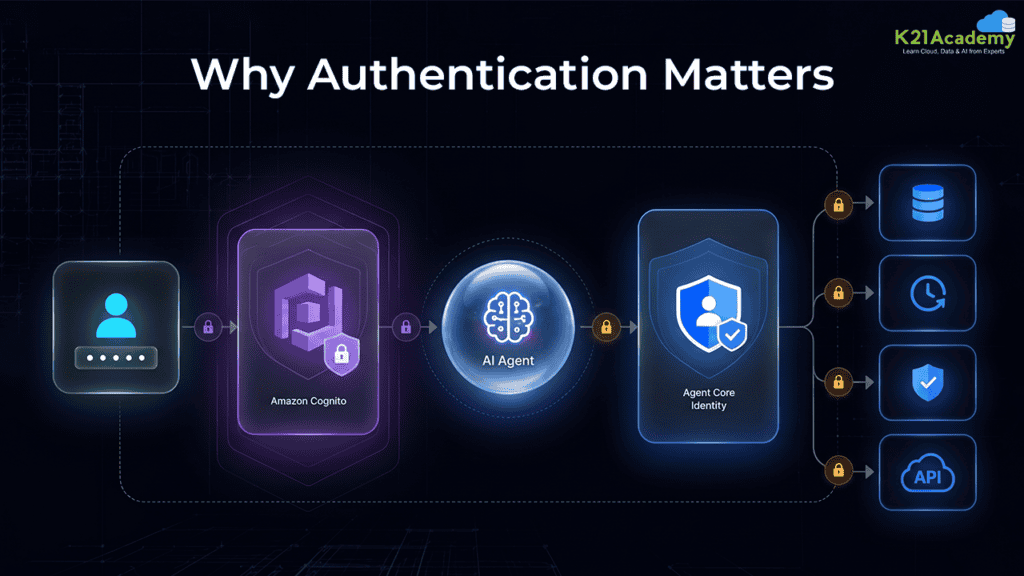
One aspect that often gets treated as an afterthought in tutorial builds but matters enormously in real deployments is authentication and authorization.
Your agent cannot reveal user-specific data, order history, warranty records, account information, without knowing who the user is. At the same time, even after authentication, the agent itself needs to have its own access controls. Just because a user is authenticated does not mean the agent should have unlimited access to every back-end service.
Amazon Cognito handles the user-facing side. It manages login flows, session tokens, role-based policies, and access rules. Agent Core Identity manages the agent’s own permissions: what services it can call, what data it can retrieve, and what actions it is authorized to take on behalf of a user. This two-layer approach (user-level and agent-level access control) is what makes the application safe to put in front of real customers.
Related Readings:- Claude Code Career Roadmap: Skills Developers and AI Engineers Need in 2026
How to Put This Project on Your Resume
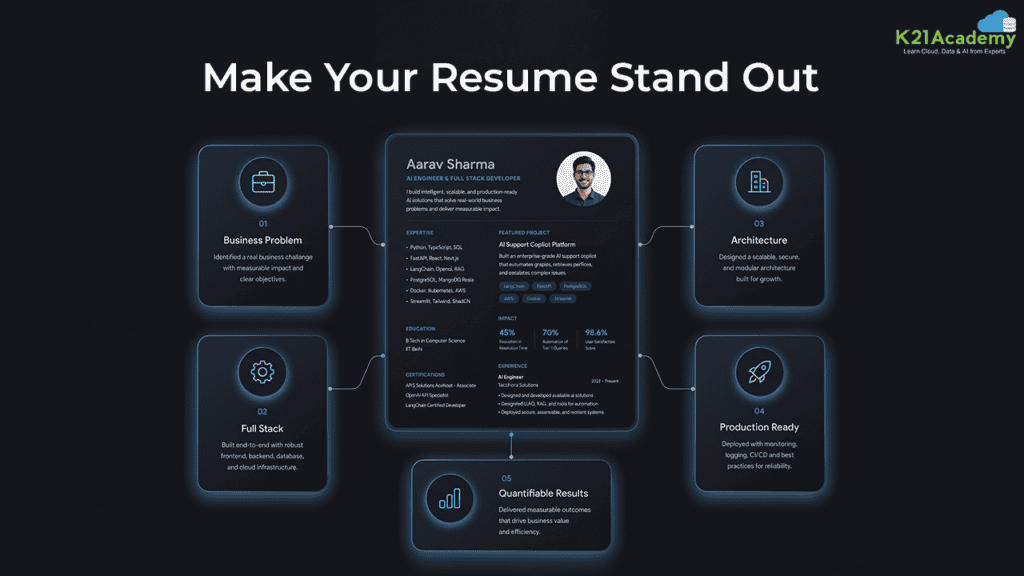
From what I’ve seen in the industry, professionals who explain projects in business terms get further in interviews than those who list tools. Here are five ways to frame this project when applying for roles in AWS AI/ML, cloud engineering, or agentic AI:-
- Lead with the business problem: “Built an agentic AI customer service agent that reduced per-ticket cost from $15-30 to $2-5 and improved first-contact resolution from 60% to over 85%.”
- Name the full stack precisely: AWS Bedrock, Amazon SageMaker AI, Agent Core (Runtime, Memory, Identity, Gateway), Amazon Cognito, AWS Lambda, CloudWatch, and Streamlit. Precision signals real hands-on experience.
- Describe the architecture decisions: Explain why you used RAG for the knowledge base, why you chose the LLM router approach for model flexibility, and how session isolation works in the Runtime layer.
- Highlight production-readiness: Mention observability (CloudWatch), authentication (Cognito), and session continuity. These show you understand what production deployment actually requires, not just what looks good in a demo.
- Quantify where possible: Response time under 30 seconds, 85-95% first-contact resolution, 2-3x productivity improvement for human agents. These are the numbers clients and hiring managers remember.
Related Readings:- 5 Resume Mistakes That Stop AI Professionals From Getting Interview Calls
Getting Started: What You Need Before Lab 1
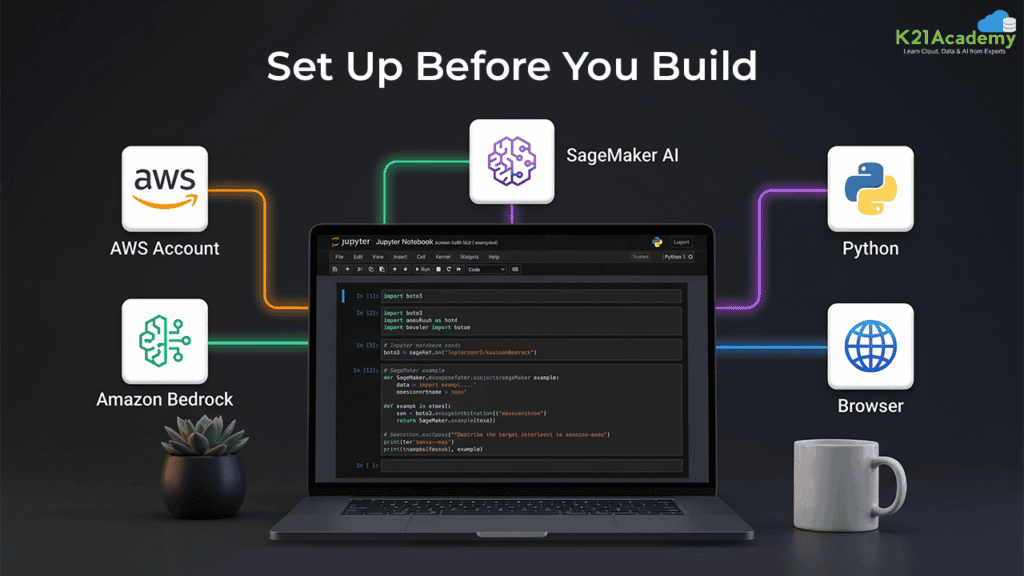
Here is what to have in place before you begin:-
- An AWS account (the free tier is enough, but it needs to be warmed up. There is a dedicated setup lab that walks through account configuration, IAM user creation, and enabling Bedrock and SageMaker access)
- Bedrock model access enabled (Claude 3.7 or the latest available version; most accounts now have this enabled by default, but double-check)
- A SageMaker notebook instance set up (this becomes your Jupyter development environment; Python 3.10 or higher is required)
- Python basics for developers; if you are an architect, manager, or DevOps engineer, you need conceptual understanding of the flow. You do not need to write the code yourself
- No local software installation needed. Everything runs in your browser through AWS
Free tutorials can get you to the concept. What they rarely give you is the full production path: memory, authentication, observability, deployment, and a real UI, all connected and working together. That is what this five-lab structure covers, end to end.
LLMs update frequently, so keep this in mind: the specific model version (Claude 3.7, for example) may be superseded by the time you start. The architecture handles this cleanly. The LLM router in Bedrock lets you swap or update the underlying model without rebuilding the agent logic.
Related Readings:- How to Build Your Own AI Bot in 2026: A Complete Guide
Wrapping Up
Building a production-ready agentic AI agent on AWS is not a one-step process, but it is a step-by-step one. Each lab adds a real layer of capability: memory, authentication, tool integration, observability, and a user-facing interface. By the time you finish all five, you have a system you can explain architecturally, defend in an interview, and extend for a real client.
This project gives you hands-on experience with AWS Bedrock, Amazon SageMaker AI, and Agent Core. At the same time, it teaches you how to think about agentic AI at a production level, which matters whether you’re building for a client, applying for a role, or leading a team through this architecture for the first time.