




If you’re learning AWS or designing a cloud architecture, one of the biggest challenges is choosing the right storage service.
AWS offers multiple storage options like Amazon S3, EBS, EFS, Glacier, FSx, and EC2 Instance Storage and each one is designed for a specific purpose. But beginners and even experienced engineers often struggle with questions like:
- Should I use S3 or EBS?
- When should I choose EFS instead of FSx?
- Which AWS storage service is best for backups or databases?
- Which one is cheapest and most scalable?
This guide explains exactly which AWS storage service to use and when, including real-world use cases, architecture decisions, and certification insights.
This article is especially useful for:
- AWS beginners preparing for certification
- Cloud architects designing solutions
- Developers deploying applications on AWS
- Engineers comparing storage options
By the end of this guide, you will clearly understand how AWS storage works and which service fits your workload.

What is AWS Storage?
AWS (Amazon Web Services) provides cloud-based storage solutions that allow businesses to store, retrieve, backup, and archive data without managing physical infrastructure.
These services provide:
- High durability and availability
- Elastic scalability
- Secure access control
- Pay-as-you-go pricing
AWS storage is designed to support different application needs, from simple file storage to high-performance databases and large-scale analytics workloads.
Also Read: Our Blog post on AWS Secrets Manager

Cloud Storage Overview
A cloud computing provider that manages and runs data storage as a service provides cloud storage, cloud computing model which is a model for storing data online.
This eliminates the need to manage physical storage systems while providing scalability, durability, and global accessibility.
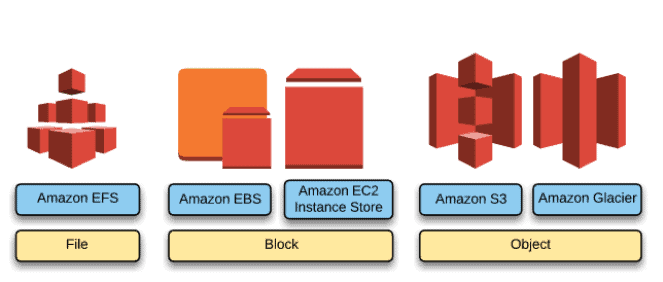
Cloud storage is typically divided into three main categories:-
1. Object Storage
Object storage stores data as objects containing data, metadata, and a unique identifier.
It is designed for massive scalability and internet-based access, making it ideal for modern cloud applications.
Examples:
- Website assets
- Media files
- Backup storage
- Data lakes
- IoT data
AWS Services:
- Amazon S3
- Amazon S3 Glacier
2. File Storage
File storage organizes data in hierarchical directories and files, similar to traditional file systems.
It is used when multiple servers need shared access to the same files.
Examples:
- Content management systems
- Development environments
- Shared application data
- Media workflows
AWS Services:
- Amazon EFS
- Amazon FS
3. Block Storage
Block storage divides data into blocks and attaches them directly to servers.
It offers low latency and high performance, making it suitable for applications like databases.
Examples:
- Databases
- Enterprise applications
- Virtual machines
- ERP systems
AWS Services:
- Amazon EBS
- EC2 Instance Storage
Check out the Hands-on-lab on EBS.

Storage Offered By Amazon Web Services (AWS)
Check out: AWS Free Tier Account Services
| Service | Storage Type | Best For |
|---|---|---|
| Amazon S3 | Object Storage | Backup, analytics, data lakes |
| Amazon S3 Glacier | Archive Storage | Long-term backups |
| Amazon EBS | Block Storage | Databases and applications |
| Amazon EFS | File Storage | Shared file systems |
| Amazon FSx | Managed File Systems | High-performance workloads |
| EC2 Instance Storage | Temporary Block Storage | Caches and buffers |
1. Simple Storage Service (Amazon S3)
Amazon’s S3 oldest and best-supported storage infrastructure, Amazon S3, has an object storage paradigm that can store and retrieve data of any size. Websites, mobile apps, business applications, and data from IoT sensors or other devices that may be dumped onto S3 are just a few examples of places where data can be retrieved.
Usage
With support for high bandwidth and demand, S3 has been extensively used to host web content. JavaScript-based static websites can be saved in S3 because scripts can also be stored there. With the help of the lifecycle management rule for S3-stored data, it facilitates the migration of data to Amazon Glacial for cold storage.
Features
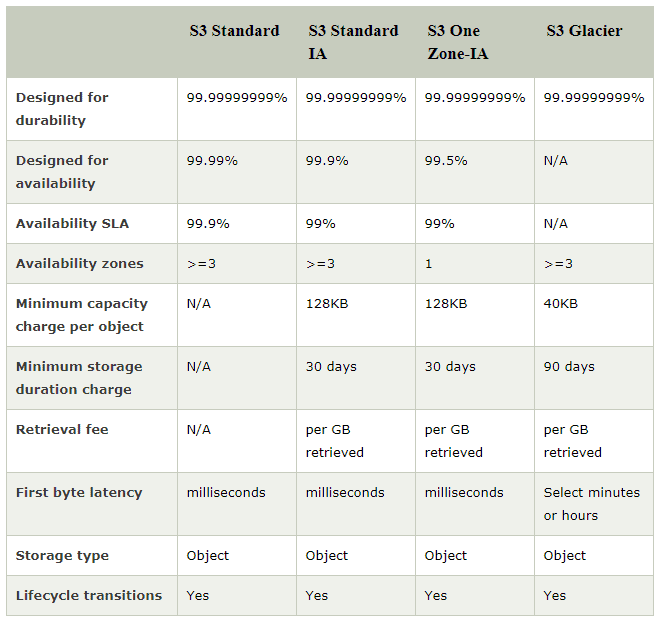
Built from the bottom up to fulfill a customer promise of 99.999999999% durability, Amazon S3 is supported by the greatest global cloud infrastructure in the world. Within each AWS Region, data is automatically replicated over at least three physically independent locations and is likewise spread across all other AWS Regions.
Security
S3 supports three different types of encryption, including client-side and server-side encryption. Other users or AWS accounts can only access data in S3 if the admin has written an access policy granting them access. Another layer of protection can be added for object operation with the support of Multi-Factor Authentication (MFA).S3 supports a variety of compliance and security standards.
Read More: S3 Hands-on-lab.
2. Amazon Glacier
Amazon Glacier offers a safe, dependable, and incredibly affordable storage option. You can use Glacier to do robust analytics on archived data. For better and more efficient outcomes, the Glacier can also make use of other AWS storage services like S3, CloudFront, etc. to transport data in and out easily.
Usage
Archives of data are kept on Amazon Glacier. A single file may make up an archive, or an archive may combine multiple files. Archives are arranged in vaults. offers the ability to query data to find the specific subset of data you require from an archive.
Feature
Durability must be given top attention because AWS Glacier is an archiving service. For archives, the glacier is intended to offer average annual durability of 99.999999999%. Within an AWS Region, data is automatically spread across a minimum of three physically isolated facilities.
Security
Access control can be established for other users by creating access rules in the AWS Identity and Access Management (IAM) service. Initially, Glacial data can only be accessible by the account owner/admin. All data is encrypted by Glacier using server-side encryption. Vaults that will store records for a long time can be locked using lockable policies.
Also Read: Our previous blog post on AWS Certified Solutions Architect Associate Salary.
3. Elastic File System (Amazon EFS)
As its name implies, EFS provides a network file system as-a-service that is scalable, elastic, highly available, and very durable. EFS has an elastic storage capacity that can automatically expand and contract based on demand. EFS is compatible with NFSv4 and NFSv4.1, the Network File System versions.
Usage
Through concurrent access from EC2 instances, the network file system EFS can grow to petabytes in size. Amounts of Amazon EC2 instances with Elastic File System EFS mounted. A Single EFS file system may even be shared by multiple EC2 instances, enabling access to expansive applications that outgrew the capabilities of a single instance. EFS can be installed in a local data center that is directly connected to an Amazon Virtual Private Cloud (VPC) using the AWS Direct Connect service.
Feature
Data is stored by EFS as objects, and each object is spread across several regions’ availability zones. longer-lasting than S3. The capacity to call APIs.
Security
When it comes to the EFS file system, there are three major layers of access constraints to take into account.
1.) IAM authorizations for API requests.
2.) Mount targets and EC2 instance security groups.
3.) Permissions at the user, group, and network file system levels.
AWS allows connectivity between EC2 instances and EFS file systems. You can associate one security group with an EC2 instance and another security group with an EFS mount target associated with the file system. These security groups act as firewalls and enforce rules that define the traffic flow between EC2 instances and EFS file systems.
Check Out: EFS Hands-on-lab.
4. Elastic Block Store (Amazon EBS)
EFS and EBS volumes are both network file systems. In Availability Zones, volumes are automatically copied for maximum availability and durability.
Usage
For usage with EC2 instances in the AWS cloud, it is dependable block-level storage. You can use EBS volumes by mounting them onto an EC2 instance just like you would a physical hard drive at your location, and then formatting the EBS volume with the desired file system. EBS enables dynamic capacity expansion, performance adjustment, and even volume-type change without any downtime or performance impact.
Features
EBS enables the preservation of point-in-time snapshots of volumes to extend the life of the data that is being stored. Every individual volume can be set up as EBS General Purpose (SSD), Provisioned IOPS (SSD), Throughput Optimized (HDD), or Cold (HDD) as necessary. About 0.1 to 0.2 percent of EBS Volumes fail, which is extremely low.
Security
In order to grant access to EBS volumes, IAM policy must be defined. Combined with data-at-rest encryption and data-in-motion security, it provides a powerful defense-in-depth security strategy for your data.
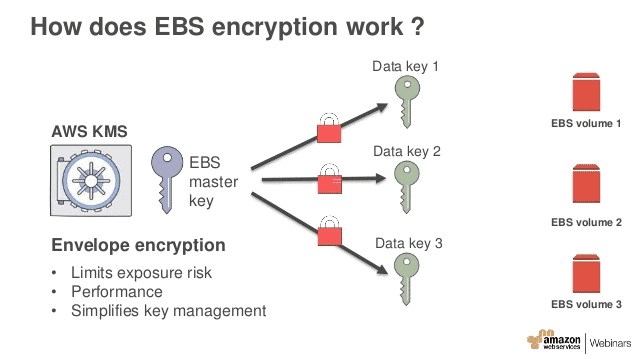
Check Out: EBS Hands-on lab
5. EC2 Instance Storage
EC2 Instance storage provides temporary block-level storage for EC2 instances.
Usage
Instance storage volumes are ideal for the temporary storage of data that changes frequently like buffers, queue caches, and scratch data. It can only be employed by one EC2 instance meaning volumes can’t be detached and attached to a different instance.
Features
Uses SSDs to deliver high random I/O performance, not intended to be used as durable disk storage. Data durability is provided through replication, or by periodically copying data to durable storageData on EC2 volume and only persists during the lifetime of the EC2 instance that it’s been related to
Security
IAM policy is required to be defined to permit secure control to users for performing operations like the launch and termination of EC2 instances. When you stop or terminate an instance, the applications and data are erased and thus making the info inaccessible to a different instance in the future.
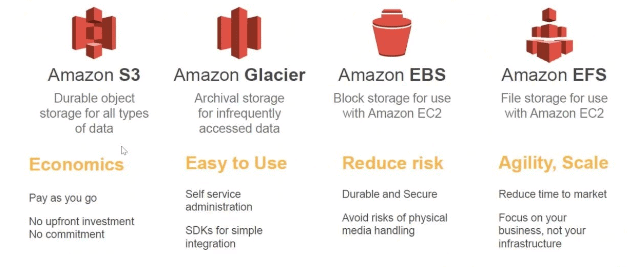
Also Read: EC2 Hands-on-lab
6. Amazon FSx
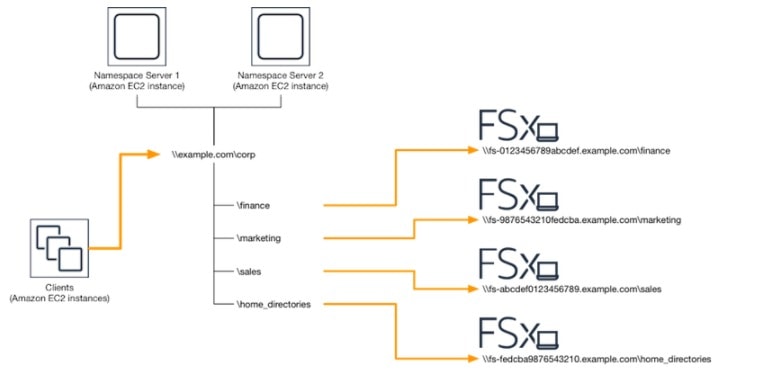
Amazon FSx is a completely managed third-party file system solution. Amazon FSx utilizes SSD storage to provide fast performance with low latency.
It provides two file systems to choose from:
- Amazon FSx for Windows File Server
- Amazon FSx for Lustre
Usage
With the use of Amazon FSx, you can utilize the rich feature sets and fast performance of widely-used open source and commercially licensed file systems, while avoiding time-consuming administrative tasks like hardware provisioning, software configuration, patching, and backups. FSx provides cost-efficient capacity with high levels of reliability and integrates with a broad portfolio of AWS services to enable faster innovation.
Features
Amazon FSx provides a wide range of Solid-State Disk (SSD) and Hard Disk Drive (HDD) storage options enabling you to optimize storage price and performance for your workload requirements. It delivers sustained high read and writes speeds and consistent low-latency data access.
Security
It automatically encrypts your data at rest using AWS KMS and in transit using SMB Kerberos session keys. It is designed to meet the highest security standards and has been assessed to comply with ISO, PCI-DSS, and SOC compliance, and is HIPAA eligible.
Check out: FSx Hands-on-lab.
Benefits Of AWS Storage
Scalability
AWS storage services automatically scale to handle petabytes of data without manual infrastructure upgrades.
High Durability
Services like Amazon S3 provide 11 nines of durability, meaning data loss is extremely rare.
Cost Efficiency
The pay-as-you-go pricing model allows businesses to store large volumes of data without upfront investment.
Global Accessibility
Data can be accessed securely from anywhere in the world through AWS infrastructure.
Disaster Recovery
AWS provides built-in backup, replication, and archival features that protect critical business data.
Over the years, Amazon Web Services (AWS) storage has been diversified vastly to cater to varying needs. With the vastly increasing data, new data storage technologies have transformed and are still evolving day by day.
Related Readings: AWS Certification Path 2026
Which AWS Storage Should You Use?
Here is a simple decision guide based on common use cases.
| Use Case | Best AWS Storage |
|---|---|
| Hosting static website assets | Amazon S3 |
| Data lake or analytics platform | Amazon S3 |
| Long-term backup or archive | Amazon Glacier |
| Database storage | Amazon EBS |
| Shared file storage across servers | Amazon EFS |
| Windows file server workloads | Amazon FSx |
| Temporary high-speed storage | EC2 Instance Storage |
| Machine learning datasets | Amazon S3 |
| Big data processing | Amazon S3 + FSx |
| High-performance computing | Amazon FSx for Lustre |
If you’re preparing for AWS certifications like Solutions Architect, understanding these differences is extremely important.
K21 Academy provides hands-on labs and real-world architecture scenarios that help learners understand exactly when to use each service.
To download the complete Certified AWS Solutions Architect Exam Questions Guide, click here
Conclusion
Choosing the right AWS storage service depends entirely on your application requirements.
- Use Amazon S3 for scalable object storage
- Use Amazon EBS for database workloads
- Use Amazon EFS for shared file systems
- Use Glacier for long-term archiving
- Use FSx for specialized file systems
Understanding these differences is essential for cloud architects, developers, and AWS certification candidates.
If you’re planning to build a career in cloud computing, learning these services with hands-on practice is the best way to gain real expertise.
Start your AWS learning journey by joining the FREE AWS Solution Architect MasterClass by K21 Academy and gain practical experience with real-world cloud architecture.
Frequently Asked Questions
AWS S3 provides what kind of storage?
Amazon S3 is an object storage service designed to store and retrieve any quantity of data from any location. It provides high durability, scalability, and security for storing files, backups, analytics data, and application assets.
Cloud storage providers manage large data centers where your data is stored and replicated. Users upload data through the internet and access it using APIs or web interfaces. The provider handles storage capacity, security, and availability using a pay-as-you-go model.
Cloud storage provides scalable, cost-efficient storage without maintaining physical infrastructure. Organizations can increase or decrease storage instantly, improve data availability, and securely access data from anywhere.
Amazon S3 is object storage used for storing large amounts of unstructured data like backups, media files, and logs. Amazon EBS is block storage attached to EC2 instances and is mainly used for applications and databases that require low-latency storage.
Amazon EBS is block storage designed for a single EC2 instance, while Amazon EFS is a scalable shared file system that multiple EC2 instances can access simultaneously.
Amazon S3 Glacier is typically the cheapest AWS storage option. It is designed for long-term data archiving and backups that are rarely accessed.
Yes, AWS Free Tier includes limited usage of services like Amazon S3, Amazon EBS, and Amazon Glacier for the first 12 months, allowing beginners to experiment with cloud storage services.
Amazon EBS is usually the best storage option for databases because it provides low latency, high performance, and persistent block storage for EC2 instances.
Amazon S3 and Amazon S3 Glacier are commonly used for backups. S3 is suitable for frequently accessed backups, while Glacier is ideal for long-term archival storage.
AWS storage services include strong security features such as encryption at rest, encryption in transit, IAM access control, bucket policies, and compliance with global standards like ISO, SOC, and PCI-DSS.
Amazon S3 offers 99.999999999% durability, often called '11 nines'. This means data is replicated across multiple facilities so the probability of data loss is extremely low.
Yes, services like Amazon S3 and Amazon Glacier can be used independently without EC2. Users can store and retrieve data directly using APIs, SDKs, or the AWS console.
Object storage stores data as objects with metadata and unique identifiers, making it ideal for scalable cloud applications. Block storage divides data into blocks and attaches them to servers, which is better for high-performance workloads like databases.
AWS storage pricing follows a pay-as-you-go model. Users pay based on storage size, data transfer, number of requests, and storage class selected.
Amazon S3 Glacier is designed for secure, low-cost long-term data archiving. It is commonly used for compliance storage, backups, and historical data retention.
Related Links/References
- AWS Certified Solutions Architect Associate SAA-CO3
- Overview of Amazon Web Services & Concepts
- Storage – Amazon Elastic Compute Cloud – AWS Documentation
- Amazon Elastic File System User Guide
- AWS Management Console Walkthrough
Next Task For You
Begin your journey towards an AWS Cloud by joining our FREE Informative Class on Amazon Cloud Free Class by clicking on the image below.