





Artificial Intelligence (AI) has moved far beyond theoretical promise and science fiction. Today, AI is deeply integrated into cloud computing platforms, significantly transforming how businesses manage data, streamline operations, and innovate at scale. Leading cloud providers like Microsoft Azure, AWS, and Google Cloud Platform (GCP) have embedded powerful AI capabilities into their offerings, enabling enterprises to harness machine learning, generative AI, and advanced analytics seamlessly. The focus is also shifting from single AI features to AI agents that can plan and act, supported by platforms such as Microsoft Foundry, Amazon Bedrock AgentCore, and Google’s Gemini Enterprise Agent Platform.
In this comprehensive blog from K21 Academy, we’ll explore how AI integration is reshaping cloud services, with a closer look at Microsoft Foundry, and delivering transformative outcomes across industries.
Table of Contents:
- Microsoft Foundry – Developing Intelligent Solutions
- Niche Azure AI Services
- Need For Azure AI Services
- Azure AI: General Cost Characteristics
- Beyond Azure: AI Integration in AWS & GCP
- Learning Artificial Intelligence: Starting Your Journey
- Conclusion
- FAQ: Key Questions Answered

Microsoft Foundry – Developing Intelligent Solutions
Microsoft Foundry is Microsoft’s unified platform for building AI applications and agents on Azure. It brings together model access, agent building, prebuilt AI tools, search and retrieval, and governance in one place. Its Foundry Tools provide ready-made AI capabilities, from vision and speech to language, document processing, and generative AI, so developers can build intelligent applications without extensive machine learning expertise.

What Are Azure AI Services?
Foundry Tools are a collection of pre-built APIs, SDKs, and cloud-based tools in Microsoft Foundry that allow developers to seamlessly integrate artificial intelligence (AI) capabilities into their applications without needing extensive knowledge of machine learning or AI model development. These tools cover a broad range of functionalities and are designed to accelerate AI adoption in various industries by offering scalable, pre-built AI models and tools for diverse use cases.
Foundry Tools can be easily integrated into applications, providing businesses with the power to enhance user experiences, automate processes, and make data-driven decisions with minimal complexity.
Below are the core categories and key features of Foundry Tools:

Below are the core categories and key features of Azure AI Services:
1. Vision: Image Recognition and Computer Vision Tasks
Microsoft Foundry provides tools that enable applications to “see” and understand the visual world. These tools are particularly useful for tasks like image classification, object detection, face detection, and optical character recognition (OCR).

Key Features:
- Image Analysis: Extracts insights from images, recognizing objects, people, and text. It can describe images, tag and categorize content, and read text in photos.
- Face: Detects human faces in images and returns details such as face location, landmarks, and image quality (for example blur, exposure, and head pose). Face identification and verification are available with Limited Access approval from Microsoft.
- Custom Image Models: Allows businesses to train custom image classification and object detection models tailored to their specific needs (e.g., recognizing specific objects in a factory setting), using Azure Machine Learning AutoML or vision-capable models in Microsoft Foundry.
- Document Intelligence: Extracts data from documents (e.g., invoices, receipts) by using OCR and machine learning to automatically understand form content.
Use Cases:
- Retail: Automatically tagging and categorizing product images for online stores.
- Healthcare: Identifying anomalies in medical images like X-rays or MRIs.
- Security: Face detection and, with Microsoft approval, face verification for secure access in facilities.
- Document Management: Automating data extraction from invoices, contracts, and receipts.
2. Speech: Voice Recognition and Translation
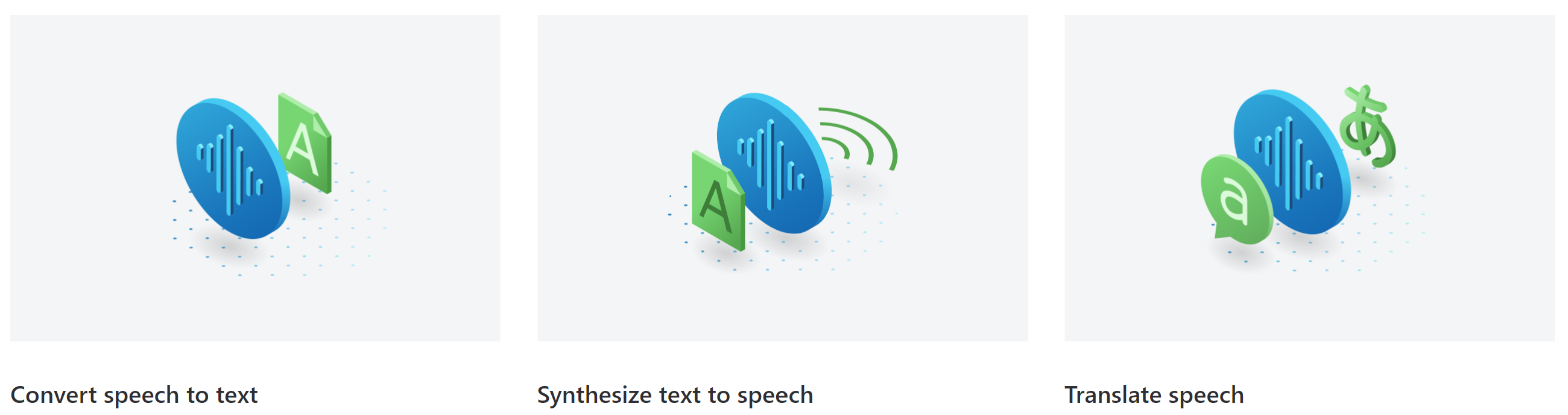
Azure Speech in Foundry Tools offers powerful speech recognition and natural language understanding capabilities, making it easier to integrate voice-based features into applications.
Key Features:
- Speech-to-Text API: Converts spoken language into written text in real-time. It supports multiple languages and can handle diverse accents and dialects.
- Text-to-Speech API: Converts written text into natural-sounding speech, supporting various voices and languages.
- Speech Translation: Real-time translation of spoken language, making it easy to build multilingual communication applications.
- Speaker Recognition: Identifies and verifies the identity of speakers based on their unique voice patterns.
Use Cases:
- Customer Service: Voice-enabled assistants that transcribe and respond to customer queries.
- Healthcare: Medical transcription services where speech is converted to text for easier record-keeping.
- Education: Real-time language translation for students and teachers speaking different languages.
- Smart Devices: Virtual assistants in IoT devices, such as Alexa or Siri, that respond to voice commands.
https://www.youtube.com/watch?v=NtP5FgOXkaM
3. Language: Text Analytics, Translation, and Language Understanding
Microsoft Foundry provides a suite of tools for analyzing, translating, and understanding text in a variety of languages. These services are powered by machine learning models that can process text data to identify sentiment, key phrases, entities, and even emotions.

Key Features:
- Text Analysis: Analyzes text to extract key phrases, detect sentiment (positive, neutral, negative), and identify named entities (such as dates, locations, or people).
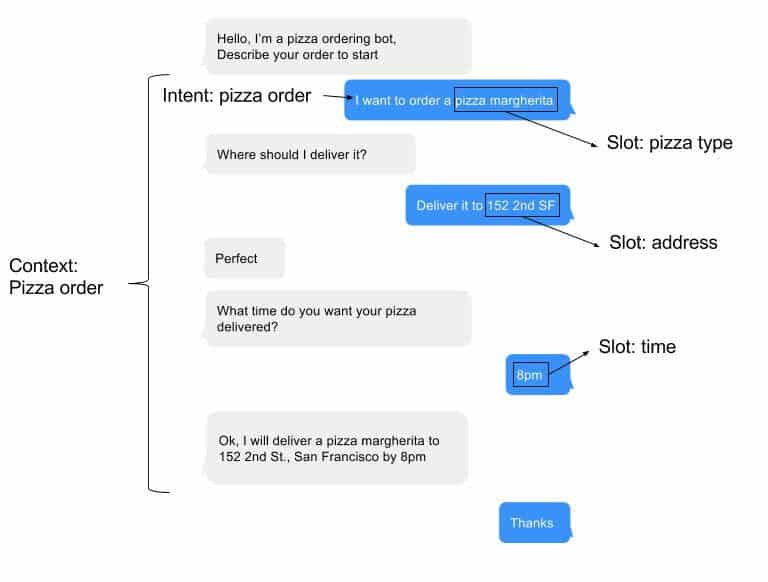
- Conversational Language Understanding: Helps developers build custom language models that allow applications to understand user intents and extract relevant data from spoken or written text.
- Translator: Provides automatic translation between multiple languages in real-time, enabling multilingual communication.
- Custom Question Answering: Creates a knowledge base from documents or FAQs, allowing businesses to build intelligent Q&A systems for customer support.
Use Cases:
- Social Media Monitoring: Analyzing customer sentiment and engagement on social media platforms.
- Customer Support: Automating responses in chatbots or virtual assistants to resolve customer queries based on intent and context.
- Content Moderation: Detecting inappropriate content in online platforms through text analysis.
- E-commerce: Personalizing shopping experiences by recommending products based on user preferences and sentiment analysis.
Related Readings: What is NLP?
4. Decision: Anomaly Detection, Content Moderation, and Personalization
Microsoft Foundry provides tools that help keep applications and platforms safe by detecting harmful content in text and images, including content generated by AI. These services help businesses protect their users and meet their own content guidelines.

Key Features:
- Azure AI Content Safety: Detects harmful user-generated and AI-generated content in text and images across four categories: sexual content, violence, hate, and self-harm, with severity levels for each.
- Multilingual Support: Moderates content in more than 100 languages.
- Custom Term Lists: Lets businesses add their own blocked terms on top of the built-in models.
- Content Safety Studio: An interactive studio where you can explore and test the service before adding it to an application.
- Protection for AI-Generated Content: Includes features such as protected material detection, which checks AI-generated text for known text content.
Use Cases:
- Social Platforms: Moderating user-generated posts and images to keep platforms safe and compliant.
- E-commerce: Screening product reviews and listings for offensive or risky content.
- Gaming and Messaging: Filtering harmful chat messages in real time.
- Generative AI Apps: Checking the prompts and responses of chatbots and assistants.
5. Generative AI: Creating Advanced Generative AI Applications
Generative AI enables businesses to create applications that generate new content, whether it’s text, images, or other forms of media. Azure OpenAI in Microsoft Foundry Models offers access to the GPT-5 family of models for applications that require advanced natural language generation.
Key Features:
- Azure OpenAI in Microsoft Foundry Models: Provides access to models such as GPT-5 and GPT-5-mini, which can generate human-like text for tasks like content creation, summarization, and conversational agents.
- Text Generation: Automatically generating readable, contextually relevant text for marketing content, reports, or even creative writing.
- Chatbots and Virtual Assistants: Using GPT-based models to create interactive conversational agents capable of engaging users with human-like responses.
- Customizable Models: Azure allows businesses to fine-tune AI models to meet specific needs, such as legal document creation, coding assistance, or customer service conversations.
Use Cases:
- Marketing: Automating content generation for blogs, social media posts, and product descriptions.
- Customer Support: Building chatbots that offer 24/7 support with accurate, human-like interactions.
- Media and Entertainment: Creating scripts, articles, and other creative content using AI-driven text generation.
- Software Development: Code generation and auto-completion tools that assist developers with programming tasks.
Specialized AI Services in Microsoft Foundry
Beyond its core AI offerings, Microsoft Foundry provides a suite of specialized AI services that cater to specific business needs. These services help businesses tackle unique industry challenges by automating processes, enhancing customer interactions, and deriving insights from complex data sources. Below, we explore some of the most impactful specialized services:
1. Foundry Agent Service: AI Agents for Customer Service Automation
Foundry Agent Service empowers businesses to build, deploy, and manage AI agents that can interact with customers, handle inquiries, and take action on their behalf. Built on the OpenAI Responses API, it is generally available and works with models from OpenAI as well as other providers such as DeepSeek, xAI, and Meta. For example, healthcare providers can build patient-focused agents that assist with appointment scheduling, symptom checking, and instant support, improving both efficiency and patient engagement.
Key Features:
- Multi-model support: Build agents on OpenAI models or on models from other providers available in Microsoft Foundry.
- Framework flexibility: Works with popular agent frameworks such as LangChain and LangGraph.
- OpenAI compatibility: Compatible with OpenAI agents, so you can use familiar tools and patterns.
Use Cases:
- Customer Support: Automate responses to frequently asked questions and resolve common customer queries quickly.
- E-commerce: Assist customers with product recommendations, order tracking, and queries about inventory.
- Lead Generation: Engage visitors on websites to collect information, qualify leads, and schedule appointments.
2. Azure Document Intelligence in Foundry Tools : Automating Data Extraction from Documents
Azure Document Intelligence in Foundry Tools is a tool designed to automatically extract structured data from scanned documents, PDFs, and images. It uses machine learning and optical character recognition (OCR) to analyze documents and extract relevant information such as names, addresses, and invoice details. For more advanced, LLM-powered extraction, it works alongside Azure Content Understanding in Foundry Tools.

Key Features:
- Pre-trained models: Out-of-the-box models can handle common document types like invoices, receipts, ID documents, bank statements, contracts, health insurance cards, and US tax forms.
- Customizable models: Users can train custom models to recognize specific document types unique to their business.
- Data extraction: Automatically extracts fields such as text, numbers, dates, and key-value pairs from documents.
Use Cases:
- Invoice Processing: Automate the extraction of information from invoices, reducing manual data entry.
- Healthcare: Extract medical information from prescriptions and patient forms for easy integration with databases.
- Finance: Extract transaction details from receipts or contracts and input them directly into accounting systems.
3. Azure Video Indexer: Deriving Insights from Video Analytics
Azure Video Indexer helps businesses extract actionable insights from video and audio content. It combines computer vision, speech recognition, and AI-based analysis to make video content searchable and useful, which is valuable for industries that rely on video for security, marketing, or operational efficiency.

Key Features:
- Video Indexing: Indexes video content and generates metadata such as labels, detected faces, and objects.
- Speech-to-Text: Converts spoken language within videos into text, enabling search and analysis of audio content.
- Sentiment Analysis: Analyzes the sentiment of spoken content in a video.
Face identification and celebrity recognition in Video Indexer require Limited Access approval from Microsoft.
Use Cases:
- Security: Review recorded surveillance footage to find unusual activities or specific events.
- Media & Entertainment: Analyze video content for automated tagging, indexing, and recommendation systems.
- Retail: Use recorded video for customer behavior analysis and store traffic review.
4. Azure OpenAI in Microsoft Foundry Models: Enterprise-Ready Generative AI
Azure OpenAI in Microsoft Foundry Models grants businesses access to OpenAI models, including the GPT-5 family (GPT-5, GPT-5-mini, and GPT-5-nano), through Azure. These models excel at generating human-like text, answering questions, summarizing content, and creating original content based on prompts.
Key Features:
- Enterprise-Ready: Models are hosted and operated by Azure, billed through your Azure subscription, covered by Azure service-level agreements, and supported by Microsoft.
- Customizable: Fine-tune supported models to better align with your business needs, whether for content creation, chatbot development, or research.
- Scalable: These models are cloud-based and can handle requests from individual developers to large enterprise applications.
Use Cases:
- Content Generation: Automatically generate blog posts, articles, and product descriptions.
- Customer Service: Develop advanced chatbots that can carry on meaningful conversations and respond to customer inquiries.
- Market Research: Analyze vast amounts of unstructured data from sources like social media, news, and customer reviews to uncover trends and insights.
Why Choose Microsoft Foundry for AI
Organizations across various industries are facing fierce competition and rapidly evolving technology landscapes. As businesses are pushed to innovate faster and become more efficient, the AI services in Microsoft Foundry are increasingly essential. These services address several core business needs, enabling companies to leverage the full potential of AI and cloud computing to stay agile, competitive, and responsive to customer needs.
1. Data Demands
In the modern business world, organizations are generating massive amounts of data, whether it’s customer interactions, transactions, or operational metrics. Microsoft Foundry helps businesses process and analyze this vast data to extract meaningful insights. AI-driven cloud solutions enable businesses to efficiently handle these data volumes, turning raw data into actionable information that can drive decision-making.

How it Helps:
Microsoft Foundry’s advanced AI models help businesses quickly sort through and interpret large data sets, enabling faster responses to market changes. This capability helps companies become more agile, quickly adapting to new challenges and opportunities.
Use Cases:
- Customer Behavior Analysis: AI helps businesses understand consumer behavior by analyzing large datasets, enabling them to adjust their strategies in real-time.
- Supply Chain Optimization: AI processes data to forecast demand, optimize stock levels, and reduce operational costs.
2. Informed Decision-Making
With AI integrated into cloud services, organizations can leverage machine learning algorithms to gain deeper insights into their data. These insights significantly improve the accuracy of decision-making by identifying patterns, trends, and anomalies that would be difficult or impossible to detect manually.

How it Helps:
By utilizing machine learning models, Microsoft Foundry helps businesses forecast potential outcomes, assess risks, and make decisions based on real-time data, rather than relying on outdated or incomplete information.
Use Cases:
- Financial Forecasting: Businesses can use AI to predict revenue, cash flow, or market fluctuations, leading to more accurate budgeting and investment decisions.
- Demand Forecasting: AI models can predict future customer demand, enabling businesses to plan production, logistics, and marketing strategies accordingly.
3. Advanced Analytics
Azure Machine Learning offers advanced analytics capabilities that go beyond traditional data analysis. These services empower businesses to analyze large datasets and gain insights that drive efficiency and innovation. Together with Microsoft Foundry, AI-powered analytics can predict market trends, detect anomalies, and identify patterns that provide valuable business intelligence.

How it Helps:
With access to advanced AI models, businesses can perform predictive analytics, anomaly detection, and data clustering, providing a more sophisticated understanding of their operations and markets.
Use Cases:
- Anomaly Detection: Detect unusual patterns in real-time, such as fraudulent transactions in financial services or unusual traffic spikes in e-commerce websites.
- Predictive Maintenance: Azure AI can predict equipment failure before it occurs, minimizing downtime in manufacturing or production environments.
4. Seamless Integration
One of the key benefits of Microsoft Foundry is how effortlessly it integrates with existing cloud infrastructure. Whether you’re already using Azure, Microsoft 365, or other cloud-based applications, Foundry tools work seamlessly within the ecosystem, ensuring smooth deployment and rapid adoption across businesses.

How it Helps:
Microsoft Foundry is built to integrate with a wide variety of existing solutions, making it easy for businesses to add AI capabilities without overhauling their entire infrastructure. This reduces the complexity and time required for adoption, allowing businesses to quickly realize the benefits of AI.
Use Cases:
- CRM Integration: AI integrates with CRM systems like Microsoft Dynamics 365, enabling automated customer support and personalized marketing campaigns.
- IoT Applications: AI can be integrated into IoT systems to automate processes and enhance decision-making based on real-time data from sensors and devices.
Related Readings: Create an Azure AI Service
5. Personalized Experiences
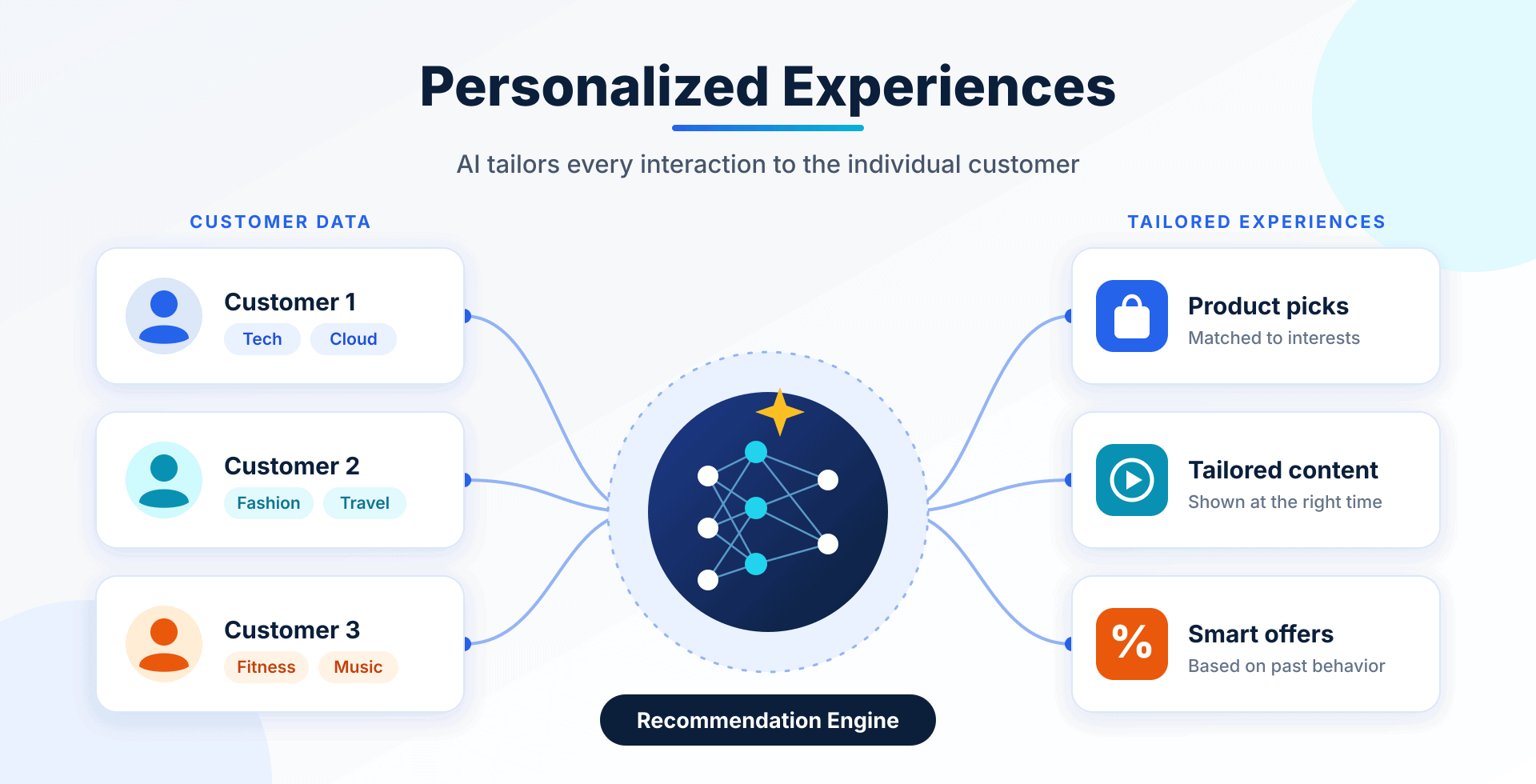
AI is at the core of delivering personalized experiences for customers. With AI-powered solutions such as recommendation engines, businesses can tailor their services and offerings to individual customers, boosting engagement and satisfaction.
How it Helps:
By analyzing customer data, AI can recommend products, content, and services based on preferences, past behavior, and predictive models. This personalization enhances customer loyalty and drives sales.
Use Cases:
- E-Commerce: Personalized product recommendations based on browsing history, increasing conversion rates.
- Entertainment: Content recommendations for users based on their viewing habits, improving user engagement in platforms like Netflix or Spotify.
6. Scalability
Microsoft Foundry’s AI services are hosted in the cloud, which means they are highly scalable to meet growing business demands. Whether your business is handling a seasonal spike in customer requests or expanding into new regions, cloud AI can automatically scale to meet these needs, all without requiring significant upfront investments in infrastructure.

How it Helps:
Cloud-based AI services provide the flexibility to scale resources up or down based on demand, ensuring that businesses only pay for what they use. This is especially important for businesses experiencing fluctuating demands or growth.
Use Cases:
- Retail: Scale up AI-powered systems during peak shopping seasons like Black Friday or holiday sales.
- Startups: Use scalable AI solutions without needing to invest heavily in infrastructure, enabling them to compete with larger organizations.
7. Competitive Edge
By adopting AI-driven solutions, organizations can gain a competitive edge by improving operational efficiency, accelerating innovation, and delivering superior customer experiences. AI allows businesses to automate tasks, optimize processes, and focus on strategic growth rather than day-to-day management.

How it Helps:
AI gives businesses the tools to innovate faster and stay ahead of competitors by providing deeper insights, automation, and personalized offerings. Companies that implement AI can adapt quickly to changes, enabling them to be more proactive rather than reactive.
Use Cases:
- Real-Time Marketing: AI enables businesses to optimize digital marketing campaigns on-the-fly, ensuring they are always aligned with customer behavior and market conditions.
- Product Development: AI-driven insights into customer preferences can drive new product innovations that cater to evolving customer needs.
8. Enhanced Security
AI helps strengthen security across cloud applications. Azure AI Content Safety screens content for harm, and Microsoft security tools such as Microsoft Defender and Microsoft Sentinel use machine learning to help detect threats. Together they help protect sensitive data and keep systems running safely.

How it Helps:
AI can monitor activity, flag abnormal patterns, and highlight potential threats faster than manual review, giving businesses stronger protection against cyberattacks, fraud, and harmful content.
Use Cases:
- Cybersecurity: Microsoft Defender and Microsoft Sentinel use machine learning to flag abnormal network activity and raise alerts.
- Fraud Prevention: AI can identify suspicious financial transactions and alert businesses in real-time to prevent fraud.
Microsoft Foundry: General Cost Characteristics
Microsoft Foundry services adopt a flexible pricing model designed to accommodate businesses of all sizes. Key characteristics include:
- Pay-as-you-go: Ideal for managing fluctuating workloads and minimizing upfront costs.
- Flexible Pricing Tiers: Available to suit diverse business needs and growth stages.
- Cost Transparency: Azure offers comprehensive cost monitoring tools, enabling effective budget management and cost optimization.
Related Readings: Azure Subscriptions : Overview
Beyond Azure: AI Integration in AWS & GCP
While Microsoft Foundry’s AI offerings are extensive, Amazon Web Services (AWS) and Google Cloud Platform (GCP) also feature powerful AI integration, providing additional options for enterprises.
AWS AI Services
AWS AI includes Amazon SageMaker AI for building, training, and deploying machine learning models, Amazon Bedrock for building generative AI applications with foundation models, Amazon Bedrock AgentCore for deploying and operating AI agents at scale, Amazon Rekognition for image and video analysis, and Amazon Lex for building conversational interfaces. AWS continuously evolves its cloud machine learning platforms, making generative AI applications more accessible.
Google Cloud AI
GCP offers powerful cloud AI platforms like the Gemini Enterprise Agent Platform for building, deploying, and managing machine learning models and AI agents. Google Cloud emphasizes generative artificial intelligence, notably with its Gemini models, making complex generative AI applications simpler for developers.
Learning Artificial Intelligence: Starting Your Journey
With rapid AI integration in cloud services, understanding fundamental AI concepts is essential. For professionals looking to deepen their AI skills:
- Explore Online Courses: K21 Academy offers specialized courses such as the AI/ML Job Oriented Program.
- Hands-on Labs: Engage in practical projects using Microsoft Foundry, AWS Machine Learning, and Google Cloud AI for real-world experience.
- Continuous Learning: Stay updated with evolving trends through dedicated forums, blogs, and professional communities like K21 Academy.
Related Readings: Top 10 AI Job Roles in 2025 | K21Academy
Conclusion
AI integration across cloud platforms like Azure, AWS, and GCP is revolutionizing how businesses operate, innovate, and compete. From handling complex data demands and enabling intelligent decision-making to delivering personalized customer experiences and improving operational security, the benefits are profound.
Azure AI services, in particular, offer diverse solutions tailored to unique business needs, empowering enterprises to embrace artificial intelligence confidently and cost-effectively. By staying ahead in adopting these transformative technologies, IT professionals and businesses alike can position themselves at the forefront of the digital revolution.
FAQ: Key Questions Answered
What is Microsoft Foundry?
Microsoft Foundry is Microsoft's platform for building AI applications and agents. Its Foundry Tools are pre-built APIs and tools that help developers add AI capabilities such as vision, speech, language, content safety, and generative AI to their applications without specialized machine learning expertise.
What is the difference between Foundry Tools and Azure OpenAI?
Foundry Tools cover a broad range of AI capabilities, while Azure OpenAI in Microsoft Foundry Models specifically provides access to OpenAI's generative AI models, like the GPT-5 family, tailored primarily for advanced natural language processing tasks.
Is Microsoft Foundry the same as Copilot?
No. Microsoft Foundry is a platform that developers use to build their own AI applications and agents, while Copilot is a family of AI assistants from Microsoft, such as GitHub Copilot for coding, Microsoft 365 Copilot for work apps, and Copilot Studio for building custom agents.
How to consume Foundry Tools?
Foundry Tools are consumed through REST APIs, SDKs, the Azure portal, and the Microsoft Foundry portal. Businesses can integrate these services directly into their applications, enabling rapid deployment and scalability.