


In this blog, You will get Azure Cloud Top Interview Questions and Answers.
You are using Azure Cloud Monitoring to monitor the performance of your Azure resources. You need to identify any resources that are performing poorly and take steps to improve their performance. How would you do this? Planning for a job switch in Azure and wondering what questions can be asked based on current market trends? Here we have come up with the most choosy and realistic Azure interview questions.
We at K21Academy have sorted out the most preferred questions in the interviews according to the job trends!!
What we will cover inside:
- Two Interview questions you can always expect !!
- Top 10 Azure Cloud Realistic Interview Questions
- Azure Admin Interview Questions
- Azure DevOps Interview Questions
- Azure Solution Architect Interview Questions
- Topic Wise Azure Interview Questions
Two Interview questions you can always expect !!
Question 1: Tell me about yourself ! or Introduce yourself
Suggestion:
Pretty common, but you want to be prepared for this to differentiate yourself from the crowd.
Most people start rambling about all their experiences, their schooling, and the certifications they have.
That doesn’t help the company at all.
They’re not actually hiring for that.
They’re hiring because they have a problem, and they need to find someone who can help them solve it
So, when companies ask me about myself, for example, You give a brief short (few lines like “Connect your experience to the job: Tailor your response to align with the job description and the company’s needs. Emphasize how your skills and experience make you an ideal candidate for the Azure Cloud position you’re interviewing for. For example, “I noticed that this role requires expertise in [mention a specific skill or area], which I’ve honed over the years. I’m excited about the opportunity to contribute to [Company Name] by leveraging my Azure Cloud experience.””)
and then flip the question on them and answer something like this, “You know, I have a lot of experience that I could talk about, but I don’t want to bore you with that. Could you let me know the specific problem you’re hiring for, and I can tell you about my experience in that area?”
Boom!
Now you are addressing their specific problem and identifying how my skill set will add value to their company.
Question 2: Any questions that you would like to ask?
Suggestion:
Any question that you would like to ask;
make sure you stand out by asking
“Based on everything that we discussed today about my background and my experience, is there any reason why you wouldn’t offer me this job?”
Yes, it feels uncomfortable.
But the reason why you want to ask this question is it gives you the opportunity to overcome any objections they may have.You have to remember that you’re selling your services and a good salesperson is good at handling objections.
They might say, “Hey, you know what? We’re not sure you have the right experience that we’re looking for right now.”
This gives you a chance to offer a rebuttal and clear up any misconceptions they may have about you.
As uncomfortable as this question may be, it saves you heartache in the long run.
This question will clarify exactly what their needs are and why you might not be the right fit… instead of feeling like you killed an interview and finding out you still didn’t get the job.
Follow Up –
Finally, you must send an email to the person who interviewed you to thank them for their time. Remember, they’re giving you something that they can never get back: their time.
And it’s only right to thank them for spending their valuable time with you.
Let’s look at the technical questions now!
Top 10 Realistic Azure interview questions
Q1: What Azure networking components or features have you utilized in a project to ensure secure and reliable communication between virtual machines and services?
Q2: What steps would you take to optimize costs in Azure? Can you share some best practices for monitoring and managing resource usage to ensure cost efficiency?
Q3: You have created Azure CI/CD Pipeline and you have to deploy this to multiple environments (test or dev). Can you use the same Pipeline? How can you achieve this?
Q4: You might have heard about the Azure express route, often you might have used VPN so what makes the express route similar or different from VPN?
Q5: A company is looking to migrate its on-premises infrastructure to Azure. What are the key considerations for this migration?
Q6: So a company is looking to implement a disaster recovery solution for their Azure workloads. What are the different Azure services that can be used for disaster recovery?
Q7: An MNC is looking to improve the performance of its Azure web application. What are some ways that Azure Storage can be used to improve the performance of the web application?
Q8: We need to integrate your Azure applications with on-premises systems as we also want to keep our physical system too. What Azure services would you use to integrate the systems?
Q9: We need to implement the process of automating tests in Azure DevOps. What testing frameworks and tools do you prefer, and why?
Click on the below image to get the answers to the above questions:
Azure Admin Interview Questions
Q1: Can you describe your experience in designing and deploying virtual machines in Azure?
Q2: You are managing an Azure environment with 100 virtual machines. One of the VMs is experiencing performance issues. How would you troubleshoot the issue?
Q3: You are using Azure Networking to create a virtual network for your Azure environment. You need to ensure that the network is secure and compliant with industry standards. How would you do this?
Q4: There is a requirement of Azure Cloud Monitoring to monitor the performance of your Azure resources. You need to identify any resources that are performing poorly and take steps to improve their performance. How would you do this?
Q5: You are implementing a new Azure security policy. How would you ensure that the policy is applied to all of the VMs in the environment?
Q6: What are Azure Resource Manager templates, and how do they make them unique from other infrastructure as code available in the market?
Q7: Can you provide an example of a challenging issue you’ve resolved in Azure and your approach to troubleshooting it?
Q8: How are Windows Active Directory and Azure Active Directory different?
Q9: Describe your experience in administering Azure environments and ensuring they adhere to industry standards.
Azure DevOps Interview Questions
Q1: Can you describe your experience with Azure DevOps, particularly in setting up and managing CI/CD pipelines for web applications and databases?
Q2: How comfortable are you with Infrastructure as Code (IaC) using JSON or YAML, and have you worked with Terraform for this purpose?
Q3: Could you explain your experience with Azure Key Vault, Azure Resource Manager, and Azure Monitor/App Insights/Log Analytics?
Q4: Let’s say a new project is initiated. What steps would you take to create and set up this project in Azure DevOps, ensuring it aligns with the organization’s best practices?
Q5: DevOps practices and technologies evolve rapidly. How do you stay updated on the latest trends, changes, and associated products or services in the DevOps field?
Q6: Can you provide an example of a situation where you helped implement best practice processes and tooling in a DevOps environment? What challenges did you face, and how did you overcome them?
Q7: Imagine you are tasked with training product teams on Azure DevOps and related tools like Git, Azure Pipelines, and Azure Test Plans. How would you structure this training to ensure effective adoption?
Q8: You’re assisting a new acquisition in migrating their source code, work item management, and development processes into Azure DevOps. What steps would you follow to ensure a smooth transition?
Azure Solution Architect Interview Questions
Q1: Explain your approach to network architecture in Azure.
Q2: Can you provide an example of how you’ve provided best practice guidance on architectural design across multiple applications and projects in an enterprise context?
Q3: How would you estimate the resources and timelines needed for a cloud migration project?
Q4: Do you have hands-on experience with containerization tools like Docker and Kubernetes? How do you integrate these into Azure architectures?
Q5: In your role, you need to communicate with development teams and internal organizations. Can you provide an example of a technical discussion where you communicated effectively at a peer level?
Q6: How do you address cloud hardening and security concerns in Azure, especially with Azure Security Center? Can you explain how you ensure compliance with Azure security standards?
Q7: Imagine you have specific requirements for an Azure-based project. How would you select the appropriate Azure services to design and deploy the infrastructure effectively?
Q8: How would you prepare LLD and HLD designs for a cloud project?
Q9: Can you provide an example of technical documentation that you have created?
Azure Interview Questions – Compute
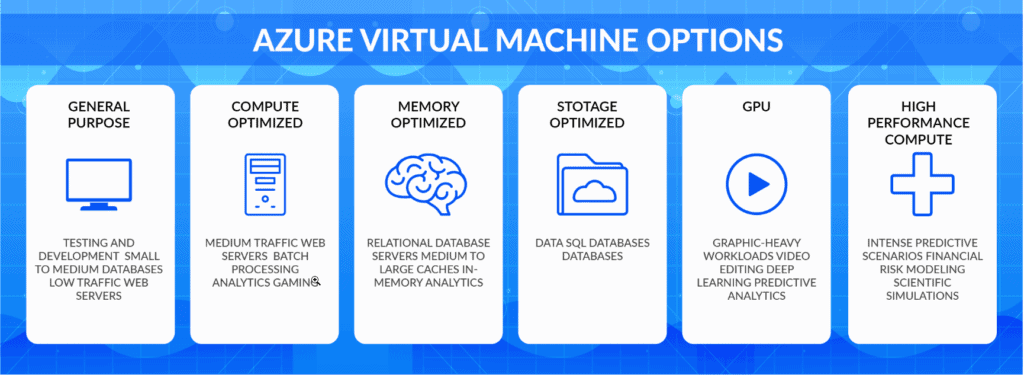
1) What is a Windows Azure compute emulator?
The compute emulator is a local emulator of Windows Azure that you can use to build and test your application before deploying it to Windows Azure.
2) How much storage can I use with a virtual machine?
Each data disk can be up to 1 TB. The number of data disks that you can use depends on the size of the virtual machine.
Azure Managed Disks are the new and recommended disk storage offerings for use with Azure Virtual Machines for persistent storage of data. You can use multiple Managed Disks with each Virtual Machine. Managed Disks offer two types of durable storage options: Premium and Standard Managed Disks.
3) Is it possible to log in to a Linux Virtual Machine without using a password?
Yes, it is possible by making use of the Key Vault mapping to any Admin VM, we can log in to another VM without the need for a password.
4) Define Azure virtual machine scale sets.
These are the Azure computation resources that can be used to deploy and manage sets of identical Virtual Machines (VMs).
These scale sets are configured in the same manner and are designed to support the autoscaling of the applications without the need for pre-provisioning of the VMs.
They help to build large-scale applications targeting big data and containerized workloads in an easier manner.
5) How can a VM be created by means of Azure CLI?
az vm create `
--resource-group myResourceGroupName `
--name myVM --image win2016datacenter `
--admin-username AzureuserNAME `
--admin-password AzurePASSWORD
Read More: Virtual Machine In Azure.
6) SQL Server installed on a Virtual Machine is an example of?
If you install SQL Server on a virtual machine manually or by using a box image, it is still a virtual machine. That means customers still need to manage all of the platform aspects. This includes the operating system settings, patches, middleware, SQL Server runtime settings, etc. As such this remains an Infrastructure as a Service.
7) Can I copy or clone an existing Azure VM?
Yes. Using managed images, you can create an image of a virtual machine and then use the image to build multiple new VMs.
Azure Interview Questions – Storage
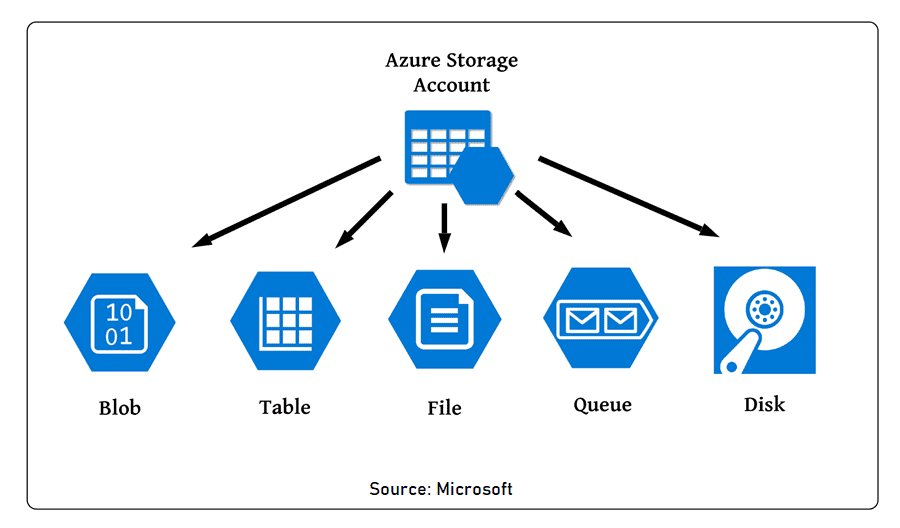
8) What is Azure Blob Storage?
Azure Blob Storage is the object storage solution provided by Microsoft for the cloud. Blob stands for “Binary Large Object”. Blob-based storage is used to store massive unstructured data in terms of text or binary format. It is ideal for serving documents/images/audio/video/text directly to the browser.
9) What are the types of storage services apart from blob storage provided by Azure?
Azure provides overall 4 types of storage services – Blob Service, Table Storage, Queue Storage, and File Storage Services.
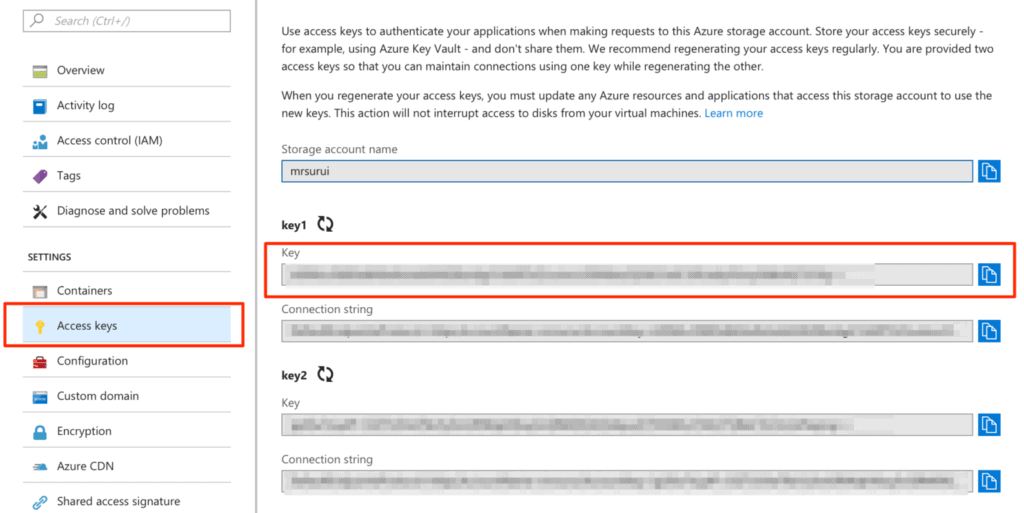
10) Define azure storage key.
Azure storage key is used for authentication for validating access for the Azure storage service to control access of data based on the project requirements. We have two types of storage keys for authentication purposes –
- Primary Access Key
- Secondary Access Key
11) What is Azure Explorer?
Azure Explorer is a free Microsoft Azure storage tool; in this, we can manage all our Microsoft Azure blobs at a commonplace or one place. Azure Storage Explorer is a useful GUI tool for inspecting and altering the data.
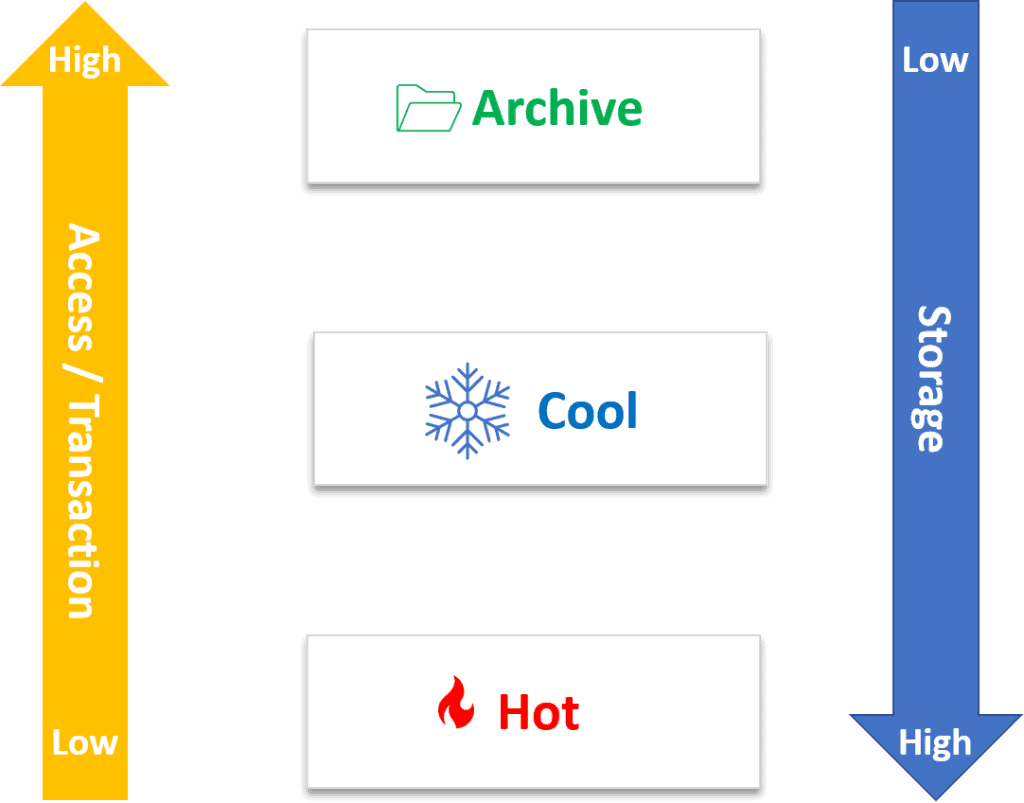
12) Azure Blob storage offers how many storage tiers?
Azure Blob, the platform’s object storage service, has four available storage tiers: Premium, Hot, Cool and Archive.
Premium and Hot are meant to store frequently accessed data, with the former offering higher performance. Cool stores infrequently accessed data held for at least 30 days, and Archive has flexible latency requirements for rarely accessed data, which is stored for at least 180 days.
Read More: Azure Storage Accounts
Azure Interview Questions – Networking
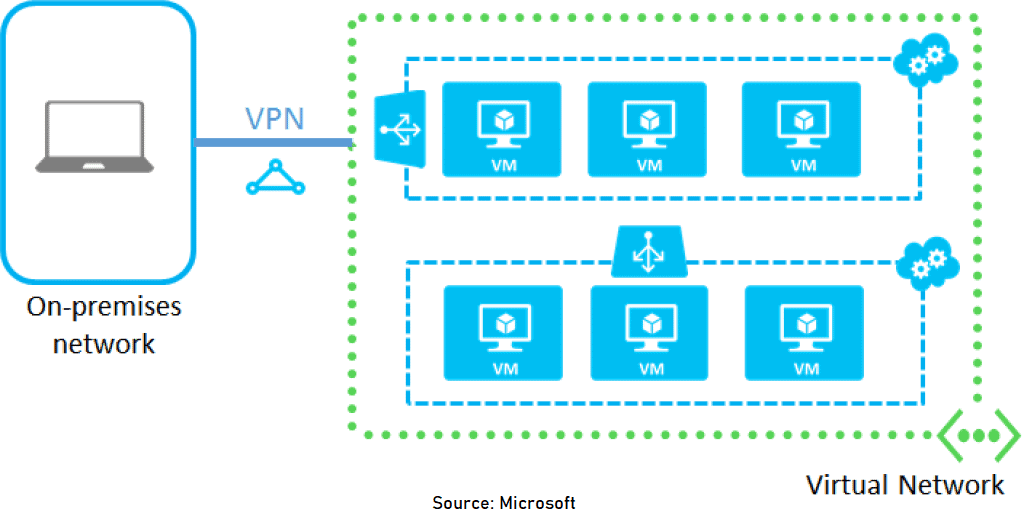
13) What tools can I use to create a VNet?
You can use the following tools to create or configure a VNet:
- Azure portal
- PowerShell
- Azure CLI
- A network configuration file (netcfg – for classic VNets only).
14) How small and how large can VNets and subnets be?
The smallest supported IPv4 subnet is /29, and the largest is /2 (using CIDR subnet definitions). IPv6 subnets must be exactly /64 in size.
15) Can I connect to the internet from a VM in a VNet?
Yes. All VMs and Cloud Services role instances deployed within a VNet can connect to the Internet.
Read More: Virtual Networks
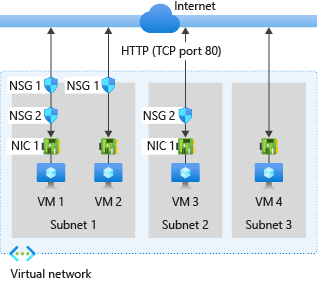
16) What is NSG?
NSG stands for Network Security Group that has a list of ACL (Access Control List) rules which either allows/denies network traffic to subnets or NICs (Network Interface Card) connected to a subnet or both. When NSG is linked with a subnet, then the ACL rules are applied to all the Virtual Machines in that subnet.
17) Which service is a cloud-based network security service that helps to protect the resources that are stored in an Azure Virtual Network?
The Azure Firewall is a cloud-based service that can be used to protect resources in an Azure virtual network. Here you can define network rules and application rules to protect your Azure Virtual Network.
Read More: Azure Firewall vs (NSG)
18) What is Azure Network Virtual Appliance (NVA)?
Azure network virtual appliance is used in the Azure application to enhance high availability. It is used as an advanced level of control over traffic flows, such as when building a demilitarized zone (DMZ) in the cloud.
Azure Interview Questions – Identities & Governance
19) What is Azure Active Directory?
Azure Active Directory (Azure AD) is Microsoft’s cloud-based identity and access management service, which helps your employees sign in and access resources in:
External resources, such as Microsoft 365, the Azure portal, and thousands of other SaaS applications.
Internal resources, such as apps on your corporate network and intranet, along with any cloud apps developed by your own organization.
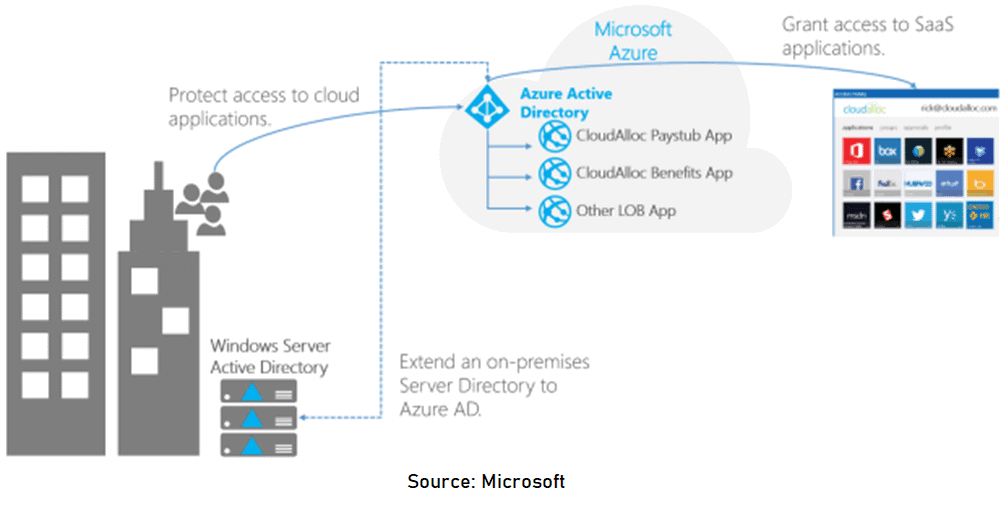
20) How can I connect my on-premises directory to Azure AD?
You can connect your on-premises directory to Azure AD by using Azure AD Connect.
21) What is Azure AD Multi-Factor Authentication?
Multi-factor authentication is a process where a user is prompted during the sign-in process for an additional form of identification, such as to enter a code on their cellphone or to provide a fingerprint scan.
Azure AD Multi-Factor Authentication works by requiring two or more of the following authentication methods:
- Something you know, typically a password.
- Something you have, such as a trusted device that is not easily duplicated, like a phone or hardware key.
- Something you are – biometrics like a fingerprint or face scan.
22) What additional forms of verification can be used with Azure AD Multi-Factor Authentication?
- Microsoft Authenticator app
- OATH Hardware token (preview)
- OATH Software token
- SMS
- Voice call
Read More: Azure AD MFA
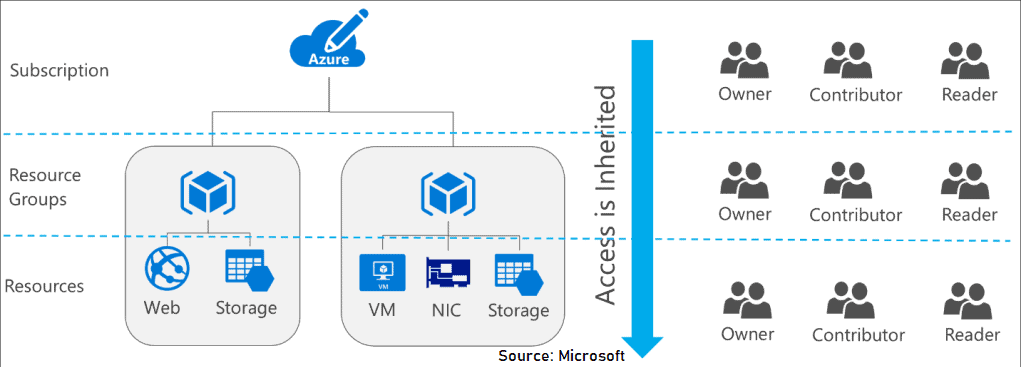
23) What is Azure RBAC?
Azure role-based access control (Azure RBAC) helps you manage who has access to Azure resources, what they can do with those resources, and what areas they have access to.
Azure RBAC is an authorization system built on Azure Resource Manager that provides fine-grained access management of Azure resources.
24) What can I do with Azure RBAC?
Here are some examples of what you can do with Azure RBAC:
- Allow one user to manage virtual machines in a subscription and another user to manage virtual networks
- Allow a DBA group to manage SQL databases in a subscription
- Allow a user to manage all resources in a resource group, such as virtual machines, websites, and subnets
25) What is Azure Policy?
Policies are sets of rules that specify what can and cannot be created in either a single resource group or a full subscription.
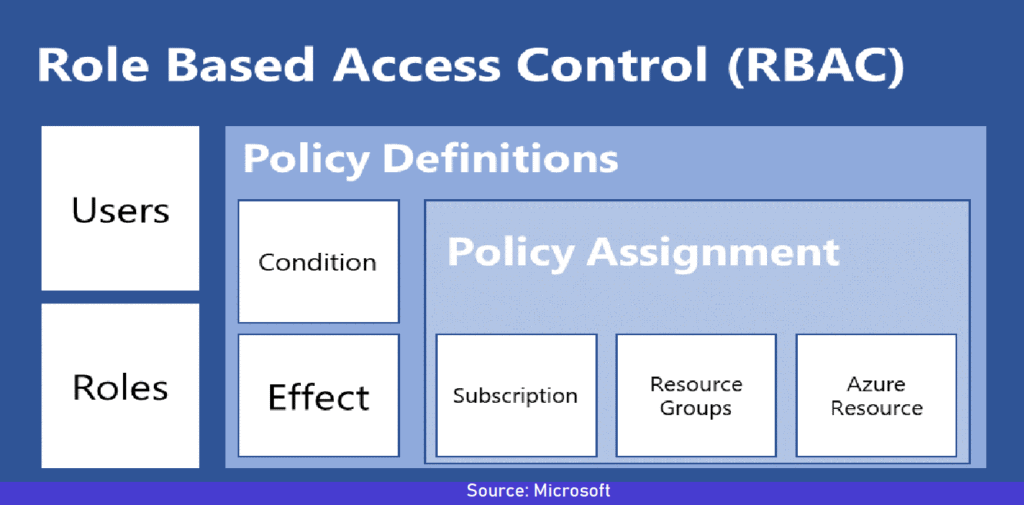
26) What are Azure Blueprints?
Just as a blueprint allows an engineer or an architect to sketch a project’s design parameters, Azure Blueprints enables cloud architects and central information technology groups to define a repeatable set of Azure resources that implements and adheres to an organization’s standards, patterns, and requirements.
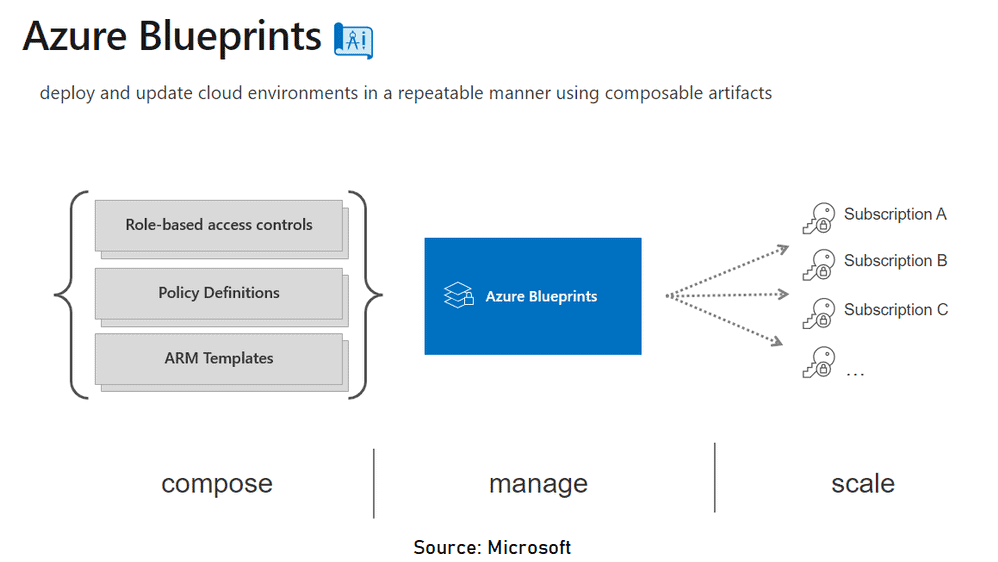
Also Read: Azure RBAC Vs. Azure Policies Vs. Azure Blueprints
Azure Interview Questions – Monitoring
27) What is Azure Monitor?
Azure Monitor is a service in Azure that provides performance and availability monitoring for applications and services in Azure, other cloud environments, or on-premises. Azure Monitor collects data from multiple sources into a common data platform where it can be analyzed for trends and anomalies.
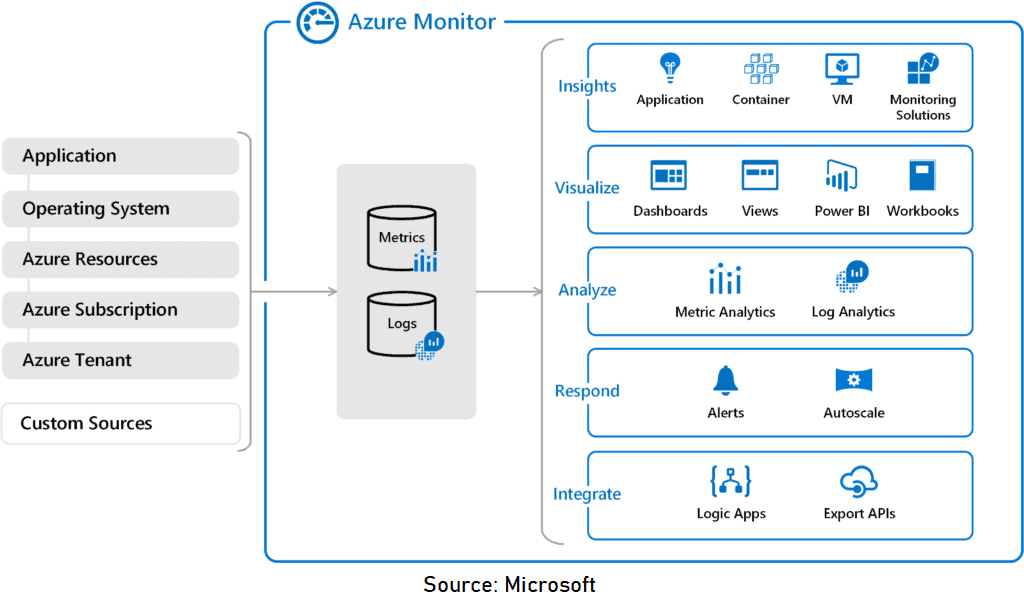
28) How do I enable Azure Monitor?
Azure Monitor is enabled the moment that you create a new Azure subscription, and Activity log and platform metrics are automatically collected.
29) What is Azure Data Explorer?
Azure Data Explorer is a fast, fully managed data analytics service for real-time analysis on large volumes of data streaming from applications, websites, IoT devices, and more.
30) What’s the difference between Azure Monitor Logs and Azure Data Explorer?
Azure Data Explorer is a fast and highly scalable data exploration service for log and telemetry data. Azure Monitor Logs is built on top of Azure Data Explorer and uses the same Kusto Query Language (KQL).
Read More: Azure Cloud Infrastructure Monitoring
Conclusion
Azure is the most used cloud platform, and companies always look for skilled employees. To help you secure a job, we put some effort and listing some preferred topics in Azure Admin Interview Questions.
Related/References
- [AZ-104] Microsoft Azure Administrator Certification Exam: Everything You Need To Know
- [AZ-400] Microsoft Azure DevOps Certification Exam: Everything You Need To Know
- [AZ-305]: Microsoft Azure Solutions Architect Certification Overview
Next Task For You
In our Azure Data Engineer training program, we will cover 28 Hands-On Labs. If you want to begin your journey towards becoming a Microsoft Certified: Azure Data Engineer Associate by checking out our FREE CLASS.