


AWS Developer Associate Hands-On Labs help you build real-world cloud development skills and gain practical experience with core AWS services. This blog provides a step-by-step overview of the labs included in the AWS Certified Developer – Associate (DVA-C02) training program.
These hands-on exercises cover important AWS developer concepts such as serverless computing, API development, CI/CD pipelines, monitoring, containers, databases, and event-driven architectures.

Hands-On Labs Included in the AWS Certified Developer – Associate (DVA-C02) Training Program
- Register for AWS Free Tier Account and Login to AWS Console
- AWS Free Tier Account Service Limits
- CloudWatch Creating Billing Alarm
- How To Use AWS CLI & Setup SDK
- AWS Identity and Access Management (IAM)
- Creating S3 Bucket, Uploading & Accessing Files, and Hosting Website
- S3 Cross-Region Replication
- AWS S3 Multipart Upload using AWS CLI
- Creating a Windows EC2 Instance
- Create a Linux EC2 Instance
- Classic and Network Load Balancer
- Configuring Load Balancer and Autoscaling on EC2 Instances
- Creating an Application Load Balancer from AWS CLI
- Map DNS Using Route53
- Visualize web traffic using Kinesis data stream
- Send an E-mail Through AWS SES
- Monitoring EC2 Instance via CloudWatch SNS
- SQS Visibility Timeout vs Delivery Delay
- Event-Driven Architectures Using AWS Lambda, SES, SNS, SQS
- Build API Gateway with Lambda Integration
- Build API Gateway with path parameter and Query string parameter
- Create a Serverless Workflow with AWS Step Functions
- AWS SAM
- Working with Code Commit
- Getting started with AWS CodeBuild using the console
- Create a Simple Pipeline (Codepipeline)
- Blue/Green Deployments using Elastic Beanstalk
- Install Python modules in AWS Lambda using Cloud9
- Create Cloud9 IDE and Run Scripts
- AWS CloudFormation Nested Stacks
- Store data in SSM Parameter store and the view from AWS CLI
- Creating a User Pool in AWS Cognito
- Enable CloudTrail and store Logs in S3
- Configure Amazon CloudWatch to Notify Change In EC2 CPU Utilization
- Install CloudWatch Agent on EC2 Instance and View CloudWatch Metrics
- Get started with X-Ray
- Using AWS S3 to Store ELB Access Logs
- DynamoDB & Global Secondary Index
- Process New Items with DynamoDB Streams and Lambda
- Create & Manage Amazon Aurora Global Databases
- Creating Ubuntu EC2
- Install & Configure AWS CLI KUBECTL & EKSCTL on Ubuntu Machine
- Create ECR, Install Docker, Create Image, and Push Image to ECR
- Create Elastic Kubernetes Service (EKS) Cluster on AWS
- Deploying PHP Guestbook with Redis Application on EKS Cluster
- Advanced Routing with Ingress-Controller – EKS
- Dynamic Provisioning of AWS EBS Persistent Volumes
- Deploy and Run Application on AWS (EKS) Fargate with ALB
Activity Guides:
Activity Guide 1: Register for an AWS Free Tier Account and Access the AWS Console
An AWS Free Tier Account is the best way to start gaining hands-on experience with AWS cloud services. AWS offers a 12-month Free Tier program for new users, allowing access to a wide range of services with limited free usage.
With the AWS Free Tier, you can explore and practice using popular AWS services such as Amazon EC2, Amazon S3, IAM, Lambda, and CloudWatch while learning core cloud computing concepts. The Free Tier helps beginners and developers build practical AWS skills without significant upfront costs.
Each AWS Free Tier service includes specific usage limits, and charges may apply if those limits are exceeded. Understanding these service limits is important for managing resources and avoiding unexpected billing charges.
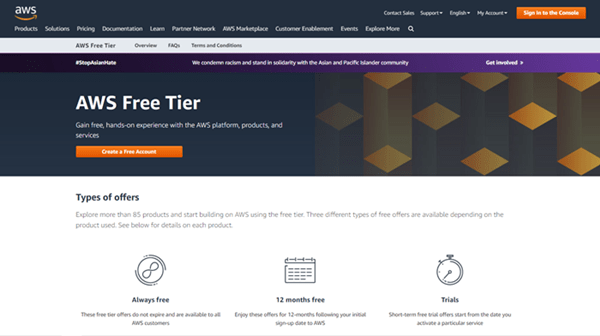
To know how to create a free AWS account, check our Step by steps blog How To Create AWS Free Tier Account.
Activity Guide 2: Understand AWS Free Tier Service Limits
AWS Free Tier services include specific usage limits that allow users to explore AWS cloud services without additional charges. Each AWS service has its own Free Tier limits based on factors such as compute hours, storage capacity, API requests, and data transfer usage.
For example, Amazon EC2 offers limited monthly compute hours for eligible instance types, while Amazon S3 includes limited storage capacity and a specific number of free requests each month. If usage exceeds the Free Tier limits, additional charges may apply based on AWS pricing.
Understanding AWS Free Tier service limits is important for managing cloud resources efficiently, avoiding unexpected billing costs, and optimizing AWS usage during hands-on practice and learning.
In this activity guide, you will learn how to monitor and understand AWS Free Tier service limits across different AWS services.
Check our blog on AWS Free Tier Account Services.
Activity Guide 3: Create Billing Alarms using Amazon CloudWatch
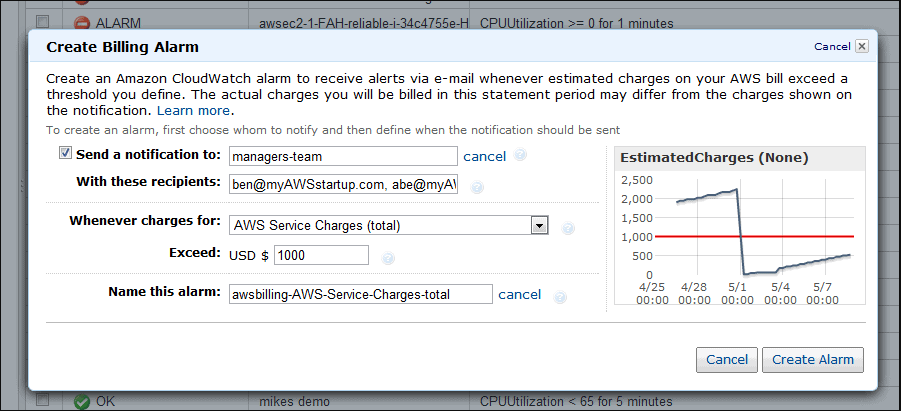
Amazon CloudWatch is a monitoring and observability service that helps users track AWS resource usage, application performance, logs, metrics, and operational events across their AWS environment. CloudWatch can also be used to create billing alarms that help monitor AWS spending and prevent unexpected charges.
Using CloudWatch billing alarms, you can configure notifications based on predefined billing thresholds. For example, you can receive alerts when EC2 CPU utilization exceeds a specific percentage or when your AWS billing amount crosses a defined limit.
Billing alarms are especially useful for AWS Free Tier users who want to monitor resource consumption and stay within free usage limits while practicing hands-on AWS services.
In this activity guide, you will learn how to configure and create billing alarms using Amazon CloudWatch.
Activity Guide 4: Install and Configure AWS CLI and SDKs
The AWS Command Line Interface (AWS CLI) is an open-source tool that allows users to manage and interact with AWS services directly from the command line. Using AWS CLI, developers and administrators can automate tasks, manage cloud resources, and execute AWS operations without using the AWS Management Console.
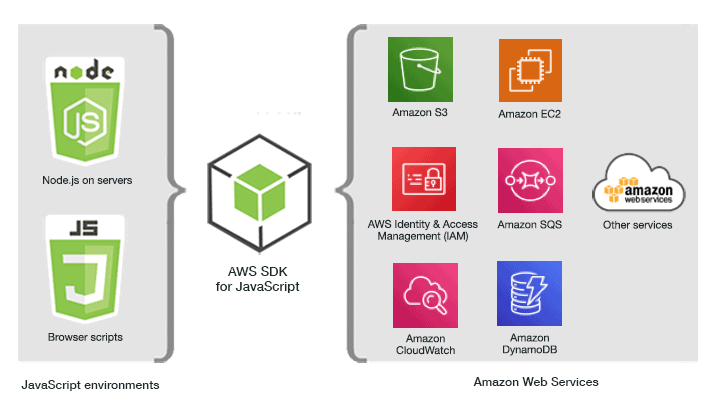
AWS Software Development Kits (SDKs) enable developers to integrate AWS services into applications using programming languages such as Python, Java, JavaScript, and .NET. SDKs simplify application development by providing ready-to-use APIs and libraries for AWS services.
In this activity guide, you will learn how to install, configure, and use AWS CLI and SDKs for managing AWS resources and automating cloud operations.
Activity Guide 5: Manage Access using AWS Identity and Access Management (IAM)
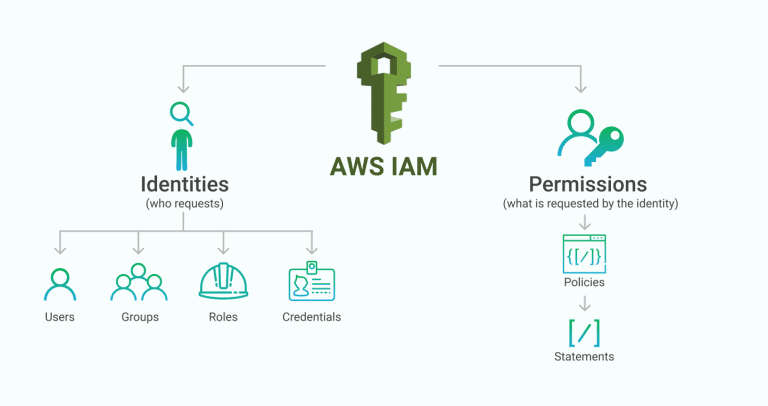
AWS Identity and Access Management (IAM) is a security service that helps organizations securely manage access to AWS resources and services. IAM allows administrators to control who can access AWS environments and define what actions users, groups, and applications are permitted to perform.
When an AWS account is first created, it includes a root user account with full access to all AWS services and resources. Because the root account has unrestricted permissions, AWS recommends using it only for critical account-level tasks such as billing management or initial account setup.
As a security best practice, daily administrative and operational activities should be performed using IAM users with limited permissions instead of the root account. IAM supports secure access management through users, groups, roles, and policies.
In this activity guide, you will learn how to create IAM users, groups, and roles, and how to attach policies to manage secure access permissions in AWS environments.
Check our blog on AWS Identity And Access Management (IAM)
Activity Guide 6: Create an Amazon S3 Bucket and Host a Static Website
Amazon Simple Storage Service (Amazon S3) is a highly scalable and durable object storage service used to store and manage data in the AWS Cloud. Amazon S3 supports a wide range of use cases, including file storage, backup and recovery, static website hosting, application data storage, archive solutions, and big data analytics.
Amazon S3 provides features such as high availability, secure access controls, lifecycle management, versioning, and storage classes to help organizations efficiently manage cloud storage resources.
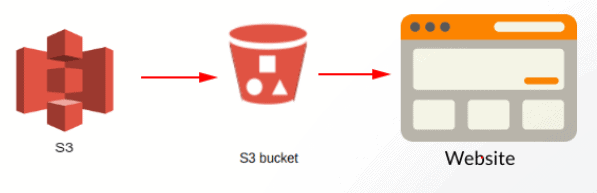
In this activity guide, you will learn how to create an Amazon S3 bucket, upload and access files, configure permissions, and host a static website using Amazon S3.
Check our blog on Amazon S3 Bucket and Storage Classes.
Activity Guide 7: S3 Cross-Region Replication
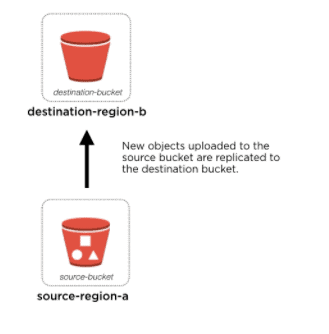
S3 Cross-Region Replication (CRR) is used to replicate the objects across Amazon S3 buckets from one region to another different AWS Regions. S3 Buckets that are configured for object replication can be owned by the same AWS account or by different accounts.
In this activity guide, you will learn how to replicate your data files from one region to another region.
Activity Guide 8: Perform Multipart Uploads in Amazon S3 using AWS CLI
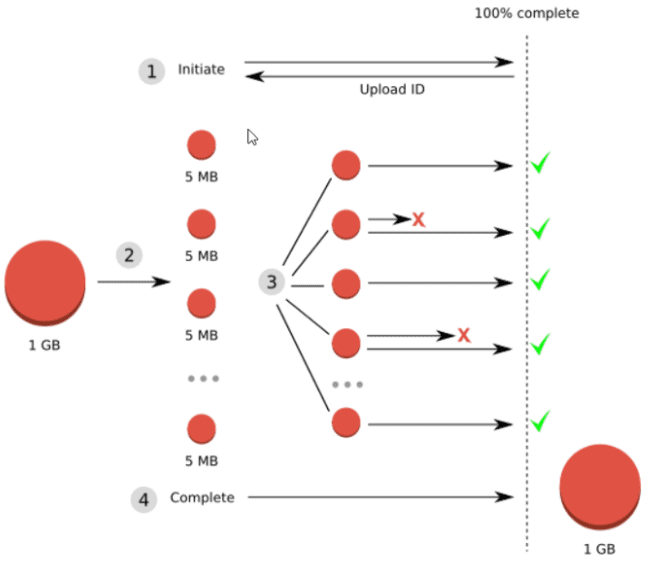
Amazon S3 Multipart Upload allows users to upload large files as multiple smaller parts instead of uploading a single object in one operation. Each part can be uploaded independently and in parallel, improving upload efficiency, reliability, and performance for large file transfers.
If an upload interruption occurs, only the failed part needs to be re-uploaded instead of restarting the entire upload process. Multipart uploads are commonly recommended for large files, especially objects larger than 100 MB.
Using the AWS CLI, developers and administrators can automate multipart uploads and efficiently manage large data transfers to Amazon S3.
In this activity guide, you will learn how to perform multipart uploads in Amazon S3 using AWS CLI commands.
Activity Guide 9: Creating a Windows EC2 Instance
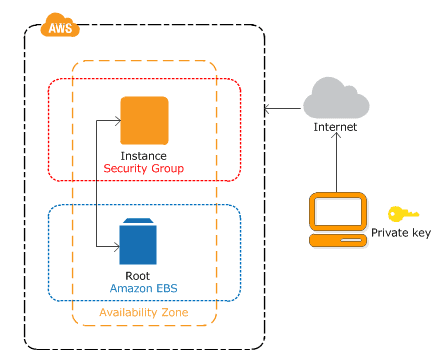
Amazon EC2 presents represents a true virtual computing environment, enabling you to use the console interfaces to launch instances with a variety of operating systems, load them with your desired application environment, manage your network’s access permissions, and run the image using as many or few systems as you desire.
In this activity guide, you will learn how to create and launch EC2 Instance.
Activity Guide 10: Create and Launch a Linux EC2 Instance
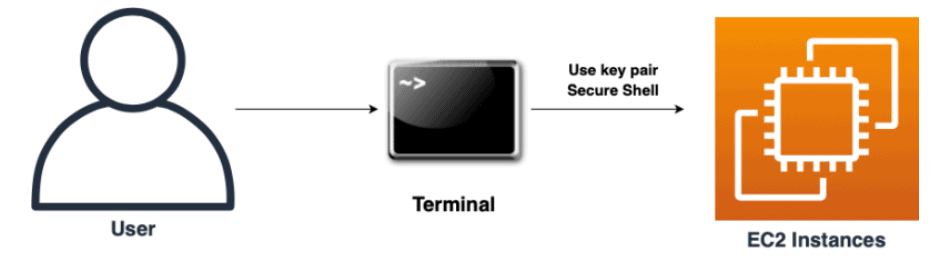
Amazon Elastic Compute Cloud (Amazon EC2) is a cloud computing service that provides secure and scalable virtual servers in the AWS Cloud. EC2 allows developers and organizations to launch, configure, and manage compute resources on demand without maintaining physical infrastructure.
Amazon EC2 supports multiple operating systems, flexible instance types, scalable storage options, and networking configurations, making it suitable for web applications, development environments, cloud workloads, and enterprise applications.
In this activity guide, you will learn how to create, configure, and launch a Linux EC2 instance in AWS.
Activity Guide 11: Classic and Network Load Balancer
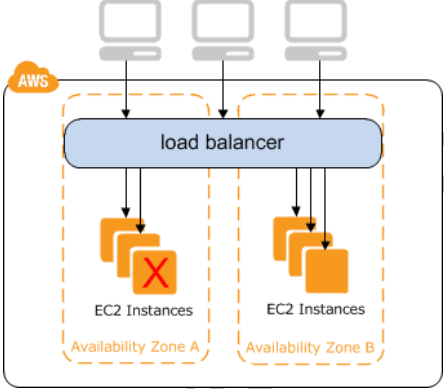
Elastic Load Balancing automatically distributes incoming traffic across multiple targets – Amazon EC2 instances, containers, IP addresses, and Lambda functions – in multiple Availability Zones and ensures only healthy targets receive traffic. Elastic Load Balancing can load balance across a Region, routing traffic to healthy targets in different Availability Zones.
In this activity guide, you will learn how to create and test Classic load balancer and Network load balancer.
Check our blog on AWS Elastic Load Balancing.
Activity Guide 12: Configuring Load Balancer and Autoscaling on EC2 Instances
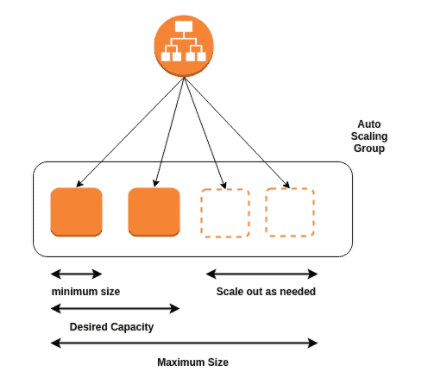
Auto Scaling monitors your applications and automatically adjusts capacity to maintain steady, predictable performance at the reduced possible cost. Using AWS Auto Scaling, it is effortless to setup application scaling for multiple resources across multiple services in minutes.
Elastic Load Balancing automatically distributes incoming application traffic across multiple targets, such as Amazon EC2 instances, containers, IP addresses, and Lambda functions. It can handle the differing load of your application traffic in a single Availability Zone or across multiple Availability Zones.
In this activity guide, we will cover step-by-step instructions on how to create Elastic Load balancer ELB & Auto Scaling group to create a system that is capable of handling variation in traffic.
Activity Guide 13: Create an Application Load Balancer using AWS CLI
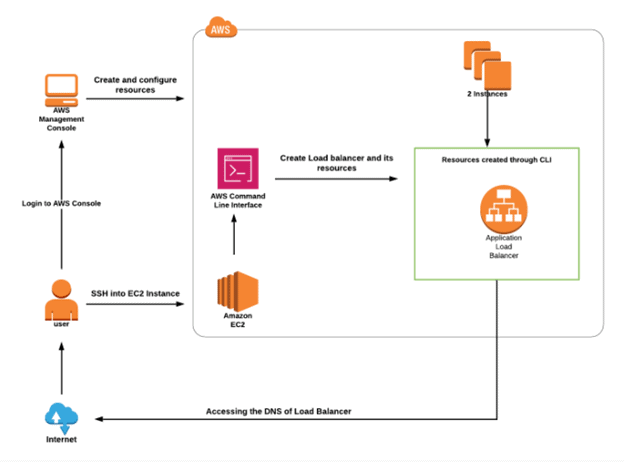
Application Load Balancer (ALB) is a feature of Elastic Load Balancing (ELB) that helps distribute incoming application traffic across multiple targets such as Amazon EC2 instances, containers, and IP addresses across multiple Availability Zones.
An Application Load Balancer operates at the application layer (Layer 7) and supports advanced routing features such as host-based routing, path-based routing, and integration with containerized and microservices-based applications.
Using the AWS CLI, developers and administrators can automate the creation and configuration of load balancers directly from the command line.
In this activity guide, you will learn how to create and configure an Application Load Balancer using AWS CLI commands.
Activity Guide 14: Map DNS Using Route53
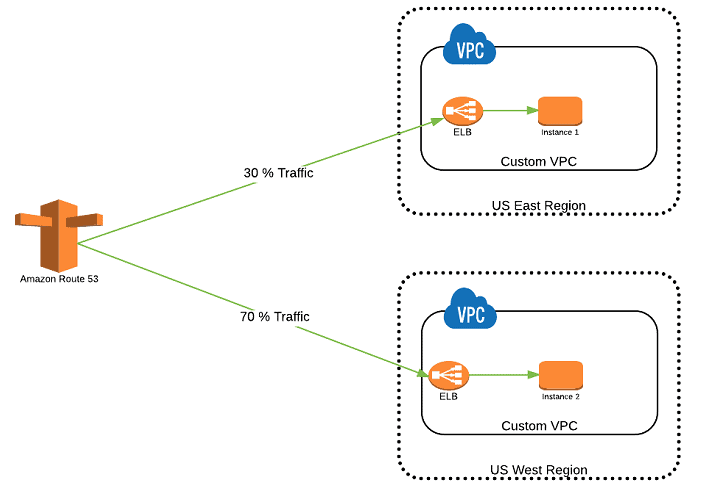
Route 53 is a service provided by AWS which is a highly available, and scalable cloud Domain web service. It is designed to give developers/businesses an extremely reliable and cost-effective way to route end users to Internet applications. Route 53 completely connects user requests to infrastructure running in AWS – such as Amazon EC2 instances, Elastic load balancers, S3 buckets – and can also be used to route users to infrastructure outside of AWS.
In this activity guide, you will learn how to map a web server DNS using Route 53.
Check our blog on AWS Route 53.
Activity Guide 15: Visualize web traffic using Kinesis data stream
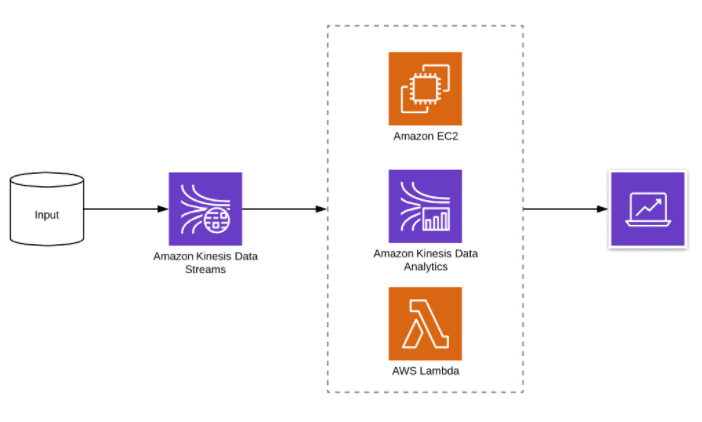
Amazon Kinesis Data Streams is a service provided by AWS, it is a greatly scalable, highly durable data ingestion and processing service optimized for streaming data. You can configure hundreds of thousands of data producers to continuously put data into a Kinesis data stream. Data will be available within milliseconds to your Amazon Kinesis applications, and those applications will receive data records in the order they were generated.
Kinesis Data Streams can be integrated with a number of AWS services, including Amazon Kinesis Data Firehose for near real-time transformation and delivery of streaming data into an AWS data lake like S3, Kinesis Data Analytics for managed stream processing, AWS Lambda for event or record processing, AWS Private Link for private connectivity, Amazon CloudWatch for metrics and log processing, and AWS KMS for server-side encryption.
In this activity guide, you will learn about how to visualize the web traffic generated through EC2 Instances using Kinesis data stream.
Check our blog on Amazon Kinesis.
Activity Guide 16: Send an E-mail Through AWS SES
Amazon Simple Email Service (SES) is a flexible, scalable, and low-effective email service that enables you to send mail from within any application. You can configure Amazon SES easily to support various email use cases, including transactional, marketing, or mass email communications.
The Amazon SES also provides flexible IP deployment and email authentication options that help drive higher deliverability and protect the sender’s reputation while sending analytics measure the impact of each email. With an Amazon SES service, you can send email securely, globally, and at any scale.
In this activity guide, you will learn about how to trigger an E-mail through an SES.
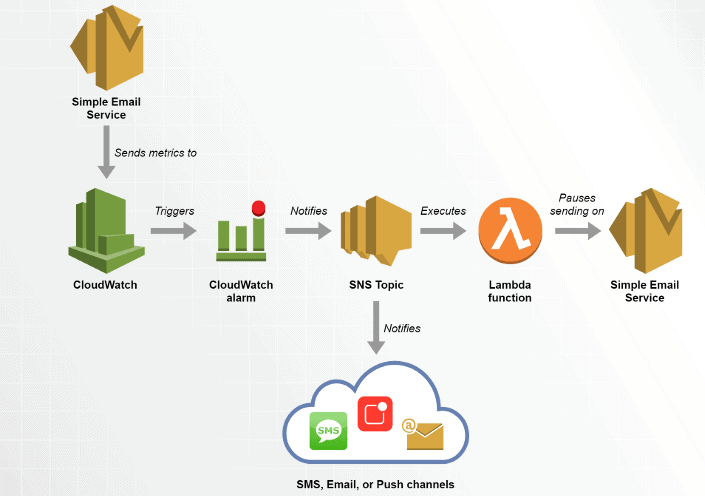
Activity Guide 17: Monitor EC2 Instances using CloudWatch and Amazon SNS
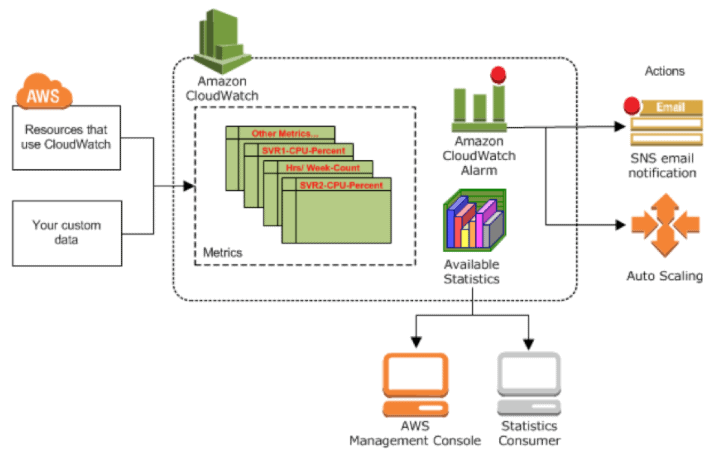
Amazon CloudWatch is a monitoring and observability service that helps track AWS resource performance, application metrics, and operational events in real time. Amazon Simple Notification Service (Amazon SNS) is a fully managed messaging service used to send notifications through email, SMS, and other communication channels.
By integrating CloudWatch with Amazon SNS, users can create automated alerts and receive notifications when specific EC2 instance metrics exceed defined thresholds, such as high CPU utilization or memory usage.
This monitoring setup helps organizations improve infrastructure visibility, automate alerting, and quickly respond to performance or operational issues in AWS environments.
In this activity guide, you will learn how to monitor Amazon EC2 instances using CloudWatch metrics and configure automated notifications with Amazon SNS.
Check our blog on Amazon SNS.
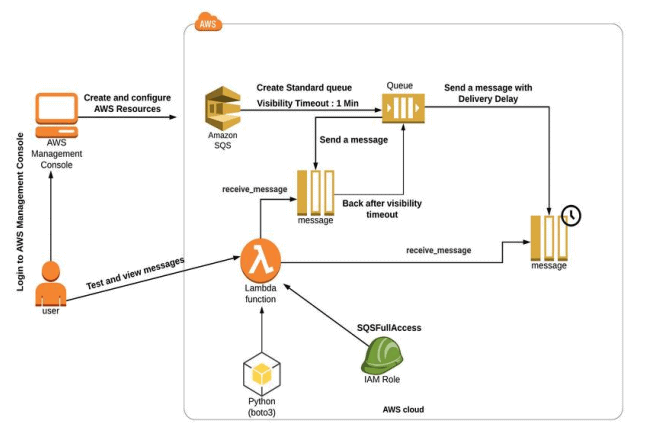
Activity Guide 18: SQS Visibility Timeout vs Delivery Delay
Amazon Simple Queue Service (SQS) is a fully controlled message queuing service that enables you to decouple and scale microservices, distributed systems, and serverless applications. SQS removes the complexity and overhead associated with managing and operating message-oriented middleware and empowers developers to focus on differentiating work.
In this activity guide, you will learn how to create a setup to test SQS visibility timeout and delivery delay.
Activity Guide 19: Event-Driven Architectures Using AWS Lambda, SES, SNS, SQS
AWS Lambda is a service that lets you run your code without managing the servers, you pay only for the compute time you use. With Lambda, you can run code for virtually any type of app or backend services, all with zero administration. here you just have to upload your code and Lambda takes care of everything required to run and scale your code with high availability and durability.
Amazon SQS is a fully controlled message queue service that allows you to decouple and scale multiple microservices, distributed systems, and server-less applications. Using SQS, you can send, receive, and store messages between the software components at any volume, without losing messages.
Amazon SNS is a fully controlled messaging service for both types of communication application-to-application (A2A) and application-to-person (A2P).
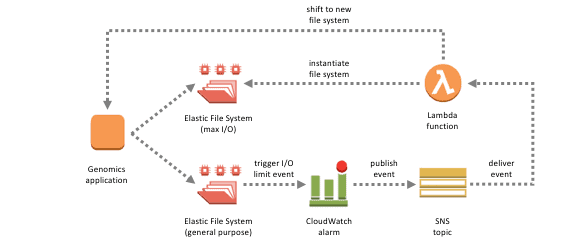
An event-driven architecture uses events to trigger and communicate between decoupled services and it acts as common modern applications built with microservices. An event is a change in state, like an item being placed in a shopping cart on an e-commerce website. Events can either carry a state or events can be identifiers.
It has three key components: event producers, event routers, and event consumers. A producer publishes an event to the router, which filters and pushes the events to users. Producer services and consumer services are decoupled, which allows users to scale, update, and deploy independently.
In this activity guide, you will learn about Event-driven architecture.
Check our blog on AWS Lambda.
Activity Guide 20: Build API Gateway with Lambda Integration
Amazon API Gateway is a completely controlled service that makes it easy for developers to create, publish, maintain, monitor, and secure APIs at any scale. APIs act as the “front door” for applications to access data, business logic, or functionality from your backend services.
AWS Lambda lets you run code without provisioning or managing servers. You pay only for the compute time you use. With Lambda, you can run code for virtually any type of application or backend service – all with zero administration.
In this activity guide, you will learn how to create an API Gateway and Integrating it with Lambda.
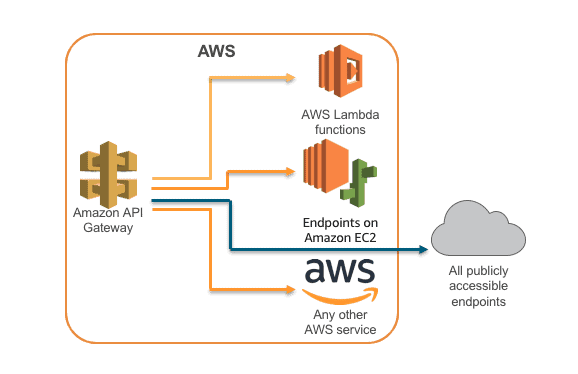
Check our blog on Amazon API Gateway.
Activity Guide 21: Build API Gateway with path parameter and Query string parameter
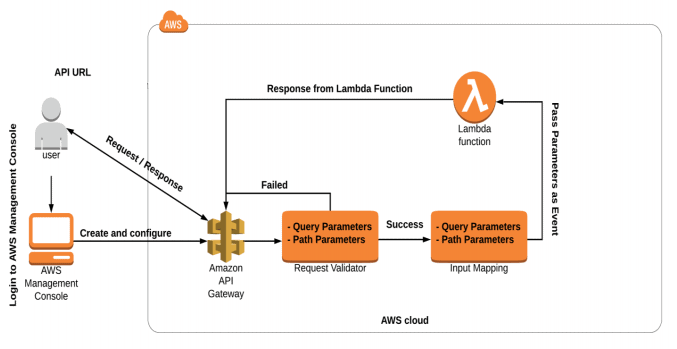
Amazon API Gateway is a completely controlled service that makes it easy for developers to create, publish, maintain, monitor, and secure APIs at any scale. APIs act as the front door for applications to access data, business logic, or functionality from your backend services. API Gateway handles all the tasks involved in accepting and processing up to hundreds of thousands of concurrent API calls, including traffic management, CORS support, authorization, and access control, throttling, monitoring, and API version management.
In this activity guide, you will learn how to create a lambda function, an API Gateway.
Activity Guide 22: Create a Serverless Workflow using AWS Step Functions
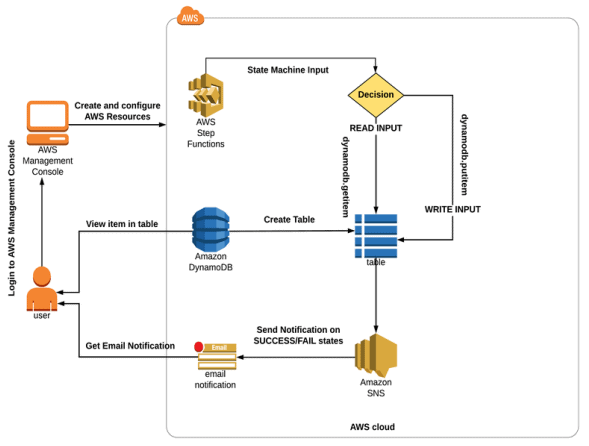
AWS Step Functions is a serverless orchestration service that helps developers coordinate AWS Lambda functions and multiple AWS services into automated workflows and business processes. It enables applications to execute tasks in a defined sequence while managing workflow state, error handling, retries, and service integrations.
Using its visual workflow interface, AWS Step Functions allows users to design event-driven and state-based workflows for serverless applications, data processing pipelines, and automation tasks. Each step in the workflow passes output to the next step based on defined business logic.
AWS Step Functions integrates with services such as AWS Lambda, Amazon SQS, DynamoDB, ECS, and API Gateway to simplify complex application orchestration.
In this activity guide, you will learn how to create and manage a serverless workflow using AWS Step Functions.
Check our blog on Aws Step Functions.
Activity Guide 23: Build Serverless Applications using AWS SAM
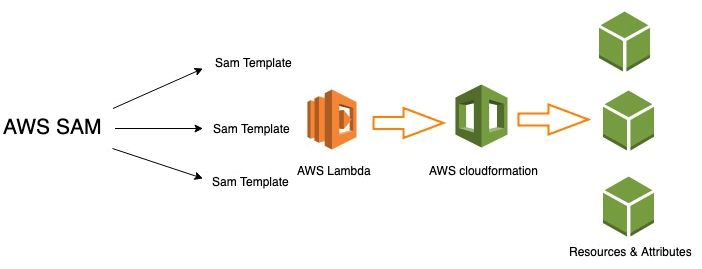
AWS Serverless Application Model (AWS SAM) is an open-source framework used to build, test, and deploy serverless applications on AWS. AWS SAM simplifies serverless development by providing shorthand syntax for defining AWS resources such as Lambda functions, API Gateway APIs, DynamoDB tables, and event source mappings using YAML templates.
With AWS SAM, developers can automate serverless application deployment and manage infrastructure as code more efficiently. It also supports local testing and integration with AWS developer tools and CI/CD workflows.
In this activity guide, you will learn how to create and deploy serverless applications using AWS SAM.
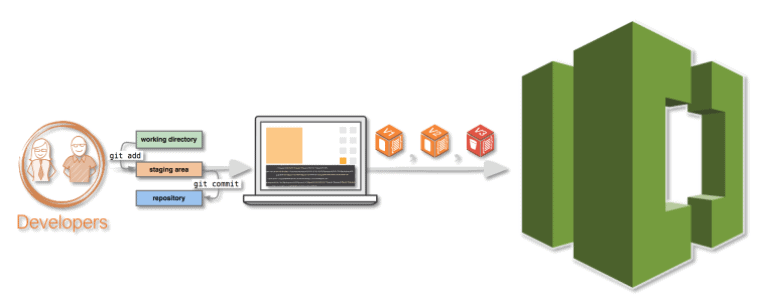
Activity Guide 24: Working with Code Commit
AWS CodeCommit is a completely controlled source control service that hosts secure Git-based repositories. It makes it effortless for teams to collaborate on code in a secure and highly scalable ecosystem. It eliminates the need to operate your source control system or worry about scaling its infrastructure. We can use CodeCommit to securely store anything from source code to binaries, and it works seamlessly with your existing Git tools.
In this activity guide, you will learn steps to creating an IAM user, Logging in to the account, Creating CodeCommit, and Adding File to Repository.
Check our blog on AWS CodeCommit.
Activity Guide 25: Getting started with AWS CodeBuild using the console
AWS CodeBuild is a completely controlled continuous integration service that compiles source code, runs tests, and produces software packages that are ready to deploy. With this, you don’t need to provision, manage, and scale your own build servers.
In this activity guide, you will learn to create two S3 buckets, create the source code, and Uploading the source code and the build spec file.
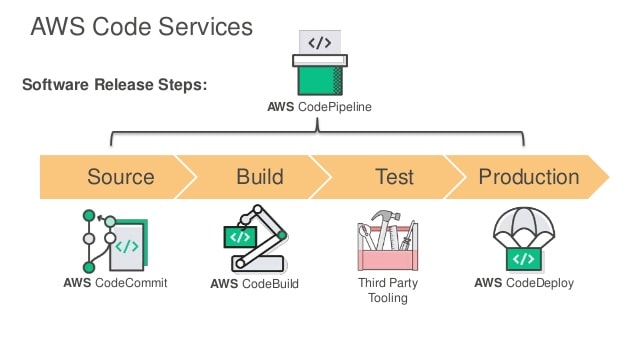
Activity Guide 26: Create a Simple Pipeline (Codepipeline)
AWS CodePipeline is a completely controlled continuous delivery service that helps you automate your release pipelines for fast and reliable application and infrastructure updates. It automates the build, test, and deploy phases of your release process every time there is a code change, based on the release model you define.
We can effortlessly integrate AWS CodePipeline with third-party services such as GitHub or with your own custom plugin. With AWS CodePipeline, you only pay for what you use.
In this activity guide, you will learn to build a complete pipeline to automate and deploy applications.
Check our blog on How to Deploy Web App From S3 Bucket To EC2 Instance
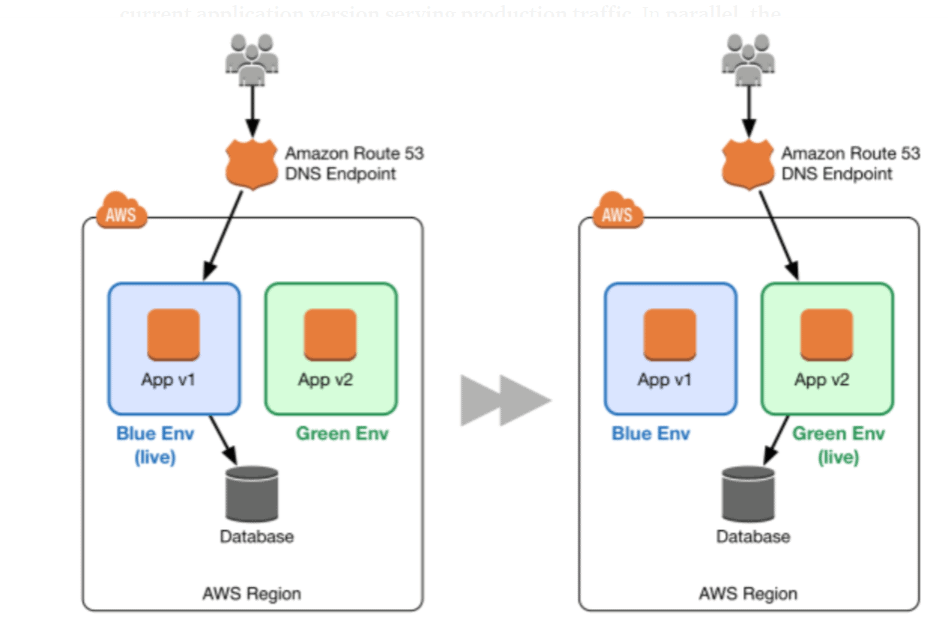
Activity Guide 27: Implement Blue/Green Deployments using AWS Elastic Beanstalk
AWS Elastic Beanstalk is a fully managed application deployment service that helps developers quickly deploy, manage, and scale web applications in the AWS Cloud. It supports multiple programming languages and platforms, including Java, .NET, PHP, Node.js, Python, Ruby, Go, and Docker.
With AWS Elastic Beanstalk, developers can upload application code while AWS automatically manages infrastructure provisioning, load balancing, auto scaling, monitoring, and application health management.
Blue/Green deployment is a deployment strategy that reduces downtime and deployment risk by running two separate application environments and switching traffic between them during application updates.
In this activity guide, you will learn how to deploy and scale web applications using AWS Elastic Beanstalk and implement Blue/Green deployment strategies for application updates.
Check out our blog on Blue-Green Deployment in AWS – The Zero Downtime Deployment.
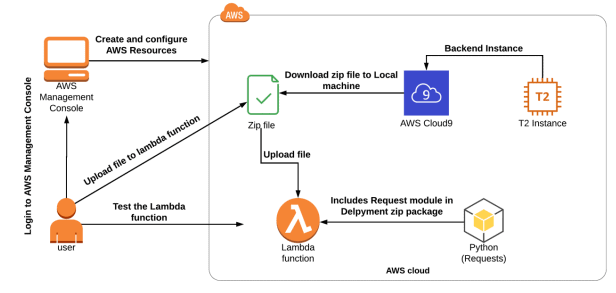
Activity Guide 28: Install Python modules in AWS Lambda using Cloud9
AWS Cloud9 is a cloud-based integrated development environment (IDE) that lets you write, run, and debug your code. It includes a code editor, debugger, and terminal. Cloud9 comes prepackaged with all required tools for popular programming languages, including JavaScript, Python, PHP, and more, so you don’t need to install files or configure your development machine to start new projects.
AWS Lambda is a serverless compute service that lets you run code without provisioning or managing servers, creating workload-aware cluster scaling logic, maintaining event integrations, or managing runtimes.
In this activity guide, you will learn how to create a lambda function, AWS Cloud9 Development Environment, import the lambda function to Cloud9.
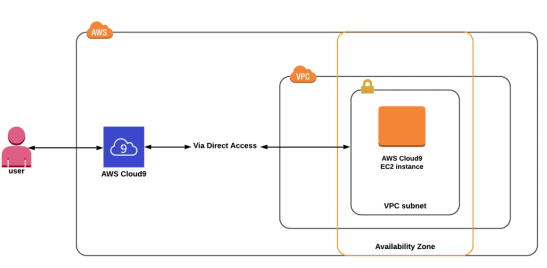
Activity Guide 29: Create Cloud9 IDE and Run Scripts
AWS Cloud9 is an integrated development environment or IDE. It offers a rich code-editing experience with support for several programming languages and runtime debuggers. It also has a built-in terminal with a preconfigured CLI. It contains a number of tools that you use to code, build, run, test, and debug software.
In this activity guide, you will learn how to create an AWS Cloud9 development environment, Install Python using the terminal and run a python file.
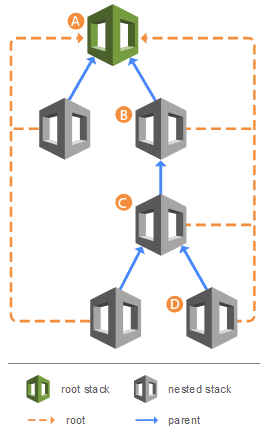
Activity Guide 30: Create AWS CloudFormation Nested Stacks
AWS CloudFormation Nested Stacks help organize and manage complex infrastructure by allowing one CloudFormation stack to be created inside another stack. Nested stacks improve infrastructure management by enabling reusable templates, modular architecture, and simplified deployment processes.
As cloud environments grow, infrastructure templates often contain repeated configurations and shared components. Using nested stacks helps developers separate infrastructure into smaller, reusable templates that are easier to maintain and update.
AWS CloudFormation uses the AWS::CloudFormation::Stack resource to create and manage nested stacks within parent templates.
In this activity guide, you will learn how to create and manage AWS CloudFormation Nested Stacks for infrastructure automation and reusable cloud deployments.
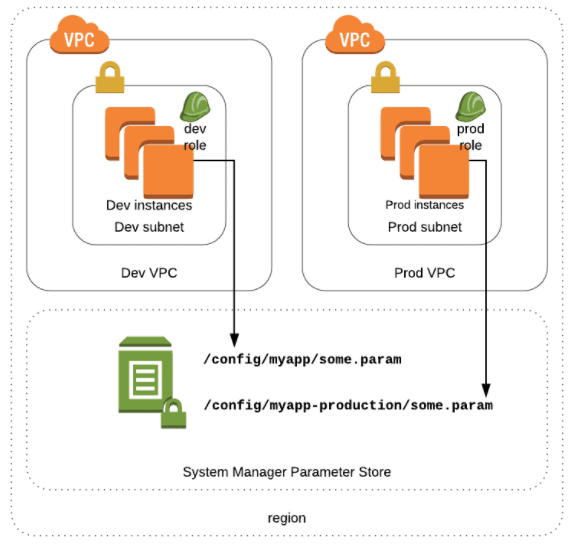
Activity Guide 31: Store data in SSM Parameter store and the view from AWS CLI
AWS Systems Manager Parameter Store provides secure, hierarchical storage for configuration data management and secrets management. You can store data such as passwords, database strings, Amazon Machine Image (AMI) IDs, and license codes as parameter values.
In this activity guide, you will learn how to store data in the SSM parameter store and view it from AWS CLI.
Activity Guide 32: Create a User Pool in Amazon Cognito
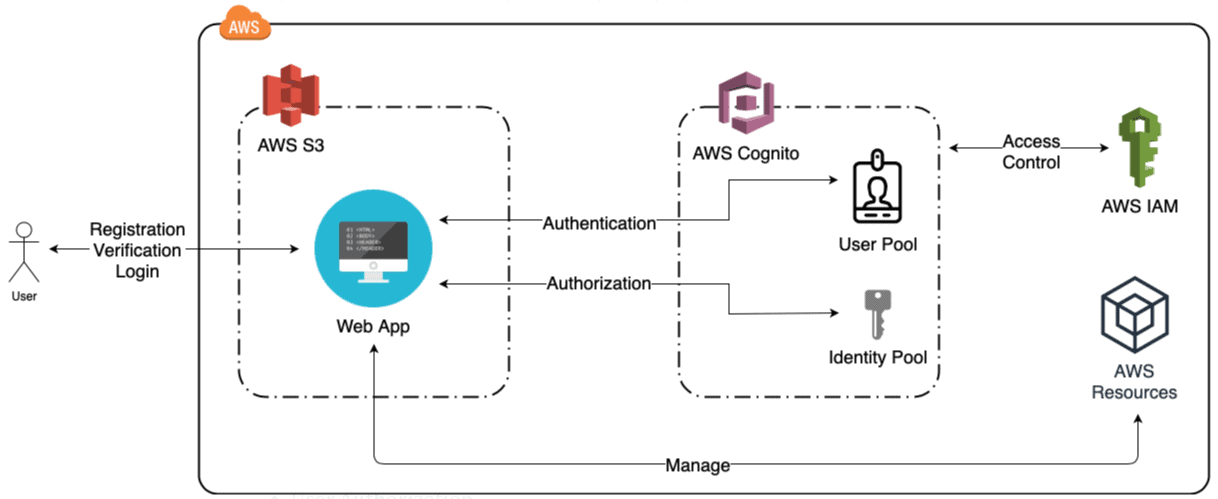
Amazon Cognito User Pools provide secure user authentication and authorization for web and mobile applications. A user pool acts as a managed user directory that allows users to sign up, sign in, and securely access applications using authentication features such as multi-factor authentication (MFA), password policies, and social identity providers.
Amazon Cognito supports both direct user authentication and third-party identity providers, helping developers simplify user management without building a custom authentication system. User profiles and authentication workflows can also be integrated into applications using AWS SDKs and APIs.
In this activity guide, you will learn how to create and configure a user pool in Amazon Cognito for secure user authentication and access management.
Check our blog on Amazon Cognito.
Activity Guide 33: Enable AWS CloudTrail and Store Logs in Amazon S3
AWS CloudTrail is a logging and auditing service that records account activity and API actions performed across AWS services. It helps organizations monitor user activity, track operational changes, improve governance, and support security and compliance requirements.
Amazon S3 integrates with AWS CloudTrail to securely store log files generated from AWS account activity and service events. CloudTrail logs include actions performed through the AWS Management Console, AWS CLI, SDKs, and AWS APIs.
Storing CloudTrail logs in Amazon S3 enables long-term log retention, centralized auditing, and easier security analysis for AWS environments.
In this activity guide, you will learn how to create an AWS CloudTrail trail and configure Amazon S3 for secure log storage and monitoring.

Activity Guide 34: Configure Amazon CloudWatch to Notify Change In EC2 CPU Utilization
Amazon CloudWatch is a monitoring service built for DevOps engineers, developers, site reliability engineers (SREs), and IT managers. CloudWatch allows you with data and actionable insights to monitor your applications, respond to system-wide performance changes, optimize resource utilization, and get a unified view of operational health.
A metric alarm watches a single CloudWatch metric or the result of a math expression based on CloudWatch metrics. The alarm performs many actions based on the value of the metric or expression relative to a threshold over several time periods.
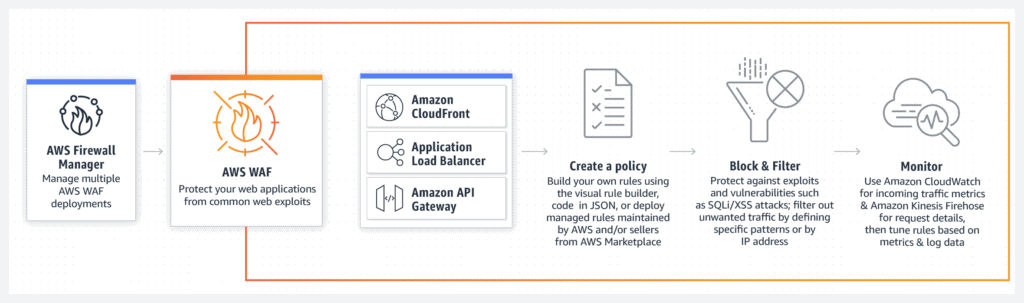
In this activity guide, we cover Step by step instructions on how to create CloudWatch Alarms to notify when CPU Utilization of an Instance exceeds the threshold.
Activity Guide 35: Install CloudWatch Agent on EC2 Instance and View CloudWatch Metrics
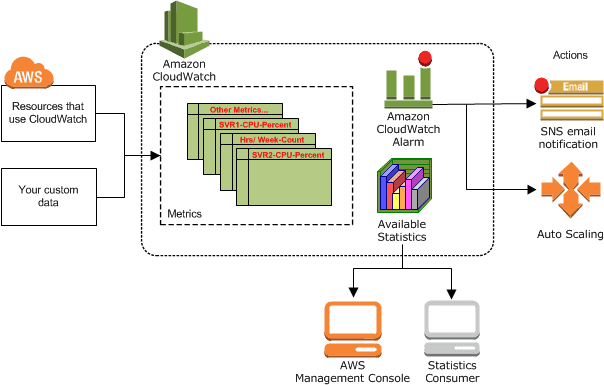
Amazon CloudWatch is a monitoring service built for DevOps engineers, developers, site reliability engineers (SREs), and IT managers. It allows you with data and actionable insights to monitor your applications, respond to system-wide performance changes, optimize resource utilization, and get a unified view of operational health.
In this activity guide, we cover step-by-step instructions for installing CloudWatch Agent on EC2 instance for Metrics Visualization.
Check our blog on CloudWatch and CloudTrail.
Activity Guide 36: Get started with X-ray
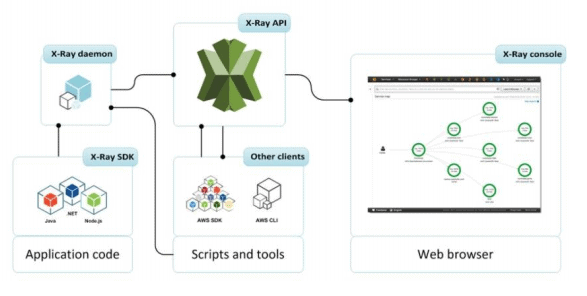
AWS X-Ray empowers the developer to analyze and create a service map that displays an application’s architecture, including its relation to components. With the help of an X-Ray, we can understand how our application and its fundamental services are performing to identify and debug the root cause of issues and errors.
In this activity guide, you will learn how to create and test sample application, view service map, and traces.
Check our blog on AWS X-Ray.
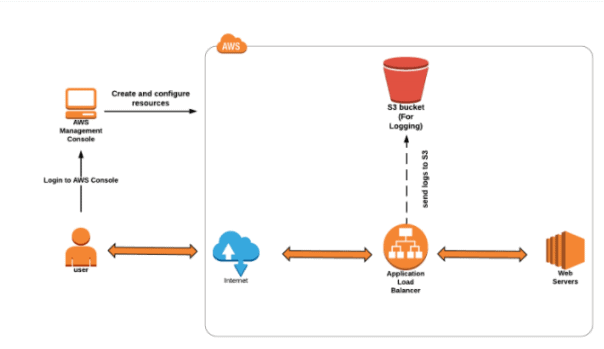
Activity Guide 37: Using AWS S3 to Store ELB Access Logs
Load Balancer is a service that allows you to distribute the incoming application or network traffic across multiple targets, such as Amazon EC2 instances, containers, and IP addresses across multiple Availability Zones. AWS currently offers three types of load balancers:
• Application Load Balancer
• Network Load Balancer
• Classic Load Balancer
In this activity guide, you will learn how to create and configure Load Balancer, a security group for the load balancer, store logs in S3 Bucket.
Activity Guide 38: DynamoDB & Global Secondary Index
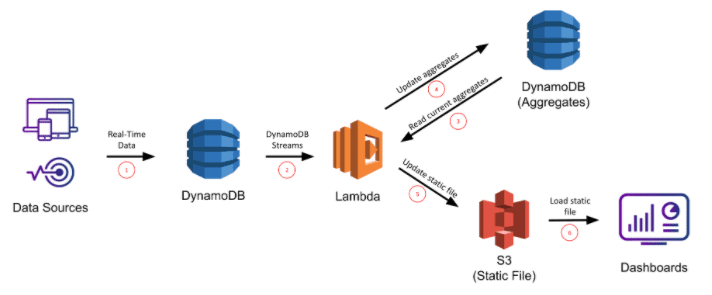
Amazon DynamoDB is a completely controlled Key-Value database service that provides fast and predictable performance with seamless scalability. DynamoDB allows you to offload the administrative burdens of operating and scaling a distributed database so that you don’t have to worry about hardware provisioning, setup, and configuration, replication, software patching, or cluster scaling.
In this activity guide, you will learn how to create a DynamoDB Table, items, use the global secondary index to fetch data.
 Check our blog on Amazon DynamoDB.
Activity Guide 39: Process New Items with DynamoDB Streams and Lambda
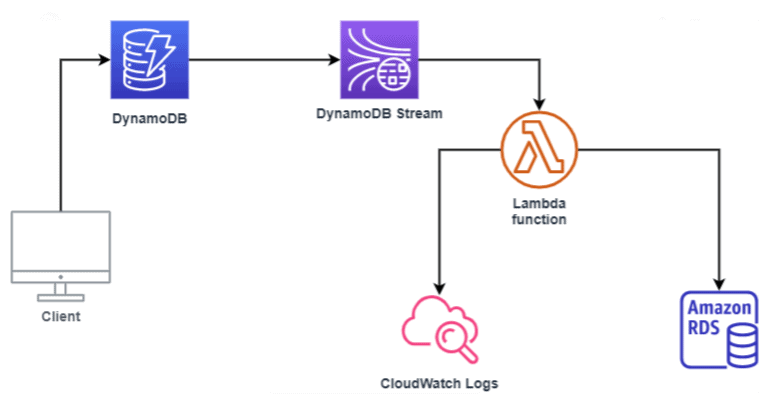
DynamoDB is a service that provides a fully controlled Key-Value database service by AWS which provides fast and predictable performance with compatible scalability.
AWS Lambda is a service that allows you to run your code without managing the servers, you pay only for the compute time you use. With Lambda, we can run code for virtually any type of app or backend services, all with zero administration. Here we just have to upload our code and Lambda takes care of everything required to run and scale your code with high availability and durability.
In this activity guide, you will learn how to create an AWS Lambda trigger to process a stream from a DynamoDB table.
Activity Guide 40: Create and Manage Amazon Aurora Global Databases
Amazon Aurora is a fully managed relational database service provided by AWS that is compatible with MySQL and PostgreSQL. It is designed to deliver high performance, scalability, availability, and reliability for cloud-based applications.
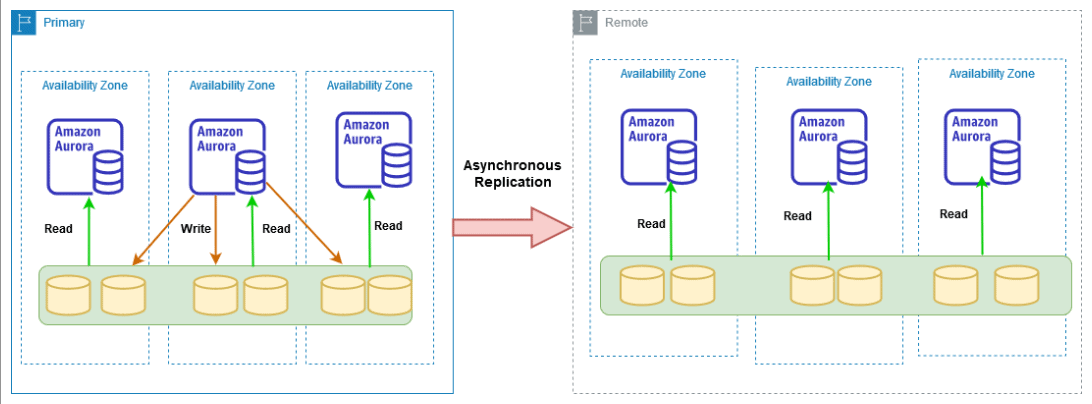
Amazon Aurora Global Database enables organizations to deploy a single database across multiple AWS Regions, helping support globally distributed applications with low-latency reads and disaster recovery capabilities.
Aurora Global Databases are commonly used for high-availability applications, cross-region replication, and business continuity strategies in enterprise cloud environments.
In this activity guide, you will learn how to create and configure an Amazon Aurora Global Database and add secondary AWS Regions for replication and disaster recovery management.
Activity Guide 41: Create an Ubuntu EC2 Instance
Amazon Elastic Compute Cloud (Amazon EC2) is a cloud computing service that provides secure and scalable virtual servers in the AWS Cloud. EC2 allows users to launch instances with different operating systems, configure networking and security settings, and deploy custom application environments based on workload requirements.
Ubuntu EC2 instances are commonly used for web hosting, application deployment, development environments, automation tasks, and cloud-native workloads.
Amazon EC2 provides flexible compute capacity, scalable infrastructure, and easy integration with other AWS services, making it a core service for cloud application development and deployment.
In this activity guide, you will learn how to create, configure, and launch an Ubuntu EC2 instance in AWS.
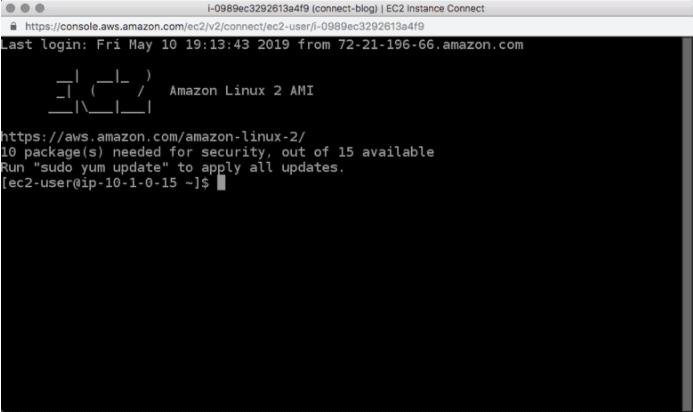
Activity Guide 42: Install & Configure AWS CLI KUBECTL & EKSCTL on Ubuntu Machine
The AWS Command Line Interface (CLI) is used for managing your AWS services from a terminal session on your own client, allowing you to control and configure multiple AWS services and implement a level of automation. The Kubernetes command-line tool, kubectl, enables you to run commands against Kubernetes clusters. You can use kubectl to deploy applications, inspect and manage cluster resources, and view logs. EKSCTL is a simple and easy CLI tool for creating clusters on EKS – Amazon’s new managed Kubernetes service for EC2.
In this activity guide, you will learn how to Install AWSCLI, KUBECTL & EKSCTL ON UBUNTU
Activity Guide 43: Create ECR, Install Docker, Create Image, and Push Image to ECR
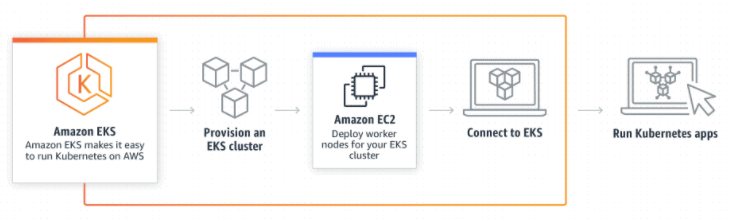
Amazon Elastic Container Registry (ECR) is a completely controlled Docker container registry that makes it easy for developers to store, manage, and deploy Docker container images. Amazon ECR is integrated with Amazon Elastic Container Service (ECS), simplifying your development to production workflow. Amazon ECR eliminates the need to operate your own container repositories or worry about scaling the underlying infrastructure.
In this activity guide, you will learn how to push images to Amazon ECR.
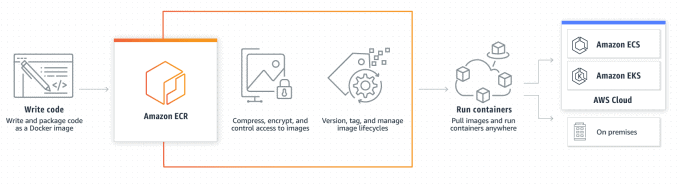
Activity Guide 44: Create Elastic Kubernetes Service (EKS) Cluster on AWS
EKS (Elastic Container Service for Kubernetes) is a managed Kubernetes service that allows you to run Kubernetes on AWS without the hassle of managing the Kubernetes control plane (Master Node). The Kubernetes control plane plays a crucial role in a Kubernetes deployment as it is responsible for how Kubernetes communicates with your cluster — starting and stopping new containers, scheduling containers, performing health checks, and many other tasks.
In this activity guide, you will learn to setup EKS Cluster Master Node Using Console, configure KUBECTL on the client.
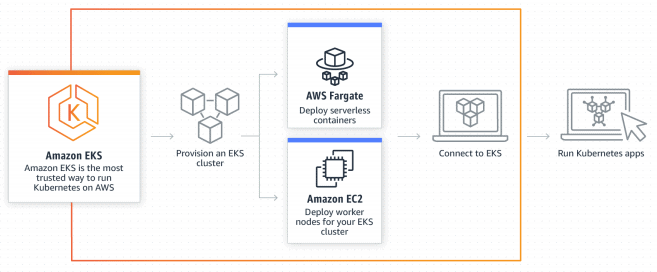
Activity Guide 45: Deploy a PHP Guestbook Application with Redis on Amazon EKS
Amazon Elastic Kubernetes Service (Amazon EKS) is a fully managed Kubernetes service that simplifies running Kubernetes workloads on AWS. Amazon EKS manages the Kubernetes control plane, helping organizations deploy, scale, and manage containerized applications without handling complex Kubernetes infrastructure management.
Using Amazon EKS, developers can run containerized applications with improved scalability, availability, and integration with AWS networking, security, and monitoring services.
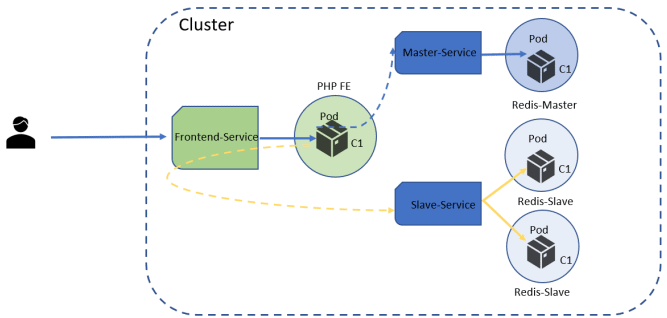
A PHP Guestbook application with Redis is a common Kubernetes demonstration workload used to understand multi-container deployments, service communication, and application scaling within Kubernetes clusters.
In this activity guide, you will learn how to deploy a PHP Guestbook application with Redis on an Amazon EKS cluster.
Activity Guide 46: Advanced Routing with Ingress-Controller – EKS
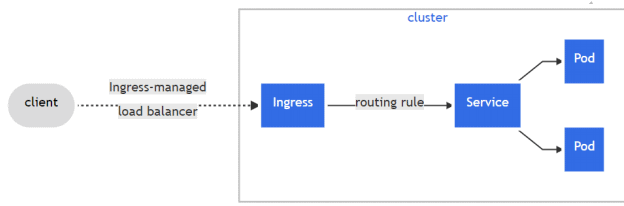
An Ingress controller is responsible for fulfilling the Ingress, usually with a load balancer, though it may also configure your edge router or additional frontends to help handle the traffic.
In this activity guide, you will learn how to deploy the NGINX ingress controller using a helm chart, Creating simple demo applications, Testing the ingress controller routes.
Activity Guide 47: Dynamic Provisioning of AWS EBS Persistent Volumes
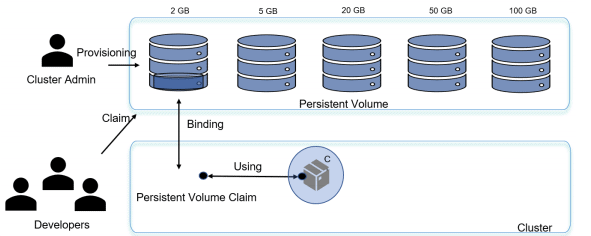
StorageClass provides a way for administrators to describe the “classes” of storage they offer. Different classes might map to quality-of-service levels, or to backup policies, or arbitrary policies determined by the cluster administrators.
Dynamic volume provisioning allows storage volumes to be created on-demand. Without dynamic provisioning, cluster administrators have to manually make calls to their cloud or storage provider to create new storage volumes, and then create PersistentVolume objects to represent them in Kubernetes.
In this activity guide, you will learn how to Built-in storage classes, deploy the Amazon EBS CSI driver to an Amazon EKS cluster, deploy a sample application.
Activity Guide 48: Deploy and Run Application on AWS (EKS) Fargate with ALB
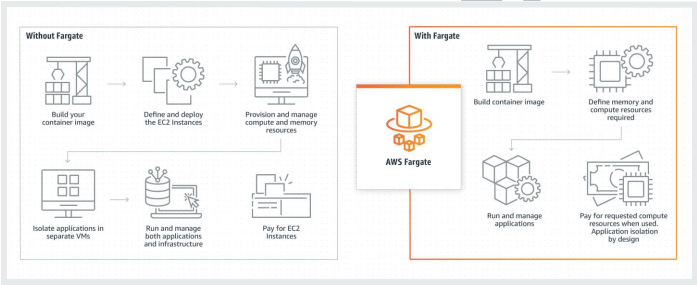
Fargate is a serverless compute engine for containers that work with both Amazon Elastic Container Service (ECS) and Amazon Elastic Kubernetes Service (EKS). Fargate makes it easy to focus on building applications. Fargate removes the need to provision and manage servers like EC2 and lets you specify and pay for resources per application, and improves security through application isolation by design.
Fargate allocates the right amount of computing, eliminating the need to choose instances and
scale cluster capacity. You need to pay only for the resources required to run your containers, so there is
no over-provisioning and paying for additional servers.
In this activity guide, you will learn how to create the EKS Fargate cluster using EKSCTL on Linux, Deploying an ALB Ingress controller.
Related Links/References
- Overview of Amazon Web Services & Concepts
- How to Create a free tier Account in AWS
- AWS Management Console Walkthrough
Next Task For You
Begin your journey towards an AWS Cloud by joining our FREE Informative Class on Amazon Cloud Free Class by clicking on the below image.