




Many developers and organizations want to build AI-powered applications like chatbots, content generators, AI assistants, and intelligent automation systems, but often face major challenges such as managing complex AI infrastructure, selecting the right foundation models, ensuring scalability, and handling high development costs. Setting up and maintaining machine learning environments can become time-consuming and difficult, especially for teams without deep AI expertise.
This is where Amazon Bedrock simplifies the process. Amazon Bedrock is a fully managed AWS service that provides secure access to powerful foundation models from leading AI providers through a single API. It enables businesses and developers to quickly build, experiment with, and scale generative AI applications without managing underlying infrastructure or machine learning operations.
In this blog, we will explore what Amazon Bedrock is, how it works, its key benefits, and why it is becoming an important service for modern AI application development.
What is Amazon Bedrock?
Amazon Bedrock is rapidly becoming one of the most talked-about generative AI services in the cloud industry, especially as businesses race to integrate AI into their applications, workflows, and customer experiences. With organizations increasingly looking for secure and scalable ways to build AI-powered solutions, Amazon Bedrock offers a simplified approach to accessing powerful foundation models without managing complex infrastructure.
At its core, Amazon Bedrock is a fully managed AWS service that enables developers and enterprises to build and scale generative AI applications using multiple high-performing bedrock foundation models through a single API. Instead of training large language models from scratch, businesses can leverage AWS Bedrock foundation models from leading AI providers to create chatbots, content generators, virtual assistants, recommendation systems, and more — while maintaining enterprise-grade security and governance.

One of the biggest advantages of Amazon Bedrock is flexibility. Users can experiment with different bedrock foundation models, customize them with proprietary data, and integrate AI capabilities into existing AWS environments with minimal operational overhead. As generative AI adoption continues to grow, organizations are increasingly turning to AWS Bedrock foundation models to accelerate innovation while reducing development complexity and cost.
In this article, you’ll learn what Amazon Bedrock is, how it works, its core features, practical use cases, benefits, pricing considerations, and why it is becoming a preferred choice for enterprises building generative AI applications on AWS.
Available Foundation Models in Amazon Bedrock
One of the biggest advantages of Amazon Bedrock is the wide range of bedrock foundation models available through a single managed platform. Instead of relying on a single AI provider, Amazon Bedrock supported models include options from multiple leading AI companies, allowing businesses to choose the best model for their use case, performance needs, and budget.
The Amazon Bedrock models list continues to expand as AWS partners with top AI providers to deliver advanced capabilities for text generation, image creation, summarization, coding assistance, conversational AI, and more.
Popular Bedrock Foundation Models Available in Amazon Bedrock
| Model Provider | Model Name | Primary Use Cases |
|---|---|---|
| Anthropic | Claude Models | Conversational AI, summarization, content generation |
| AI21 Labs | Jurassic Models | Text generation, question answering, enterprise NLP |
| Meta | Llama Models | Open-source LLM applications, chatbots |
| Amazon | Titan Models | Embeddings, text generation, personalization |
| Stability AI | Stable Diffusion | AI image generation and creative design |
| Cohere | Command Models | Enterprise search, text classification, summarization |
These bedrock foundation models are accessible through APIs without requiring infrastructure management, GPU provisioning, or complex ML deployment processes.
Understanding Amazon Bedrock Supported Models
The flexibility of Amazon Bedrock supported models allows organizations to experiment with multiple foundation models and select the one that delivers the best results for their workloads. For example:
- Claude models are commonly used for advanced conversational AI and long-context reasoning tasks.
- Amazon Titan models are ideal for secure enterprise AI applications within the AWS ecosystem.
- Stable Diffusion models are widely used for generating high-quality AI images.
- Llama models are preferred by developers looking for customizable open-weight AI models.
This multi-model approach gives businesses greater control over cost optimization, performance tuning, and responsible AI implementation.
Why the Bedrock Playground is Important
The bedrock playground plays a major role in AI experimentation because it helps users quickly identify:
-
Which model performs best for a task
-
How prompts influence AI responses
-
Token usage and response quality
-
Model speed and output consistency
According to industry trends, organizations using AI prototyping environments can significantly reduce development and testing time before production deployment. This makes the AWS Bedrock Playground valuable for both learning and enterprise AI adoption.
Hands-On Labs Using Bedrock Foundation Models
To better understand how Amazon Bedrock works in real-world scenarios, here are some beginner-friendly practical labs you can try.
Lab 1: Build an AI Chatbot with Claude on Amazon Bedrock
Objective:
Create a conversational AI chatbot using one of the most popular bedrock foundation models.
Tools Required:
- AWS Account
- Amazon Bedrock Access
- Python or AWS Console
- Claude Model (Anthropic)
Estimated Time: 30–45 minutes
Difficulty Level: Beginner
Steps:
- Log in to the AWS Management Console.
- Open Amazon Bedrock.
- Enable access to Claude models.
- Use the Bedrock playground or API to send prompts.
- Test chatbot responses with different queries.
Skills You Build:
- Prompt engineering
- API interaction
- Conversational AI development
- Generative AI application basics
Real-World Relevance:
Useful for customer support bots, virtual assistants, and enterprise AI chat solutions.
Expected Output Example:
A chatbot capable of answering customer queries in natural language with contextual responses.
Lab 2: Generate Images Using Stable Diffusion in Bedrock
Objective:
Use Amazon Bedrock supported models for AI image generation.
Tools Required:
- AWS Account
- Amazon Bedrock
- Stability AI Stable Diffusion Model
Estimated Time: 20–30 minutes
Difficulty Level: Beginner
Steps:
- Access Amazon Bedrock in AWS.
- Select the Stable Diffusion model.
- Enter a descriptive text prompt.
- Generate and download AI-created images.
- Experiment with different prompt styles.
Skills You Build:
- Prompt design for image generation
- Creative AI workflows
- Generative media understanding
Real-World Relevance:
Helpful for marketing creatives, product design, social media content, and branding.
Expected Output Example:
AI-generated images based on user prompts such as landscapes, product mockups, or digital artwork.
Lab 3: Create Text Embeddings with Amazon Titan Models
Objective:
Learn how Amazon Titan models can generate embeddings for semantic search and recommendation systems.
Tools Required:
- AWS Account
- Amazon Bedrock
- Amazon Titan Embeddings Model
Estimated Time: 40 minutes
Difficulty Level: Intermediate
Steps:
- Open Amazon Bedrock.
- Select Amazon Titan Embeddings.
- Input sample text data.
- Generate embeddings using the API.
- Store vectors for similarity search testing.
Skills You Build:
- Embedding generation
- Semantic search implementation
- AI-powered recommendation systems
Real-World Relevance:
Used in enterprise search engines, recommendation platforms, and knowledge retrieval systems.
Expected Output Example:
Vector embeddings representing semantic meaning of text for similarity matching.
Why Bedrock Foundation Models Matter
The growing adoption of bedrock foundation models is transforming how organizations build AI solutions. Instead of spending months training large models, developers can rapidly experiment with pre-trained models optimized for different tasks.
By offering a broad Amazon Bedrock models list, AWS enables businesses to:
- Accelerate AI development
- Reduce infrastructure complexity
- Improve scalability
- Support responsible AI practices
- Integrate generative AI into existing cloud environments faster
As generative AI continues evolving, Amazon Bedrock supported models provide a strong foundation for enterprises, developers, and learners looking to build production-ready AI applications efficiently.
What is the Playground in AWS Bedrock?
The Playground in AWS Bedrock is an interactive environment that allows you to experiment with machine learning models directly within the platform. It provides a user-friendly interface for testing and fine-tuning models without requiring extensive coding. This approach makes it easier to explore and customize them for specific use cases.
Prerequisites Before Enabling Foundation Models in Amazon Bedrock
Before you begin, ensure you have the following:
- An AWS account (Free or Paid).
- A billing alert set up using AWS CloudWatch.
- IAM permissions for Amazon Bedrock
- Access to a supported AWS Region
- Basic understanding of AWS Console navigation
This setup process helps configure bedrock model access and enables you to use AWS Bedrock foundation models for generative AI applications.
Step-by-Step Guide to Enabling Foundation Models in Amazon Bedrock
Why This Matters
Before using generative AI applications in AWS, users must first enable Bedrock models and configure model access permissions. This process allows access to multiple bedrock foundation models including Amazon Titan, Claude, Llama, and Stability AI models through Amazon Bedrock.
Step 1: Access Amazon Bedrock
1. First, log in to your AWS account.
2. Next, search for “Bedrock” in the AWS Management Console and open the service.

Figure 1: Accessing the Amazon Bedrock Service in the AWS Console
Step 2: Manage Model Access
1. When you first access the service, a screen will prompt you to Get Started.
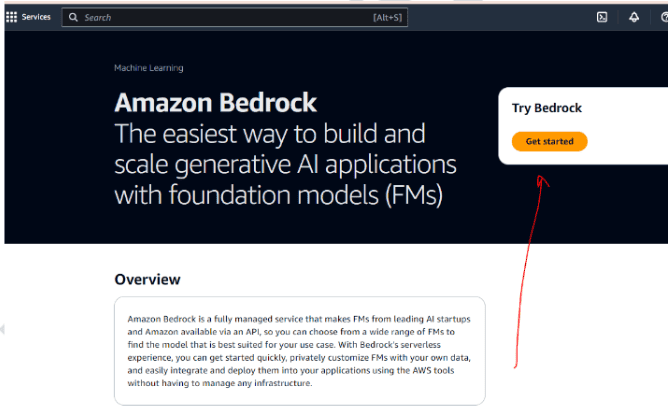
Figure 2: Initial Setup Screen for Amazon Bedrock
Then, select Manage Model Access to proceed.

Figure 3: Manage Model Access Option
Step 3: Enable Foundation Models
1. At this point, you can choose to enable all models or select specific ones based on your needs.

Figure 4: Enabling Foundation Models in Amazon Bedrock
2. Afterward, navigate to the Text Playground from the side menu and click on Select Model.

Figure 5: Testing Bedrock Foundation Models in Text Playground
3. In the Text Playground, click on Select model
 4. Choose Amazon as the provider. If you do not have access, click on Request Access and then Enable All Models.

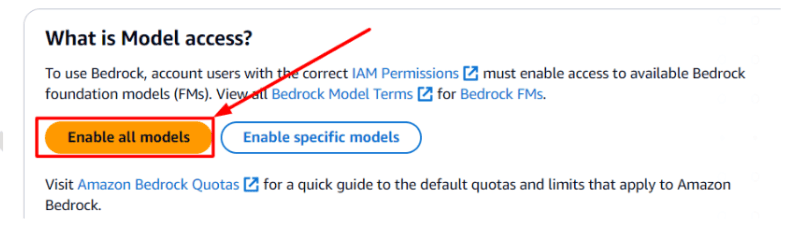
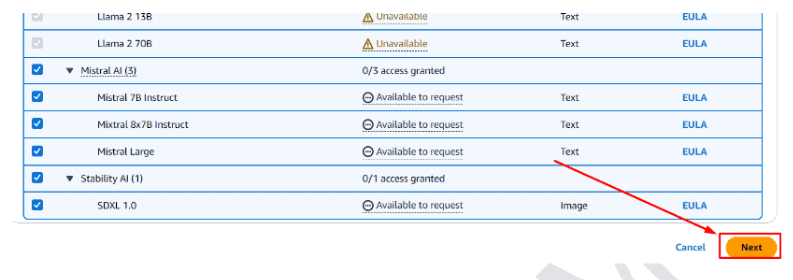
Figure 6: Requesting Access to Foundation Models
Step 4: Provide Required Details
1. Now, fill in the necessary details:
- Company name: K21Academy
- Company website URL: https://k21academy.com/
- Industry: Education
- Intended users: External User
- Use cases: Learning purposes
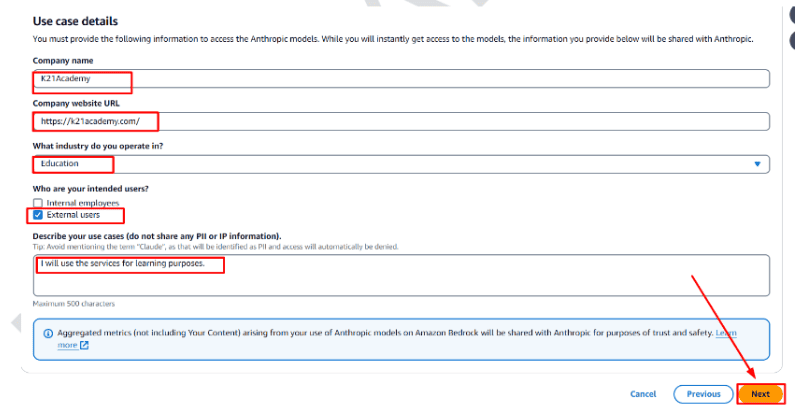
Figure 7: Submitting Details for Model Access Request
.
Figure 8: Submission Confirmation
2. Finally, click Submit
3. Within 5-10 minutes, access to the Foundation Models will be granted, and you’ll be ready to use them for your AI projects.
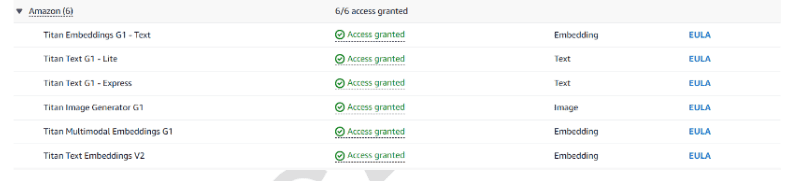
Now we have enabled all the Foundation Models that can be used in Amazon Bedrock and they are ready to use.
Common Issues While Enabling Foundation Models in Bedrock
1. “Access Not Available” Error
This usually happens when Amazon Bedrock is unavailable in your selected AWS Region.

Solution:
Switch to supported regions such as us-east-1 or us-west-2.
2. Model Access Request Pending
Some foundation models require manual approval.
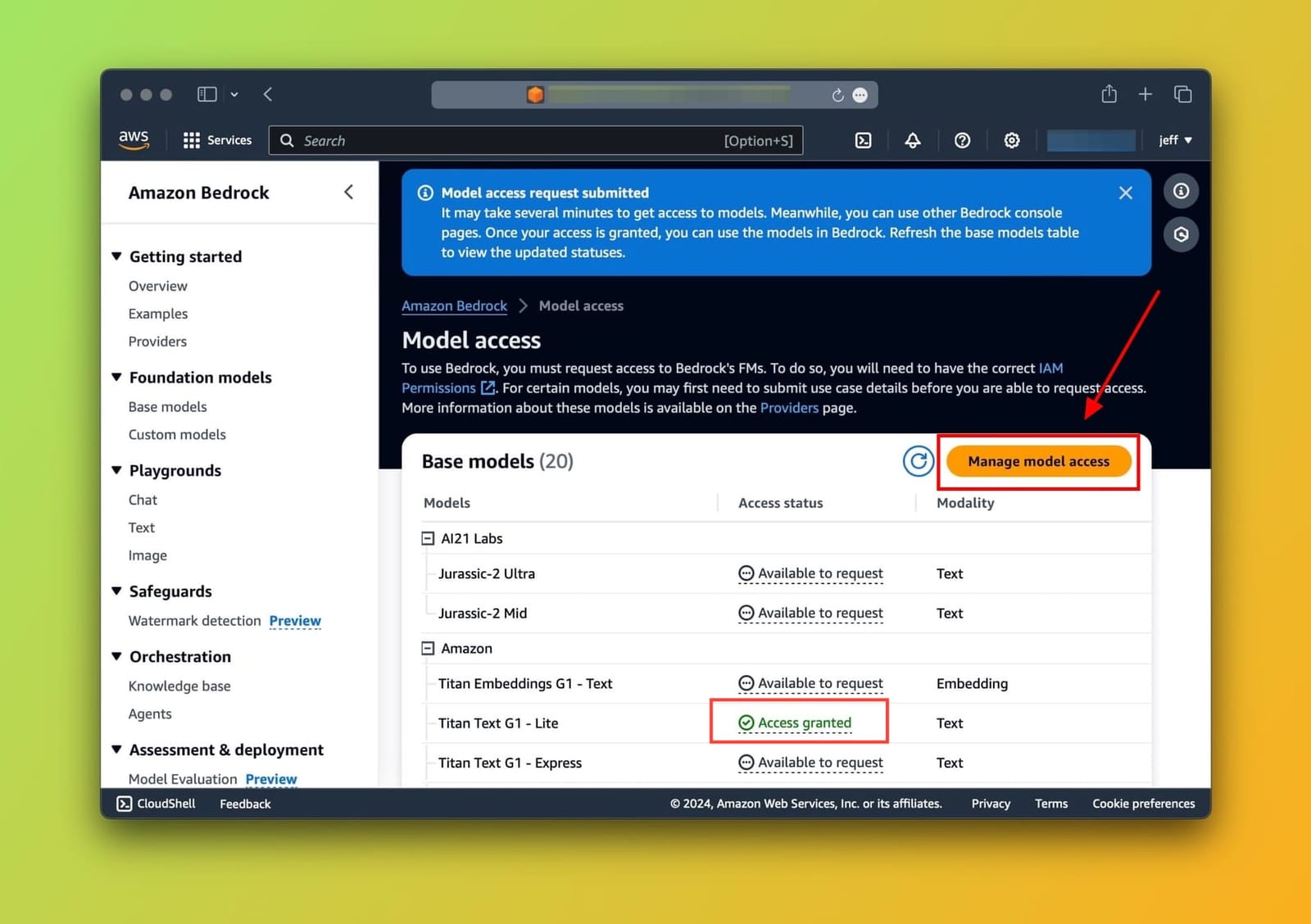
Solution:
Wait 5–10 minutes and refresh the console.
3. Unable to See Models
This may occur due to missing IAM permissions.
Solution:
Ensure your AWS account has permissions for Amazon Bedrock services.
Using the Bedrock Playground
After enabling foundation models in Amazon Bedrock, the next step is learning how to use the Bedrock Playground effectively. The Bedrock Playground is a built-in interactive environment within Amazon Bedrock that allows users to test prompts, experiment with different foundation models, and evaluate AI-generated responses without writing code.
For beginners, the AWS Bedrock Playground provides one of the fastest ways to understand how generative AI models behave in real time. Instead of building a full application, users can directly interact with foundation models through a simple interface and instantly compare outputs across different providers.
As organizations increasingly adopt generative AI, playground environments have become critical for rapid experimentation, prompt engineering, and model evaluation. The foundation model playground in Amazon Bedrock helps developers, data professionals, and enterprises validate AI use cases before moving into production deployment.
Types of Playgrounds Available in Amazon Bedrock
Amazon Bedrock currently offers multiple playground experiences depending on the use case.
| Playground Type | Purpose | Common Use Cases |
|---|---|---|
| Text Playground | Generate and analyze text outputs | Content generation, summarization |
| Chat Playground | Multi-turn conversational AI testing | Chatbots, virtual assistants |
| Image Playground | AI image generation testing | Creative design, media generation |
These playgrounds allow users to test various bedrock foundation models using a graphical interface.
How to Use a Foundation Model in the Amazon Bedrock Playground
Once model access is enabled, you can immediately start testing prompts in the foundation model playground.
Step 1: Open the Playground
-
Sign in to the AWS Console.
-
Open Amazon Bedrock.
-
From the left menu, select:
-
Text Playground
-
or Chat Playground
-
Step 2: Select a Foundation Model
-
Click Select Model.
-
Choose a provider such as:
-
Amazon Titan
-
Anthropic Claude
-
Meta Llama
-
-
Select the desired model version.
The bedrock playground allows quick switching between models for comparison testing.
Step 3: Enter a Prompt
Now enter a prompt into the input area.
Example Prompt
Explain the benefits of cloud computing in simple terms.
You can also experiment with:
-
Summarization prompts
-
Coding prompts
-
Question-answering tasks
-
Marketing content generation
-
AI tutoring scenarios
Step 4: Generate Output
Click Run or Generate.
The foundation model playground will process your request and generate an AI response in real time.
Expected Output Example
The selected model may return:
-
A simplified explanation
-
Structured bullet points
-
Conversational responses
-
Detailed technical answers
Response quality may vary depending on the chosen foundation model.
Key Features of AWS Bedrock Playground
1. Prompt Testing
Users can experiment with different prompt styles and observe how outputs change.
2. Multi-Model Comparison
The AWS Bedrock Playground supports multiple AI providers, making it easier to compare performance across models.
3. Parameter Configuration
Users can modify:
-
Temperature
-
Maximum tokens
-
Top P values
-
Stop sequences
This helps fine-tune AI behavior.
4. No Infrastructure Management
The bedrock playground is fully managed by AWS, removing the need for GPU setup or backend deployment.
Common Use Cases of Bedrock Playground
| Use Case | Example |
|---|---|
| Content Creation | Blog drafts, marketing copy |
| AI Chatbots | Customer support assistants |
| Education | AI tutoring and explanations |
| Coding Assistance | Code generation and debugging |
| Business Automation | Email drafting and summarization |
These real-world applications make the bedrock playground highly useful for developers, enterprises, and learners.
Verifying Your Playground Setup
You can confirm your setup is working correctly if:
-
Models appear in the playground
-
Prompts generate responses successfully
-
No permission or access errors appear
-
Outputs are generated within seconds
If prompts fail, verify:
-
Bedrock model access is enabled
-
Your AWS Region supports the model
-
IAM permissions are configured correctly
Once verified, you can start building and testing generative AI applications directly within the Amazon Bedrock ecosystem.
Pricing & Cost Considerations in Amazon Bedrock
As generative AI adoption grows, understanding Amazon Bedrock cost becomes essential for organizations planning AI-powered applications at scale. One of the biggest advantages of Amazon Bedrock is its pay-as-you-go pricing model, which allows businesses to access powerful foundation models without investing in expensive GPU infrastructure or managing machine learning environments.
However, bedrock pricing can vary significantly depending on:
- The foundation model used
- Input and output token volume
- Region
- On-demand vs provisioned throughput
- Image or text generation workloads
Because different bedrock foundation models have different pricing structures, understanding bedrock model cost is important for optimizing AI usage and controlling cloud expenses.
How Amazon Bedrock Pricing Works
Amazon Bedrock pricing is primarily based on API consumption. Users are charged according to:
- Number of input tokens
- Number of output tokens
- Type of foundation model
- Inference mode
- Fine-tuning or customization usage
A token generally represents a small piece of text. Longer prompts and larger AI-generated outputs increase overall amazon bedrock cost.
Amazon Bedrock Pricing Models
| Pricing Component | Description | Cost Impact |
|---|---|---|
| Input Tokens | Text sent to the model | Lower compared to output |
| Output Tokens | AI-generated response text | Usually higher cost |
| Model Selection | Claude, Titan, Llama, etc. | Different rates per model |
| Provisioned Throughput | Reserved capacity for production workloads | Higher but predictable pricing |
| On-Demand Usage | Pay-per-request model | Flexible for experimentation |
| Fine-Tuning | Custom model training | Additional charges apply |
Estimated Bedrock Model Cost Comparison
The actual bedrock model cost depends on provider pricing and token consumption. Below is a simplified comparison for general understanding.
| Foundation Model | Typical Use Case | Relative Cost Level |
|---|---|---|
| Amazon Titan | Enterprise AI applications | Moderate |
| Anthropic Claude | Conversational AI and reasoning | Higher |
| Meta Llama | Open-weight experimentation | Moderate |
| Cohere Command | Summarization and NLP | Moderate |
| Stable Diffusion | AI image generation | Variable |
Important Note
Costs may change frequently based on AWS updates and provider pricing revisions. Always verify the latest amazon bedrock cost directly in the AWS pricing console.
Factors That Affect Amazon Bedrock Cost
1. Prompt Size
Longer prompts consume more input tokens, increasing bedrock pricing.
2. Response Length
Large generated outputs increase output token charges.
3. Model Complexity
Advanced reasoning models generally cost more than lightweight models.
4. Request Volume
Applications with high API traffic generate higher monthly expenses.
5. Real-Time vs Batch Usage
Provisioned throughput offers predictable performance but may cost more than on-demand inference.
Cost Optimization Tips for Amazon Bedrock
Use Smaller Models for Testing
Avoid expensive large models during initial experimentation.
Optimize Prompt Length
Shorter prompts reduce token usage and lower bedrock pricing.
Monitor Token Consumption
Track usage regularly using AWS billing dashboards.
Use On-Demand Inference for Development
Provisioned throughput is better suited for large-scale production environments.
Compare Multiple Models
Different bedrock foundation models may provide similar output quality at lower cost.
Implement Response Limits
Restrict maximum output tokens to control unexpected usage spikes.
Example Cost Scenario
Suppose a chatbot application:
- Receives 10,000 user prompts daily
- Generates medium-length responses
- Uses a premium conversational foundation model
In this scenario, monthly amazon bedrock cost may increase significantly depending on token usage patterns and response sizes. Organizations should estimate expected workloads before large-scale deployment.
Is Amazon Bedrock Cost-Effective?
For many businesses, Amazon Bedrock provides strong value because it:
- Eliminates infrastructure management
- Reduces AI deployment time
- Supports multiple foundation models
- Offers scalable pay-as-you-go pricing
- Simplifies enterprise AI adoption
Instead of building and maintaining complex AI systems from scratch, organizations can focus on developing AI-powered applications while AWS manages the backend infrastructure.
For learners and businesses exploring generative AI, understanding bedrock pricing and optimizing bedrock model cost early can help prevent unnecessary cloud expenses while maximizing AI performance and scalability.
Summary
This blog provides a step-by-step guide to enabling Foundation Models in Amazon Bedrock, a managed service that offers access to high-performance AI models from leading providers. You’ll learn how to access the service, manage model permissions, and enable the models for your AI projects. We also covered how to provide the necessary details to gain access and offered troubleshooting tips for common issues. Enabling these models allows you to leverage powerful AI capabilities without the need to manage infrastructure, setting the stage for advanced generative AI applications.
Frequently Asked Questions
Amazon Bedrock is a fully managed AWS service that provides access to multiple bedrock foundation models through a single API. It allows developers and businesses to build generative AI applications without managing infrastructure, enabling use cases such as chatbots, content generation, summarization, and AI-powered automation.
Amazon Bedrock is important because it simplifies generative AI adoption by providing secure access to leading foundation models without requiring complex machine learning infrastructure. Organizations can quickly experiment, build, and scale AI applications using AWS Bedrock foundation models while reducing operational overhead and development time.
Amazon Bedrock works by offering managed access to foundation models from providers such as Anthropic, Meta, Amazon, and Cohere through APIs and playground environments. Users can enable models, send prompts, customize responses, and integrate AI capabilities into applications without handling servers, GPUs, or model deployment processes.
Amazon Bedrock offers several benefits including simplified AI development, scalable infrastructure, access to multiple bedrock foundation models, enterprise-grade security, and pay-as-you-go pricing. It helps organizations accelerate generative AI adoption while minimizing the complexity of training and managing machine learning models.
Amazon Bedrock is valuable for cloud professionals, developers, data engineers, AI practitioners, solution architects, and businesses exploring generative AI. Anyone interested in building AI-powered applications using AWS Bedrock foundation models can benefit from learning how Bedrock simplifies AI experimentation and deployment.
To use Amazon Bedrock, users need an AWS account, appropriate IAM permissions, access to supported AWS Regions, and basic familiarity with AWS services. While programming knowledge is helpful, beginners can also use the bedrock playground interface to experiment with foundation models without coding experience.
To get started with Amazon Bedrock, sign in to the AWS Console, open the Bedrock service, and enable foundation model access. After approval, users can test prompts in the AWS Bedrock Playground or interact with models programmatically using SDKs and APIs for generative AI development.
The future of Amazon Bedrock looks strong as enterprises continue adopting generative AI technologies. AWS is expanding supported foundation models, improving customization features, and enhancing enterprise AI capabilities. Amazon Bedrock is expected to play a major role in scalable, secure, and production-ready AI application development. What is Amazon Bedrock?
Why is Amazon Bedrock important?
How does Amazon Bedrock work?
What are the benefits of Amazon Bedrock?
Who should learn about Amazon Bedrock?
What are the prerequisites for Amazon Bedrock?
How to get started with Amazon Bedrock?
What is the future of Amazon Bedrock?
Related References
- What is Generative AI & How It Works?
- What is Prompt Engineering?
- Creating a Free Tier AWS Account
- AWS Certified AI Practitioner (AIF-C01) Certification Exam
- AWS Certified AI Practitioner (AIF-C01): Step-by-Step Hands-on Labs
Join FREE Masterclass
Ready to elevate your AWS GEN AI expertise? Join our free class and gain hands-on experience with expert guidance.
Register Now: Free AWS Gen AI-Class
Take this opportunity to learn from industry experts and Download the FREE GUIDE: How to Enable Foundation Models to use in Bedrock on AWS Account.



![AWS AI Services: Complete List of AI, ML & GenAI Tools with Use Cases [2026]](https://k21academy.com/wp-content/uploads/2024/09/AWS-AI-1.png)

![AWS DevOps [DOP-C02] Professional Step By Step Activity Guides (Hands-On Labs)](https://k21academy.com/wp-content/uploads/2023/02/DOP-C02-1.png)