

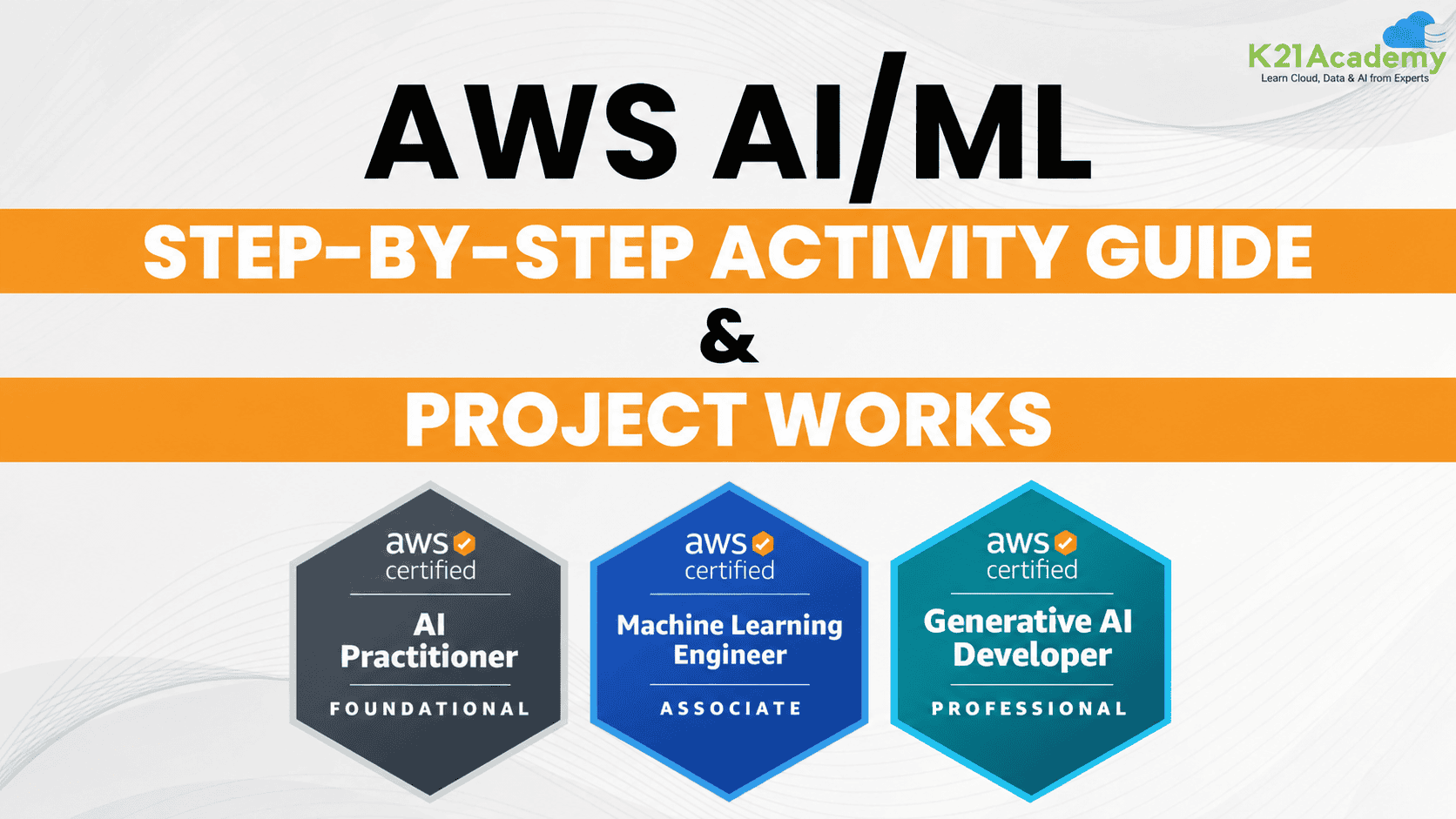



Welcome to our AWS GenAI/ML Mastery Bootcamp! In this post, we’ll cover everything you need to master AWS GenAI/ML, secure a high-paying job, and get certified (AIF-C01, MLA-C02, AIP-C01) in this dynamic field. Whether you’re starting with the basics or looking to deepen your expertise, we’ve got you covered with a comprehensive approach to AWS Generative AI and ML.
We’ll dive into the essentials of AI, ML & Gen AI and explore advanced topics through detailed hands-on labs and project work. Our step-by-step activity guides and real-world projects will provide you with the practical skills and knowledge needed to excel in interviews and advance your career.
Prepare to immerse yourself in hands-on learning experiences that will pave the way for your success in the AWS AI/ML domain. From foundational concepts to advanced techniques, this boot camp will equip you with everything you need to thrive in this ever-evolving field. Let’s get started on this transformative journey together!

Table of Contents:
1. Hands-On Labs For AWS AI/ML
1.1 AI/ML & GenAI for Beginners
1.2 Generative AI Foundation & AWS Ecosystem
- Lab 1: Requesting AWS Service Quota Increases
- Lab 2: Invoke Foundation Models for Text Generation Using Amazon Bedrock Console
1.3 Accessing Bedrock Foundation Models Using APIs
- Lab 3: Invoke Foundation Models for Text, Image & Code Generation Using APIs
- Lab 4: Build AI Solutions with Amazon Bedrock Converse API
- Lab 5: Exploring Transformer Models and Tokenization
- Lab 6: Build & Deploy an AI Chatbot Using Amazon Bedrock and AWS Lambda
1.4 Prompt Engineering Fundamentals
- Lab 7: Prompt Engineering Techniques Using Amazon Bedrock Foundation Models
- Lab 8: Invoke Zero-Shot Prompts for Text Generation Using Amazon Bedrock
1.5 Retrieval-Augmented Generation (RAG)
- Lab 9: Setting Up Guardrails with Amazon Bedrock
- Lab 10: Text and Vector Embeddings Using Amazon Bedrock APIs
- Lab 11: Building a RAG Application Using Amazon Bedrock Console
- Lab 12: Build a Question-Answering RAG Application Using Amazon Bedrock API
- Lab 13: Building an End-to-End RAG System Using Amazon Bedrock APIs
- Lab 14: Build Agentic GraphRAG Using Amazon Bedrock
1.6 Agentic AI and Workflow Orchestration
- Lab 15: Build an AI Agent Using Amazon Bedrock AgentCore
- Lab 16: Integrate Amazon Bedrock Models with LangChain Agents
- Lab 17: Build Production-Ready AI Agents with Amazon Bedrock AgentCore
- Lab 18: Build a Multi-Agent Insurance Claims Processing System on AWS
- Lab 19: Build an Agentic AI Application Using LangChain
1.7 Data Validation, Processing and Enhancement
- Lab 20: Design Scalable Data Pipelines Using AWS Glue and Step Functions
1.8 Foundation Model Customization and Deployment
- Lab 21: Create a Custom Foundation Model Using Amazon Bedrock Fine-Tuning
- Lab 22: Amazon Bedrock Model Evaluation, Monitoring, and Cost Optimization
1.9 GenAI Security, Governance & Responsible AI
- Lab 23: Explore AWS Managed AI Services
- Lab 24: Protect Transcriptions Using Amazon Transcribe
- Lab 25: Enhancing Clinical Documentation with AWS AI Services
- Lab 26: Setting Up Amazon SageMaker Domain, Studio & Canvas
- Lab 27: Build a Sample Chatbot Using Amazon Lex
- Lab 28: Build an Amazon Lex Chatbot with AWS Lambda and Third-Party APIs
- Lab 29: Perform Sentiment Analysis Using Amazon Comprehend
- Lab 30: Explore Amazon Polly and Amazon Rekognition
- Lab 31: Build an AI-Powered IT Help Desk Ticketing System
- Lab 32: Introduction to AWS Glue
- Lab 33: Using AWS Glue Data Catalog with Amazon Athena
- Lab 34: Working with Amazon Kinesis Data Streams
- Lab 35: Analyzing CSV Data in Amazon S3 Using Athena
- Lab 36: Build a Real-Time Data Pipeline Using Amazon Kinesis, Apache Spark, and Amazon S3
1.12 Data Integrity, Transformation & Feature Engineering
- Lab 37: Build Data Pipelines Using No-Code ETL
- Lab 38: Prepare Data for TF-IDF Using Amazon SageMaker JupyterLab
- Lab 39: Data Preprocessing Using AWS Glue DataBrew
- Lab 40: Create and Run ETL Jobs Using AWS Glue
1.13 Exploratory Data Analysis
- Lab 41: Streamlining Data Analysis with Amazon SageMaker
- Lab 42: Hyperparameter Optimization Using Amazon SageMaker
- Lab 43: Tune, Deploy, and Predict with TensorFlow on Amazon SageMaker
- Lab 44: Data Preparation and Automated Model Training Using SageMaker
1.15 Model Deployment & Monitoring with SageMaker
- Lab 45: Build, Train, and Deploy Machine Learning Models Using Amazon SageMaker Canvas
- Lab 46: Build, Train, and Deploy a Machine Learning Model Using Amazon SageMaker AI
- Lab 47: Install Docker, Create an Image, and Push It to Amazon ECR
- Lab 48: Create and Configure an Amazon EKS Cluster
- Lab 49: Build an End-to-End MLOps Pipeline Using Amazon SageMaker
1.17 Model Security, Compliance & Governance
- Project 1: Build an AI Loan Advisory System on AWS (LoanGenie)
- Project 2: Build Production-Ready AI Agents Using Amazon Bedrock AgentCore
- Project 3: Build a Secure Multi-Agent Patient Support Assistant Using Amazon Bedrock AgentCore
- Project 4: Build a RAG Application Using Amazon Bedrock & SageMaker
- Project 5: Build an AI Stylist with Amazon Bedrock, SageMaker & Stable Diffusion
- Project 6: Predicting Customer Churn Using Machine Learning
- Project 7: Build a Crypto AI Agent Using Amazon Bedrock
- AWS Certified Cloud Practitioner (CLF-C02)
- AWS AI Practitioner (AIF-C01)
- AWS Machine Learning Associate (MLA-C02)
- AWS Generative AI Developer (AIP-C01)
- AWS Solution Architect Associate (SAA-C03)
1. Hands-On Labs For AWS AI/ML
1.1 AI/ML & GenAI for Beginners
This foundational module introduces Artificial Intelligence (AI), Machine Learning (ML), Deep Learning (DL), and Generative AI. It covers essential concepts, different types of machine learning, real-world applications, and the key differences between ML and Deep Learning.
Learners will also explore how AI/ML technologies are used across major cloud platforms, including AWS, Microsoft Azure, and Google Cloud, building a strong foundation for the hands-on labs in upcoming modules.
1.2 Generative AI Foundation & AWS Ecosystem
This module introduces Generative AI fundamentals, foundation models, transformer architectures, embeddings, and prompt engineering techniques. Learners will explore AWS Generative AI services, particularly Amazon Bedrock, and understand how foundation models are accessed and used to build AI-powered applications.
Through hands-on labs, learners will gain practical experience managing AWS service quotas and generating text using foundation models in Amazon Bedrock.
Lab 1: Requesting AWS Service Quota Increases
Objective: Learn how to identify, review, and request AWS service quota increases for AI/ML workloads.
In this lab, you will explore AWS Service Quotas and learn how to check existing quota limits, identify the appropriate service and quota, and submit increase requests when supported. You will also understand how to raise AWS Support tickets for service-related issues and review Amazon Bedrock quota requirements.
By the end of this lab, you will understand how to manage AWS service quotas and address quota-related limitations when working with Generative AI services.
Related Readings: 6 Proven Solutions for Amazon Bedrock ThrottlingException
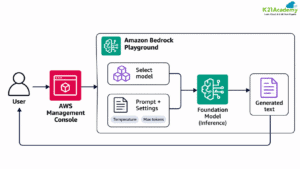
Lab 2: Invoke Foundation Models for Text Generation Using Amazon Bedrock Console
Objective: Learn how to invoke foundation models through the Amazon Bedrock console to generate AI-powered text.
In this lab, you will explore the Amazon Bedrock console, select an available foundation model, and use the playground to generate text responses from natural language prompts. You will experiment with prompt instructions and model inference settings to understand how they influence generated responses.
By the end of this lab, you will have hands-on experience invoking foundation models and generating text using Amazon Bedrock without writing code.
Related Readings: 10 Step-by-Step Labs to Master AWS Generative AI – K21 Academy
Prerequisite: Set Up Your AWS Account
Before starting the hands-on labs, ensure you have an active AWS account with access to the required services.
New AWS customers can explore eligible services through the AWS Free Tier, which offers promotional credits and Free and Paid plan options. Some advanced AI/ML services may require a Paid plan and can incur additional charges.
Related Readings: How To Create AWS Free Tier Account
1.3 Accessing Bedrock Foundation Models Using APIs
This module explores how to access and interact with foundation models using Amazon Bedrock APIs and AWS SDKs. Learners will understand the fundamentals of transformer architectures, tokenization, and programmatic model invocation while gaining practical experience with Boto3 and the Amazon Bedrock Converse API.
Through hands-on labs, learners will generate text, images, and code using foundation models, explore tokenization techniques, and build AI-powered chatbots integrated with AWS Lambda.
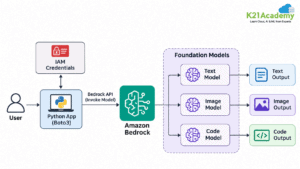
Lab 3: Invoke Foundation Models for Text, Image & Code Generation Using APIs
Objective: Learn how to invoke Amazon Bedrock foundation models programmatically to generate text, images, and code.
In this lab, you will configure AWS credentials and use Boto3 to interact with supported foundation models through Amazon Bedrock APIs. You will explore different prompts and inference parameters to generate text responses, AI-created images, and code snippets.
By the end of this lab, you will understand how to integrate foundation model inference into Python applications using AWS APIs.
Related Readings: Amazon Bedrock Explained: A Comprehensive Guide to Generative AI
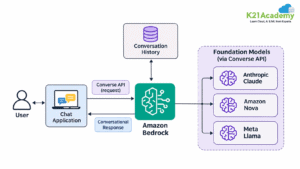
Lab 4: Build AI Solutions with Amazon Bedrock Converse API
Objective: Learn how to build Generative AI applications using the Amazon Bedrock Converse API.
In this lab, you will explore the Converse API, configure model requests, and generate conversational responses using supported foundation models. You will learn how to structure messages, manage conversation history, and interact with different models through a consistent API interface.
By the end of this lab, you will gain hands-on experience building conversational AI workflows with Amazon Bedrock.
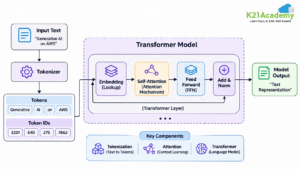
Lab 5: Exploring Transformer Models and Tokenization
Objective: Understand how transformer models process text using tokenization and attention mechanisms.
In this lab, you will explore tokenization techniques using transformer-based models. You will examine how input text is converted into tokens, understand token IDs, and explore the role of attention mechanisms in processing language.
By the end of this lab, you will understand the fundamental concepts behind transformer-based language models and how tokenization supports natural language processing applications.
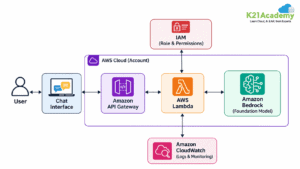
Lab 6: Build & Deploy an AI Chatbot Using Amazon Bedrock and AWS Lambda
Objective: Build and deploy an AI-powered chatbot using Amazon Bedrock foundation models and AWS Lambda.
In this lab, you will create a serverless chatbot workflow using AWS Lambda to invoke a supported foundation model through Amazon Bedrock. You will configure the necessary IAM permissions, develop a Lambda function to process user messages, and test the chatbot with different prompts.
By the end of this lab, you will understand how to integrate Amazon Bedrock with AWS Lambda to create scalable, serverless conversational AI applications.
Related Readings: AWS Bedrock for Enterprise Architects: What It Is & Where It Fits
1.4 Prompt Engineering Fundamentals
This module introduces prompt engineering techniques used to improve the quality, accuracy, and relevance of responses generated by foundation models. Learners will explore prompt structure, zero-shot, one-shot, few-shot prompting, and other techniques for controlling AI-generated outputs.
Through hands-on labs with Amazon Bedrock, learners will experiment with different prompting strategies, compare model responses, and understand how to design effective prompts for real-world Generative AI applications.
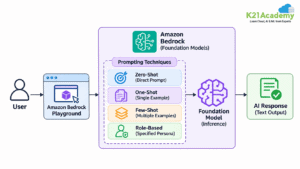
Lab 7: Prompt Engineering Techniques Using Amazon Bedrock Foundation Models
Objective: Learn how to apply different prompt engineering techniques using foundation models in the Amazon Bedrock console.
In this lab, you will explore the Amazon Bedrock playground and experiment with zero-shot, one-shot, few-shot, and role-based prompting techniques. You will create prompts, adjust instructions and context, and compare how different prompting approaches influence the accuracy, relevance, and structure of AI-generated responses.
By the end of this lab, you will understand how to design effective prompts and select appropriate prompting techniques for various Generative AI use cases.
Related Readings: AWS Generative AI Hands-On Labs – Prompt Engineering
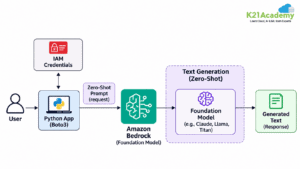
Lab 8: Invoke Zero-Shot Prompts for Text Generation Using Amazon Bedrock
Objective: Learn how to generate AI-powered text using zero-shot prompting techniques with Amazon Bedrock.
In this lab, you will use Python and Boto3 to invoke a supported foundation model through the Amazon Bedrock API without providing examples in the prompt. You will create prompts for text generation, experiment with different instructions, and analyze model responses to understand how zero-shot prompting works.
By the end of this lab, you will gain practical experience generating text through Amazon Bedrock APIs and understand how to apply zero-shot prompting in real-world Generative AI applications.
Related Readings: AWS Generative AI Hands-On Labs – Zero-Shot Prompting
1.5 Retrieval-Augmented Generation (RAG)
This module explores Retrieval-Augmented Generation (RAG), a technique that combines foundation models with external knowledge sources to generate more accurate and context-aware responses. Learners will understand RAG architectures, vector embeddings, semantic search, text chunking strategies, and the differences between RAG, fine-tuning, and model training.
Through hands-on labs using Amazon Bedrock, learners will implement guardrails, generate vector embeddings, build knowledge-based question-answering applications, and develop end-to-end RAG workflows. The module also introduces Agentic GraphRAG for advanced knowledge retrieval and reasoning.
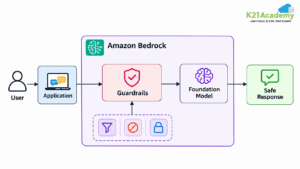
Lab 9: Setting Up Guardrails with Amazon Bedrock
Objective: Learn how to configure and test Amazon Bedrock Guardrails to promote safer and more responsible Generative AI responses.
In this lab, you will create guardrails in Amazon Bedrock, configure content filters, define denied topics, and explore sensitive information protection. You will test different prompts to understand how guardrails evaluate and filter harmful or restricted content.
By the end of this lab, you will understand how to apply Amazon Bedrock Guardrails to help improve the safety and compliance of Generative AI applications.
Related Readings: AWS Generative AI Hands-On Labs – Guardrails with Amazon Bedrock
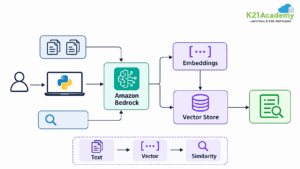
Lab 10: Text and Vector Embeddings Using Amazon Bedrock APIs
Objective: Learn how to generate text embeddings and perform semantic similarity searches using Amazon Bedrock foundation models.
In this lab, you will use Python and Boto3 to invoke a supported embedding model through Amazon Bedrock. You will convert text into numerical vector representations, compare embeddings using similarity techniques, and explore how semantic search identifies related information.
By the end of this lab, you will understand how vector embeddings support semantic search, document retrieval, and RAG applications.
Related Readings: Understanding RAG with LangChain
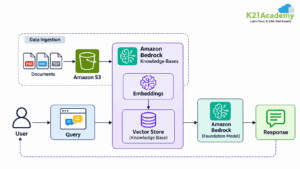
Lab 11: Building a RAG Application Using Amazon Bedrock Console
Objective: Build a Retrieval-Augmented Generation application using Amazon Bedrock Knowledge Bases through the AWS Management Console.
In this lab, you will create an Amazon S3 data source, configure an Amazon Bedrock Knowledge Base, select an embedding model and supported vector store, and synchronize documents for retrieval. You will then test the knowledge base by asking questions based on the uploaded content.
By the end of this lab, you will have built a knowledge-based RAG application that retrieves relevant information and generates contextual responses using Amazon Bedrock.
Related Readings: AWS Machine Learning Hands-On Labs – Building and Querying a RAG System with Amazon Bedrock Knowledge Bases
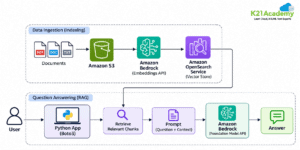
Lab 12: Build a Question-Answering RAG Application Using Amazon Bedrock API
Objective: Develop a question-answering application using Amazon Bedrock APIs and Retrieval-Augmented Generation.
In this lab, you will use Python and Boto3 to process documents, generate embeddings, retrieve relevant text chunks, and send context-enriched prompts to a foundation model through Amazon Bedrock. You will explore how retrieval improves the relevance of generated answers.
By the end of this lab, you will understand how to implement a question-answering RAG workflow programmatically using Amazon Bedrock APIs.
Related Readings: AWS Generative AI Hands-On Labs – QA-Based RAG Application Using Bedrock API
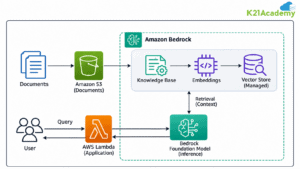
Lab 13: Building an End-to-End RAG System Using Amazon Bedrock APIs
Objective: Build an end-to-end Retrieval-Augmented Generation system using Amazon Bedrock APIs and AWS services.
In this lab, you will integrate document ingestion, vector embeddings, knowledge retrieval, and foundation model inference into a complete RAG workflow. You will explore how Amazon Bedrock Knowledge Bases, Amazon S3, and supporting AWS services work together to process user queries and generate context-aware responses.
By the end of this lab, you will understand how to build and integrate the core components of a scalable RAG application using Amazon Bedrock.
Related Readings: AWS Generative AI Hands-On Labs – End-to-End RAG System Using APIs
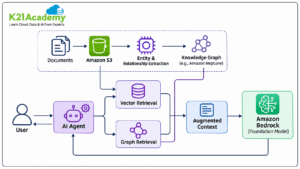
Lab 14: Build Agentic GraphRAG Using Amazon Bedrock
Objective: Explore how to build an Agentic GraphRAG application using Amazon Bedrock and graph-based knowledge retrieval.
In this lab, you will explore how graph relationships and vector-based retrieval can be combined to provide richer contextual information to foundation models. You will work with knowledge graph concepts, entity relationships, and agent-driven retrieval workflows to understand how complex questions can be answered using interconnected knowledge.
By the end of this lab, you will understand how Agentic GraphRAG combines graph-based retrieval, foundation models, and agentic reasoning to support advanced question-answering applications.
Related Readings: AWS Generative AI & Amazon Bedrock Interview Questions – GraphRAG and Vector Search
1.6 Agentic AI and Workflow Orchestration
This module introduces Agentic AI, intelligent agents, and workflow orchestration using Amazon Bedrock, Amazon Bedrock AgentCore, LangChain, and LangGraph. Learners will explore the differences between traditional AI applications and agentic workflows, understand how AI agents interact with tools, and learn how multiple agents collaborate to complete complex tasks.
Through hands-on labs, learners will build AI agents, integrate foundation models with LangChain, explore production-ready agent deployment, and develop multi-agent workflows for real-world business applications.
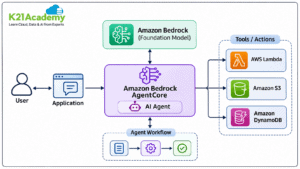
Lab 15: Build an AI Agent Using Amazon Bedrock AgentCore
Objective: Learn how to build and run an AI agent using Amazon Bedrock AgentCore.
In this lab, you will explore Amazon Bedrock AgentCore and learn how to integrate a foundation model with tools to perform automated tasks. You will create an agent workflow, configure the required AWS permissions, and test how the agent processes user requests and executes actions.
By the end of this lab, you will understand how Amazon Bedrock AgentCore supports building and running AI agents in AWS environments.
Related Readings: AWS Generative AI Developer Certification Guide – K21 Academy
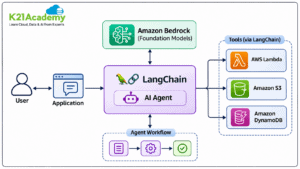
Lab 16: Integrate Amazon Bedrock Models with LangChain Agents
Objective: Learn how to integrate Amazon Bedrock foundation models with LangChain to build intelligent AI agents.
In this lab, you will configure LangChain to interact with foundation models hosted on Amazon Bedrock. You will create an AI agent, connect external tools, and explore how LangChain orchestrates model interactions and tool execution to complete user-defined tasks.
By the end of this lab, you will understand how to combine Amazon Bedrock and LangChain to develop flexible, tool-enabled AI applications.
Lab 17: Build Production-Ready AI Agents with Amazon Bedrock AgentCore
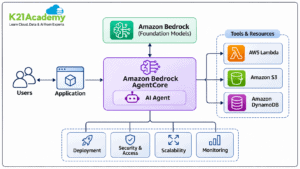
Objective: Learn how to develop, deploy, and monitor production-ready AI agents using Amazon Bedrock AgentCore.
In this lab, you will explore how Amazon Bedrock AgentCore supports running AI agents in managed environments. You will examine agent deployment, secure tool access, runtime management, and monitoring capabilities required for enterprise applications.
By the end of this lab, you will understand how to prepare AI agents for production environments with a focus on security, scalability, reliability, and operational monitoring.
Related Readings: AWS Generative AI Developer Certification Guide – K21 Academy
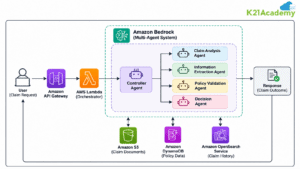
Lab 18: Build a Multi-Agent Insurance Claims Processing System on AWS
Objective: Learn how to design a multi-agent AI system for automating insurance claims processing using AWS Generative AI services.
In this lab, you will explore how specialized AI agents collaborate to process insurance claims. The workflow includes analyzing claim information, extracting relevant details, validating policy information, and coordinating decisions across multiple agents using foundation models and orchestration tools.
By the end of this lab, you will understand how multi-agent architectures can streamline complex business workflows while supporting validation, human review, and controlled automation.
Related Readings: AWS Generative AI & Amazon Bedrock Interview Questions – K21 Academy
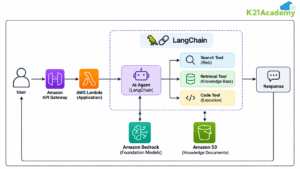
Lab 19: Build an Agentic AI Application Using LangChain
Objective: Learn how to develop an Agentic AI application using LangChain and foundation models.
In this lab, you will build an AI agent capable of interpreting user requests, selecting appropriate tools, and executing multi-step workflows. You will explore LangChain agent components, tool integration, and interaction with foundation models to create an application that performs tasks beyond basic text generation.
By the end of this lab, you will understand how to use LangChain to orchestrate agentic workflows and build intelligent AI-powered applications.
1.7 Data Validation, Processing and Enhancement
This module focuses on data validation, transformation, and feature engineering techniques used to prepare high-quality datasets for AI/ML applications. Learners will explore data integrity, feature transformation, data quality checks, and scalable processing workflows using AWS services.
Through a hands-on lab, learners will understand how AWS Glue and AWS Step Functions work together to automate data processing, coordinate ETL jobs, and prepare reliable datasets for downstream AI/ML workloads.
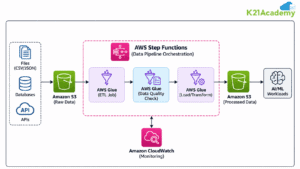
Lab 20: Design Scalable Data Pipelines Using AWS Glue and Step Functions
Objective: Learn how to design and automate scalable data processing pipelines using AWS Glue and AWS Step Functions.
In this lab, you will create a data processing workflow using Amazon S3 for data storage, AWS Glue for data transformation, and AWS Step Functions for workflow orchestration. You will explore how to automate ETL jobs, validate data quality, and coordinate processing steps to prepare datasets for AI/ML applications.
By the end of this lab, you will understand how to build scalable, automated data pipelines that improve data quality, processing efficiency, and reliability for machine learning workloads.
Related Readings:
1.8 Foundation Model Customization and Deployment
This module focuses on customizing, deploying, and optimizing foundation models using Amazon Bedrock. Learners will explore model deployment strategies, fine-tuning techniques, performance evaluation, and monitoring practices for Generative AI applications.
Through hands-on labs, learners will gain practical experience fine-tuning foundation models with custom datasets, evaluating model performance, monitoring inference workloads, and optimizing operational costs for production-ready AI solutions.
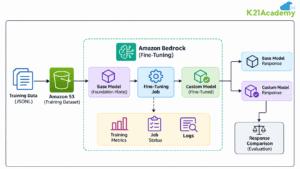
Lab 21: Create a Custom Foundation Model Using Amazon Bedrock Fine-Tuning
Objective: Learn how to customize foundation models using fine-tuning capabilities in Amazon Bedrock.
In this lab, you will prepare a custom training dataset, upload it to Amazon S3, and configure a fine-tuning job using a supported Amazon Bedrock foundation model. You will monitor the training process, create a customized model, and test its responses against the original base model.
By the end of this lab, you will understand how to fine-tune foundation models using Amazon Bedrock and evaluate customized model performance for specific business requirements.
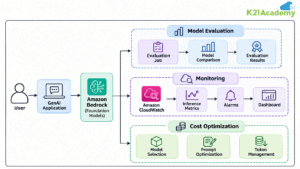
Lab 22: Amazon Bedrock Model Evaluation, Monitoring, and Cost Optimization
Objective: Learn how to evaluate foundation model performance, monitor inference workloads, and optimize Amazon Bedrock costs.
In this lab, you will explore Amazon Bedrock model evaluation to compare foundation models based on response quality and performance. You will also examine Amazon CloudWatch metrics, monitor inference activity, and apply cost optimization techniques such as model selection, prompt optimization, and token usage management.
By the end of this lab, you will understand how to evaluate and monitor foundation models while improving the efficiency and cost-effectiveness of Generative AI applications on AWS.
1.9 GenAI Security, Governance & Responsible AI
This module focuses on securing Generative AI applications, protecting sensitive information, and implementing responsible AI practices on AWS. Learners will explore content moderation, safety policies, data encryption, personally identifiable information (PII) protection, and regulatory compliance.
The module also introduces AI governance frameworks and ethical design principles to help organizations develop secure, trustworthy, and responsible Generative AI solutions.
1.10 AWS AI & ML Services
This module introduces AWS managed AI and machine learning services that help organizations build intelligent applications without developing complex AI models from scratch. Learners will explore Amazon Comprehend, Amazon Lex, Amazon Translate, Amazon Transcribe, Amazon Polly, Amazon Rekognition, Amazon Textract, and Amazon SageMaker AI.
Through hands-on labs, learners will gain practical experience analyzing text, processing speech, extracting information from documents, building conversational chatbots, configuring SageMaker environments, and developing AI-powered automation solutions.
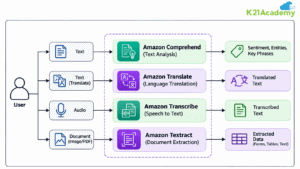
Lab 23: Explore AWS Managed AI Services
Objective: Gain hands-on experience with AWS managed AI services for text analysis, language translation, speech processing, and document extraction.
In this lab, you will explore Amazon Comprehend, Amazon Translate, Amazon Transcribe, and Amazon Textract to analyze text, translate content, convert audio into text, and extract information from documents.
By the end of this lab, you will understand how AWS managed AI services can be integrated into applications to automate common language and document processing tasks.
Related Readings: AWS AI, ML & Generative AI Services
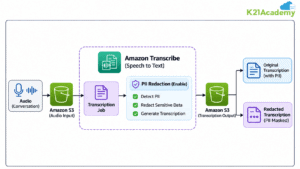
Lab 24: Protect Transcriptions Using Amazon Transcribe
Objective: Learn how to protect sensitive information in speech-to-text outputs using Amazon Transcribe.
In this lab, you will explore Amazon Transcribe to convert audio into text and configure personally identifiable information (PII) redaction for supported transcription workflows. You will review the generated transcription and understand how sensitive information can be identified and redacted.
By the end of this lab, you will understand how to improve privacy protection in automated transcription workflows.
Related Readings: AWS ML Specialty Hands-On Guide — Transcription Privacy Lab
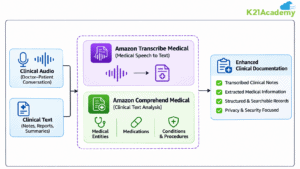
Lab 25: Enhancing Clinical Documentation with AWS AI Services
Objective: Learn how to process clinical text and medical audio using Amazon Comprehend Medical and Amazon Transcribe Medical.
In this lab, you will explore medical transcription and clinical text analysis to extract relevant medical information from supported inputs. You will use these services to understand how clinical documentation workflows can be automated while considering data privacy and security.
By the end of this lab, you will understand how AWS healthcare AI services can support clinical documentation and medical information extraction.
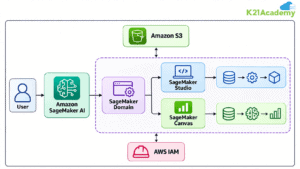
Lab 26: Setting Up Amazon SageMaker Domain, Studio & Canvas
Objective: Learn how to configure an Amazon SageMaker AI environment for machine learning development and no-code model building.
In this lab, you will create or configure a SageMaker domain, access SageMaker Studio, and explore SageMaker Canvas. You will learn how the environments support data preparation, model development, and machine learning workflows.
By the end of this lab, you will understand how to set up and navigate the Amazon SageMaker AI development environment.
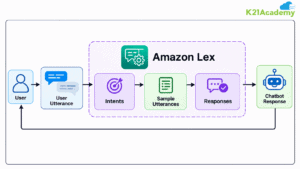
Lab 27: Build a Sample Chatbot Using Amazon Lex
Objective: Learn how to create and test a conversational chatbot using Amazon Lex.
In this lab, you will create an Amazon Lex chatbot, define intents, configure sample utterances, and design responses to user requests. You will build and test the chatbot using example conversations such as greetings and food orders.
By the end of this lab, you will understand how Amazon Lex enables conversational interfaces using natural language understanding.
Related Readings: Amazon Lex: Introduction, Features & Use Cases
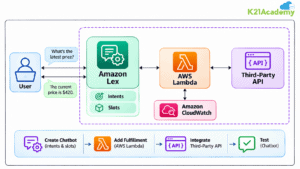
Lab 28: Build an Amazon Lex Chatbot with AWS Lambda and Third-Party APIs
Objective: Learn how to integrate Amazon Lex with AWS Lambda and external APIs to build dynamic conversational applications.
In this lab, you will create a Lambda function that retrieves information from a third-party REST API and connect it to an Amazon Lex chatbot. You will configure intents, slots, and fulfillment logic, then test responses generated from external data.
By the end of this lab, you will understand how to extend chatbot capabilities through serverless functions and API integration.
Related Readings: Amazon API Gateway: Concepts and Use Cases
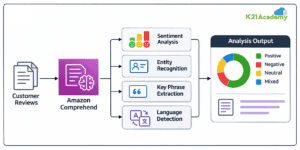
Lab 29: Perform Sentiment Analysis Using Amazon Comprehend
Objective: Learn how to analyze customer feedback and identify sentiment using Amazon Comprehend.
In this lab, you will process customer reviews and feedback using Amazon Comprehend to classify sentiment as positive, negative, neutral, or mixed. You will also explore text analysis capabilities such as entity recognition, key phrase extraction, and language detection.
By the end of this lab, you will understand how to extract actionable insights from unstructured text using AWS natural language processing services.
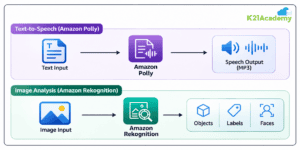
Lab 30: Explore Amazon Polly and Amazon Rekognition
Objective: Gain hands-on experience with text-to-speech generation and image analysis using Amazon Polly and Amazon Rekognition.
In this lab, you will explore how Amazon Polly converts text into natural-sounding speech and how Amazon Rekognition analyzes images to detect objects, labels, and visual characteristics.
By the end of this lab, you will understand how to integrate speech synthesis and computer vision capabilities into AI-powered applications.
Related Readings: Top AI/ML Projects on AWS & Azure Cloud in 2026
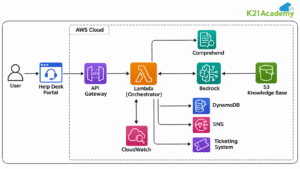
Lab 31: Build an AI-Powered IT Help Desk Ticketing System
Objective: Learn how to build an AI-powered IT help desk workflow for processing and managing support requests.
In this lab, you will explore how AI services can analyze incoming support tickets, identify the nature of an issue, classify requests, and assist with ticket routing or response generation. You will understand how intelligent automation can improve IT support workflows.
By the end of this lab, you will understand how AI-powered ticket analysis and automation can support faster and more consistent IT service management.
1.11 Data Ingestion
This module focuses on data ingestion, storage, and processing using AWS services. Learners will explore Amazon S3, bucket policies, access control lists (ACLs), object versioning, and cross-region replication to understand how data is securely stored and managed in AWS.
Through hands-on labs, learners will work with AWS Glue, Amazon Athena, Amazon Kinesis Data Streams, and Apache Spark to catalog datasets, query information stored in Amazon S3, and build scalable data ingestion pipelines for AI/ML applications.
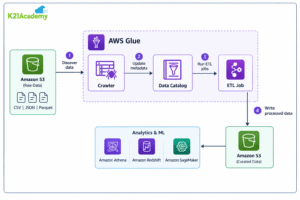
Lab 32: Introduction to AWS Glue
Objective: Learn how AWS Glue helps discover, organize, and prepare data for analytics and machine learning workloads.
In this lab, you will explore the AWS Glue console, understand its core components, and learn how crawlers, the Data Catalog, and ETL jobs work together to support data integration. You will also examine how AWS Glue connects with Amazon S3 to manage and process datasets.
By the end of this lab, you will understand the fundamental capabilities of AWS Glue and how it supports automated data discovery and preparation.
Related Readings: AWS Glue: Overview, Features, Architecture, Use Cases & Pricing
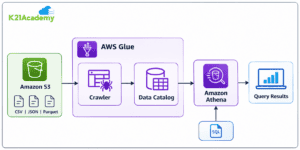
Lab 33: Using AWS Glue Data Catalog with Amazon Athena
Objective: Learn how to catalog data stored in Amazon S3 and query it using AWS Glue Data Catalog and Amazon Athena.
In this lab, you will configure an AWS Glue crawler to discover the structure of data stored in Amazon S3, create metadata tables in the Glue Data Catalog, and access those tables using Amazon Athena. You will execute SQL queries to retrieve and analyze the cataloged data.
By the end of this lab, you will understand how AWS Glue Data Catalog and Amazon Athena work together to support serverless data discovery and analysis.
Related Readings: Amazon Athena: Exploring Cloud Data Insights
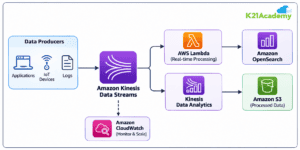
Lab 34: Working with Amazon Kinesis Data Streams
Objective: Learn how to ingest and process real-time streaming data using Amazon Kinesis Data Streams.
In this lab, you will create a Kinesis data stream, configure data producers to send records, and explore how consumer applications retrieve streaming data. You will also examine stream monitoring and scaling options for managing continuously arriving data.
By the end of this lab, you will understand how Amazon Kinesis Data Streams supports real-time data ingestion and processing for analytics and machine learning applications.
Related Readings: What is AWS Kinesis (Amazon Kinesis Data Streams)?
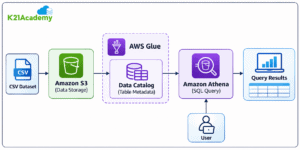
Lab 35: Analyzing CSV Data in Amazon S3 Using Athena
Objective: Learn how to analyze CSV datasets stored in Amazon S3 using Amazon Athena and SQL queries.
In this lab, you will upload a CSV dataset to an Amazon S3 bucket, configure Amazon Athena to access the data, create a table with the appropriate schema, and execute SQL queries to retrieve and analyze information.
By the end of this lab, you will understand how to perform serverless data analysis on Amazon S3 datasets using Amazon Athena without managing database infrastructure.
Related Readings: 10 Unbelievable AWS Data Engineer Labs & Projects
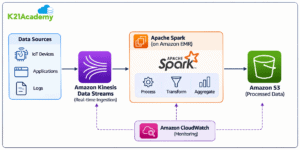
Lab 36: Build a Real-Time Data Pipeline Using Amazon Kinesis, Apache Spark, and Amazon S3
Objective: Learn how to build a scalable data ingestion and processing pipeline using Amazon Kinesis, Apache Spark, and Amazon S3.
In this lab, you will explore how Amazon Kinesis ingests streaming data, Apache Spark processes and transforms incoming records, and Amazon S3 stores the processed output. You will understand how these services work together to support real-time analytics and machine learning workloads.
By the end of this lab, you will understand how to design and implement a streaming data pipeline that supports scalable data ingestion, transformation, and storage on AWS.
Related Readings: Data Engineering With AWS Machine Learning
1.12 Data Integrity, Transformation & Feature Engineering
This module focuses on preparing, cleaning, transforming, and validating data for machine learning applications using AWS services. Learners will explore data transformation techniques, AWS Glue, Amazon SageMaker Feature Store, and SageMaker Data Wrangler to understand how high-quality datasets are created for AI/ML workflows.
Through hands-on labs, learners will build no-code data pipelines, perform TF-IDF feature extraction using SageMaker JupyterLab, preprocess datasets with AWS Glue DataBrew, and automate ETL workflows using AWS Glue.
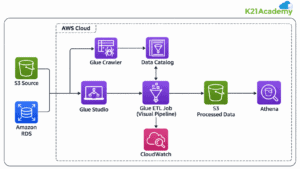
Lab 37: Build Data Pipelines Using No-Code ETL
Objective: Learn how to build data processing pipelines using AWS Glue Studio’s visual ETL capabilities.
In this lab, you will explore no-code data integration workflows using AWS Glue Studio. You will configure data sources, apply transformations using a visual interface, and define destinations for processed datasets without manually writing complex ETL scripts.
By the end of this lab, you will understand how to create and manage scalable data transformation pipelines using visual ETL tools on AWS.
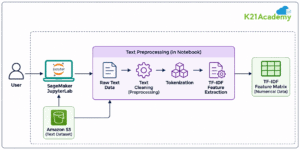
Lab 38: Prepare Data for TF-IDF Using Amazon SageMaker JupyterLab
Objective: Learn how to preprocess text data and extract meaningful features using TF-IDF in Amazon SageMaker JupyterLab.
In this lab, you will set up a JupyterLab environment in Amazon SageMaker AI, load text datasets, and apply preprocessing techniques such as tokenization, text cleaning, and feature extraction. You will calculate Term Frequency–Inverse Document Frequency (TF-IDF) scores to identify important words across documents.
By the end of this lab, you will understand how TF-IDF converts unstructured text into numerical features for machine learning and natural language processing applications.
Lab 39: Data Preprocessing Using AWS Glue DataBrew
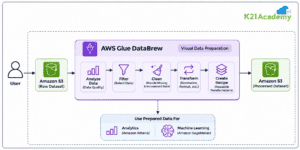
Objective: Learn how to clean, transform, and prepare datasets using AWS Glue DataBrew without writing code.
In this lab, you will explore the AWS Glue DataBrew visual interface to analyze data quality, identify missing or inconsistent values, and perform transformations such as filtering, normalization, and data cleaning. You will also understand how to create reusable transformation recipes for preparing datasets.
By the end of this lab, you will understand how AWS Glue DataBrew simplifies data preprocessing and improves data quality for downstream analytics and machine learning workflows.
Lab 40: Create and Run ETL Jobs Using AWS Glue
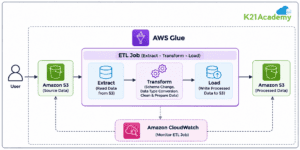
Objective: Learn how to create, execute, and monitor ETL jobs using AWS Glue.
In this lab, you will use Amazon S3 to store source datasets, configure an AWS Glue ETL job, apply transformations such as schema adjustments and data type conversions, and save the transformed data to a destination S3 bucket. You will also monitor the job execution and review the processed output.
By the end of this lab, you will understand how to automate Extract, Transform, and Load (ETL) workflows using AWS Glue for data analytics and machine learning applications.
1.13 Exploratory Data Analysis
This module focuses on exploring, analyzing, and understanding datasets before building machine learning models. Learners will explore data analysis techniques, time-series trends, feature selection, Amazon QuickSight, and Apache Spark on Amazon EMR.
Through a hands-on lab, learners will use Amazon SageMaker Canvas and Data Wrangler to explore datasets, identify patterns, handle data quality issues, and prepare data for machine learning workflows without extensive coding.
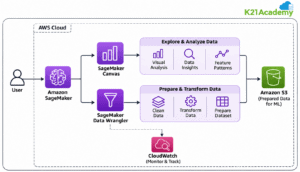
Lab 41: Streamlining Data Analysis with Amazon SageMaker
Objective: Learn how to perform exploratory data analysis and prepare datasets using Amazon SageMaker Canvas and Data Wrangler.
In this lab, you will explore Amazon SageMaker Canvas and Data Wrangler to import datasets, examine data distributions, identify missing values, detect patterns, and perform data transformations. You will also explore visual data analysis techniques to understand relationships between features and prepare datasets for machine learning.
By the end of this lab, you will understand how to streamline exploratory data analysis and data preparation using Amazon SageMaker’s visual tools, improving the efficiency of machine learning workflows.
1.14 Model Training & Tuning
This module focuses on training and optimizing machine learning models using Amazon SageMaker AI. Learners will explore model training techniques, distributed training, hyperparameter tuning, and automated machine learning to improve model performance and efficiency.
Through hands-on labs, learners will configure SageMaker training jobs, optimize model hyperparameters, build and deploy TensorFlow models, and automate data preparation and model training using SageMaker Data Wrangler and Autopilot.
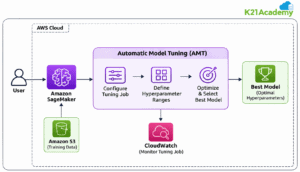
Lab 42: Hyperparameter Optimization Using Amazon SageMaker
Objective: Learn how to optimize machine learning model performance using Amazon SageMaker Automatic Model Tuning (AMT).
In this lab, you will configure a hyperparameter tuning job, define the search ranges, select an optimization strategy, and monitor multiple training jobs. You will compare model performance using evaluation metrics and identify the best-performing hyperparameter configuration.
By the end of this lab, you will understand how SageMaker Automatic Model Tuning helps improve machine learning model performance while reducing manual experimentation.
Related Readings: AWS SageMaker Algorithms: Linear Learner, XGBoost, KNN & More (2026 Guide)
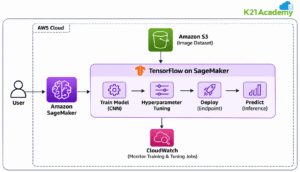
Lab 43: Tune, Deploy, and Predict with TensorFlow on Amazon SageMaker
Objective: Learn how to train, tune, and deploy a deep learning model using TensorFlow on Amazon SageMaker AI.
In this lab, you will prepare an image dataset, build a Convolutional Neural Network (CNN) using TensorFlow, and train the model using SageMaker. You will explore hyperparameter tuning, evaluate model performance, and deploy the trained model to an inference endpoint for predictions.
By the end of this lab, you will gain hands-on experience developing and deploying deep learning models using TensorFlow and Amazon SageMaker.
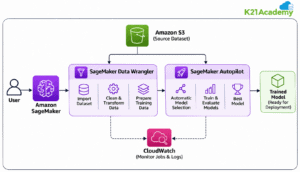
Lab 44: Data Preparation and Automated Model Training Using SageMaker
Objective: Learn how to automate data preparation and machine learning model training using Amazon SageMaker Data Wrangler and Autopilot.
In this lab, you will import a dataset, clean and transform features using SageMaker Data Wrangler, and prepare the processed data for automated model training. You will then explore SageMaker Autopilot to perform model selection, training, and evaluation with minimal manual configuration.
By the end of this lab, you will understand how SageMaker simplifies data preparation and accelerates machine learning model development using automated workflows.
1.15 Model Deployment & Monitoring with SageMaker
This module focuses on deploying and managing machine learning models using Amazon SageMaker AI. Learners will explore SageMaker Studio, MLflow, built-in algorithms, and the machine learning lifecycle, from model development to deployment and monitoring.
Through hands-on labs, learners will build and train machine learning models, explore low-code model development using SageMaker Canvas, deploy trained models, and understand how to generate predictions and monitor model performance.
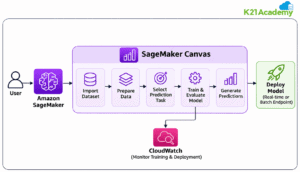
Lab 45: Build, Train, and Deploy Machine Learning Models Using Amazon SageMaker Canvas
Objective: Learn how to build, train, and deploy machine learning models with minimal coding using Amazon SageMaker Canvas.
In this lab, you will explore Amazon SageMaker Canvas to import datasets, prepare data, select a prediction task, and train machine learning models using a visual interface. You will evaluate model performance, generate predictions, and explore supported deployment options.
By the end of this lab, you will understand how to develop end-to-end machine learning solutions using SageMaker Canvas without writing extensive code.
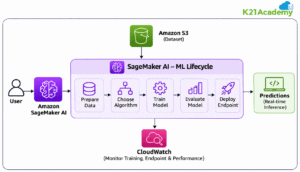
Lab 46: Build, Train, and Deploy a Machine Learning Model Using Amazon SageMaker AI
Objective: Learn how to build, train, evaluate, and deploy machine learning models using Amazon SageMaker AI.
In this lab, you will prepare a dataset, select an appropriate machine learning algorithm, configure a SageMaker training job, and evaluate the trained model. You will deploy the model to a SageMaker inference endpoint, generate predictions, and explore monitoring options.
By the end of this lab, you will gain practical experience with the machine learning lifecycle, from data preparation and model training to deployment and inference using Amazon SageMaker AI.
1.16 MLOps on AWS
This module focuses on Machine Learning Operations (MLOps), containerization, and automated model deployment using AWS services. Learners will explore Docker, Amazon Elastic Container Registry (ECR), Amazon Elastic Kubernetes Service (EKS), and AWS CloudFormation to understand how machine learning infrastructure is managed and scaled.
Through hands-on labs, learners will create Docker images, manage container repositories, deploy Kubernetes clusters, and build end-to-end MLOps pipelines using Amazon SageMaker to automate model training, deployment, and monitoring.
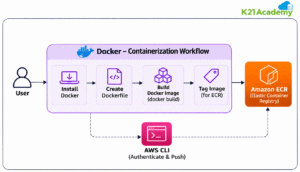
Lab 47: Install Docker, Create an Image, and Push It to Amazon ECR
Objective: Learn how to containerize applications using Docker and store container images in Amazon Elastic Container Registry (ECR).
In this lab, you will install Docker, create a Dockerfile, build a container image, and configure an Amazon ECR repository. You will authenticate Docker with Amazon ECR and push your image to the repository for secure storage and future deployment.
By the end of this lab, you will understand how Docker and Amazon ECR work together to package, store, and manage container images for AWS applications and machine learning workloads.
Related Readings: Docker Tutorial: Complete Guide from Beginner to Advanced — K21 Academy
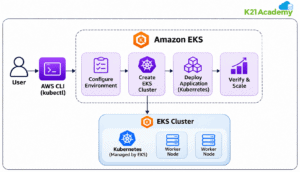
Lab 48: Create and Configure an Amazon EKS Cluster
Objective: Learn how to create and manage a Kubernetes cluster using Amazon Elastic Kubernetes Service (EKS).
In this lab, you will explore Amazon EKS, configure the required AWS environment, create an EKS cluster, and connect to it using kubectl. You will also examine worker nodes, networking, and basic Kubernetes deployment operations.
By the end of this lab, you will understand how Amazon EKS simplifies Kubernetes cluster management and supports the deployment and scaling of containerized applications on AWS.
Related Readings: Amazon EKS (Elastic Kubernetes Service): Complete Workflow — K21 Academy
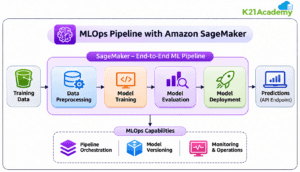
Lab 49: Build an End-to-End MLOps Pipeline Using Amazon SageMaker
Objective: Learn how to build and automate an end-to-end machine learning pipeline using Amazon SageMaker and MLOps practices.
In this lab, you will explore how to organize machine learning workflows into automated stages, including data preprocessing, model training, evaluation, and deployment. You will use Amazon SageMaker to understand pipeline orchestration, model versioning, and operational monitoring.
By the end of this lab, you will understand how MLOps pipelines support reproducible model development, consistent deployment, and efficient management of machine learning applications on AWS.
Related Readings: MLOps Hands-On Labs and Projects — K21 Academy
1.17 Model Security, Compliance & Governance
This module focuses on securing machine learning models, protecting sensitive data, and implementing governance and compliance practices across AWS AI/ML environments. Learners will explore responsible AI, Amazon Augmented AI (A2I), security best practices, and AWS services for managing model security and regulatory compliance.
The module also introduces AWS Config, AWS Artifact, Amazon SageMaker Ground Truth, SageMaker Feature Store, and SageMaker Model Cards to help learners understand how organizations maintain data integrity, enforce security policies, document model information, and support responsible AI throughout the machine learning lifecycle.
2. Real-time Projects
Project 1: Build an AI Loan Advisory System on AWS (LoanGenie)
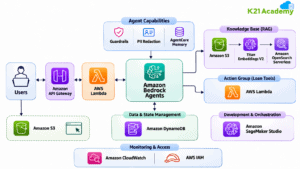
This project focuses on building an AI-powered loan advisory system using Amazon Bedrock Agents and AWS services to automate loan eligibility checks, EMI calculations, and customer inquiries. You will explore Agentic AI, Amazon Nova Pro, Knowledge Bases, Retrieval-Augmented Generation (RAG), AWS Lambda, DynamoDB, and API Gateway to develop an intelligent loan assistance application.
By the end of this project, you will understand how to build a serverless AI loan advisor that provides personalized loan recommendations, retrieves accurate financial information, and automates customer interactions using Generative AI on AWS.
Project 2: Build Production-Ready AI Agents Using Amazon Bedrock AgentCore
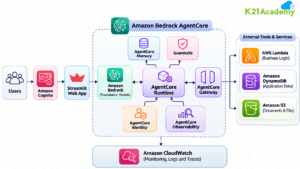
This project focuses on building and deploying a production-ready AI Customer Support Agent using Amazon Bedrock AgentCore. You will explore AgentCore Runtime, Memory, Gateway, Identity, and Observability, along with Amazon Bedrock, AWS Lambda, and Amazon Cognito to develop secure, scalable, and intelligent customer support workflows.
By the end of this project, you will understand how to deploy and manage AI agents that handle customer inquiries, access external tools, maintain conversation history, and automate support tasks using AWS Generative AI services.
Project 3: Build a Secure Multi-Agent Patient Support Assistant Using Amazon Bedrock AgentCore
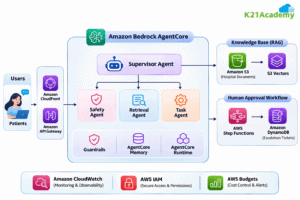
This project focuses on building a secure AI-powered patient support assistant using Amazon Bedrock AgentCore. You will explore multi-agent orchestration, RAG, Knowledge Bases, Guardrails, and human approval workflows to automate routine hospital inquiries while ensuring accurate responses and patient data protection.
By the end of this project, you will understand how to design and deploy a secure multi-agent AI system that handles patient inquiries, retrieves verified healthcare information, escalates clinical questions to healthcare professionals, and supports safe, auditable automation using AWS services.
Project 4: Build a RAG Application Using Amazon Bedrock & SageMaker
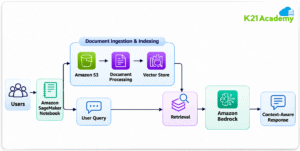
This project focuses on building a Retrieval-Augmented Generation (RAG) application using Amazon Bedrock and Amazon SageMaker Notebooks. You will explore document processing, vector embeddings, knowledge retrieval, and foundation model integration to generate context-aware responses.
By the end of this project, you will understand how to connect Generative AI models with external knowledge sources to develop intelligent question-answering applications.
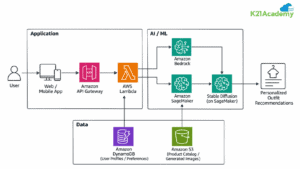
Project 5: Build an AI Stylist with Amazon Bedrock, SageMaker & Stable Diffusion
This project focuses on creating an AI-powered fashion stylist that generates personalized outfit recommendations using Generative AI. You will explore Amazon Bedrock, Amazon SageMaker, and Stable Diffusion to understand how language models and image generation techniques can support personalized fashion experiences.
By the end of this project, you will understand how to combine Generative AI, image generation, and recommendation workflows to develop creative AI-powered applications.
Project 6: Predicting Customer Churn using ML Model
This project focuses on predicting customer churn using Machine Learning to help businesses identify customers at risk of leaving. You will explore data preparation, feature engineering, classification algorithms, model evaluation, and prediction using Amazon SageMaker.
By the end of this project, you will understand how to develop predictive models that support customer retention strategies and data-driven business decisions.

Project 7: Build a Crypto AI Agent using Amazon Bedrock
This project explores building intelligent AI agents using Amazon Bedrock to analyze cryptocurrency market information. You will explore foundation model integration, market data retrieval, agent orchestration, and automated analysis workflows.
By the end of this project, you will understand how Agentic AI applications combine external data, tools, and foundation models to generate insights and support financial analysis workflows.

Explore More AWS AI/ML & Generative AI Projects
The projects highlighted above are just a selection of what you’ll explore in our AWS GenAI/ML Mastery Bootcamp. Our program includes 14+ real-world, hands-on projects covering Machine Learning, Deep Learning, Generative AI, Agentic AI, MLOps, and AWS Cloud services.
Want to explore the complete project collection? Click here to explore all AWS AI/ML projects and discover more opportunities to build practical, job-ready skills.
3. Certifications Covered Within The Program
1. AWS Certified Cloud Practitioner (CLF-C02)
This foundational certification validates your understanding of AWS Cloud concepts, core services, security, architecture, pricing, and support. It is ideal for beginners to demonstrate general AWS knowledge and cloud fluency, preparing you for more advanced certifications.

Related Readings: AWS Certified Cloud Practitioner (CLF-C02) Exam – Complete Guide by K21 Academy
2. AWS Certified AI Practitioner (AIF-C01)
Designed for individuals familiar with AI/ML technologies on AWS, this certification covers foundational AI/ML concepts, generative AI, and AWS AI services like SageMaker, Comprehend, and Lex. It suits business analysts, IT support, and project managers exploring AI applications.

Related Readings: Ultimate Guide to AWS Certified AI Practitioner (AIF-C01) 2026 – K21 Academy
3. AWS Certified Machine Learning – Associate (MLA-C02)
This certification focuses on building, training, tuning, and deploying ML models on AWS. It covers data preparation, modeling, and evaluation for those performing development or data science roles.

Related Readings: Prepare for AWS MLA-C02 with K21 Academy: Associate ML Engineer Exam
4. AWS Certified AI/ML – Generative AI Developer (AIP-C01)
An advanced certification validating expertise in designing and deploying Generative AI solutions on AWS. It covers data preprocessing, prompt engineering, model fine-tuning, deployment, and operationalizing AI workflows at scale.

Related Readings: AWS Certified – Generative AI Developer Certification.
5. AWS Certified Solutions Architect – Associate (SAA-C03)
An associate-level certification validating expertise in designing secure, resilient, high-performing, and cost-optimized cloud architectures on AWS. It covers AWS compute, storage, networking, security, high availability, scalability, and designing solutions based on the AWS Well-Architected Framework.

Related Readings: AWS Certified Solutions Architect Associate (SAA-C03) – Hands-On Labs and Projects
Related References
-
- Join Our Generative AI Whatsapp Community
- Introduction To Amazon SageMaker Built-in Algorithms
- Introduction to Generative AI and Its Mechanisms
- Mastering Generative Adversarial Networks (GANs)
- Generative AI (GenAI) vs Traditional AI vs Machine Learning (ML) vs Deep Learning (DL)
- AWS Certified AI Practitioner (AIF-C01) Certification Exam