





There are different types of security credentials or ways of authentication offered by AWS for accessing its resources. This depends on the way you are accessing AWS, be it via Management Console, AWS Command Line Interface, SDKs, or through applications.
AWS access can be gained using several ways, which include but not limited to IAM users, IAM roles, AWS IAM Identity Center, and temporary security credentials. AWS always advises the use of temporary security credentials via IAM roles for programmatic access than long-term access keys.

If you don’t have an AWS account, you can check how to create an AWS free tier account.
Access to the AWS account and resources is provided by AWS in various forms. Depending upon your engagement with AWS, the access can be classified into two categories:
- Console Access – Access to AWS through the AWS Management Console via the browser.
- Programmatic Access – Access to AWS resources via the AWS CLI, AWS SDKs, APIs, or applications.
This type of access in AWS is managed by identities like IAM Users, IAM Roles, and IAM Identity Center. AWS highly recommends using temporary security credentials and IAM Roles.
Console Access
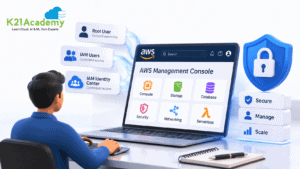
AWS Management Console can be accessed using various identity providers, which include AWS root user, IAM users, and AWS IAM Identity Center users.
| Access Method | Purpose | Recommended Usage |
|---|---|---|
| Root User | AWS account ownership and initial setup | Use only for account-level tasks. Enable MFA and avoid daily usage. |
| IAM User | Individual user access with assigned permissions | Use only when required. Follow least privilege access. |
| IAM Identity Center | Centralized workforce access management | Recommended approach for organizations managing multiple users. |
While creating an AWS account, a root user gets automatically created by using the email id and password used at the time of account creation.
Root users have full control over all AWS services and permissions. Because of the unlimited permissions that come with root user accounts, AWS suggests using root users for account level activities, Multi-Factor Authentication (MFA), and not creating root user access keys.
Do not use the root user for everyday AWS operations. Create IAM users or use IAM Identity Center for regular access, and enable MFA on privileged accounts.
IAM users are created within the AWS account by the root user or an IAM administrator. To log in using the IAM user, you must have the account alias or 12-digit AWS account ID, the IAM user name, and the IAM user password. If you have forgotten your IAM user’s password, contact your IAM administrator or the account owner. If your IAM administrator granted you authority to manage your own AWS credentials, you can use the Security Credentials page to change your password on a regular basis, which is a security best practice.
Related Readings: Amazon Cloudtrail vs Cloudwatch, know their major differences!
Programmatic Access
Through programmatic access, people can interact with AWS services using AWS CLI, SDKs, APIs, or automation tools. IAM roles and temporary security credentials are always recommended by AWS because these give short-lived access to the resources and thus decrease the risk that comes along with using long-lived credentials.
Access Keys for programmatic access comprise two components; Access Key ID and Secret Access Key. Both these credentials are necessary for authenticating requests to the AWS services.
Avoid storing AWS access keys directly in application code. Use IAM roles, AWS credentials files, or environment variables to securely manage credentials.
Related Readings: About Amazon Route 53.

Steps to Create Access Keys
Access keys are necessary only when programmatic access is required using AWS CLI, SDKs, APIs, or any other third-party tools. In case of requirement of access keys, please ensure that it is not possible for you to use IAM roles or any other temporary credentials before proceeding.
In case of requirement of access keys, please follow the following steps:
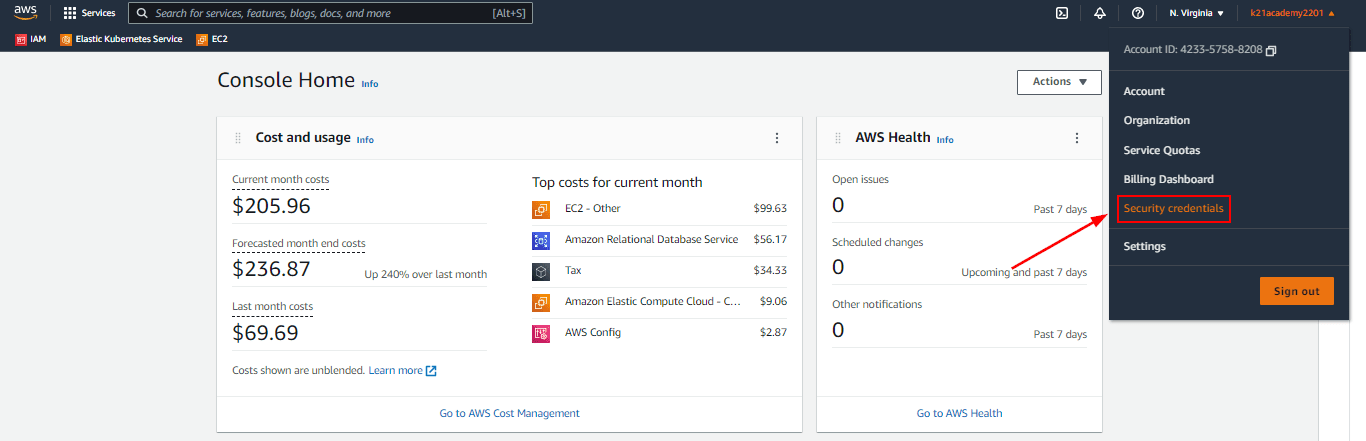
1) Go to the AWS Management Console and navigate to the IAM service console. Choose an IAM user whose access key you would like to generate.
 Related Readings: AWS for testers.
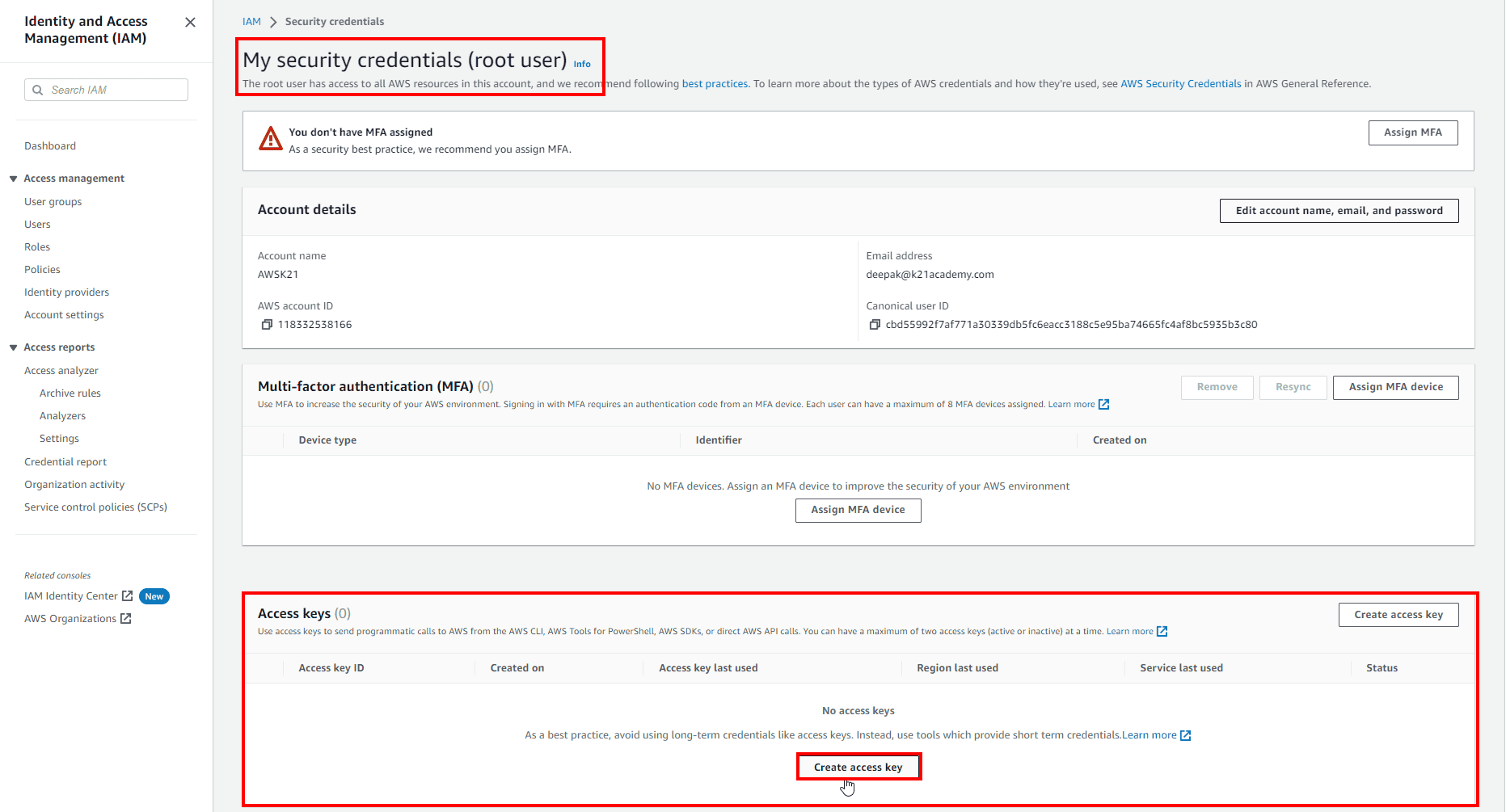
2) Go to the Security Credentials tab, find the Access Keys option and click on Create Access Key.
Related Readings: what is aws fargate?
3) Either download or save the Access Key ID and Secret Access Key. The secret access key will appear only once at the time of creation. In case it gets lost, you will need to create an access key.
Never share AWS access keys publicly or commit them to source code repositories. Use IAM roles and temporary credentials whenever possible.
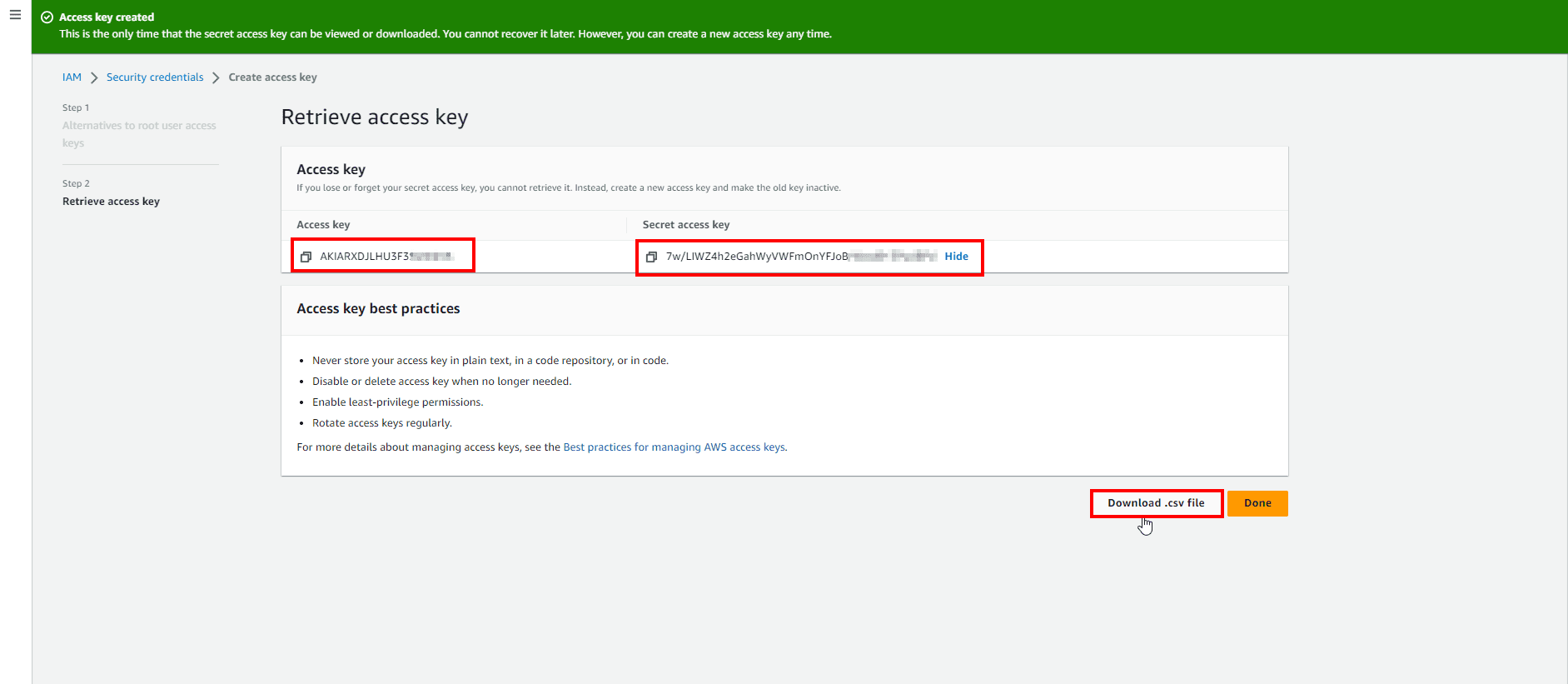
Note: Make sure you save these as once you close this window, you won’t be able to view them.
When set up properly, the credentials will be usable with both Terraform and other automation technologies. In production systems, the use of IAM roles and temporary credentials is suggested rather than permanent keys.
Best Practices to Manage AWS Access Keys
Security best practices should be observed while handling access keys in AWS as follows:
- Access keys should never be created for the root user of AWS unless there is an urgent need for such. IAM users and roles should be used instead.
- Temporary security credentials through IAM roles should be preferred rather than creating access keys wherever applicable.
- Access keys should be created for IAM users who need programmatic access.
- AWS access keys should never be stored in application code or repository. Credentials files, environment variables, or IAM roles should be used for AWS access keys.
- MFA should be enabled for root users and privileged accounts.
Frequently Asked Questions
What is an AWS Secret Access Key?
How do I create an AWS access key for an IAM user?
What is the difference between an AWS Access Key ID and Secret Access Key?
Related Readings: AWS Elastic Load Balancer types
Related Links/References
- AWS Certified Solutions Architect Associate SAA-CO3
- Overview of Amazon Web Services & Concepts
- AWS Identity And Access Management (IAM)
- AWS Management Console Walkthrough
Next Task For You
Begin your journey towards an AWS Cloud by joining our FREE Informative Class on Amazon Cloud Free Class by clicking on the image below.