



Kubernetes is the mood of the developers right now! It is trending like never before. Kubernetes a.k.a K8s is an open-source system for managing containerized applications across multiple hosts. It provides basic mechanisms for deployment, maintenance, and scaling of applications. Everything in Kubernetes is all about Deployment.
Here is what is going to be covered in this post:
- What Problems Does Kubernetes Solve?
- What is a Kubernetes Deployment
- Kubernetes Deployment Features
- Types of Deployment
- Step-by-step Kubernetes Deployment
- Kubernetes Deployment: Tinder’s Move to Kubernetes
What Problems Does Kubernetes Solve?
 Since the whole idea of Kubernetes is based on containers and the management of it, it eases the monitoring tasks. Kubernetes orchestrates the networking, computing, and storage infrastructure. It gets rid of the need for manual orchestration in a cluster and automates the orchestration process so that the applications are highly available and also makes sure that the resources are optimally utilized. K8s prominently helps in solving the issues below:
- Load balancing
- Horizontal Scaling
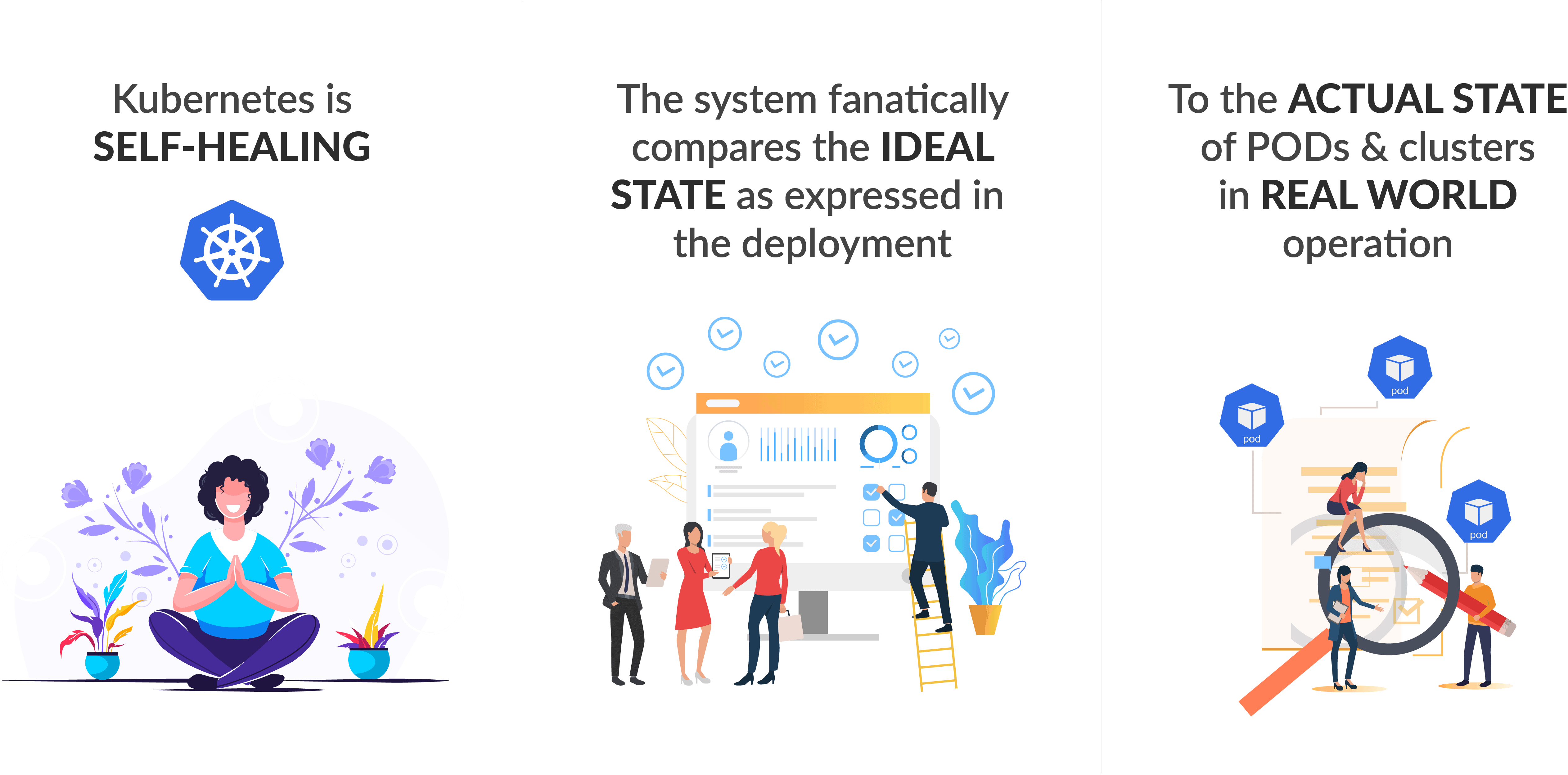
- Self Healing
- Automated Rollouts and Rollbacks
- Secret and Configuration Management
- Storage Orchestration
Check Out: How to Install Prometheus and Grafana on Kubernetes. Click here
What is a Kubernetes Deployment
As said earlier everything about Kubernetes is all about Deployment! Deployment is a type of Kubernetes object that describes the desired state of our system and how we want our deployments to occur. In other words, it is like any other controller such as Replication Controller and Replica Set.
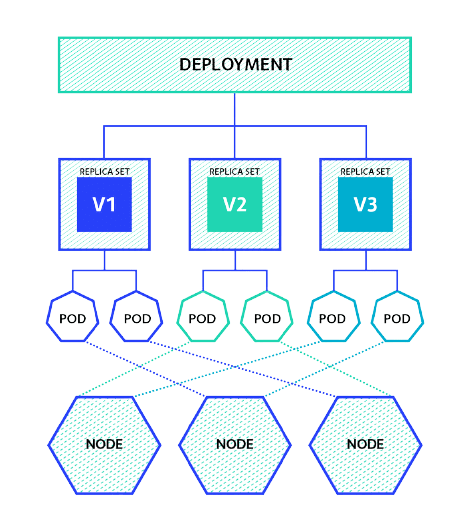 Deployments on a high level are all about updates and rollbacks. The deployment controller provides declarative updates for pods and replica sets. These updates include things such as updating the version inside the spec file, increasing or decreasing the number of pod replicas. A deployment manifest file includes the pod definition, the number of replicas and also can include the preferred deployment strategy. Moreover, you don’t need individual spec files, one manifest file is enough to manage all these.
Also Read: Kubernetes vs Docker: know their major differences!
K8s Deployment Features
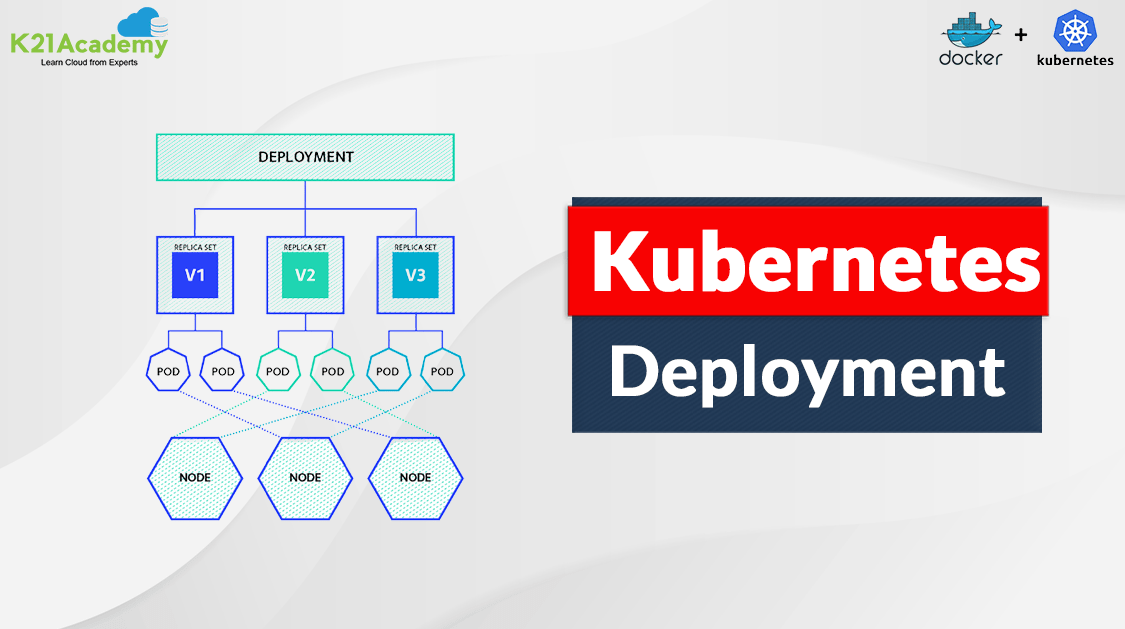
A Deployment owns and manages one or more ReplicaSets. And Replica Set manages the basic units in Kubernetes – Pods.

Relationship among Pods, ReplicaSet and Deployment
There a few more important features of a Kubernetes Deployment that one needs to know for the best utilization.
- Multiple Replicas: Multiple replicas of pods are created for high availability and load balancing with the help of deployment. By default, one count of Replicas is created by K8s, even if you don’t specify it. Thus, it makes sure that the required number of instances are running all the time and the new pod will be spun up in no time.
- Upgrade: The major benefit of using Deployment to control your pods is the ability to perform rolling updates. The rolling update allows you to update the configuration of the pods gradually, and Deployments offer numerous options to control this process.
- Rollback: Rollback Deployment is going back to the previous instance of the deployment if there is some issue with the current or new deployment.
- Scaling: The number of pods running should be dependent on the traffic. For this purpose scale up and scale down strategies are defined in the deployment manifest.
To know more about Kubernetes ingress click here
Types of Kubernetes Deployment
In Kubernetes there are a few different ways to release an application, it is necessary to choose the right strategy. Also, the right deployment procedure depends on the needs, we have mentioned some of the possible strategies below:
- Recreate: This method terminates the old version and releases the new one.
- Ramped: This technique releases a new version in a rolling update one after the other.
- Blue/green: This is where a new version is released alongside the old version then switch traffic.
- Canary: This is procedure releases a new version to a subset of users, then proceeds to a full rollout.
Also Check: How to Write a Kubernetes Operator. Click here
K8s Deployment Guide
Before we hop on to a simple pod deployment, there are some prerequisites that have that are necessary. Do have a look at them and check out the note if you need help with them.
Prerequisites for K8s Deployment
- Docker has to be installed on master and worker nodes as well
- Kubernetes Cluster should be set up at least with one worker node
- Deployment manifest file
Note: Check out the Docker Installation video blog to install docker on your mac, windows or Linux systems. Also, create a 3 node Kubernetes Cluster from the Step-by-Step Kubernetes Cluster Creation Guide.
Kubernetes Deployment on a Cluster
1) Writing a deployment manifest YAML file.
$ vi nginx-deploy.yml
#Deployment
#nginx-dploy.yml

apiVersion: apps/v1
kind: Deployment
metadata:
  name: nginx-deploy
  labels:
    app: nginx-app
spec:
  replicas: 3
  selector:
    matchLabels:
      app: nginx-app
  template:
    metadata:
      labels:
        app: nginx-app
    spec:
      containers:
      - name: nginx-container
        image: nginx:1.7.9
        ports:
        - containerPort: 80
2) Create a deployment from the nginx-deploy.yml that we just wrote
$ kubectl create -f nginx-deploy.yml
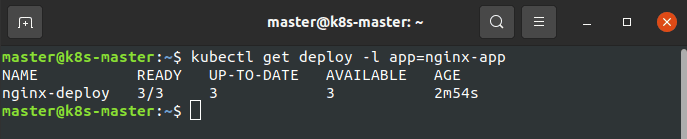
 3) Check if replicas are running successfully
$ kubectl get deploy -l app=nginx-app
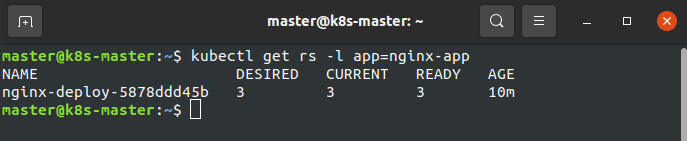
 4) Check the ReplicaSets of our deployment
$ kubectl get rs -l app=nginx-app
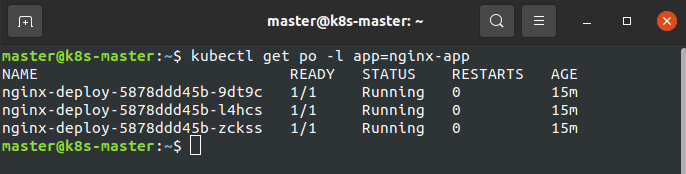
 5) Display the pods which are a part of this deployment
$ kubectl get po -l app=nginx-app
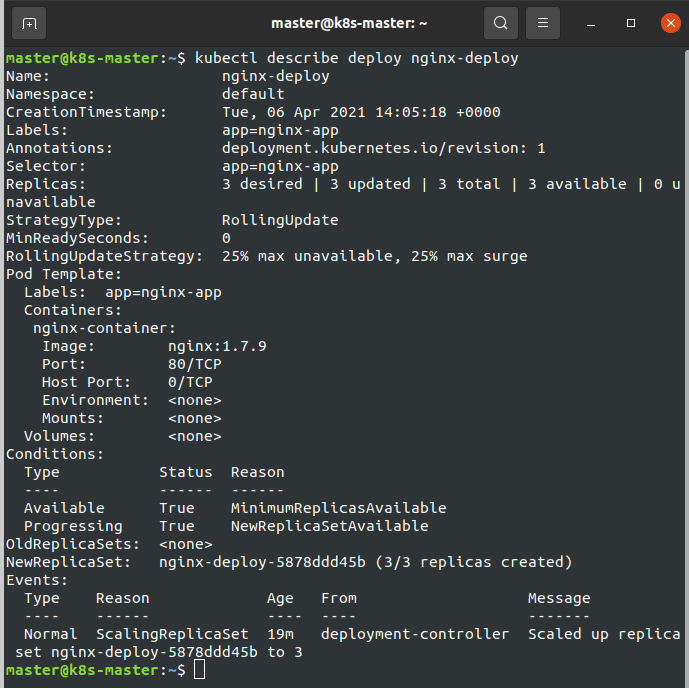
 6) Check complete details of the deployment that we just created
$ kubectl describe deploy nginx-deploy
Check Out: How to create labels in Kubernetes. Click here
Update a Kubernetes Deployment
1) Update the image of the current deployment to 1.9.1
$ kubectl set image deploy nginx-deploy nginx-container=nginx:1.9.1
 2) Check the status of the deployment
$ kubectl rollout status deployment/nginx-deploy
 3) Display the deployment
$ kubectl get deploy
Also Check: How to install Kubernetes dashboard. Click here
Rollback Kubernetes Deployment
1) Current deployment image accidentally updated to v1.91, which is invalid.
$ kubectl set image deploy nginx-deploy nginx-container=nginx:1.91 --record

2) Since the output of the update command is misleading, we have to check the status of the deployment
$ kubectl rollout status deployment/nginx-deploy
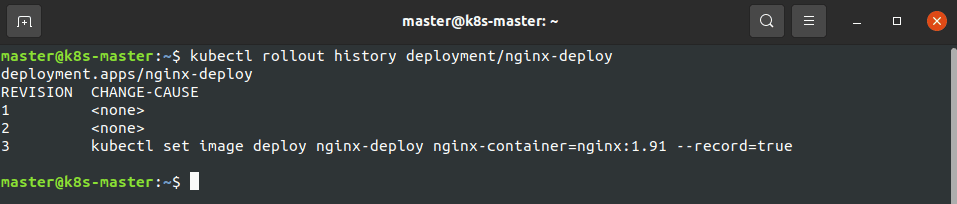
 3) Since we had applied ‘–record’ the commands executed before will be recorded.
$ kubectl rollout history deployment/nginx-deploy
 4) To fix this issue, we have to undo the last update.
$ kubectl rollout undo deployment/nginx-deploy
 5) Check the status of the deployment
$ kubectl rollout status deployment/nginx-deploy

Read More: About Kubernetes Multi Container Pod. Click here
Scale-Up of a Kubernetes Deployment
Imagine there are is a heavy load on your website which leads to traffic and you want to update the number of application instances, you can follow the procedure below in order to do so.
1) Scale-up the app instances from 3 to 5
$ kubectl scale deployment nginx-deploy –replicas=5
 2) Display the instances
$ kubectl get deploy
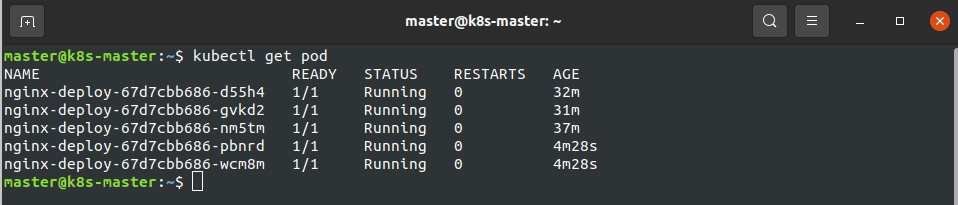
 3) Check the pods
$ kubectl get pod
Check Out: What is Aks Cluster in Azure. Click here
Scale-Down of a Kubernetes Deployment
If there is less load on your website which leads to resource wastage and you want to update the number of application instances, you can follow the procedure below in order to do so.
1) Scale down the app instances from 5 to 1
$ kubectl scale deployment nginx-deploy –replicas=1
 2) Display the instances
$ kubectl get deploy

3) To view all the pods which are a part of the nginx-deployment
$ kubectl get po -l app=nginx-app

Also Check: Our previous blog post on Docker and Kubernetes. Click here
Delete the Kubernetes Deployment
1) Delete all the resources like pods, deployments, ReplicaSets
$ kubectl delete -f nginx-deploy.yml
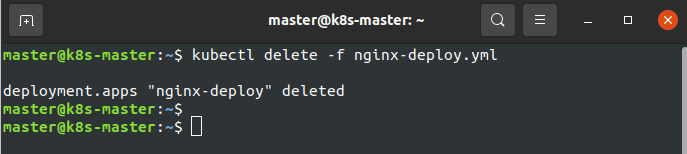 2) To make sure everything is erased.
$ kubectl get po -l app=nginx-app

To know more about Kubernetes Monitoring. Click here
Kubernetes Deployment: Tinder’s Move to Kubernetes
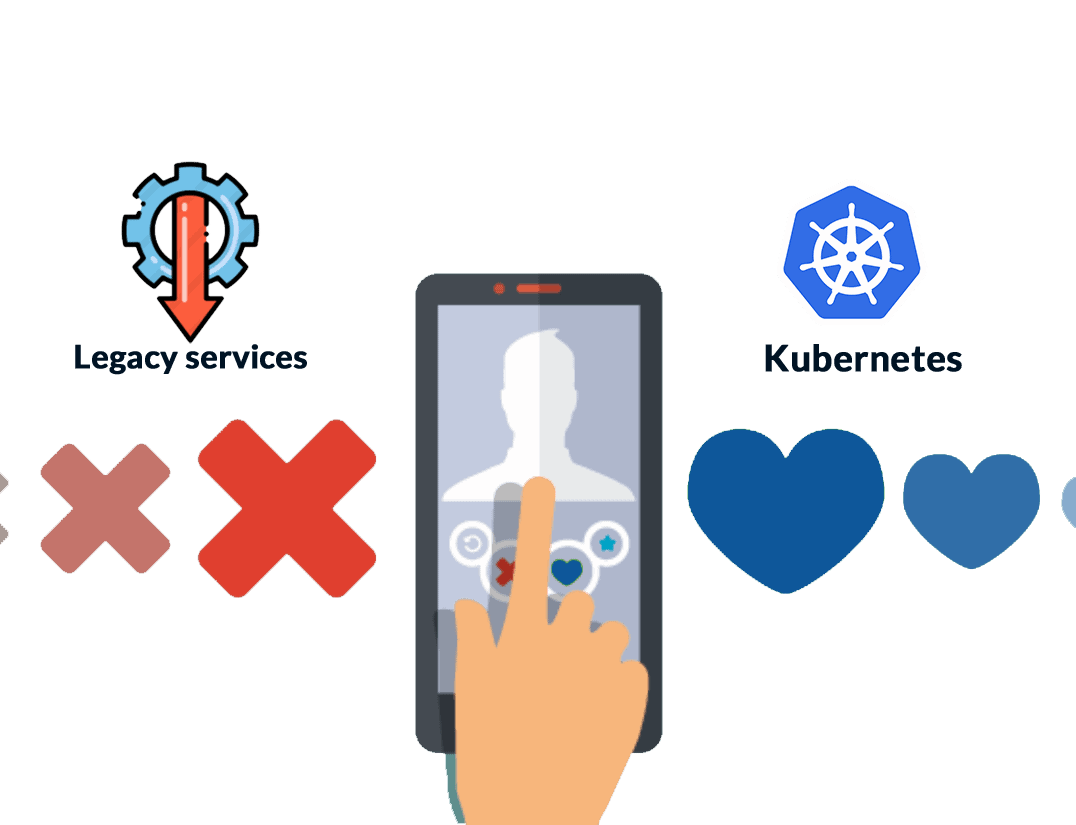 As more and more people started using tinder, the application started to get increased traffic. The engineering team met with a lot of challenges to scale and stabilize the application. Tinder’s engineering team faced a struggle of scale and stability with AWS ECS. They often used to wait several minutes for EC2 instances to come online during scaling, which was only seconds with Kubernetes. That’s when they came up with Kubernetes which indeed was a lifesaver!
Tinder’s migration towards K8s started in early 2018. There were various stages involved in it. By late 2018, they started moving their legacy services to Kubernetes. Finally by March of 2018 Tinder’s engineering team solved compelling challenges to migrate 200 services and run a K8s cluster at scale totalling 1,000 nodes, 15,000 pods, and 48,000 running containers.
After Kubernetes, containers at Tinder also served traffic within seconds as opposed to minutes. Scheduling multiple containers on EC2 instance also provided horizontal density, which promoted cost savings in 2019 as compared to 2018.
Also Read: Our blog post on Certified Kubernetes Administrator
Conclusion
So, are you not convinced yet to start your journey with Kubernetes?! Kubernetes Deployment is not a mammoth task, the above guide is easy as it gets for a simple demo. It’s preferably the need of the hour but that doesn’t mean we should always use Kubernetes to deploy our application. Understanding our requirements is the best thing to take any step further. If Docker & Kubernetes seems interesting, do check out some of our blogs below.
Related Post
- Kubernetes for Beginners
- Kubernetes Architecture | An Introduction to Kubernetes Components
- Install Docker on Windows, Ubuntu, and Mac: A Complete Step-by-Step Guide
- How To Setup A Three Node Kubernetes Cluster For CKA: Step By Step
- Visit our YouTube channel on “Docker & Kubernetes”
- Certified Kubernetes Administrator (CKA) Certification Exam: Everything You Must Know
- Certified Kubernetes Administrator (CKA) Certification: Step By Step Activity Guides/Hands-On Lab Exercise
Next Task For You
Discover the Power of Kubernetes, Docker & DevOps – Join Our Free Masterclass. Unlock the secrets of Kubernetes, Docker, and DevOps in our exclusive, no-cost masterclass. Take the first step towards building highly sought-after skills and securing lucrative job opportunities. Click on the below image to Register Our FREE Masterclass Now!