




You’re halfway through your AWS lab, ready to clean up your OpenSearch Service Collections, and you click into OpenSearch Service on the console. Instead of your collections dashboard, you land on a “Complete Your Account Setup” page.
If that’s happened to you, you’re not alone; it’s one of the most common blockers learners hit while working through OpenSearch labs on AWS. The good news: it’s not a bug, it’s not a permissions issue, and it’s fixable in a few minutes once you know what’s actually going on.
In this blog, we’ll break down exactly why this happens and walk through the fix step by step. First, though, it helps to understand what Amazon OpenSearch Service actually is and why your AWS account type matters here.

Complete Account Setup Prompt on Amazon OpenSearch
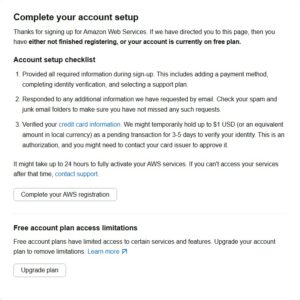
If you have clicked on Amazon OpenSearch Service in your AWS Console, and what you see is a screen asking you to “Complete Your Account Setup,” not your dashboard or any OpenSearch Service collections list, what AWS is doing here is trying to tell you that the settings of your account do not fulfill the necessary conditions for using this service.
This is not about lack of permissions. This is not about IAM policies. This is not about limitations to the regions. This is not an AWS system problem.
This is a very simple way for AWS to inform you that your account is not yet set up according to the pay-as-you-go billing model, which is a mandatory condition for using Amazon OpenSearch Serverless, including its Collections feature.
The prompt is set up for the protection of the users from being charged for those services that go beyond the limits of the free tier, but for students who want to complete the lab exercise, it can become a major obstacle.
Note: If you are just starting to work with AWS and setting up your account for the first time, we advise you to read our article on How To Set Up Your AWS Account the Right Way.
Amazon OpenSearch Service Overview
Amazon OpenSearch Service is an entirely managed service on AWS based on the open-source search and analytics engine. Initially created on Elasticsearch, OpenSearch was introduced by AWS when it decided to fork the codebase under an open-source license in 2021. Amazon OpenSearch Service currently is able to support both OpenSearch and Elasticsearch APIs, thus being backward compatible with legacy workloads.
It is among the most popular services on AWS for the following:
- Log and event analytics: real-time ingestion, search, and visualization of application and infrastructure logs
- Full-text search: creating advanced search solutions in web and mobile applications
- Security analytics: detection of threats, SIEM workloads, and audit logs processing
- Real-time monitoring and observability: creating dashboards, processing metrics, and sending alerts
- Vector and semantic search: supporting similarity search capabilities of machine learning and Generative AI applications
Amazon OpenSearch Service does not require you to perform any heavy tasks of deployment and management of your own OpenSearch cluster. The infrastructure is handled by AWS, while you work with the data and queries.
There are two different versions of Amazon OpenSearch Service. The first one is the managed clusters, where you select your instance types and number of nodes and scale them on your own, while for the second, called OpenSearch Serverless, everything mentioned above is done by AWS automatically. However, Collections can be found only in the latter version.
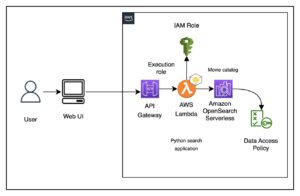
Overview of Amazon OpenSearch Serverless
Amazon OpenSearch Serverless is a deployment option in OpenSearch Service that goes one step further in terms of managed experience. While using the standard OpenSearch Service, you would have to specify the instance type, decide on the number of nodes, and manage capacity. Using Serverless, you bypass all of that completely.
You just create a collection, configure the access policy, and start indexing documents. AWS manages the provisioning, scaling, and management of all the compute and storage behind the scenes on an invisible and dynamic basis.
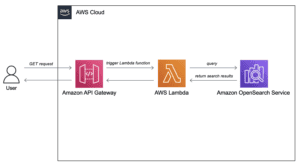
Benefits of OpenSearch Serverless:
- No need to manage any infrastructure: there are no nodes, no instances, no clusters to size
- Automatic scaling: scaling up and down occurs on its own depending on the workload
- Pricing on consumption basis: you are charged based on usage, not reserved capacity
- Quick environment set-up: you can be up and running in minutes
- High availability included: AWS replicates the data in different Availability Zones
When to Use OpenSearch Serverless
OpenSearch Serverless is perfect for:
- Development, testing, and lab environments
- Workloads that are intermittent or unpredictable
- Operational simplicity is more important than control
- AI/ML workloads with vector search requirements
Related Readings: AWS Lambda Serverless
The same pay-only-for-what-you-use approach applies here too, letting you scale compute without managing servers.
OpenSearch Serverless Collections Explained
The collection is the most important component of the OpenSearch Serverless system. It is an abstraction that groups one or more indexes into a serverless collection. You can consider a collection to be your “serverless OpenSearch cluster” with zero effort spent on managing clusters.
Creating a collection involves the following actions being taken automatically by AWS:
- Compute allocation: No need to worry about picking instance types
- Storage allocation: No need to bother with volume configuration
- Index and query handling: Automatic scaling based on demand
- Encryption: Automatic encryption at rest and in transit
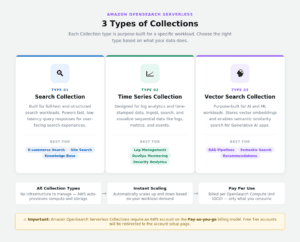
There are three types of OpenSearch Service collections in OpenSearch Serverless:
1) Search Collection
Optimized for full-text and structured search loads. Choose this option when you are developing search capabilities in your app, whether it be an e-commerce product search function, content discovery tool, or document retrieval platform.
Good for: E-commerce search, site search, knowledge base search
2) Time Series Collection
Developed for log analysis and time-stamped data. When you are dealing with sequential data application logs, infrastructure metrics, security events, or audit trails and want to analyze, filter, and visualize them over time.
Good for: Log management, CloudWatch log analysis, security monitoring, DevOps observability
3) Vector Search Collection
Specialized for AI/ML workloads. The vector search collection is optimized for working with vector embeddings of text, images, and other data and allows you to perform similarity searches (semantic search or nearest-neighbor search).
The collection type is extensively used for the following:
-
Generative AI applications – RAG (Retrieval Augmented Generation) pipelines
-
Recommendation engines – finding similar products, articles, or content
-
Chatbot knowledge bases – retrieving the most relevant documents for user queries
Related Readings: An Overview of Retrieval-Augmented Generation (RAG) & RAGOps
AWS Account Types: Why It Matters for OpenSearch
Before we move on to Issue & Fix, it’s crucial to discuss AWS billing models since it’s the main reason why access is being blocked.
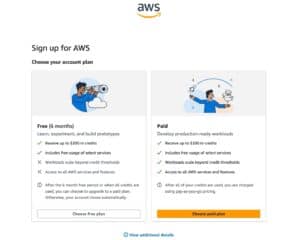
1) AWS Free Tier Account
At the start of your AWS account creation journey, you receive access to AWS Free Tier, which allows you to try out certain AWS services within predefined limits free of charge for 12 months (some are permanently free). This feature is fantastic for getting acquainted with AWS, but there’s one catch: certain AWS services, especially the newer and advanced ones such as OpenSearch Serverless, are not accessible or must be billed to become fully operational.
Best for: First-time users exploring AWS at no cost
Related Readings: Services Offered By AWS In Free Tier Account
2) Pay-as-you-go (Standard Billing)
The standard AWS billing structure in which you only pay for what you actually use. There are no up-front obligations. All you need to do is activate the Pay-as-you-go mode by providing a valid payment option and completing the process of setting up your account to get access to all AWS services such as the Amazon OpenSearch Service Collections.
Best for: Learners and individuals running labs like OpenSearch Serverless
3) AWS Enterprise / Organizations
For enterprises, AWS provides AWS Organizations and Enterprise Support to consolidate billing and obtain discounted prices. This does not apply to individual lab users.
Best for: Companies managing multiple AWS accounts under one billing setup
Note: Migrating to a pay-as-you-go model does NOT mean that AWS will start charging your account automatically. Remember that limits of the free tier model will apply. You will be charged only in case you go beyond the specified limits or use services outside the Free Tier. Always delete your resources after completing a lab.
Amazon OpenSearch Service Collection Issue and Fix
When learners get to the point where they are supposed to be in the OpenSearch Serverless part of the AWS lab and select OpenSearch Service from the AWS Console, some of them see this page rather than the OpenSearch Service Collections dashboard:
“Complete Your Account Setup”
Here is what one of our learners encountered while doing this particular lab:
“I’m not able to access Amazon OpenSearch Service/Collections from my end. I was trying to follow through with one of the labs to delete the collections, but whenever I click on OpenSearch Service, the system prompts me to complete the account setup. Attached below is the screenshot of the page I’m being directed to.”
Cause of Amazon OpenSearch Service Collections Access Error
There are a couple of things that need to be verified before proceeding directly to the fix. Go through these verifications step-by-step:
1) First Verification – Make Sure You Have Signed In To The Right AWS Account
You need to sign in to the right AWS account. It is easy to confuse different AWS accounts and sign into a wrong one. Make sure that the Account ID in the top right corner of your console is the same as that of your lab account.
2) Verify If You Are Signed In To the Right Region of AWS
The Amazon OpenSearch Serverless service is not available in all the AWS regions. Make sure that your console region is set to one of the available regions such as US East (N. Virginia), US West (Oregon), or EU (Ireland).
3) Billing Status Check – The Major Cause of the Problem
Open the Billing and Cost Management section of the AWS Console and see if your account is in the free tier but has no payment method attached to it. This is the most frequent cause of the problem since, for accessing the OpenSearch Service collections, your account must be activated via the pay-as-you-go billing model.
Fix: Upgrade to Pay-as-you-go Model
Step 1: Sign in to your AWS Management Console at console.aws.amazon.com
Step 2: Click on your account name in the top right corner → Click on “Account”
Step 3: Look at the Payment Methods section on the screen
Step 4: Click on “Add a payment method” and add your valid credit/debit card details. AWS will apply a small one-time charge ($1 USD) to your card, which is immediately refunded after a few days.
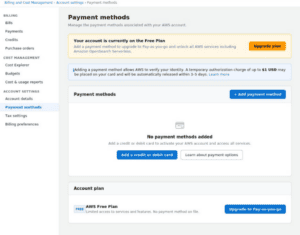
Step 5: After adding your payment method, go to Billing & Cost Management → Account settings and check whether you have completed your account setup
Step 6: Return to your AWS console → Type in “OpenSearch” → Click on “Amazon OpenSearch Service.”
Step 7: This should take you to the Amazon OpenSearch Service page and from there, you can access Serverless → Collections without getting an account setup pop-up
Related Readings: AWS Management Console Walkthrough
After the fix, verify access
After you’ve upgraded your account, perform a quick check before continuing with your lab:
- Go to Amazon OpenSearch Service → Serverless → Collections
- Check if the list of OpenSearch Service Collections is displayed without being redirected anywhere or getting any errors
- If you were performing your lab to delete a Collection, then continue with your process
- Once you’re done with your lab, be sure to delete all the OpenSearch Service Collections because any leftover Collections will incur charges OpenSearch Serverless is billed per OCU (OpenSearch Compute Unit) per hour
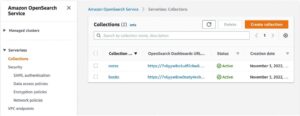
It’s always important to cleanup your resources after each lab. This applies even when using the pay-as-you-go method, where having any collection will cost you money.
In case you have already added your payment option and configured your billing settings but you are seeing this message, this could be a matter related to account activation.
Related Readings: AWS Cost Optimization Guide
Frequently Asked Questions (FAQs) on OpenSearch Service Collections
Q1. Why do I get redirected to “Complete Your Account Setup” when I go to Amazon OpenSearch Service?
The cause of this problem is that you are currently using a Free Plan account on AWS without any payment method attached to it. In order to use Amazon OpenSearch Serverless, you need to upgrade to the pay-as-you-go billing model since OpenSearch Service collections require this. Otherwise, AWS will redirect you to the account setup page rather than Collections.
Q2. Will I be charged instantly once I upgrade to Pay-as-you-go?
Not at all. The upgrade to Pay-as-you-go does not mean that AWS will start charging you immediately. All your benefits from the Free Tier remain valid. You will be charged for the excess of the Free Tier limit or services not included in it. But Amazon OpenSearch Serverless is not included in the Free Tier.
Q3. What is the cost of Amazon OpenSearch Serverless?
The price of Amazon OpenSearch Serverless is calculated based on OCU (OpenSearch Compute Unit) per hour. This means that it is calculated separately for indexing and for search compute.
There is no free tier for OpenSearch Serverless, so that is why you need to upgrade your account in order to get access to this product.
Q4. Can the $1 USD charge due to adding a payment method be refunded?
This is a temporary verification hold, which is not going to be actually charged. AWS charges this fee in order to verify your card details, and the hold gets released in 3 to 5 days. You will not see it on your statement.
Q5. I upgraded my account but still see the account setup page. What can I do?
It might take 24 hours for account activation to propagate across all AWS products. In case you have already added your payment method and done account setup, just wait a few hours and try to access OpenSearch Service again.
Q6. In which AWS regions does Amazon OpenSearch Serverless run?
Amazon OpenSearch Serverless runs in certain AWS regions, such as US East (N. Virginia), US West (Oregon), and EU (Ireland). If you are using a non-supported AWS region, then you may have a limited experience on the console. Check the list of AWS region services for the most up-to-date availability.
Q7. How is Amazon OpenSearch Service different from Amazon OpenSearch Serverless?
In Amazon OpenSearch Service, you have full control over your clusters and instance types and node numbers and scaling, but in Amazon OpenSearch Serverless, you don’t have to worry about any of these; you just create a collection and let AWS do the rest for you. Serverless is good for unpredictable lab scenarios.
Q8. Should I delete my OpenSearch Service Collections after each lab?
Yes, that is very important. OpenSearch Service collections are charged per OCU per hour, even if not in use. If you leave a collection up and running even after your lab, then you’ll be charged for them on your account. You should go to OpenSearch Service → Serverless → Collections and delete all OpenSearch Service Collections at the end of your lab.
Q9. Is this problem possible with other AWS services as well?
Yes. Similarly, services such as Amazon Bedrock and Amazon SageMaker would also exhibit the same ‘Complete your account setup’ message because they do not have an active pay-as-you-go billing arrangement. The remedy in this case is to provide a valid payment method in the Billing & Cost Management section.
Q10. Are there any other AWS services like OpenSearch and Generative AI labs?
AWS OpenSearch, RAG pipeline, and vector search labs are available at K21 Academy in AWS AI/ML and generative AI labs. Refer to our AWS GenAI labs page to get a list of all the labs that are covered.
Next Task For You
Begin your journey towards an AWS cloud by joining our FREE informative class on Amazon Cloud Free Class by clicking on the image below.