


AWS Certified Security Specialty Hands-On Labs are designed to help you build practical cloud security skills and gain real-world experience with AWS security services. This blog provides a step-by-step overview of the hands-on labs and activity guides included in the AWS Certified Security – Specialty (SCS-C03) training program to help you strengthen your preparation for the certification exam.
These practical activity guides cover important AWS security concepts such as identity and access management, monitoring and logging, governance, compliance, network security, threat detection, and infrastructure protection. By completing these AWS security labs, you will gain hands-on experience with core AWS services and learn how to implement cloud security best practices in real-world environments.

Hands-On Labs Included in the AWS Certified Security – Specialty (SCS-C03) Training Program
The walkthrough of the Step-By-Step Activity Guides of AWS Certified Security – Specialty (SCS-C03) training program will prepare you thoroughly for the AWS SCS-C03 certification and apply for the exam click here.
List of Labs that we include in Our training AWS Certified Security – Specialty (SCS-C03)
- Create AWS Free Trial Account
- Create IAM users, groups, roles & Policies
- Create a Power user
- Enable MFA on the root account
- Create a user pool in AWS Cognito
- Working AWS Organizations & Service Control Policies
- Working with Simple AD
- Understanding Lambda@Edge
- Setting Up AWS Config to Assess Audit & Evaluate AWS Resources
- Enable CloudTrail and Store Logs in S3
- Install CloudWatch Agent on EC2 Instance & View CloudWatch Metrics
- AWS Access control alerts with CloudWatch & CloudTrail.
- Check AWS Resources in Trusted Advisor
- Check the Compliance status of the Security group
- Classify sensitive data in your environment using Amazon Macie
- Registering a Domain Name For Free
- Working with Route53 for Disaster Recovery
- Block web traffic with WAF
- Find vulnerabilities on an EC2 instance using Amazon Inspector
- Get started with Amazon ECS using Fargate
- Understanding & Configuring Layered Security in an AWS VPC
- Understanding Stateful vs Stateless Firewalls
- How to set up an AWS Site-to-Site (S2S) VPN Connection
- How to implement end to end VPC Endpoint service
- Access EC2 from Session manager & send SSH logs to CloudWatch
- Using AWS Systems Manager for Patch Management
- Implementing AWS WAF with ALB to block SQL Injection, Geo-Location & Query string
 Activity Guide I: Create an AWS Free Tier Account
 Activity Guide I: Create an AWS Free Tier Account
Creating an AWS Free Tier Account is the first step toward gaining hands-on experience with AWS cloud services. AWS offers a 12-month Free Tier for new users, allowing learners and professionals to explore a wide range of AWS services with limited free usage.
With an AWS Free Tier account, you can practice working with cloud services such as Amazon EC2, Amazon S3, IAM, Lambda, and many other AWS tools commonly used in cloud computing and security environments. This hands-on experience helps you build practical AWS skills while learning how cloud infrastructure works in real-world scenarios.
For detailed step-by-step instructions, check out our guide on How To Create AWS Free Tier Account
In this activity guide, you will learn how to register for an AWS Free Tier account and logging into AWS Console
Activity Guide II: Create IAM Users, Groups, Roles, and Policies
AWS Identity and Access Management (IAM) is a core AWS security service that helps you securely manage access to AWS resources. Using IAM, you can control who can access specific AWS services and define what actions users, groups, and applications are allowed to perform within your AWS environment.
When you first create an AWS account, you receive a root user account with full access to all AWS services and resources. Because the root account has unrestricted permissions, AWS recommends using it only for critical account-level tasks such as billing management or initial account setup.
As a security best practice, daily administrative and operational tasks should be performed using IAM users with limited permissions instead of the root account.
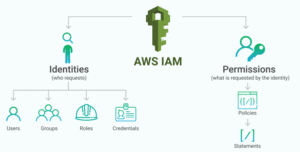
In this activity guide, You will learn how to use create an IAM user, role, Group and attach policies to it.
Activity Guide III: Create a Power User
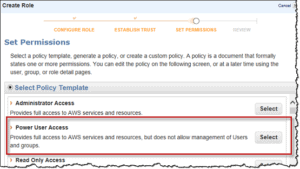
An AWS IAM Power User is an identity that has access to most AWS services and resources but does not have permission to manage IAM users, groups, or access permissions. This type of access is commonly used for developers, engineers, and operational teams who need broad access to AWS resources without receiving full administrative privileges.
Power Users can create and manage AWS resources such as EC2 instances, S3 buckets, Lambda functions, and databases, but they cannot modify sensitive IAM security settings. This helps organizations follow the principle of least privilege while maintaining operational flexibility.
Activity Guide IV: Enable MFA on The Root Account
AWS Multi-Factor Authentication is a simple best practice that adds an additional layer of protection on the top of your user name and password. With the enabled MFA, when a user signs in to an AWS Console, they will be prompted for their user name and password (First authentication), as well as for an authentication code (Second Authentication) from their AWS MFA device. These details are Taken together to increase security for your AWS account settings and resources.
You can enable MFA for your AWS account as well as for an individual IAM user you have created under your root account. MFA is also used to control access to AWS service APIs. AWS does not charge any additional cost for using the MFA.
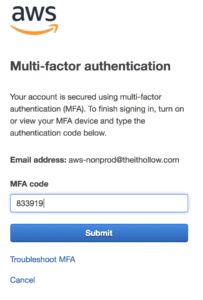
In this activity guide, You will learn how to use enable the MFA on your root account.
Activity Guide V: Create a User Pool in AWS Cognito
Amazon Cognito User Pools provide secure user authentication and authorization for web and mobile applications. A user pool acts as a managed user directory that allows users to sign up, sign in, and securely access applications using authentication features such as multi-factor authentication (MFA), password policies, and social identity providers.
Amazon Cognito helps developers manage user identities without building a custom authentication system from scratch. It also integrates with AWS services and applications through SDKs and APIs.
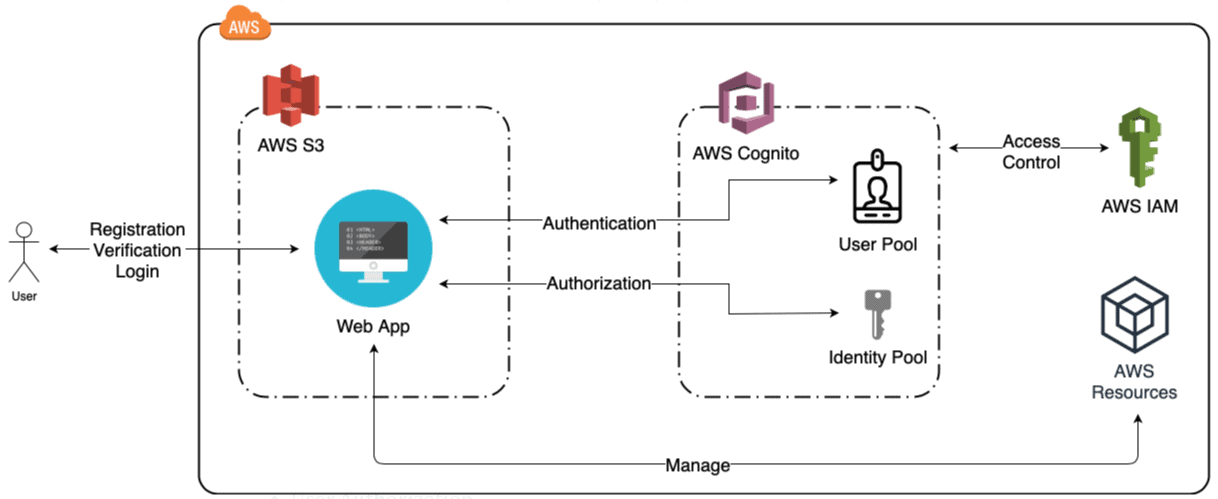 In this activity guide, you will learn how to create a user pool in AWS Cognito.
Activity Guide VI: Work with AWS Organizations and Service Control Policies (SCPs)
AWS Organizations helps businesses centrally manage and govern multiple AWS accounts from a single environment. It simplifies account management, billing, security, compliance, and access control across AWS workloads.
Using AWS Organizations, you can group accounts based on business requirements and apply governance policies using Service Control Policies (SCPs). SCPs help administrators define permission boundaries and restrict actions across accounts within an organization.
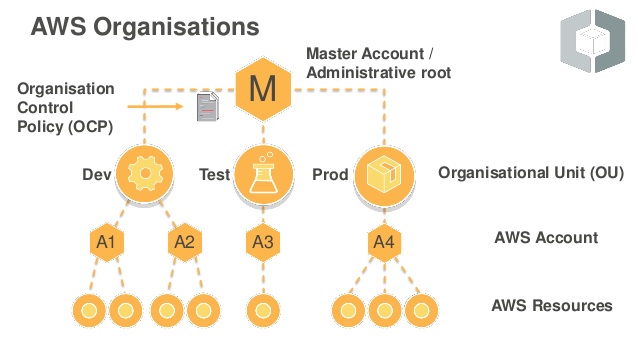
In this activity guide, you will learn to create and manage AWS Organizations using SCP (Service Control Policies).
Activity Guide VII: Work with AWS Directory Service (Simple AD)
AWS Directory Service enables you to integrate Microsoft Active Directory (AD) with AWS services and cloud applications. Directory services help organizations manage users, groups, devices, and access permissions in a centralized environment.
Simple AD is a directory option provided by AWS for basic Active Directory-compatible workloads and user management tasks.
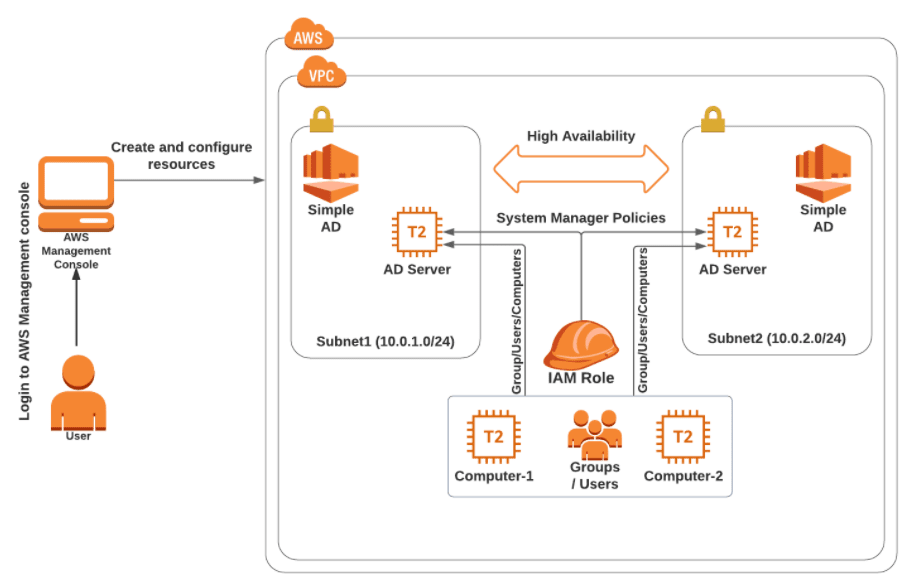
In this Activity guide, you will learn how to create a Simple AD directory, add Groups, Users and Computers.
Activity Guide VIII: Understanding Lambda@Edge
Lambda@Edge is an AWS feature integrated with Amazon CloudFront that allows you to run code closer to end users through AWS edge locations. Running code at edge locations helps reduce latency, improve application performance, and customize content delivery for users worldwide.
Lambda@Edge executes AWS Lambda functions in response to CloudFront events such as viewer requests, origin requests, and content delivery actions. This allows developers to implement features such as URL rewrites, authentication, request filtering, and personalized content delivery without managing servers.
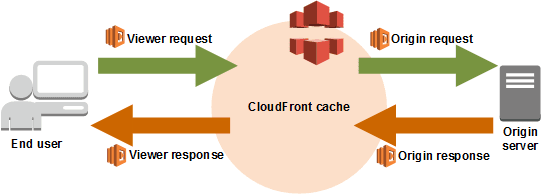
In this activity guide, you will learn about how we are implementing Lambda@edge at origin request. The lambda will be redirecting the path to the appropriate HTML page based on the user URL.
Activity Guide IX: Setting Up AWS Config to Assess Audit & Evaluate AWS Resources
AWS Config is a service that enables you to assess, audit, and evaluate the configurations of your AWS resources. Config continuously monitors and records your AWS resource configurations and allows you to automate the evaluation of recorded configurations against desired configurations. With Config, you can review changes in configurations and relationships between AWS resources, dive into detailed resource configuration histories, and determine your overall compliance against the configurations specified in your internal guidelines.
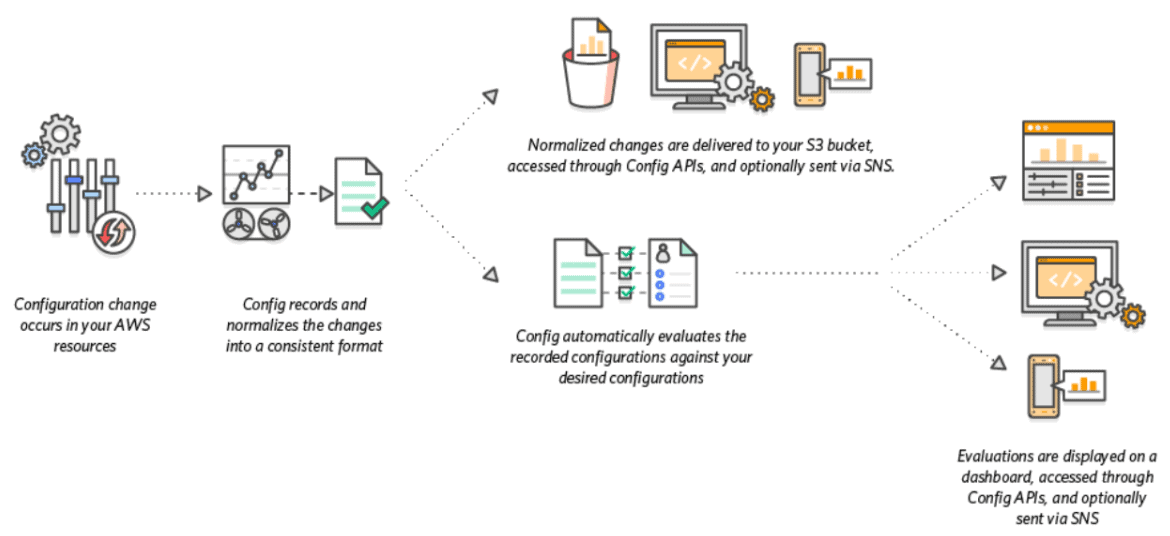
In this activity guide, you will learn how to Enabling Governance using AWS Config
Activity Guide X: Enable CloudTrail & Store Logs in S3
Amazon S3 is integrated with AWS CloudTrail, a service that provides a record of actions taken by a user, role, or an AWS service in Amazon S3. CloudTrail captures a subset of API calls for Amazon S3 as events, including calls from the Amazon S3 console and from code calls to the Amazon S3 APIs.
If you create a trail, you can enable continuous delivery of CloudTrail events to an Amazon S3 bucket, including events for Amazon S3.

In this activity guide, you will learn to implement step-by-step instructions to create a trail and store logs in an S3 bucket.
Activity Guide XI: Install the CloudWatch Agent on an EC2 Instance and View CloudWatch Metrics
Amazon CloudWatch is a monitoring and observability service that helps organizations monitor AWS resources, applications, and infrastructure performance in real time. It provides metrics, logs, alarms, and dashboards that help teams improve visibility, troubleshoot issues, and optimize resource utilization across cloud environments.
By installing the CloudWatch Agent on Amazon EC2 instances, users can collect additional system-level metrics such as memory usage, disk utilization, and custom application logs.
In this activity guide, you will learn how to install and configure the CloudWatch Agent on an EC2 instance and visualize monitoring metrics using Amazon CloudWatch dashboards.
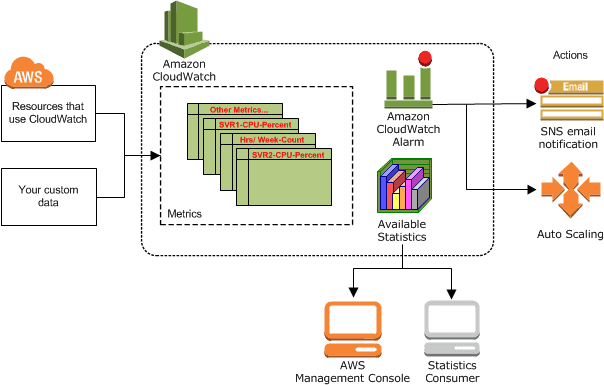
In this activity guide, we cover Step by step instructions for installing CloudWatch Agent on EC2 instance for Metrics Visualization
Activity Guide XII: Configure AWS Access Control Alerts using CloudWatch and CloudTrail
Amazon CloudWatch helps monitor AWS resources and applications by collecting logs, metrics, and operational data in real time. AWS CloudTrail records account activity and API actions performed across AWS services, helping organizations improve auditing, governance, and security monitoring.
By integrating CloudWatch with CloudTrail, organizations can detect suspicious activities, create metric filters, and trigger automated alerts for important security events.
In this activity guide, you will learn how to configure AWS CloudTrail, create CloudWatch log groups and metric filters, and set up SNS alerts for AWS access control and security monitoring events.

In this activity guide, you will learn how to create a Cloudtrail and CloudWatch log group, while also creating a metric filter to receive an alarm from CloudWatch via SNS topic.
Activity Guide XIII: Monitor AWS Resources using Trusted Advisor
AWS Trusted Advisor provides recommendations that help organizations follow AWS best practices related to security, performance, fault tolerance, service limits, and cost optimization.
Trusted Advisor analyzes your AWS environment and identifies potential risks such as unrestricted security groups, publicly accessible Amazon S3 buckets, and underutilized resources.
In this activity guide, you will learn how to use AWS Trusted Advisor to monitor AWS resources and identify security and operational best practice recommendations.
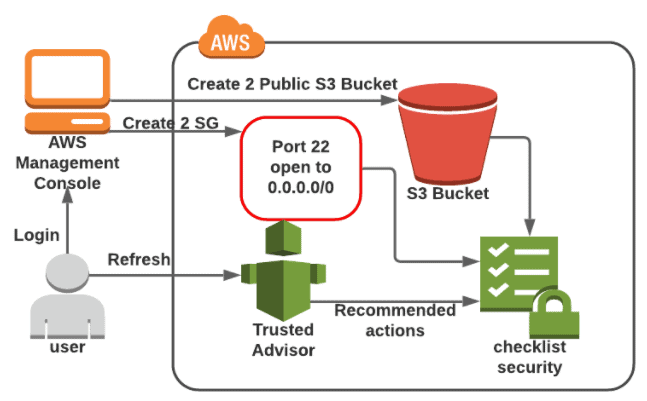
In this Activity Guide, you will learn how to monitor the Unrestricted Security group and public S3 Bucket with the help of AWS Trusted Advisor.
Activity Guide XIV: Check the Compliance Status of Security Groups using AWS Config
AWS Config is a governance and compliance service that helps organizations assess, audit, and evaluate the configuration of AWS resources. It continuously monitors resource configurations and tracks compliance against defined security and governance rules.
Using AWS Config, organizations can identify non-compliant or improperly configured security groups and improve overall cloud security posture.
In this activity guide, you will learn how to configure AWS Config recording settings and detect unprotected or non-compliant security groups within your AWS environment.
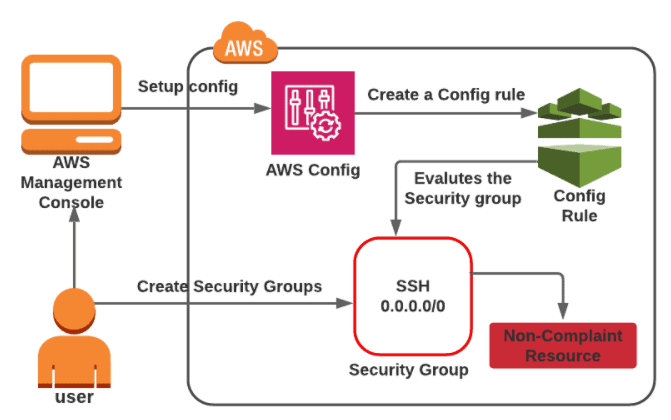
In this Activity guide, you will learn how to set up a recording configuration setting for AWS Config and Detect the unprotected Security groups present in the account.
Activity Guide XV: Classify Sensitive Data using Amazon Macie
Amazon Macie is a data security and privacy service that uses machine learning and pattern matching to discover, classify, and protect sensitive data stored in AWS environments.
Amazon Macie can automatically identify sensitive information such as personally identifiable information (PII), financial records, credentials, and confidential business data stored in Amazon S3 buckets.
In this activity guide, you will learn how to create and configure an Amazon Macie job to identify and classify sensitive data in your AWS environment.
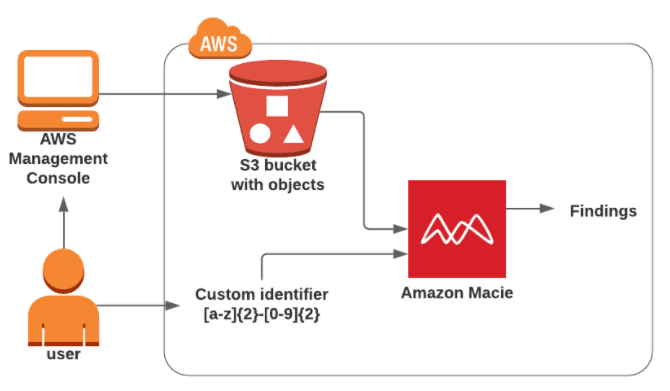
In this activity guide, you will learn how to create and configure an Amazon Macie job to discover sensitive data.
Activity Guide XVI: Register and Configure a Domain using Amazon Route 53
Domain names make it easier for users to access websites and applications without remembering complex IP addresses. Amazon Route 53 is AWS’s scalable Domain Name System (DNS) web service that helps organizations register domain names and route internet traffic efficiently.
Amazon Route 53 supports domain registration, DNS routing, health checks, and traffic management features for highly available applications.
In this activity guide, you will learn how to register and configure a domain using Amazon Route 53 and manage DNS settings for cloud-based applications.
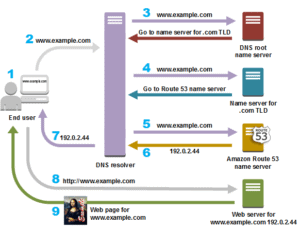
In this activity guide, you will learn how to get a domain name for free.
Activity Guide XVII: Working with Route53 for Disaster Recovery
Amazon Route 53 is a highly available and scalable cloud Domain Name System (DNS) web service. It is designed to give developers and businesses an extremely reliable and cost-effective way to route end users to Internet applications by translating names like www.example.com into the numeric IP addresses like 192.0.2.1 that computers use to connect. Amazon Route 53 is fully compliant with IPv6 as well.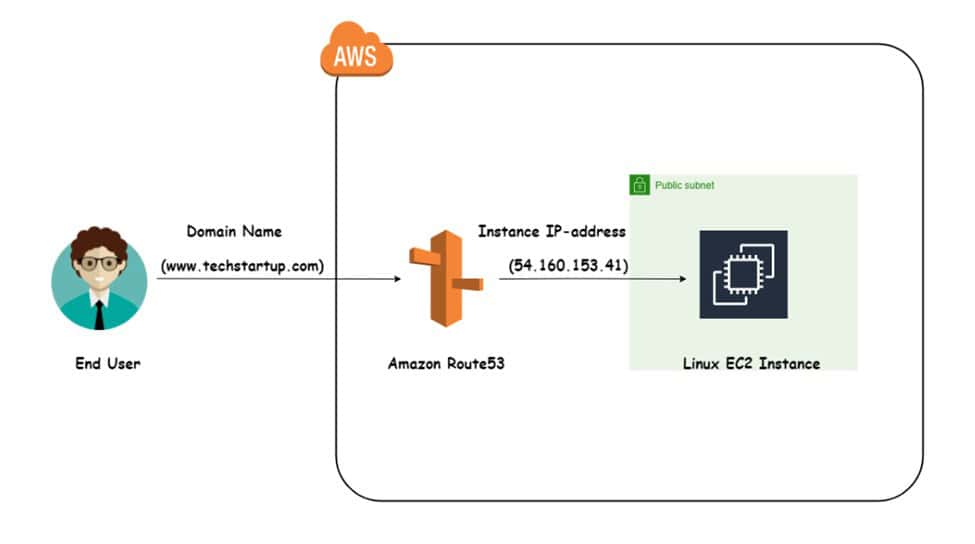
In this activity guide, you will learn how to plan the recovery from a disaster using Route53, Active-Active Failovers, and Active-Passive Failovers.
Activity Guide XVIII: Block Web Traffic with WAF
AWS Web Application Firewall is a firewall that helps you to protect your web application server against common web exploits that might affect the availability and compromise the security concerns of your application. The AWS WAF also gives you control over the traffic that it reaches to your applications by enabling you to create security rules that block common attack patterns like SQL injection and cross-site scripting.
The Users can create their own rules/policies and specify the conditions that AWS WAF searches for in incoming web requests, and the AWS cost for using the WAF is only for what you use.
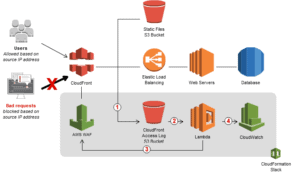
In this activity guide, you will learn how to create an IP set and test the working of WAF.
Activity Guide XIX: Find Vulnerabilities on an EC2 Instance Using Amazon Inspector
Amazon Inspector tests the network accessibility of your Amazon EC2 instances and the security state of your applications that run on those instances. Amazon Inspector assesses applications for exposure, vulnerabilities, and deviations from best practices. After performing an assessment, Amazon Inspector produces a detailed list of security findings that is organized by level of severity.
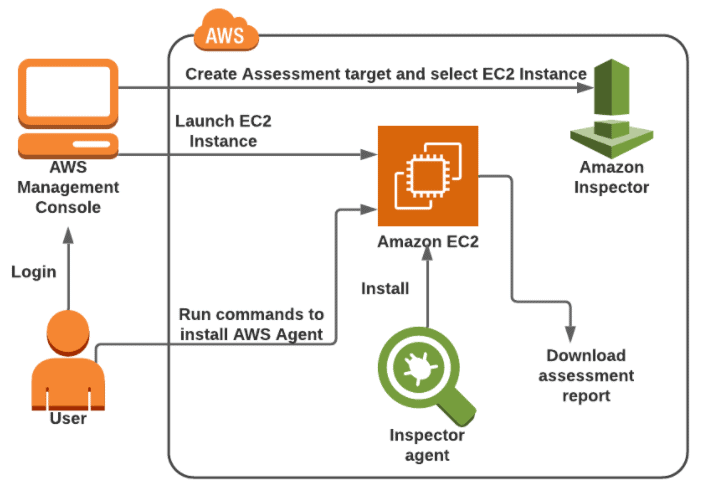
In this Activity guide, you will learn how to launch the EC2 instance and configure an Inspector with an Assessment target and template.
Activity Guide XX: Get Started with Amazon ECS Using Fargate
AWS Fargate is a technology that you can use with Amazon ECS to run containers without the overhead of managing servers or clusters of instances. With Fargate, and no longer need to have provisioned, configured, or scale the clusters of virtual machines to run containers. This removes the need to choose server types, decide when to scale your clusters or optimize cluster packing.
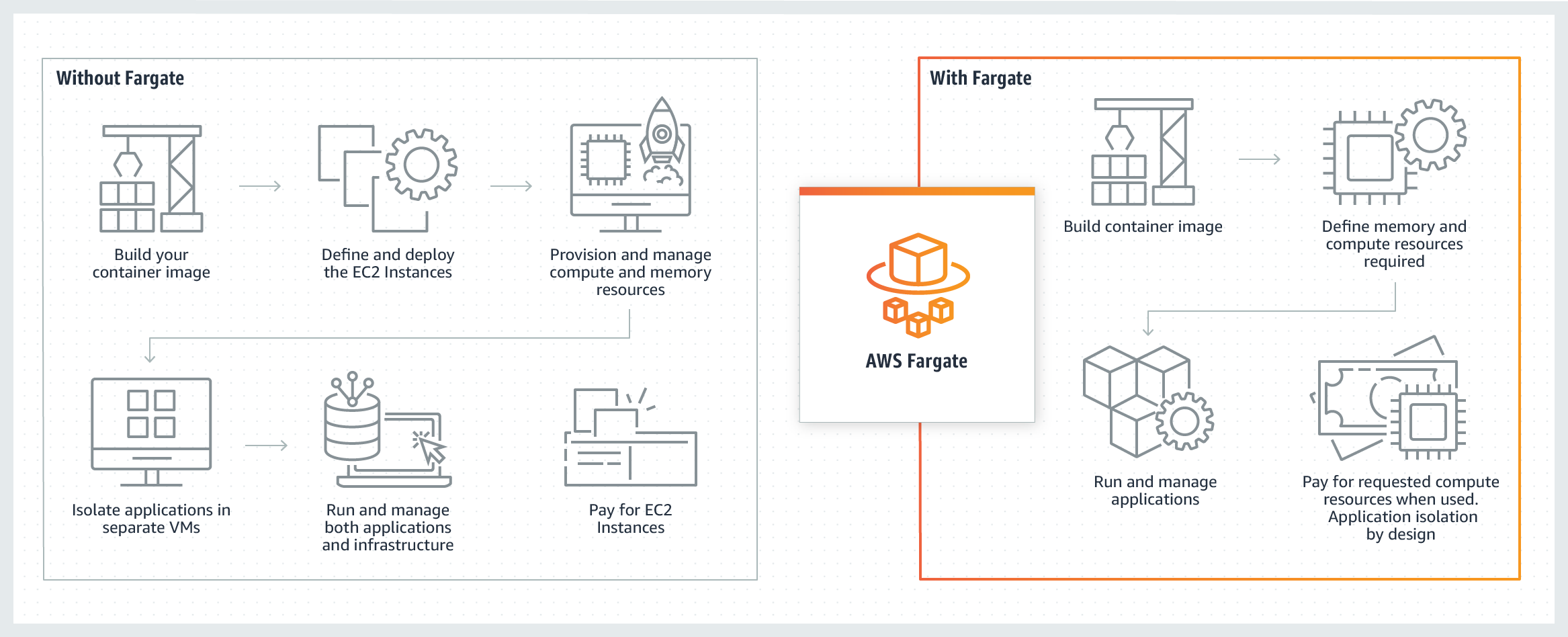
In this Activity guide, you will learn about ECS using the fargate launch type.
Activity Guide XXI: Understanding & Configuring Layered Security in an AWS VPC
Amazon VPC allows you to launch your AWS resources in an isolated network that is defined by us in a more private & secure way. This feature enables us to increase the security level of the AWS resources.
The AWS resources can be protected using multilayered VPC which includes security groups and a Network Access Control List. The VPC security group provides security at the instance level which acts as a firewall and controls both inbound and outbound traffic.
The VPC NACL provides security at Network Level i.e subnet level which acts as a firewall for associated subnets and controls inbound and outbound traffic.
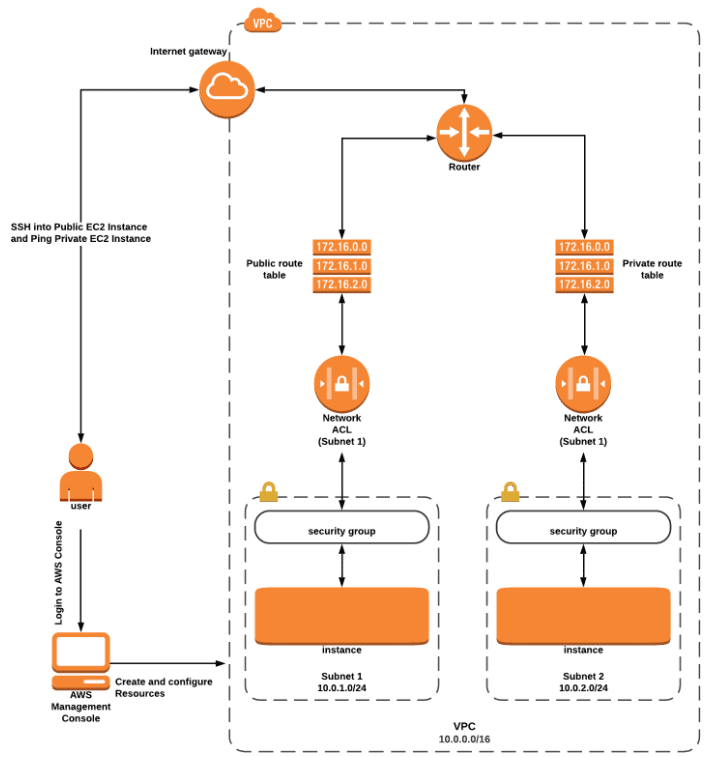
In this Activity Guide, you will learn how to configure Multi-layered Security in AWS VPC and launch 2 EC2 instances (one in a public subnet and another in a private subnet)
Activity Guide XXII: Understanding Stateful vs Stateless Firewalls
Security groups are stateful: This means any changes applied to an incoming rule will be automatically applied to the outgoing rule. If you allow an incoming port 22, the outgoing port 22 will be automatically opened.
Network ACLs are stateless: This means any changes applied to an incoming rule will not be applied to the outgoing rule. If you allow an incoming port 22, you would also need to apply the rule for outgoing traffic.
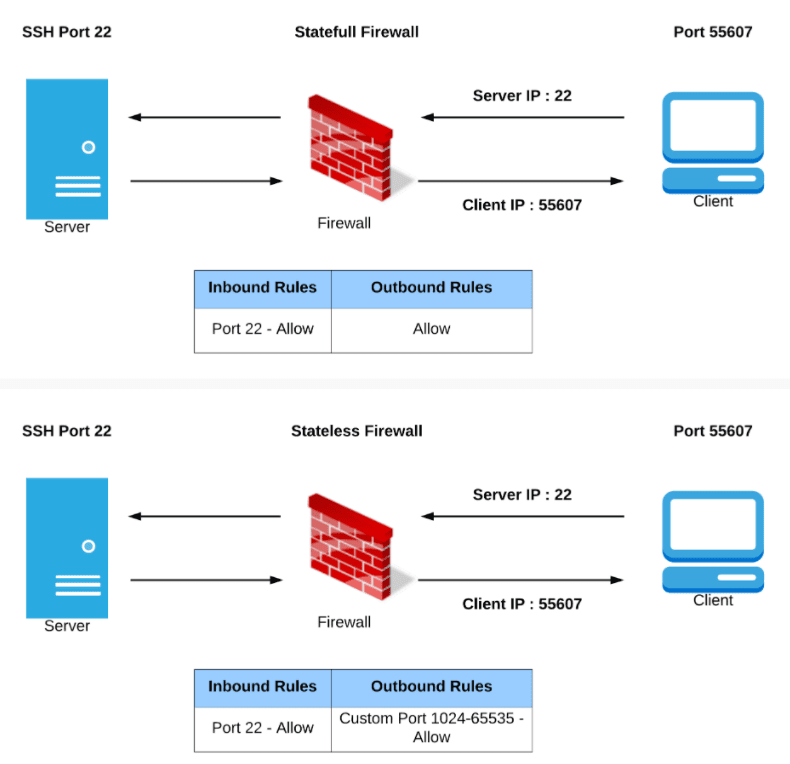
In this Activity Guide, you will understand the difference between stateful (Security group) and stateless (Network ACL) firewalls.
Activity Guide XXIII: Set Up an AWS Site-to-Site (S2S) VPN Connection
An AWS Site-to-Site VPN connection enables secure communication between your AWS Virtual Private Cloud (VPC) and your on-premises network using Internet Protocol Security (IPsec). This allows organizations to securely extend their internal network infrastructure to the AWS Cloud.
By default, resources deployed inside an Amazon VPC cannot directly communicate with external on-premises networks. Site-to-Site VPN helps establish encrypted connectivity between AWS environments and remote data centers or office networks.
In this activity guide, you will learn how to configure and establish a secure Site-to-Site VPN connection between your AWS Cloud environment and an on-premises network.
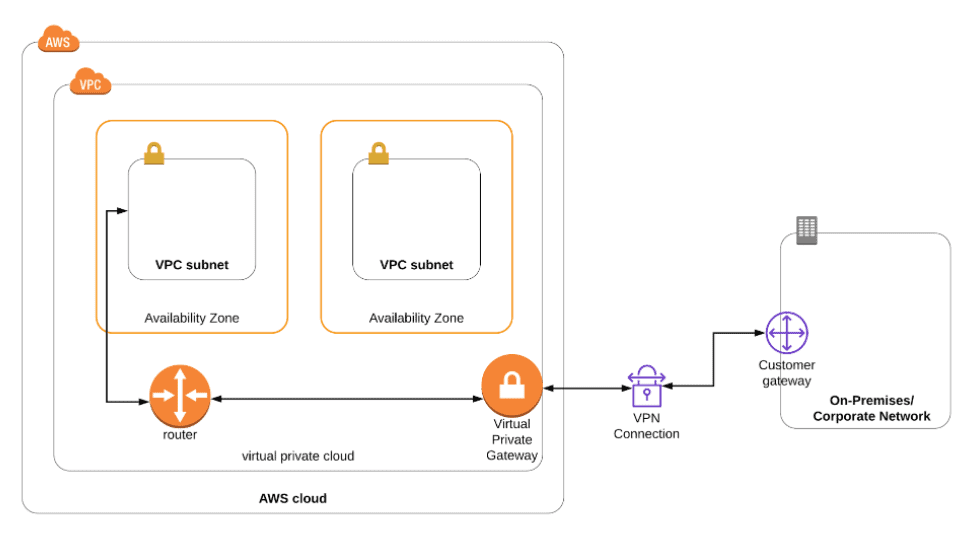
In this Activity Guide, you will how to set up a site to site VPN connection between your AWS Cloud and On-premise Network.
Activity Guide XXIV: Implement End-to-End VPC Endpoint Services
AWS VPC Endpoints enable private connectivity between your Virtual Private Cloud (VPC) and supported AWS services without requiring an internet gateway, NAT device, VPN connection, or AWS Direct Connect. This helps improve security by keeping traffic within the AWS network instead of exposing it to the public internet.
VPC endpoints are highly available, scalable, and redundant networking components designed for secure communication between services and VPC environments.
In this activity guide, you will learn how to implement an end-to-end VPC Endpoint Service connection between service provider and customer VPCs within AWS.
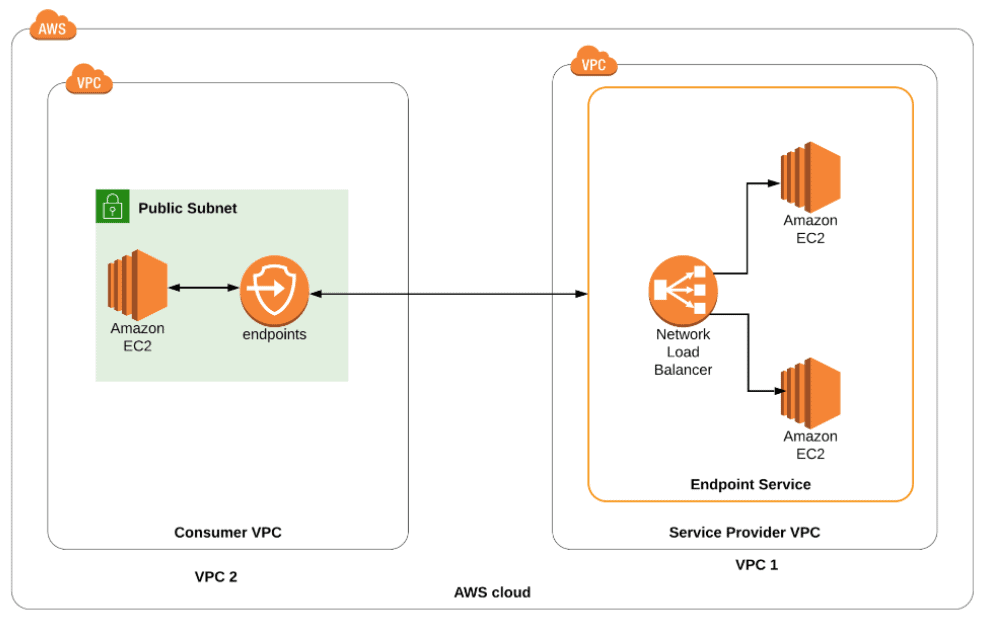
In this Activity Guide, you learn how to set up an end to end connection between two VPC’s (Services Provider and customer) using Endpoint service
Activity Guide XXV: Access EC2 Instances using Session Manager and Send Logs to CloudWatch
AWS Systems Manager Session Manager is a fully managed service that allows secure access to Amazon EC2 instances and on-premises servers without opening inbound ports or managing SSH keys. It provides browser-based and command-line access while improving security and auditability.
Session Manager integrates with AWS CloudWatch to store session activity logs for monitoring and compliance purposes.
In this activity guide, you will learn how to launch an EC2 instance with the appropriate Systems Manager (SSM) role, connect to the instance using Session Manager, and send session logs to Amazon CloudWatch.
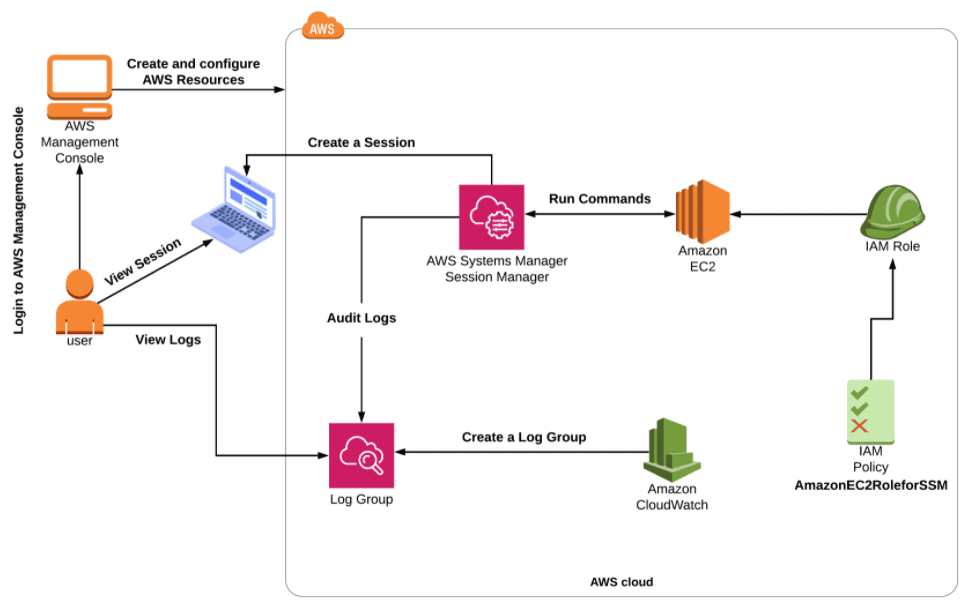
In this Activity Guide, you will learn how to launch an EC2 instance with the SSM role and then connect to the EC2 via AWS Session manager and view the logs in Cloudwatch.
Activity Guide XXVI: Use AWS Systems Manager for Patch Management
AWS Systems Manager helps organizations manage and automate operational tasks across AWS infrastructure. It provides centralized visibility, automation, configuration management, and operational control for AWS resources.
Patch Management in AWS Systems Manager allows administrators to automate the process of scanning, approving, and applying operating system patches across EC2 instances and managed servers.
In this activity guide, you will learn how to use AWS Systems Manager for infrastructure management and automated patch management in AWS environments.
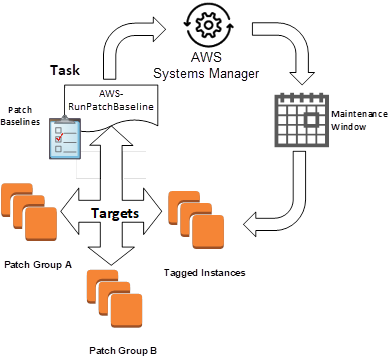
In this activity guide, you will learn the creation and management of Infrastructure using AWS SSM.
Activity Guide XXVII: Implement AWS WAF with ALB to Block SQL Injection and Geo-Based Attacks
AWS WAF (Web Application Firewall) helps protect web applications from common web exploits and malicious traffic that can affect application availability, security, and performance.
AWS WAF can be integrated with an Application Load Balancer (ALB) to create security rules that block threats such as SQL injection attacks, cross-site scripting (XSS), malicious query strings, and unwanted traffic from specific geographic locations.
In this activity guide, you will learn how to configure AWS WAF with an Application Load Balancer (ALB) and create security rules to filter and block malicious web traffic.
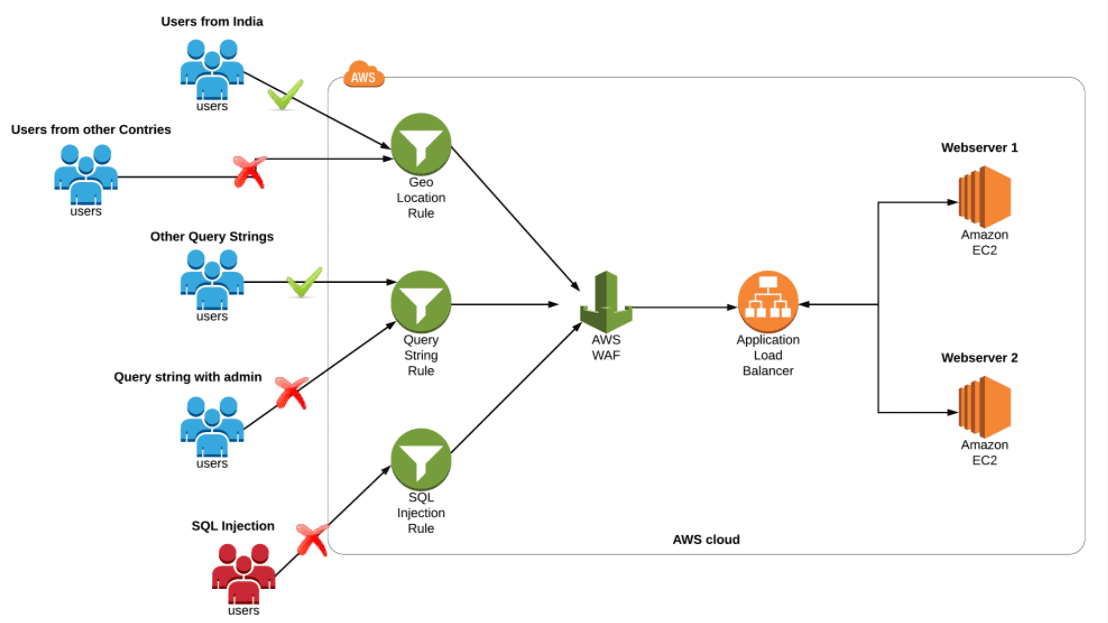
In this Activity Guide, you will learn how to set up WAF and create a set of rules to block access from geo-locations, SQL Injections and block certain Query String parameters.
Related References
- AWS Certificate Manager: Overview, Features and How it Works?
- AWS Database Services – Amazon RDS, Aurora, DynamoDB, ElastiCache
- Multi-Account Management Using AWS Organizations
- AWS Certified Solutions Architect: Roles & Responsibilities
- Amazon Kinesis Overview, Features And Benefits
- AWS Route 53 Introduction
Next Task For You
Begin your journey towards an AWS Cloud by joining our FREE Informative Class on Amazon Cloud Free Class by clicking on the below image.