





Amazon Q is the family of AI helpers from Amazon Web Services (AWS). At first, it was built to help developers, IT folks and business users get done, automate chores and look up information by just asking in plain language.
The AI assistant lineup from AWS has changed a lot. The skills in Amazon Q Developer are moving over to AWS Assistant and Kiro. Amazon Q Business has grown into enterprise AI tools through AWS Quick. AWS has also spread AI-powered analytics and customer service features across its platform.
In this guide, we will look at what Amazon Q is, its main features and real-world uses, how the AI assistant tools from AWS have shifted in 2026 and which tools companies and developers should think about right now.

Getting to Know Amazon Q
Amazon Web Services (AWS) launched Amazon Q as an AI-powered assistant designed to help users find information, generate content, write code, and simplify everyday tasks using natural language.
Initially, Amazon Q offered specialized capabilities for software development, enterprise knowledge management, business intelligence, and customer service. By 2026, AWS had evolved many of these capabilities into dedicated AI-powered products and services.
To understand the technology behind these assistants, explore our guide on Introduction to Generative AI and Its Mechanisms.
Why People Need AI Helpers at Work
Modern companies store large amounts of data across cloud platforms, applications, and business systems. Finding relevant information, troubleshooting technical issues, and performing repetitive tasks can consume valuable time.
Generative AI assistants help employees and developers work more efficiently by providing contextual answers, assisting with technical tasks, and simplifying access to information.
For a better understanding of how these technologies differ, read our comparison of Generative AI vs Traditional AI vs Machine Learning vs Deep Learning.
How Amazon Q Tackles These Problems
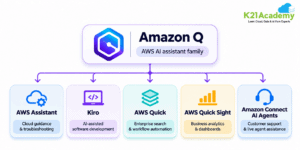
Amazon Q introduced AI-powered assistance across AWS environments and enterprise applications. Its capabilities have since evolved into several offerings:
- AWS Assistant: Helps users understand AWS services, troubleshoot cloud resources, analyze costs, and access guidance directly within the AWS Management Console.
- Kiro: Provides AI-powered software development capabilities, including agentic coding, code generation, and development workflows.
- AWS Quick: Helps business users search enterprise knowledge, analyze information, and automate workflows using AI.
- AWS Quick Sight: Supports business intelligence, data visualization, and AI-powered analytics.
- Amazon Connect AI Agents: Assist contact center teams with customer interactions, knowledge retrieval, and automated support workflows.
These tools help organizations apply generative AI to their specific business and technical requirements.
Security and Privacy
AWS AI assistants provide security features such as identity-based access controls, encryption, and integration with enterprise authentication systems.
However, data protection, permissions, and privacy settings vary by product. Organizations should configure access policies, review data-handling practices, and follow AWS security recommendations before deploying these tools.
Key Features of Amazon Q
1) AWS Assistant and Kiro: AI Tools for Developers and IT Professionals
AWS initially introduced Amazon Q Developer to help developers and IT professionals build applications, troubleshoot technical issues, and manage AWS resources using generative AI.
In November 2026, Amazon Q Developer in the AWS Management Console was renamed AWS Assistant. For software development, AWS now recommends transitioning from Amazon Q Developer IDE plugins to Kiro.
AWS Assistant: Your Cloud Expert
AWS Assistant provides AI-powered assistance directly within the AWS Management Console. It helps users understand AWS services, troubleshoot cloud resources, analyze costs, and follow AWS best practices.
For example, users can ask how to deploy a web application on AWS or investigate issues with existing cloud resources.
Kiro: AI-Powered Software Development
Kiro is an AI-powered development environment that helps developers build applications using natural language instructions and agentic workflows.
Its key capabilities include:
- Code generation and editing
- AI-assisted debugging and troubleshooting
- Agentic coding and automated development workflows
- Requirements-driven development using specifications
- Integration with development tools and Model Context Protocol (MCP)
Kiro helps developers turn application requirements into working solutions while maintaining control over the development process.
Integration with AWS and Development Tools
AWS Assistant is accessible through the AWS Management Console, while Kiro provides AI-powered assistance within software development environments.
These tools serve different purposes. AWS Assistant focuses on cloud infrastructure guidance and management, while Kiro helps developers write, test, and improve application code.
Example Use Case
Suppose a developer wants to build a serverless web application on AWS.
They can use AWS Assistant to understand services such as Amazon API Gateway, AWS Lambda, and Amazon DynamoDB.
The developer can then use Kiro to generate application code, implement features, and assist with testing.
This approach combines AI-powered cloud guidance with AI-assisted software development.
Important Update for Amazon Q Developer Users
AWS has announced that Amazon Q Developer IDE plugins will reach end of support on April 30, 2027.
Existing users should consider migrating to Kiro to access newer AI coding capabilities and ongoing updates.
2) Amazon Q Business and AWS Quick: AI for Enterprise Productivity
AWS introduced Amazon Q Business as an AI-powered assistant that allowed employees to search company information, generate content, and complete tasks using natural language.
AWS stopped accepting new Amazon Q Business customers on July 31, 2026. Existing customers can continue using the service, while AWS recommends AWS Quick for new enterprise AI applications.
In November 2026, Amazon Quick was renamed AWS Quick. The updated name reflects its focus on enterprise productivity, security, and AI-powered workflows.
Integration with Enterprise Systems
AWS Quick connects with enterprise applications, documents, databases, and collaboration platforms to help employees access relevant business information.
It supports integrations with tools such as Salesforce, Slack, Microsoft Teams, and other enterprise data sources.
These integrations allow employees to search for information across multiple systems without manually switching between applications.
AI-Powered Assistance Across Departments
AWS Quick helps teams improve productivity through AI-powered search, data analysis, and workflow automation.
Its capabilities support different business functions:
- Marketing: Analyze customer trends, summarize campaign information, and prepare reports.
- Finance: Analyze financial data, identify insights, and support reporting workflows.
- Human Resources: Find relevant company policies and answer employee questions using approved information.
- Sales: Research customer accounts, summarize business information, and assist with follow-up activities.
AWS Quick also supports AI agents that help teams complete multi-step tasks and automate business processes.
Security and Privacy
AWS Quick provides enterprise security and governance capabilities, including identity management, access controls, and integration with AWS monitoring services.
Organizations can configure permissions to control access to connected applications and business information.
AWS states that customer data in Quick is not used to train underlying models. However, organizations should review the service documentation and configure security settings according to their requirements.
Important Update for Amazon Q Business Users
As of July 31, 2026, Amazon Q Business is no longer available to new customers.
AWS continues to provide bug fixes and security updates for existing customers but no longer accepts new feature requests for the service.
AWS recommends migrating existing Amazon Q Business applications to AWS Quick and using AWS Quick for new enterprise generative AI and agentic AI solutions.
3) AWS Quick Sight: AI-Powered Business Intelligence and Analytics
Amazon Q in QuickSight was introduced to help business users analyze data, create visualizations, and discover insights using natural language.
In October 2025, Amazon QuickSight evolved into Amazon Quick Suite, combining business intelligence tools with AI-powered productivity features. In November 2026, Amazon Quick Suite was renamed AWS Quick, while its business intelligence capability became AWS Quick Sight.
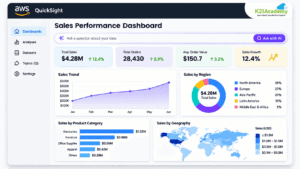
AWS Quick Sight continues to provide dashboards, data visualization, and AI-powered analytics to help organizations make informed decisions.
Enhancing Business Intelligence Accessibility
AWS Quick Sight allows users to explore business data through interactive dashboards and natural language queries.
Its generative BI capabilities help employees understand data, identify trends, and gain insights without requiring advanced technical knowledge.
Users can ask questions about their datasets and receive relevant answers based on the information they are authorized to access.
Simplifying Data Visualization
AWS Quick Sight helps users create charts, dashboards, and analytical reports using connected business data.
For example, a sales manager can request a breakdown of sales by product category and use the results to create visualizations.
AI-assisted features also help users create calculations, explore datasets, and improve their analyses.
Automated Insights and Reporting
AWS Quick Sight supports AI-powered insights, executive summaries, and data storytelling.
These capabilities help teams identify patterns, summarize dashboard findings, and communicate business performance more effectively.
Users can generate summaries from dashboards and create data stories to present key findings to stakeholders.
Integration with AWS Quick
AWS Quick Sight is part of the broader AWS Quick platform, which combines business intelligence, AI-powered research, enterprise search, and workflow automation.
This integration allows teams to move from analyzing business data to researching information and taking action through connected AI workflows.
Important Update for Existing QuickSight Users
Existing QuickSight customers can continue using their dashboards, datasets, and analyses after the transition to AWS Quick Sight.
According to AWS, the November 2026 name change does not require changes to existing data, settings, or pricing.
AWS Quick Sight also retains core capabilities such as interactive dashboards, SPICE in-memory analytics, embedded analytics, and dashboard sharing.
4) Amazon Connect AI Agents: Intelligent Customer Service and Support
Amazon Q in Connect was introduced as an AI-powered assistant designed to help contact center agents resolve customer issues through real-time recommendations and relevant business information.
By 2026, AWS had expanded these capabilities into AI agents within Amazon Connect Customer. These agents help customer service representatives, automate routine support tasks, and interact directly with customers.
Transforming Customer Service
Amazon Connect Customer uses generative AI and agentic workflows to improve customer support across voice, chat, email, and other communication channels.
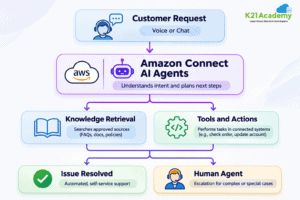
AI agents can understand customer requests, retrieve information from connected knowledge sources, and recommend appropriate actions.
They can also handle certain customer requests automatically, reducing repetitive work for human agents.
Real-Time Assistance
During customer interactions, Amazon Connect AI agents can analyze conversations and provide relevant recommendations.
Their capabilities include:
- Identifying customer intent during conversations.
- Suggesting responses based on relevant knowledge sources.
- Retrieving information from connected business systems.
- Recommending troubleshooting steps and next actions.
- Assisting with customer service tasks and transactions.
These features help customer service representatives respond more efficiently while maintaining human oversight.
AI-Powered Customer Self-Service
Amazon Connect Customer supports AI agents that interact directly with customers through voice and chat.
These agents can answer common questions, retrieve information, and complete supported actions using connected systems.
When a request requires human assistance, the interaction can be transferred to a customer service representative.
For Supervisors and Administrators
Amazon Connect provides AI-powered capabilities that help contact center teams manage customer interactions and improve operational efficiency.
These include:
- Generating summaries of customer conversations and cases.
- Assisting with follow-up notes and customer service documentation.
- Providing guidance through knowledge bases and step-by-step workflows.
- Configuring AI agents, prompts, and guardrails for different support scenarios.
Supervisors can also use Amazon Connect’s reporting and analytics capabilities to monitor contact center performance.
Important Update for Amazon Q in Connect Users
AWS has expanded the original Amazon Q in Connect experience into a broader AI agent framework within Amazon Connect Customer.
Organizations can configure these agents to support human representatives, automate customer interactions, and connect with business applications.
This evolution reflects AWS’s growing focus on agentic AI for customer service and contact center operations.
Enhancing Productivity and Efficiency
AWS AI assistants help developers and business teams improve productivity by automating tasks, simplifying workflows, and providing faster access to information.
1) Improving Developer Productivity
Kiro helps developers generate code, troubleshoot issues, and build applications using natural language instructions. Its AI-powered capabilities reduce repetitive coding tasks and support faster development.
2) Simplifying Cloud Management
AWS Assistant helps IT professionals troubleshoot AWS resources, understand cloud services, and analyze costs directly within the AWS Management Console.
This reduces the time spent searching documentation and investigating technical issues.
3) Automating Business Workflows
AWS Quick helps employees search enterprise information, summarize documents, and automate business processes.
Its AI-powered workflows support activities such as report preparation, customer research, and routine administrative tasks.
4) Improving Business Analytics
AWS Quick Sight helps users analyze data, create dashboards, and generate insights using natural language.
Its AI-powered analytics capabilities make it easier to identify trends, prepare reports, and support business decisions.
Together, these AWS AI tools help organizations reduce manual effort, streamline operations, and improve productivity across technical and business teams.
Keeping Things Safe and Private with Amazon Q
AWS AI assistants provide security and privacy features that help organizations protect sensitive data, manage user access, and maintain control over AI-powered workflows.
1) Identity and Access Management
AWS tools such as AWS Assistant, Kiro, and AWS Quick offer security controls based on their specific capabilities.
Organizations can manage user access through AWS Identity and Access Management (IAM), IAM Identity Center, and other supported authentication methods.
2) Data Protection and Privacy
AWS provides encryption and data protection capabilities to help safeguard sensitive information.
AWS Quick does not use customer content to train underlying large language models. However, data handling and privacy settings may vary across AWS AI products and subscription plans.
3) Permissions and Compliance
AWS Quick provides access controls that help restrict users to business information they are authorized to access.
Organizations can configure permissions, monitor activities, and apply security policies according to their compliance requirements.
4) Secure AI Workflows
AWS AI tools provide security features to support enterprise applications and automated workflows.
Organizations should follow AWS security best practices, review AI-generated outputs, and ensure automated actions operate within approved permissions.
These measures help businesses use AI-powered tools while maintaining appropriate security, privacy, and governance controls.
Practical Use Cases and Scenarios
AWS AI tools help businesses solve everyday challenges across software development, cloud management, business analytics, and customer service. Here are four practical scenarios demonstrating how these tools can be used.
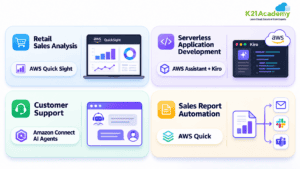
Scenario 1: Analyzing Sales Performance with AWS Quick Sight
A retail company notices declining sales in certain regions but struggles to identify the cause.
A sales analyst uses AWS Quick Sight to explore regional sales data, compare product performance, and generate visualizations using natural language queries.
The insights help the team identify underperforming products and make informed decisions about inventory and marketing strategies.

Scenario 2: Building a Serverless Application with AWS Assistant and Kiro
A developer needs to build a serverless web application but is unsure which AWS services to use.
The developer asks AWS Assistant for guidance on services such as AWS Lambda, Amazon API Gateway, and Amazon DynamoDB.
They then use Kiro to generate application code, troubleshoot errors, and assist with testing.
This approach simplifies development and helps the developer build the application more efficiently.
Scenario 3: Resolving Customer Issues with Amazon Connect AI Agents
A customer contacts an online banking support team because they cannot access their account.
Amazon Connect AI agents analyze the conversation, retrieve relevant troubleshooting information, and suggest appropriate steps to the support representative.
For supported requests, AI agents can also provide automated assistance or transfer the interaction to a human agent when necessary.
This helps reduce response times and improve the customer support experience.
Scenario 4: Automating Sales Reports with AWS Quick
A sales team spends several hours collecting information from different business applications to prepare weekly reports.
Using AWS Quick, the team can retrieve information from connected enterprise systems, summarize relevant data, and automate supported reporting workflows.
This reduces repetitive manual work and allows employees to focus on customer relationships and sales activities.
These scenarios demonstrate how AWS AI tools can address practical business challenges, improve productivity, and support better decision-making.
Getting Started with AWS AI Assistants
Getting started with AWS AI tools depends on whether you want to build applications, manage cloud services, analyze business data, or automate customer support.
1) Choose the Right AWS AI Tool
Select the service that best matches your requirements:
- AWS Assistant: For troubleshooting AWS resources, understanding cloud services, and analyzing costs.
- Kiro: For AI-assisted software development, code generation, and debugging.
- AWS Quick: For enterprise search, business research, and workflow automation.
- AWS Quick Sight: For creating charts, dashboards, and analyzing business data.
- Amazon Connect AI Agents: For automated customer support and real-time agent assistance.
2) Set Up Your Environment
Each AWS AI tool has its own setup process:
- AWS Assistant: Sign in to the AWS Management Console and open AWS Assistant using the assistant icon.
- Kiro: Download Kiro from its official website, install it, and complete the sign-in process.
- AWS Quick: Sign up for AWS Quick or access an existing organization account.
- AWS Quick Sight: Access the business intelligence capabilities within your AWS Quick environment.
- Amazon Connect AI Agents: Configure an Amazon Connect instance, connect supported knowledge sources, and adjust AI agent settings.
3) Configure Access and Security
Before using AWS AI tools, review the required permissions, supported AWS Regions, pricing, and data protection settings.
Organizations should configure appropriate access controls and test AI-generated responses before using them in production.
4) Start with a Practical Task
Begin with a simple task, such as troubleshooting an AWS resource, generating application code, analyzing a sales dashboard, or answering customer questions.
Review the results and gradually expand AI usage based on your business requirements.
For detailed setup instructions, refer to the official AWS documentation for each service.
For more: Click here
If you’re looking to build foundational AI knowledge on AWS, explore our AWS Certified AI Practitioner (AIF-C01) Certification Exam guide to understand the certification, exam topics, and preparation process.
Conclusion
Amazon Q has played an important role in bringing generative AI capabilities to AWS developers, IT professionals, and business users. As AWS continues to evolve its AI offerings, tools such as AWS Assistant, Kiro, AWS Quick, AWS Quick Sight, and Amazon Connect AI Agents provide specialized solutions for different business needs.
From simplifying cloud management and software development to automating workflows and improving customer support, these AI-powered tools help organizations work more efficiently.
Choosing the right AWS AI tool depends on your requirements, existing infrastructure, and business goals. By understanding these capabilities, organizations can make better use of generative AI and agentic AI in their everyday operations.
Frequently Asked Questions
Q1) What is Amazon Q, and how has it changed in 2026?
Amazon Q was introduced as an AWS generative AI assistant for developers and business users. By 2026, several of its capabilities had evolved into specialized tools, including AWS Assistant for cloud management, Kiro for software development, AWS Quick for enterprise productivity, and AWS Quick Sight for business analytics.
Q2) What is the difference between Amazon Q Developer and Kiro?
Amazon Q Developer originally helped developers generate code, troubleshoot issues, and work with AWS services. AWS now recommends Kiro for AI-assisted software development. Kiro supports agentic coding, debugging, and specification-driven development, while AWS Assistant provides guidance within the AWS Management Console.
Q3) Is Amazon Q Business still available in 2026?
Amazon Q Business stopped accepting new customers on July 31, 2026. Existing customers can continue using the service, while AWS recommends AWS Quick for new enterprise AI applications. AWS Quick supports enterprise search, business research, and workflow automation.
Q4) Are AWS AI assistants secure for business use?
AWS AI tools provide security capabilities such as encryption, identity management, and access controls. However, privacy settings and data-handling policies vary by service. Organizations should review the relevant AWS documentation and configure appropriate permissions before using these tools with sensitive business information.
Q5) Do I need coding skills to use AWS AI assistants?
Not all AWS AI tools require coding skills. Business users can use AWS Quick to search enterprise information and automate supported workflows, while AWS Quick Sight supports data analysis through dashboards and natural language queries. Tools such as Kiro are primarily designed for software developers.
Next Task For You
Don’t miss our EXCLUSIVE Free Training on Generative AI on AWS Cloud! This session is perfect for those pursuing the AWS Certified AI Practitioner certification. Explore AI, ML, DL, & Generative AI in this interactive session.
Click the image below to secure your spot!