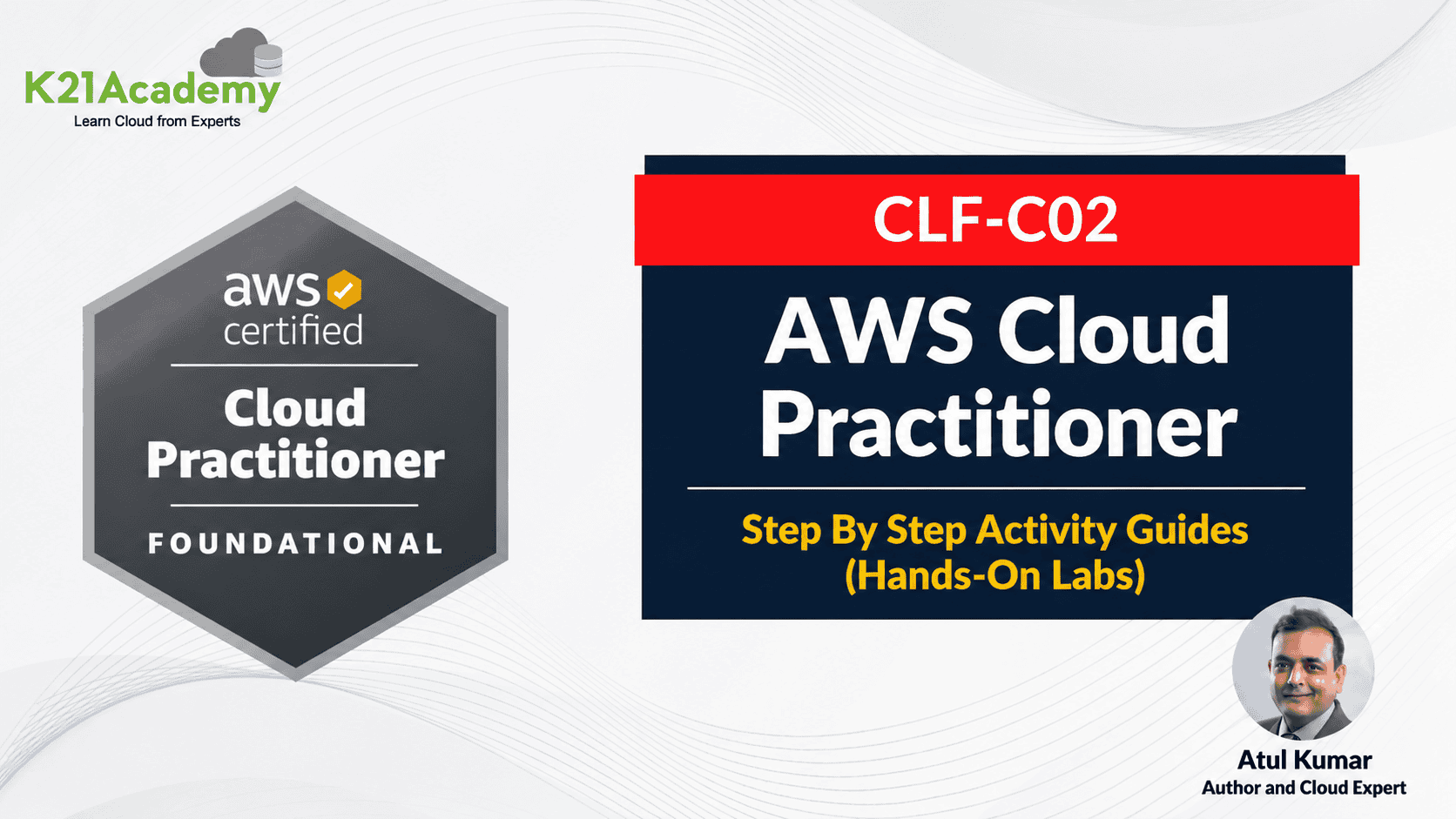



The AWS Cloud Practitioner certification (CLF-C02) is the foundational AWS credential, and the fastest way to pass it is to stop reading and start clicking. This guide gives you 9 hands-on AWS Cloud Practitioner labs that walk you through the exact services AWS tests on the exam — EC2, S3, IAM, CloudWatch, billing alerts, and more. Click here.
Every lab below is a step-by-step activity guide you can run inside your own AWS Free Tier account. By the end, you’ll have practical experience with the four exam domains: Cloud Concepts, Security & Compliance, Cloud Technology & Services, and Billing & Pricing.
The AWS Certified Cloud Practitioner (CLF-C02) costs $100, has 65 questions, runs 90 minutes, and requires a 700/1000 score to pass. AWS recommends 6 months of cloud exposure, but candidates with no prior experience pass within weeks of focused study + hands-on practice.

Why hands-on labs matter for the AWS Cloud Practitioner exam
The AWS Cloud Practitioner exam tests recognition; given a scenario, can you identify the right service? You can memorize service descriptions from a slide deck, but candidates who pass on the first try almost universally do one thing differently: they touch the AWS Console.
When you’ve actually launched an EC2 instance, you instantly recognize “elastic compute” questions. When you’ve configured an S3 lifecycle policy, “infrequent access vs. Glacier” questions take 5 seconds instead of 30. These AWS Cloud Practitioner labs in this guide map directly to the most-tested services on CLF-C02.
What you’ll need before starting
- A valid email address and credit card (for AWS Free Tier signup – you won’t be charged if you stay within free tier limits)
- A laptop with a modern browser
- Roughly 4–6 hours total to complete all labs (~30–45 minutes each)
- Optional: an SSH client (Terminal on Mac/Linux, PuTTY, or Windows Terminal on Windows) for the EC2 labs
List of Labs in Our AWS Certified Cloud Practitioner (CLF-C02)
1.0 Getting Started: AWS Setup and Configuration
- Lab 1: Create an AWS Free Tier Account
- Lab 2: Set Up CloudWatch Billing Alerts
1.1 EC2 and Cloud Computing Basics
- Lab 1: Launch and Connect to an Amazon Linux EC2 Instance
- Lab 2: Launch and Connect to an Amazon Windows EC2 Instance
1.2 Amazon S3 (Simple Storage Service)
- Lab 1: Create an S3 Bucket, Upload Files, and Set Permissions & Host a Static Website Using Amazon S3
1.3 IAM (Identity and Access Management)
- Lab 1: Set Up and Configure AWS Identity and Access Management (IAM)
1.4 Security and Compliance
- Lab 1: Set Up CloudWatch to Monitor EC2 Instances
1.6 Event-Driven Architecture and Lambda
- Lab 1: Set Up Event-Driven Architecture Using AWS Lambda
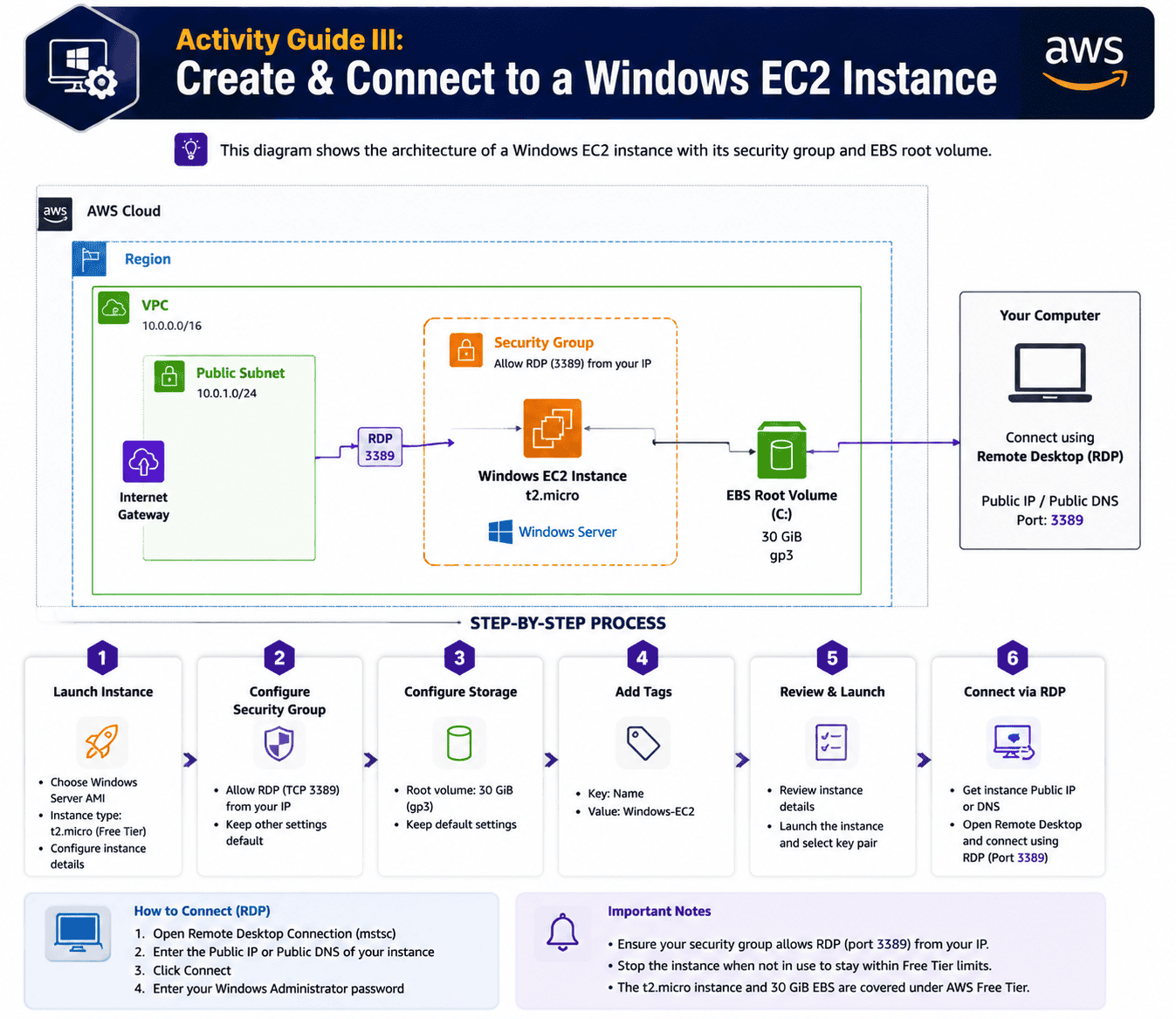
Activity Guide I: Create an AWS Free Tier Account
Amazon Web Services (AWS) offers a free tier that gives new subscribers 6 months of hands-on access to most core services, with usage limits designed for learning rather than production workloads. For AWS Cloud Practitioner candidates, the Free Tier is non-negotiable — you cannot pass CLF-C02 reliably without practicing in a real account.
This lab covers signing up for AWS, validating your billing details, and confirming free tier eligibility on the AWS Management Console.
What you’ll learn:
- How to register for an AWS Free Tier account
- How to verify your account and set up MFA on the root user
- How to navigate the AWS Management Console for the first time
📘 Detailed walkthrough: How to Create an AWS Free Tier Account Activity Guide II: CloudWatch – Create Billing Alerts & Service Limits
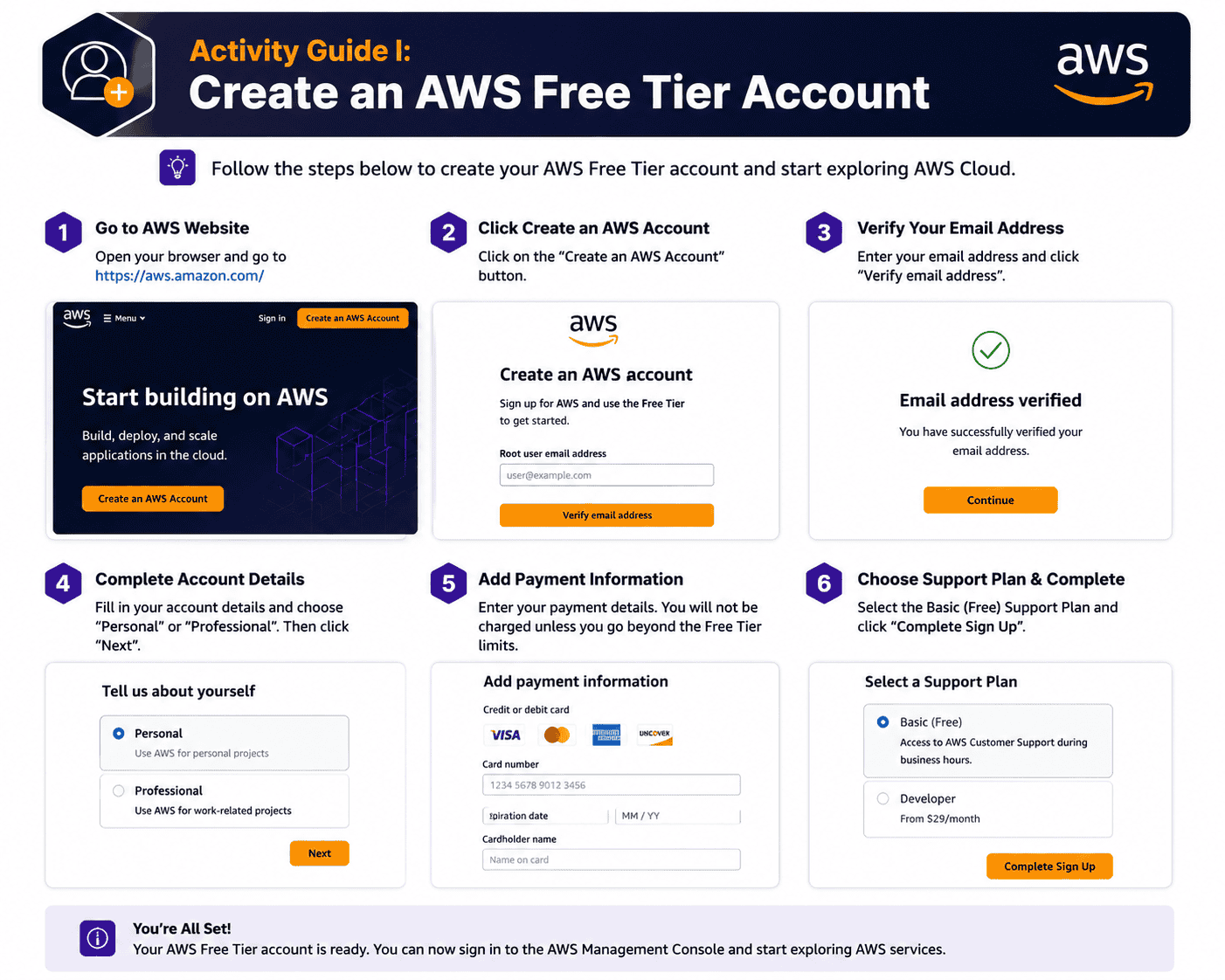 Activity Guide II: CloudWatch – Create Billing Alerts & Service Limits
Even on the Free Tier, accidental over-usage can result in a surprise bill. Amazon CloudWatch lets you create billing alarms that notify you the moment your spend crosses a threshold – a critical Day 1 setup for any AWS Cloud Practitioner learner.
CloudWatch monitors AWS resources and applications, collects metrics and logs, and can trigger automated actions. In this lab, you’ll set a $10 billing alarm and configure SNS to email you when it fires.
What you’ll learn:
- How to enable AWS billing alerts in your account
- How to create a CloudWatch alarm tied to your AWS account billing metric
- How to configure SNS email notifications for the alarm
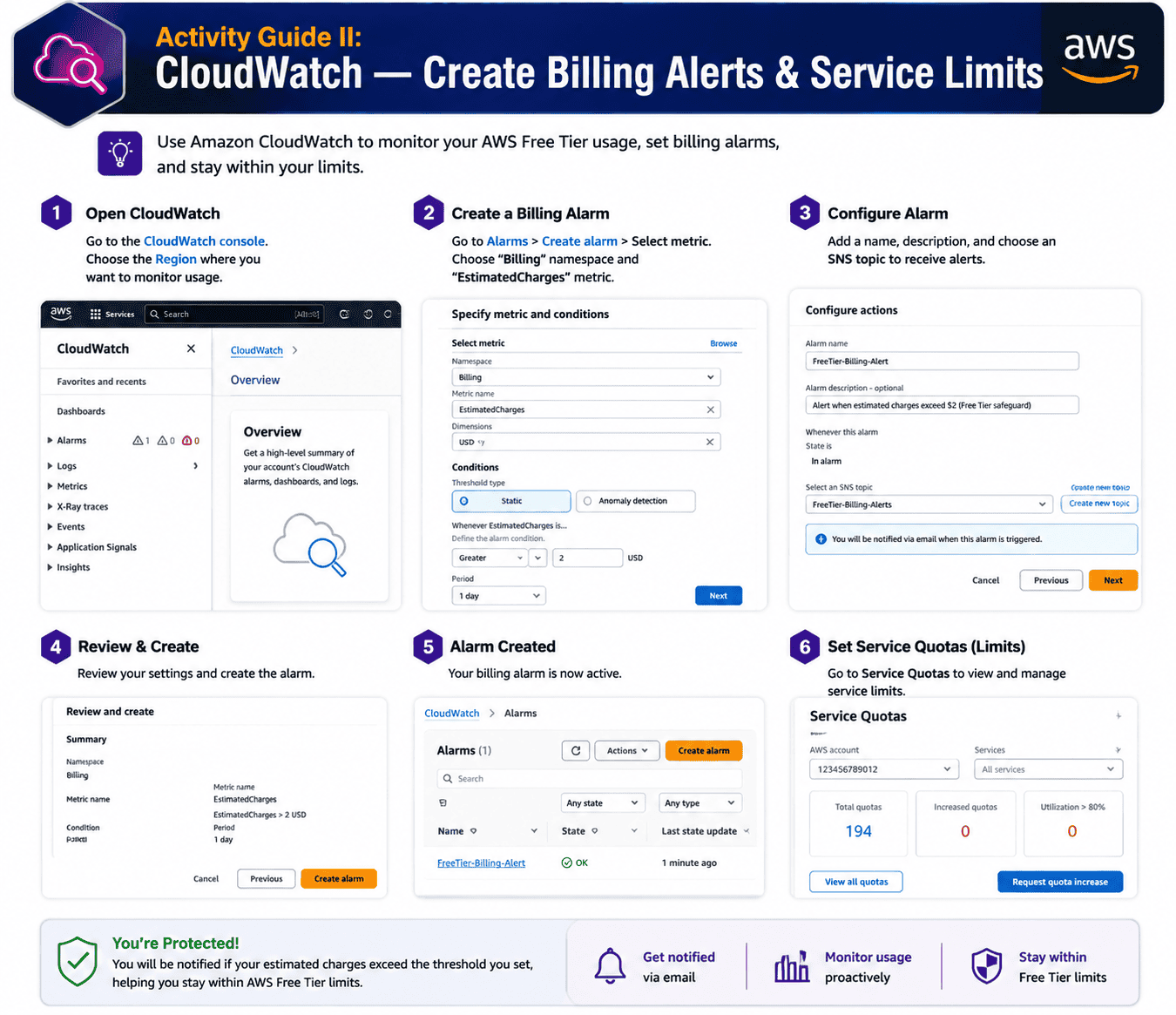
Activity Guide III: Create & Connect to a Windows EC2 Instance
Amazon EC2 (Elastic Compute Cloud) provides resizable virtual servers in the AWS Cloud. EC2 appears in roughly 1 in 5 questions on the AWS Cloud Practitioner exam, so getting comfortable with launching, connecting to, and terminating instances pays back across the entire test.
This lab walks through launching a Windows Server EC2 instance, configuring its security group, generating a key pair, and connecting via Remote Desktop (RDP).
What you’ll learn:
- How to launch a Windows EC2 instance from an AMI
- How to configure security groups and key pairs
- How to connect to your instance using RDP
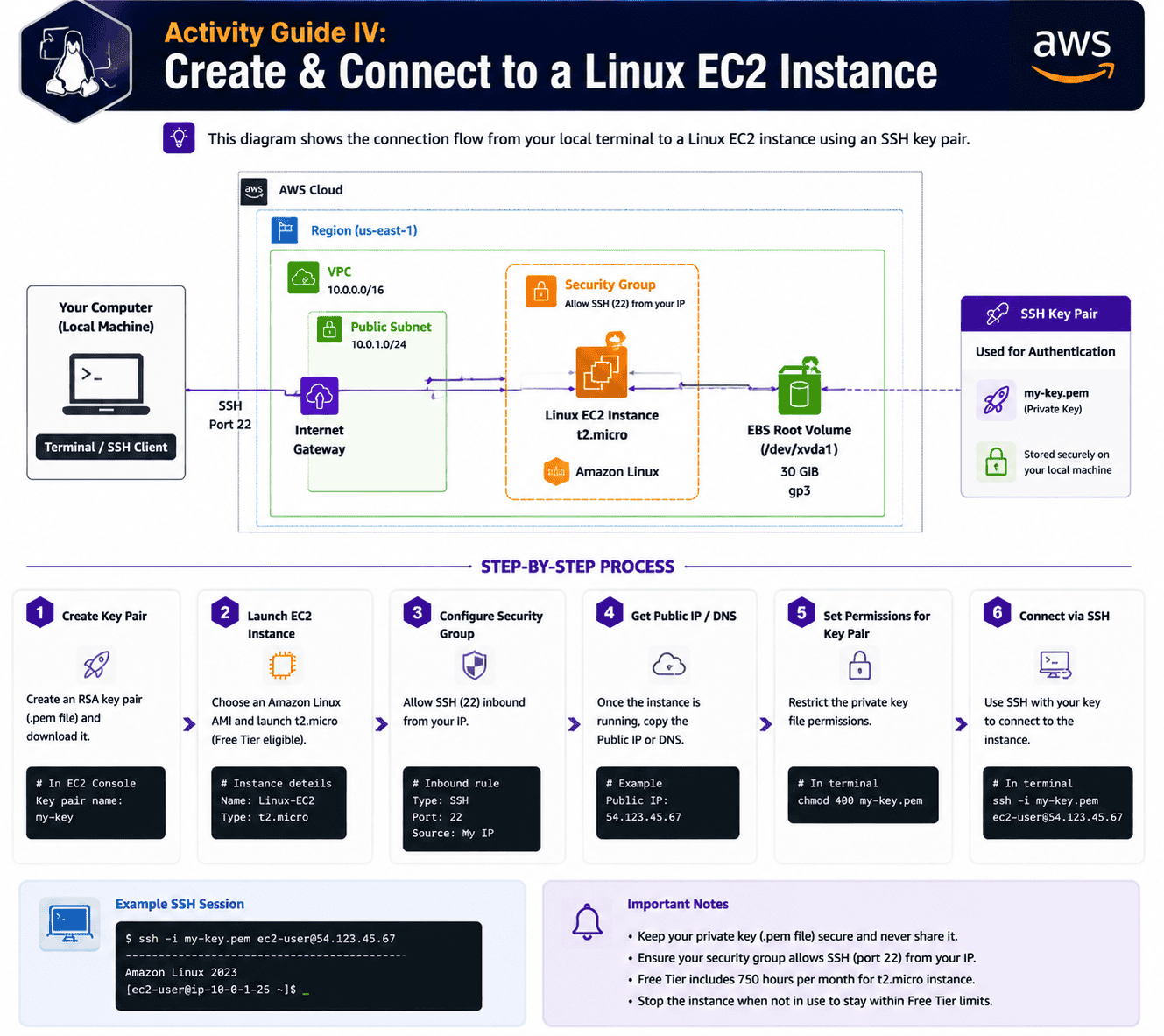
Activity Guide IV: Create & Connect to a Linux EC2 Instance
Linux instances are the most common EC2 workload on AWS, and the SSH-based connection model shows up in CLF-C02 scenario questions. An EC2 instance is a virtual server inside Amazon’s Elastic Compute Cloud – Amazon offers various instance types optimized for compute, memory, storage, or network performance.
In this lab, you’ll launch an Amazon Linux 2 instance, generate a .pem key pair, and SSH in from your local terminal.
What you’ll learn:
- How to launch a Linux EC2 instance
- How to use SSH key pairs to authenticate
- How to connect from your terminal and run basic commands
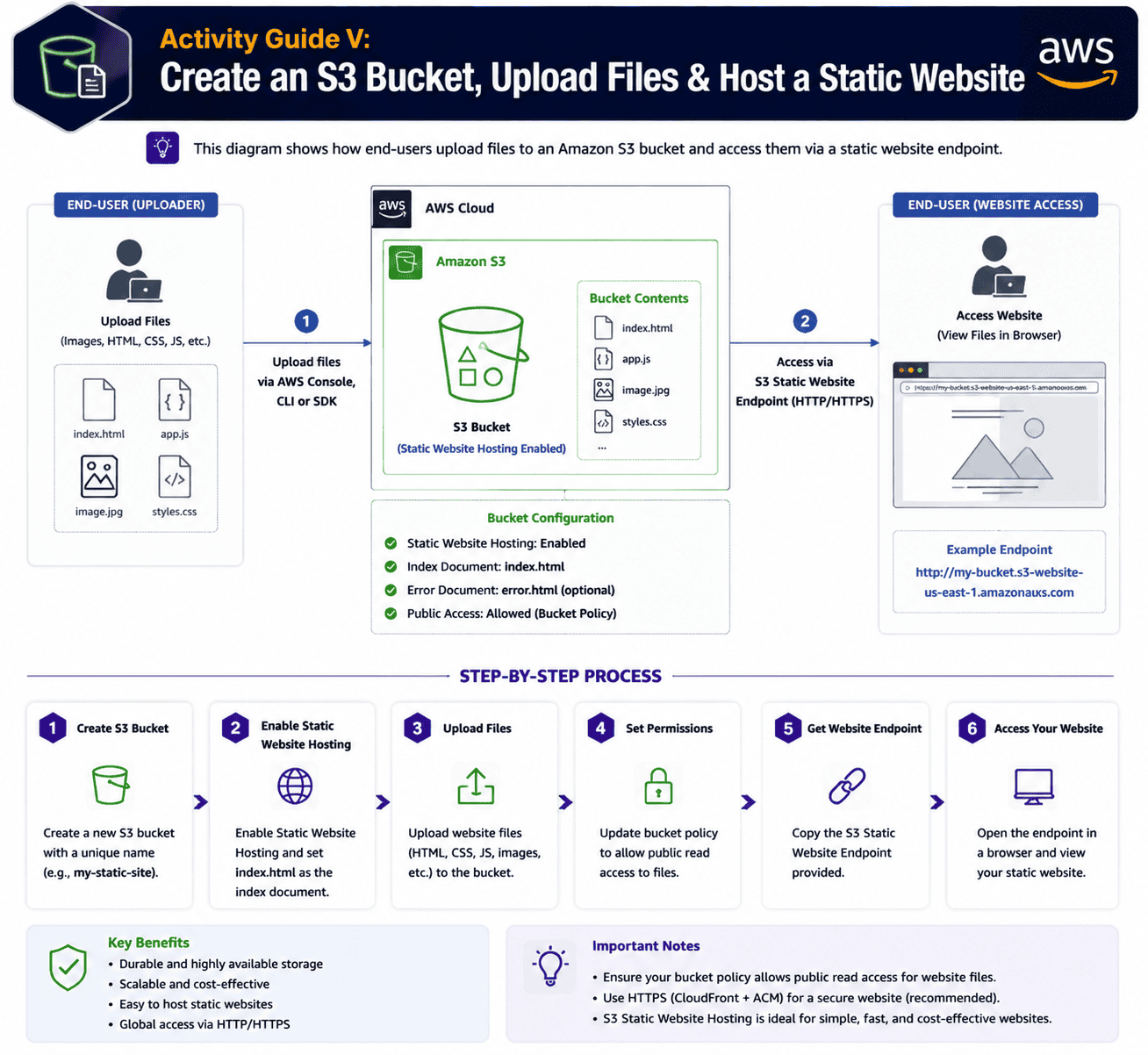
Activity Guide V: Create an S3 Bucket, Upload Files & Host a Static Website
Amazon Simple Storage Service (S3) is the AWS object storage service — virtually unlimited scalability, 99.999999999% (11 nines) of durability, and used by everyone from individual developers to Fortune 500 enterprises. S3 questions are heavily represented on the AWS Cloud Practitioner exam, particularly around storage classes, durability, and static website hosting.
This lab covers the full S3 workflow: bucket creation, uploading objects, configuring public access, and turning a bucket into a static website endpoint.
What you’ll learn:
- How to create an S3 bucket and configure permissions
- How to upload, download, and manage objects
- How to host a static website directly from S3
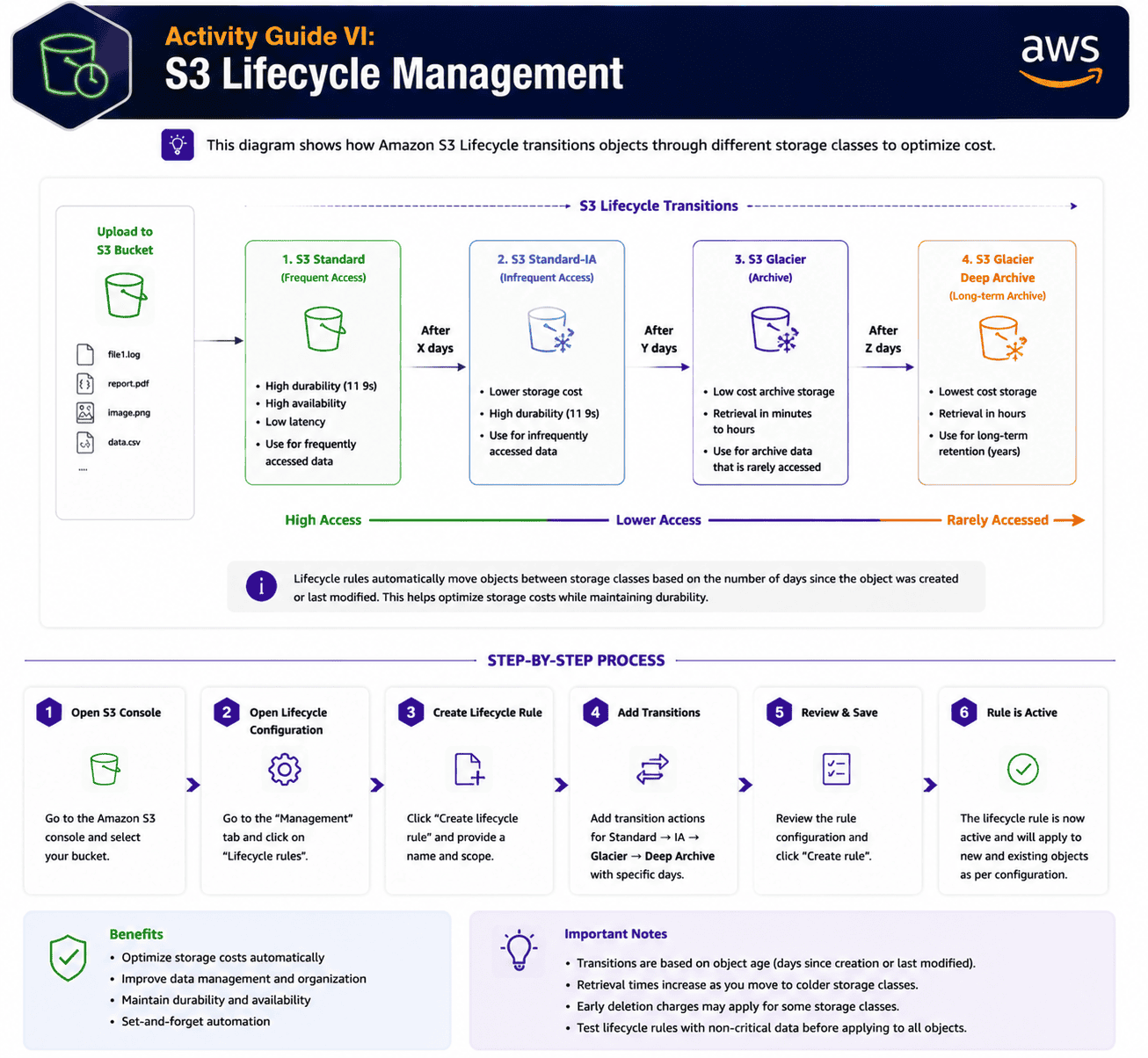
Activity Guide VI: S3 Lifecycle Management
An S3 Lifecycle configuration is a set of rules that automatically move or delete objects based on age – a major exam topic for AWS Cloud Practitioner because it covers cost optimization, storage classes, and data retention together.
In this lab, you’ll set rules that transition objects from S3 Standard → Standard-IA → Glacier → Glacier Deep Archive on a schedule, and finally expire them.
What you’ll learn:
- How to create lifecycle rules on an S3 bucket
- How to transition objects between storage classes for cost savings
- How to set expiration policies for object cleanup
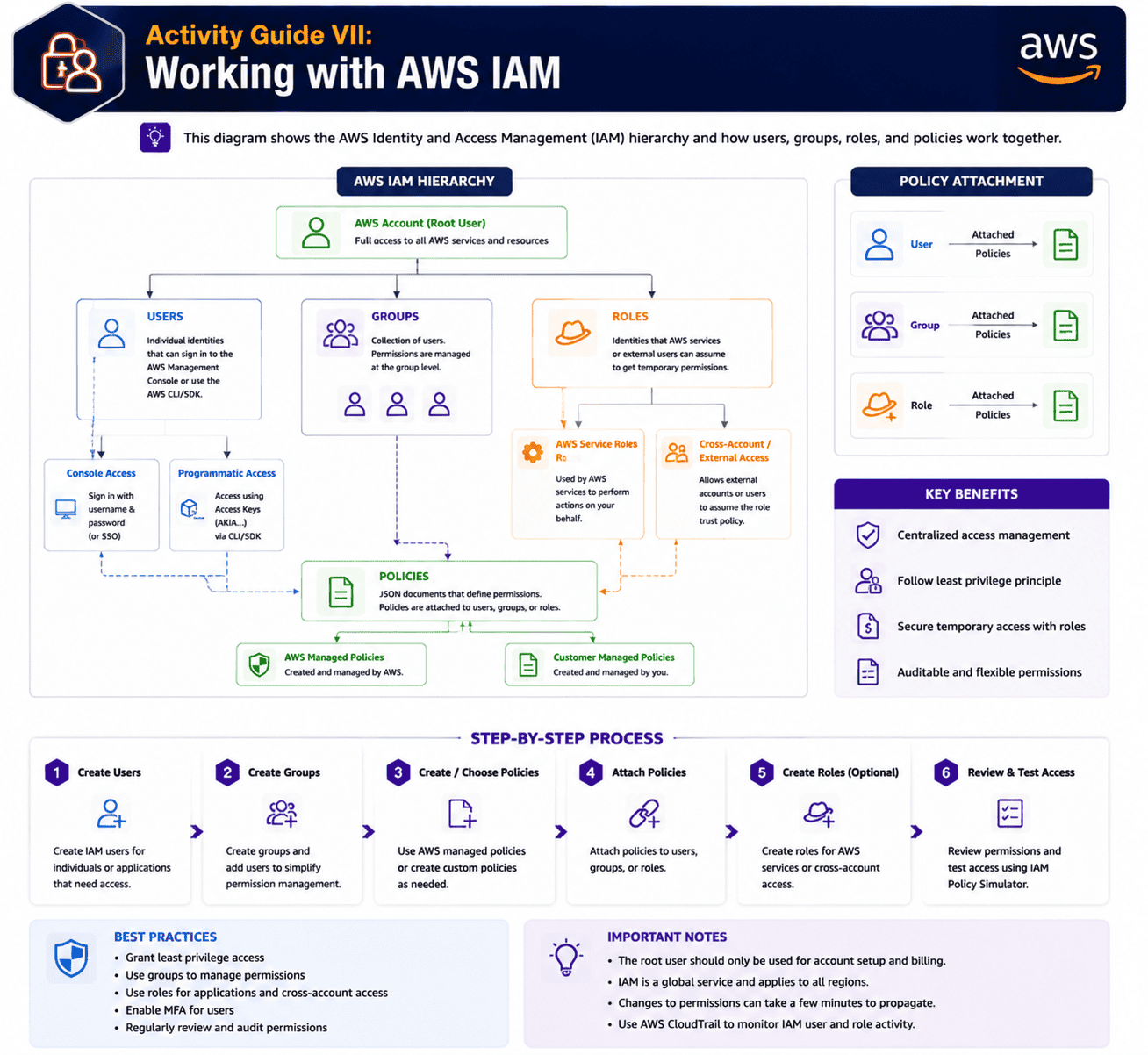
Activity Guide VII: Working with AWS IAM
AWS Identity and Access Management (IAM) is the service that controls who can do what in your AWS account. Security and Compliance is the largest exam domain on CLF-C02 at 30%, and IAM concepts – users, groups, roles, and policies – show up in nearly every security-related question.
A strong tip: AWS recommends never using the root user for daily tasks, even for executives. This lab walks through creating IAM users, organizing them into groups, attaching policies, and creating an IAM role that an EC2 instance can assume.
What you’ll learn:
- How to create IAM users and groups
- How to attach managed and inline policies
- How to create and assign IAM roles to AWS services
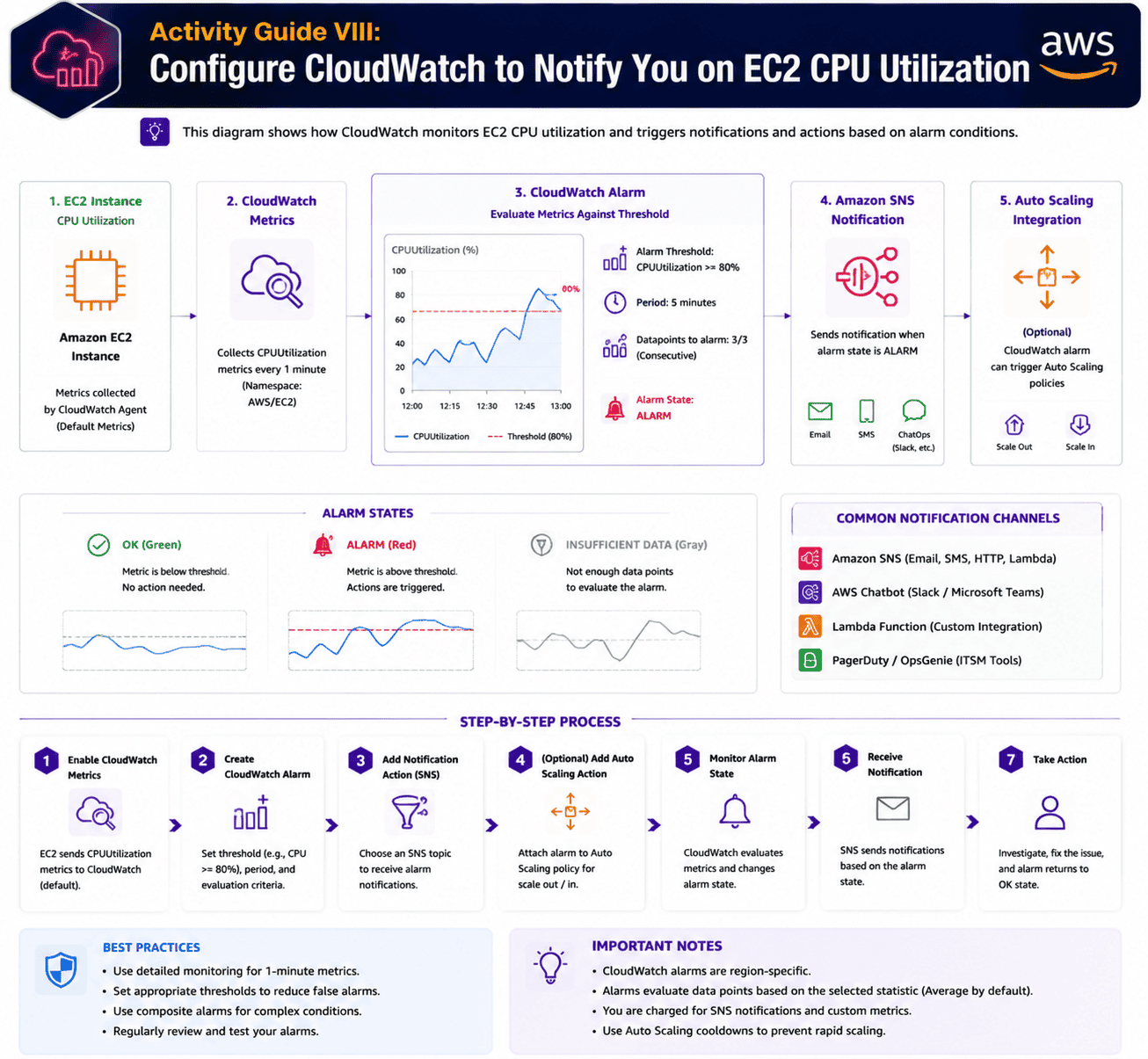
Activity Guide VIII: Configure CloudWatch to Notify You on EC2 CPU Utilization
CloudWatch is the AWS observability service for DevOps, IT, and platform engineers. It provides operational visibility across applications and infrastructure – and on the AWS Cloud Practitioner exam, CloudWatch alarms are a recurring scenario.
In this lab, you’ll create a CloudWatch alarm that watches a running EC2 instance and triggers an SNS email notification when CPU utilization exceeds 70% for 5 consecutive minutes.
What you’ll learn:
- How to attach a CloudWatch alarm to an EC2 instance metric
- How to configure SNS topics and email subscriptions
- How to test the alarm by simulating a high CPU load
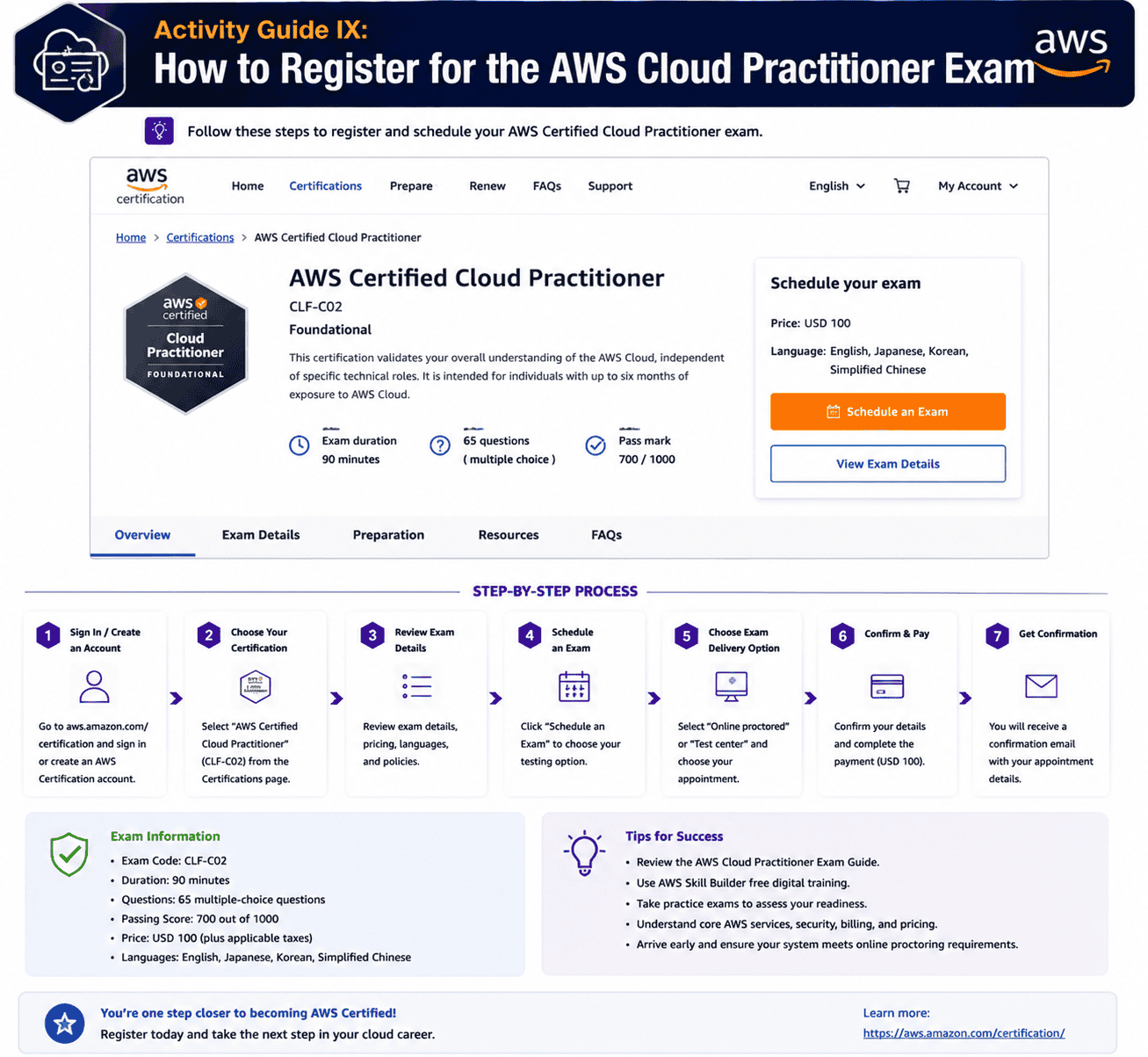
Activity Guide IX: How to Register for the AWS Cloud Practitioner Exam
You’ve finished all 8 hands-on AWS Cloud Practitioner labs – now schedule the exam. AWS certifications validate your AWS Cloud knowledge and skills with an industry-recognized credential, and they’re delivered as proctored, timed exams either at Pearson VUE test centers or via online proctoring.
This guide walks through creating an AWS Certification account, scheduling the CLF-C02, choosing between in-person and online proctoring, and what to expect on exam day.
What you’ll learn:
- How to create your AWS Certification account
- How to schedule the AWS Certified Cloud Practitioner CLF-C02 exam
- What to expect during a proctored exam session
Next Task For You
Begin your journey towards an AWS Cloud by joining our FREE Informative Class on Amazon Cloud Free Class by clicking on the image below.