




Python loops and control statements are the backbone of every program, but most tutorials only scratch the surface.
This guide is different.
Here, you’ll master Python loops (for, while, nested) and control statements (break, continue, pass) with 20+ real-world examples, debugging scenarios, and modern Python 3.12 features like match-case and the walrus operator.
Whether you’re a beginner or preparing for interviews, this guide gives you everything from basics to performance optimization in one place.
What Are Loops and Control Statements in Python?
Python loops and control statements are fundamental concepts used to control the flow of a program.
- Loops (for, while, nested) allow you to repeat a block of code multiple times.
- Control statements (break, continue, pass) allow you to control how loops behave during execution.
In simple terms:
Loops repeat code, while control statements control the repetition.
Looping Statements
The first statement in a function is executed first, followed by the second, and so on. There may be a situation when you need to execute a block of code several times.
Programming languages provide various control structures that allow for more complicated execution paths. A loop statement allows us to execute a statement or group of statements multiple times. The following diagram illustrates a loop statement −
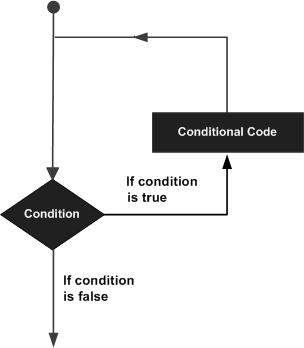
Python programming language provides the following types of loops to handle looping requirements.
Loop Type & Description |
|
|---|---|
| While Loop | Repeats a statement or group of statements while a given condition is TRUE. It tests the condition before executing the loop body. |
| For Loop | Executes a sequence of statements multiple times and abbreviates the code that manages the loop variable. |
| Nested Loop | You can use one or more loops inside any another while, for or do..while loop. |
1. While Loop
A while loop statement in Python programming language repeatedly executes a target statement as long as a given condition is true.
Syntax
The syntax of a while loop in the Python programming language is −
while expression:
   statement(s)
Here, statement(s) may be a single statement or a block of statements. The condition may be any expression, and true is any non-zero value. The loop iterates while the condition is true.
When the condition becomes false, program control passes to the line immediately following the loop.
In Python, all the statements indented by the same number of character spaces after a programming construct are considered to be part of a single block of code. Python uses indentation as its method of grouping statements.
Flow Diagram
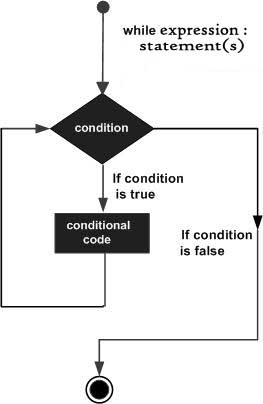
Here, the key point of the while loop is that the loop might not ever run. When the condition is tested and the result is false, the loop body will be skipped and the first statement after the while loop will be executed.
Example:
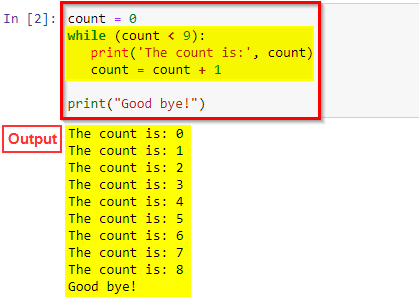
The block here, consisting of the print and increment statements, is executed repeatedly until count is no longer less than 9. With each iteration, the current value of the index count is displayed and then increased by 1.
count = 0
while (count < 9):
   print('The count is:', count)
   count = count + 1

print("Good bye!")
More examples:-
Example 1: Basic loop
while count < 5:
print(count)
count += 1
Example 2: User input validation
while password != “admin”:
password = input(“Enter password: “)
Example 3: Retry logic
while attempts > 0:
print(“Trying…”)
attempts -= 1
Example 4: Walrus operator (Python 3.8+)
print(line)
Use while loop when the number of iterations is unknown.
Related Readings: What is a Large Language Model (LLM)?
2. For Loop
It has the ability to iterate over the items of any sequence, such as a list or a string.
Syntax
for iterating_var in sequence:
   statements(s)
If a sequence contains an expression list, it is evaluated first. Then, the first item in the sequence is assigned to the iterating variable iterating_var. Next, the statements block is executed. Each item in the list is assigned to iterating_var, and the statement(s) block is executed until the entire sequence is exhausted.
Flow Diagram
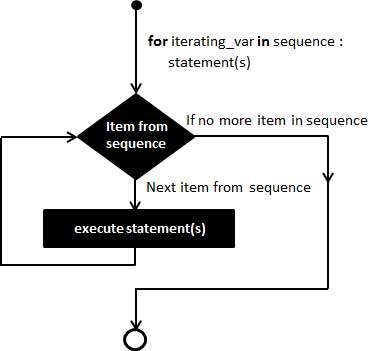
Example:
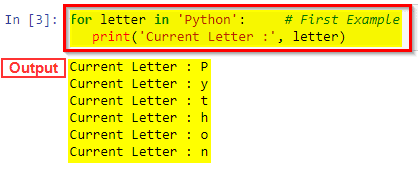
In this code we are iterate the each letter of the string using for loop.
for letter in 'Python':
   print('Current Letter :', letter)
More examples:-
Example 1: Using range()
print(i)
Example 2: Iterate over list
print(fruit)
Example 3: Dictionary iteration
for key, value in data.items():
print(key, value)
Example 4: enumerate()
print(index, value)
Advanced Examples
names = [“A”, “B”] scores = [90, 80] for n, s in zip(names, scores):
print(n, s)# reversed()
for i in reversed(range(5)):
print(i)
Related Readings:- An Introduction To Python For Microsoft Azure Data Scientist | DP-100
3. Nested Loop
Python programming language allows using of one loop inside another loop. The following section shows few examples to illustrate the concept.
Syntax
for iterating_var in sequence:
   for iterating_var in sequence:
      statements(s)
   statements(s)
The syntax for a nested while loop statement in the Python programming language is as follows −
while expression:
   while expression:
      statement(s)
   statement(s)
A final note on loop nesting is that you can put any type of loop inside of any other type of loop. For example, a for loop can be inside a while loop or vice versa.
Example
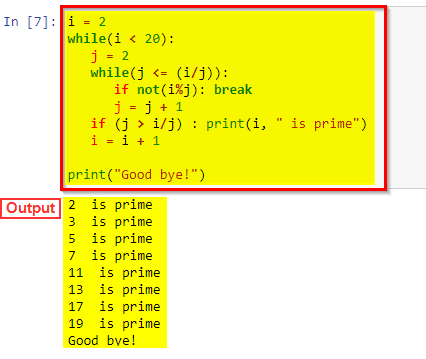
The following program uses a nested for loop to find the prime numbers from 2 to 20 −
i = 2
while(i < 20):
   j = 2
   while(j <= (i/j)):
      if not(i%j): break
      j = j + 1
   if (j > i/j) : print (i, " is prime")
   i = i + 1

print ("Good bye!")
More examples:-
Example 1: Matrix traversal
for col in row:
print(col)
Example 2: Coordinate pairs
for y in range(3):
print(x, y)
Example 3: Prime numbers
for i in range(2, num):
if num % i == 0:
break
else:
print(num, “is prime”)
Time Complexity
Nested loops = O(n²) → can be slow for large data.
Related Readings:- Python For Data Science: Why, How & Libraries Used
Loop Control Statements
Loop control statements change execution from its normal sequence. When execution leaves a scope, all automatic objects that were created in that scope are destroyed.
Python supports the following control statements. Click the following links to check their detail.
Let us go through the loop control statements briefly
Control Statements & Description |
|
|---|---|
| Break Statement | Terminates the loop statement and transfers execution to the statement immediately following the loop |
| Continue Statement | Causes the loop to skip the remainder of its body and immediately retest its condition prior to reiterating. |
| Pass Statement | The pass statement in Python is used when a statement is required syntactically but you do not want any command or code to execute. |
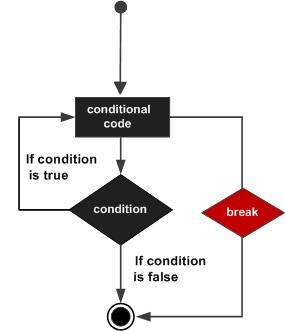
1. Break Statement
It terminates the current loop and resumes execution at the next statement, just like the traditional break statement in C.
The most common use for break is when some external condition is triggered requiring a hasty exit from a loop. The break statement can be used in both while and for loops.
If you are using nested loops, the break statement stops the execution of the innermost loop and start executing the next line of code after the block.
Syntax
The syntax for a break statement in Python is as follows −
break
Flow Diagram
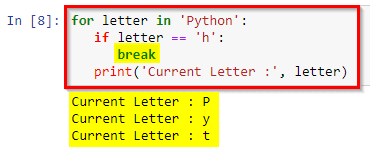
Example:
for letter in 'Python':
   if letter == 'h':
      break
   print('Current Letter :', letter)
Related Readings: Azure AI/ML Certifications: Step-by-Step Guide to Succeed in 2026
2. Continue Statement
It returns the control to the beginning of the while loop.. The continue statement rejects all the remaining statements in the current iteration of the loop and moves the control back to the top of the loop.
The continue statement can be used in both while and for loops.
Syntax
continue
Flow Diagram
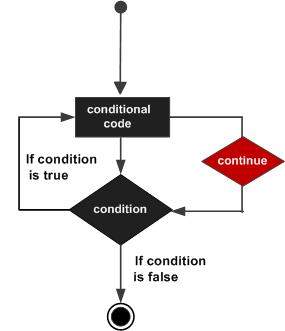
Example:
for letter in 'Python':
   if letter == 'h':
      continue
   print('Current Letter :', letter)
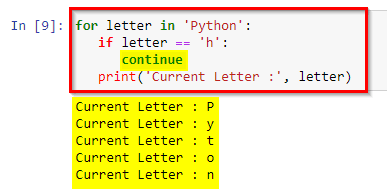
Related Readings:- Natural Language Processing with Python
3. Pass Statement
It is used when a statement is required syntactically but you do not want any command or code to execute.
The pass statement is a null operation; nothing happens when it executes. The pass is also useful in places where your code will eventually go, but has not been written yet (e.g., in stubs for example)
Syntax
pass
Example:
for letter in 'Python':
   if letter == 'h':
      pass
      print('This is pass block')
   print('Current Letter :', letter)

print("Good bye!")
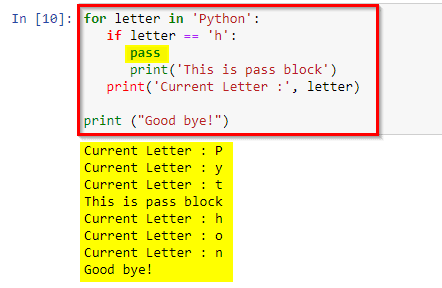
4. Difference between Break and Continue in Python
The main difference between break and continue in python is loop termination. In this tutorial, we will explain the use of break and the continue statements in the python language. The break statement will exist in python to get exit or break for and while conditional loop. The break and continue can alter the flow of normal loops and iterate over the block of code until the test expression is false.
Basis for comparison |
Break |
Continue |
|---|---|---|
| Task | It eliminates the execution of the remaining iteration of the loop | It will terminate only the current iteration of the loop. |
| Control after break/continue | ‘break’ will resume control of the program to the end of the loop enclosing that ‘break’. | The ‘continue’ will resume the control of the program to the next iteration of that loop enclosing ‘continue’ |
| causes | It early terminates the loop. | It causes the early execution of the next iteration. |
| continuation | The ‘break ‘stop the continuation of the loop. | The ‘continue’ does not stop the continuation of the loop and it stops the current. |
| Other | It is used with the ‘switch’, ‘label’ | Cannot be executed with the switch and labels. |
Related Readings:- Data Scientists vs Data Engineers vs Data Analyst
Comparison Table
| Statement | Effect | Use Case |
|---|---|---|
| break | Stops loop | Exit early |
| continue | Skip iteration | Ignore specific values |
| pass | No operation | Placeholder |
Python Match-Case Statement (Modern Control Flow, 3.10+)
Syntax:
case pattern:
action
Example:
status = 200
match status:
case 200:
print(“OK”)
case 404:
print(“Not Found”)
Advanced Example:
match data:
case (“user”, id):
print(f”User ID: {id}“)
Better than if-elif for complex pattern matching.
Related Readings:- Python For Beginners: Step By Step Activity Guides (Hands-On Labs)
Common Loop Errors and How to Debug Them
1. Infinite Loop
Fix: Add condition or break.
2. Off-by-one Error
3. Modifying list during iteration
mylist.remove(item)
4. Wrong loop variable
print(j) # error
5. IndexError
print(arr[i+1])
Debugging Checklist
- Check loop condition
- Print variables inside loop
- Verify range boundaries
- Avoid modifying collections
Related Readings:- Python OOPs Concepts, Error And Exception Handling
Loop Performance: For vs While vs List Comprehension
Example:
squares = [x*x for x in range(1000)]
Comparison:
| Method | Speed | Use Case |
|---|---|---|
| List Comprehension | Fastest | Data transformation |
| For Loop | Moderate | General logic |
| While Loop | Slowest | Conditional loops |
Use list comprehension whenever possible.
Conclusion
Python loops and control statements are essential for writing efficient and clean code.
Mastering for loops, while loops, nested loops, and control statements will significantly improve your programming skills.
Practice with real examples and debugging scenarios to truly understand them.
Frequently Asked Questions (FAQs)
Break exits the loop completely, while continue skips the current iteration and moves to the next one.
Yes, but break only exits the inner loop. Use flags or functions to exit outer loops.
For loops are generally faster due to Python’s internal optimizations.
Use pass when a statement is required but you don’t want to execute anything.
The walrus operator (:=) allows assignment inside expressions, useful in loops.
Use reversed() with range:
for i in reversed(range(5)):
print(i)
It is a modern control structure for pattern matching introduced in Python 3.10.
Common reasons:
- Condition never becomes False
- Counter not updated
- Wrong logic Q1: What is the difference between break and continue in Python?
Q2: Can you break out of nested loops in Python?
Q3: Is a for loop or while loop faster?
Q4: When should I use pass?
Q5: What is the walrus operator?
Q6: How do I iterate backwards in Python?
Q7: What is match-case in Python?
Q8: Why is my loop running infinitely?
Next Task For You…
Python’s growth is very promising but now we into the era of claude code. Gaining the right skills through the right platform will get you to the perfect job.