






Artificial Intelligence (AI) chatbots have become more advanced, helping users communicate naturally, generate content, solve problems and automate everyday tasks. Improvements in Natural Language Processing (NLP) and machine learning have made these assistants more capable of understanding questions and providing relevant responses.
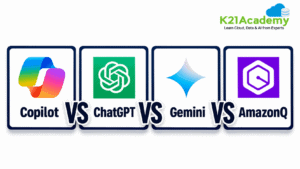
Popular AI assistants such as ChatGPT, Azure Copilot and Google Gemini offer different capabilities for individuals and businesses. AWS also provides specialized solutions such as Amazon Q Developer and AWS Quick for software development, cloud operations and enterprise productivity.
With so many options available, choosing the right AI assistant can be challenging. Is ChatGPT better for general tasks? Should Azure users choose Azure Copilot? How does Google Gemini compare? And when should businesses use AWS AI assistants?
This guide compares their features, strengths, limitations and practical use cases to help you choose the AI assistant that best fits your needs.
Overview of AI Chatbots
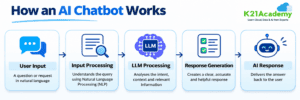
AI chatbots use artificial intelligence and natural language processing to understand questions, create answers and help users with different tasks. Today’s AI assistants can help with writing, coding, research, data analysis and cloud management.
Let’s look at some AI assistants available in 2026.
1. Azure Copilot
Azure Copilot is Microsoft’s AI assistant built to help people manage Azure resources. It offers guidance, troubleshooting support and recommendations for managing cloud environments.
Key Uses: Azure resource management, cloud troubleshooting, setup guidance and performance tuning.
2. ChatGPT by OpenAI
ChatGPT is a general-purpose AI assistant developed by OpenAI. It helps people write content, generate code, analyze information, conduct research and solve problems.
Key Uses: Content creation, programming, research, data analysis and workflow automation.
3. Google Gemini
Google Gemini is an AI assistant developed by Google. It supports writing, coding, research and tasks involving text, images and other content, with integrations across Google’s products and services.
Key Uses: Research, content creation, coding, document analysis and Google Workspace productivity.
4. Amazon Q Developer
Amazon Q Developer is an AI-powered assistant from AWS that helps developers build, understand and maintain applications. It also provides AWS-related guidance and coding assistance.
Key Uses: Code generation, debugging, application development and AWS troubleshooting.
5. AWS Quick
AWS Quick is an AI-powered workspace that combines enterprise search, business intelligence and AI features. It helps teams find information, analyze business data and improve productivity.
Key Uses: Enterprise knowledge search, data visualization, business analytics and AI-powered workflows.
Each AI assistant offers different capabilities. Choosing the right one depends on your needs, technical background and preferred cloud or productivity platform.
Related Readings: Master Generative AI on Azure with Hands-On Labs & Projects for 2025
Key Features Comparison
AI assistants have different skills based on what they are designed for and the platforms they work on. Some are good at everyday tasks, while others focus on software development, cloud management or business data analysis. The choice often depends on the task.
1. Natural Language Processing (NLP)
-
ChatGPT: Understands natural language and helps with writing, coding, research and solving complex problems.
-
Azure Copilot: Understands cloud-related questions and provides guidance for managing Azure resources.
-
Google Gemini: Handles conversations involving text, images and other media.
-
Amazon Q Developer: Answers coding-related questions and provides AWS technical guidance.
-
AWS Quick: Helps people find company information and analyze business data using natural language.
2. Integration and Compatibility
-
ChatGPT: Works with external tools, applications and connected data sources.
-
Azure Copilot: Integrates with Azure services and the Azure management environment.
-
Google Gemini: Works with Google tools such as Gmail, Docs and other Workspace applications.
-
Amazon Q Developer: Supports AWS development and cloud management workflows.
-
AWS Quick: Connects enterprise data sources with business intelligence tools and AI-powered workflows.
Related Readings: Hugging Face: Revolutionizing NLP and Beyond
3. User Experience and Productivity
-
ChatGPT: Useful for everyday tasks, content creation, research and coding.
-
Azure Copilot: Helps cloud professionals troubleshoot problems and manage Azure environments.
-
Google Gemini: Supports productivity across Google applications and services.
-
Amazon Q Developer: Helps developers write code, fix bugs and build applications.
-
AWS Quick: Helps business teams analyze data, discover insights and improve productivity.
Related Readings: What is a large language model (LLM)?
4. Customization and Security
ChatGPT, Gemini and enterprise AWS assistants offer different customization options depending on the product and subscription plan.
Azure Copilot focuses on Azure environments and permissions, while Amazon Q Developer supports AWS development tasks.
AWS Quick provides business-focused features for accessing enterprise information.
Organizations should compare data security, access controls and integration requirements before choosing a platform.
5. Pricing and Accessibility
Pricing varies depending on the assistant, subscription plan, usage and business requirements.
ChatGPT and Google Gemini offer options for individual users, while Azure Copilot, Amazon Q Developer and AWS Quick have service-specific pricing and availability.
Users should check official pricing pages before choosing a platform because features and subscription plans may change.
Overall, the best AI assistant depends on whether you need general-purpose AI, cloud management, coding assistance or business data analysis. Choosing the right assistant can make a significant difference in everyday productivity.
Quick Comparison Table: ChatGPT vs Gemini vs Copilot vs Amazon Q
Let’s quickly look at the comparison between chatgpt vs gemini vs copilot vs amazon Q:
|
AI Assistant |
Best For |
Key Strength |
Main Limitation |
|---|---|---|---|
|
Azure Copilot |
Azure cloud management |
Resource guidance and troubleshooting |
Primarily Azure-focused |
|
ChatGPT |
General productivity, coding and research |
Versatile conversational capabilities |
Responses require verification |
|
Google Gemini |
Google Workspace and multimodal tasks |
Google integrations and content analysis |
Features vary by plan |
|
Amazon Q Developer |
AWS development |
Coding assistance and AWS guidance |
Primarily AWS-focused |
|
AWS Quick |
Enterprise search and analytics |
Business data analysis and AI workflows |
Enterprise-oriented setup |
Key Considerations when Choosing an AI Chatbot
When choosing an AI chatbot, think about what you need it to do. Your goals, the tools you already use, your budget and the platforms you rely on all matter. Here are some key points to keep in mind.
1. Purpose and Use Cases
Start by deciding what you want the AI chatbot to help you with. ChatGPT and Google Gemini are great for writing, doing research and handling everyday tasks. Azure Copilot is built for managing Azure cloud services. Amazon Q Developer focuses on coding and working with AWS tools. AWS Quick helps businesses make sense of data and get more done.
2. Integration with Existing Tools
Think about how the chatbot works with your current software. Azure Copilot connects easily with Azure services. Gemini fits in well with Google Workspace. AWS assistants are designed to work with AWS workflows and tools.
3. Ease of Use
Some chatbots are easier to use than others. ChatGPT and Gemini are simple and suitable for people who are just starting out. Azure Copilot and Amazon Q Developer are better suited for people who work with cloud systems and development environments.
4. Security and Data Privacy
Look into how the chatbot protects your data. Check how it handles sensitive information, user access and business data. Security features can differ based on the product and the plan you choose.
5. Pricing and Features
Compare what you get for free versus what you pay for. Look at usage limits, feature availability and how much it costs for businesses. Pick a chatbot that offers what you need and stays within your budget.
The right AI chatbot is the one that fits your work, connects with your tools and makes your job easier.
Related Readings: GitHub Copilot: Key Features & Installation
Statistical Comparison
1. ChatGPT vs. Azure Copilot
ChatGPT and Azure Copilot are AI assistants created for different purposes. ChatGPT is a versatile assistant that supports writing, coding, research, data analysis and solving complex problems. Azure Copilot focuses on managing and troubleshooting Microsoft Azure cloud environments.
Key Differences
-
Primary Purpose: ChatGPT helps with productivity and technical tasks, while Azure Copilot focuses on Azure cloud administration.
-
Cloud Integration: Azure Copilot operates within the Azure portal and offers guidance based on Azure resources. ChatGPT supports a wider range of tasks and can work with connected tools and data sources.
-
Coding Assistance: ChatGPT helps create, explain and debug code in different programming languages. Azure Copilot supports Azure configuration, cloud operations and related technical tasks.
-
Data Analysis: ChatGPT can analyze files, create charts and explain data insights. Azure Copilot focuses on Azure resource data, monitoring and operational insights.
-
Target Users: ChatGPT is suitable for students, developers, professionals and businesses. Azure Copilot is more useful for Azure administrators, cloud engineers and IT professionals.
Which One Should You Choose?
Choose ChatGPT if you need help with writing, research, coding, data analysis or general productivity.
Choose Azure Copilot if you work with Microsoft Azure and need assistance managing cloud resources, troubleshooting problems or understanding your Azure environment.
Both assistants can improve productivity, but the better choice depends on your specific tasks and technical requirements.
2. Azure Copilot vs. Gemini
Azure Copilot and Google Gemini are AI assistants built for different tasks. Azure Copilot focuses on managing Microsoft Azure cloud environments. Google Gemini, on the other hand, helps people with writing, research, coding and everyday tasks across Google’s tools.
Key Differences
-
Main Purpose: Azure Copilot helps manage Azure cloud resources. Google Gemini supports productivity, research and content creation.
-
Platform Integration: Azure Copilot integrates with Microsoft Azure services and cloud resources. Google Gemini works with Google Workspace applications such as Gmail, Docs and Sheets.
-
Technical Assistance: Azure Copilot helps cloud professionals troubleshoot problems, configure resources and manage Azure environments. Gemini supports coding, problem-solving and technical research.
-
Data Analysis: Azure Copilot provides insights into Azure resources and cloud operations. Gemini helps users analyze documents, organize information and understand data.
-
Target Users: Azure Copilot is suitable for cloud engineers, Azure administrators and IT professionals. Google Gemini is useful for students, researchers, developers and business professionals.
Which One Should You Choose?
Choose Azure Copilot if you use Microsoft Azure and need assistance managing cloud infrastructure, troubleshooting issues or improving cloud operations.
Choose Google Gemini if you use Google Workspace and need help with research, writing, coding or everyday tasks.
Both assistants offer useful AI capabilities. The right choice depends on your work requirements and the platforms you use.
3. ChatGPT vs. Google Gemini
ChatGPT and Google Gemini are two popular AI assistants that help users with writing, coding, research and daily tasks. Both can understand natural language, process information and create content. However, they differ in how they connect with tools and the features they offer.
Key Differences
-
Primary Purpose: ChatGPT is built for general use. It supports productivity, research, coding and problem-solving. Google Gemini offers similar capabilities but is designed to work closely with Google’s ecosystem.
-
Platform Integration: ChatGPT connects with supported tools, files and applications. Gemini, on the other hand, integrates with Google services like Gmail, Docs, Sheets and Drive.
-
Coding Assistance: ChatGPT helps write code, explain how it works and fix bugs. Gemini also supports programming, code review and technical tasks.
-
Data Analysis: ChatGPT can process uploaded files, create charts and explain what the data means. Gemini can analyze documents, spreadsheets and other supported formats.
-
Multimodal Capabilities: Both assistants can handle text, images and other media. The exact features depend on the model, product version and subscription plan.
-
Target Users: ChatGPT suits students, developers, researchers and professionals who want a versatile AI tool. Gemini is especially useful for people who use Google Workspace every day.
Which One Should You Choose?
Choose ChatGPT if your work involves writing, coding, research, data analysis or solving problems. It offers a wide range of capabilities across different tasks.
Choose Google Gemini if you already use Google Workspace and want AI assistance that works directly within Gmail, Docs or Drive.
Both tools offer advanced artificial intelligence capabilities. The right choice depends on what you do, the tools you use and the features you need.
4. Amazon Q Developer vs. Azure Copilot
Amazon Q Developer and Azure Copilot are AI assistants built to support developers and cloud professionals. Amazon Q Developer focuses on coding and AWS-related tasks, while Azure Copilot helps users manage, troubleshoot and optimize Microsoft Azure cloud environments.
Key Differences
-
Primary Purpose: Amazon Q Developer supports writing code, debugging and building applications on AWS. Azure Copilot focuses on managing, troubleshooting and optimizing Azure cloud infrastructure.
-
Platform Integration: Amazon Q Developer works with AWS development tools and supported applications. Azure Copilot integrates with the Azure portal and Microsoft Azure services.
-
Coding Assistance: Amazon Q Developer helps generate, explain and improve code. Azure Copilot provides guidance for configuring and managing Azure resources.
-
Cloud Management: Amazon Q Developer provides AWS-related technical guidance, while AWS assistant supports troubleshooting resources in the AWS Management Console. Azure Copilot helps users monitor, manage and optimize Azure environments.
-
Target Users: Amazon Q Developer is useful for AWS developers and software engineers. Azure Copilot is suitable for Azure administrators, cloud engineers and IT professionals.
Which One Should You Choose?
The choice depends on your specific requirements and the cloud platform you use.
Choose Amazon Q Developer if you build applications on AWS and need help with writing code, debugging or other AWS development tasks.
Choose Azure Copilot if you manage Microsoft Azure resources and need assistance troubleshooting cloud issues, configuring resources or optimizing infrastructure.
Both Amazon Q Developer and Azure Copilot support technical workflows, but the better choice depends on your cloud platform and development requirements.
5. AWS Quick vs. ChatGPT and Google Gemini
AWS Quick, ChatGPT and Google Gemini help users find information, analyze data and complete tasks more efficiently. However, they serve different purposes. AWS Quick focuses on business data and workflows, while ChatGPT and Google Gemini support a wider range of everyday tasks.
Key Differences
-
Primary Purpose: AWS Quick focuses on searching business data, analyzing information and automating workflows. ChatGPT and Google Gemini help with writing, coding, research and everyday productivity.
-
Platform Integration: AWS Quick connects with enterprise data sources and business applications. ChatGPT supports connected tools and applications, while Google Gemini integrates closely with Google Workspace.
-
Data Analysis: AWS Quick helps companies analyze business data through dashboards and AI-powered insights. ChatGPT and Google Gemini can analyze documents, interpret data and perform analytical tasks.
-
AI Automation: AWS Quick provides AI agents that can automate business workflows. ChatGPT and Google Gemini also support task automation, depending on the product, integrations and subscription plan.
-
Security and Access: AWS Quick provides enterprise-focused access controls and governance features. ChatGPT and Google Gemini offer security and privacy options that vary across individual and business plans.
-
Target Users: AWS Quick is designed for business teams and organizations. ChatGPT and Google Gemini are useful for individuals, developers, researchers and businesses.
Which One Should You Choose?
Choose AWS Quick if your organization needs enterprise data search, business analytics or workflow automation using connected company information.
Choose ChatGPT if you need help with writing, coding, research, data analysis or problem-solving.
Choose Google Gemini if you frequently use Google Workspace and want AI assistance across Google’s applications.
All three assistants offer useful AI capabilities. The best choice depends on your tasks, existing tools and business requirements.
AI Chatbot Comparison Table: ChatGPT vs. Gemini vs. Azure Copilot vs. AWS AI Assistants
|
AI Assistant |
Best For |
Key Strength |
Main Limitation |
|---|---|---|---|
|
ChatGPT |
Writing, coding, research and data analysis |
Versatile capabilities and tool integrations |
AI-generated responses require verification |
|
Azure Copilot |
Azure cloud management |
Azure resource guidance and troubleshooting |
Primarily focused on Azure environments |
|
Google Gemini |
Google Workspace and productivity |
Integration with Google’s applications and multimodal capabilities |
Some features depend on the subscription |
|
Amazon Q Developer |
AWS application development |
Code assistance and AWS technical guidance |
Primarily focused on AWS development |
|
AWS Quick |
Enterprise search and business analytics |
Connected business data, dashboards and AI workflows |
Requires enterprise setup and data connections |
Related Readings: What is Prompt Engineering?
Which AI Chatbot Is Better in 2026?
Choosing the right AI chatbot depends on your work, technical requirements and the platforms you use. ChatGPT, Azure Copilot, Google Gemini, Amazon Q Developer and AWS Quick all offer different strengths for individuals, developers and businesses.
Which AI Assistant Should You Choose?
-
ChatGPT: A good choice for writing, coding, research, data analysis and everyday productivity. It helps students, developers and professionals who need a versatile AI assistant.
-
Azure Copilot: Best suited for Azure administrators, cloud engineers and IT professionals who need help managing Azure resources, troubleshooting problems and improving cloud operations.
-
Google Gemini: Suitable for people who regularly use Google Workspace applications like Gmail, Docs and Sheets. It supports research, writing, coding and document analysis.
-
Amazon Q Developer: Helpful for AWS developers and software engineers who need assistance with code generation, debugging and other AWS development tasks.
-
AWS Quick: Designed for organizations that need enterprise search, business analytics, data visualization and AI-powered workflow automation.
Final Recommendation
For general-purpose tasks, ChatGPT and Google Gemini are good choices. Azure Copilot and Amazon Q Developer focus more on cloud management and development tasks, while AWS Quick supports enterprise search, business analytics and AI-powered workflow automation.
There is no single AI assistant that works best for everyone. The right choice depends on your needs, existing tools, budget and the features each platform offers.
Related Reading: Top AI Tools Every AI/ML Professional Should Learn in 2026