




Azure Data Factory (ADF) is a cloud-based data integration service offered by Microsoft which enables businesses to create pipelines in order to move and manage data.
Due to the increasing popularity of cloud data platforms, Azure Data Engineers who have practical experience with Azure Data Factory have become essential assets within the business world. The preparation of ADF interviews requires a comprehensive knowledge of various aspects like pipelines, activities, integration runtime, triggers, data flows, and monitoring.
In this Azure Data Factory Interview Questions and Answers, all the common interview questions for beginners, intermediates, and experienced Data Engineers are included.
Azure Data Factory interview questions and answers are divided into the following parts:
- Basic Azure Adf Interview Questions and Answers
- Intermediate Adf Interview Questions and Answers
- Advanced Adf Interview Questions and Answers
Basic Adf Azure Data Factory Interview Questions and Answers
1) Why do we need Azure Data Factory?
2) What is Azure Data Factory?
3) What is Integration Runtime?
4) How much is the limit on the number of integration runtimes?
5) What are the different components used in Azure Data Factory?
6) What is the key difference between the Dataset and Linked Service in Azure Data Factory?
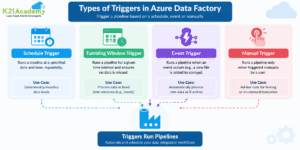
7) How many types of triggers are supported by Azure Data Factory?
8) What are the different rich cross-platform SDKs for advanced users in Azure Data Factory?
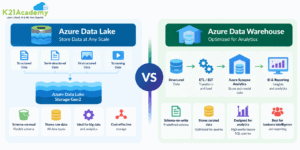
9) What is the difference between Azure Data Lake and Azure Data Warehouse?

1) Why do we need Azure Data Factory?

Azure Data Factory doesn’t store any data itself; it lets you produce workflows that orchestrate the movement of data between supported data stores and data processing. You can monitor and manage your workflows using both programmatic and UI mechanisms. Apart from that, it is the best tool available today for ETL processes with an easy-to-use interface. This shows the need for Azure Data Factory.
2) What is Azure Data Factory?

Azure Data Factory is a cloud-based integration service offered by Microsoft that lets you create data-driven workflows for orchestrating and automating data movement and data transformation over cloud. Data Factory services also offer to create and run data pipelines that move and transform data and then run the pipeline on a specified schedule.
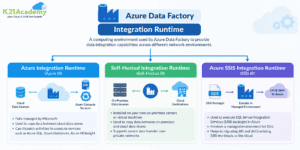
3) What is Integration Runtime?
Related Reading: Azure Data Factory Pipeline: Create, Components & Best Practices
4) How much is the limit on the number of integration runtimes?
There’s no specific limit on the number of integration runtime instances. But there’s a limit on the number of VM cores used by Integration runtime grounded on per subscription for SSIS package execution.
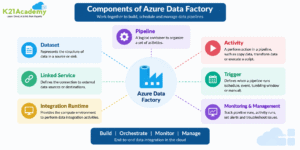
5) What are the different components used in Azure Data Factory?
6) What is the key difference between the Dataset and Linked Service in Azure Data Factory?
The dataset specifies a source to the data store described by the linked service. When we put data to the dataset from an SQL Server instance, the dataset indicates the table’s name that contains the target data or the query that returns data from dissimilar tables.
Linked service specifies a definition of the connection string used to connect to the data stores. For illustration, when we put data in a linked service from a SQL Server instance, the linked service contains the name for the SQL Server instance and the credentials used to connect to that case.
Related Reading: Azure Data Lake Storage Gen2: Complete Guide for Azure Data Engineers
7) How many types of triggers are supported by Azure Data Factory?
Related Readings: Azure Data Factory
8) What are the different rich cross-platform SDKs for advanced users in Azure Data Factory?
The Azure Data Factory V2 provides a rich set of SDKs that we can use to write, manage, and watch pipelines by applying our favourite IDE. Some popular cross-platform SDKs for advanced users in Azure Data Factory are as follows:
- Python SDK
- C# SDK
- PowerShell CLI
- Users can also use the documented REST APIs to interface with Azure Data Factory V2
Related Reading: Azure Data Engineer Certification: Skills, Roadmap & Career Guide
9) What is the difference between Azure Data Lake and Azure Data Warehouse?
Related Reading: Azure Data Lake
Intermediate ADF Interview Questions
10) What is Blob Storage in Azure?
It helps to store a large amount of unstructured data similar to text, images, or double data. It can be used to expose data intimately to the world. Blob storage is most commonly used for streaming audio or videos, storing data for backup, and disaster recovery, storing data for analysis, etc. You can also create Data Lakes using blob storage to perform analytics.
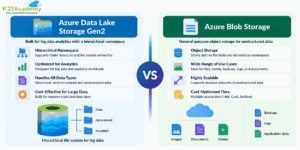
11) Difference between Data Lake Storage and Blob Storage.
Related Reading: Azure Data Lake Storage Gen2: Features, Architecture & Benefits
12) What are the steps to create an ETL process in Azure Data Factory?
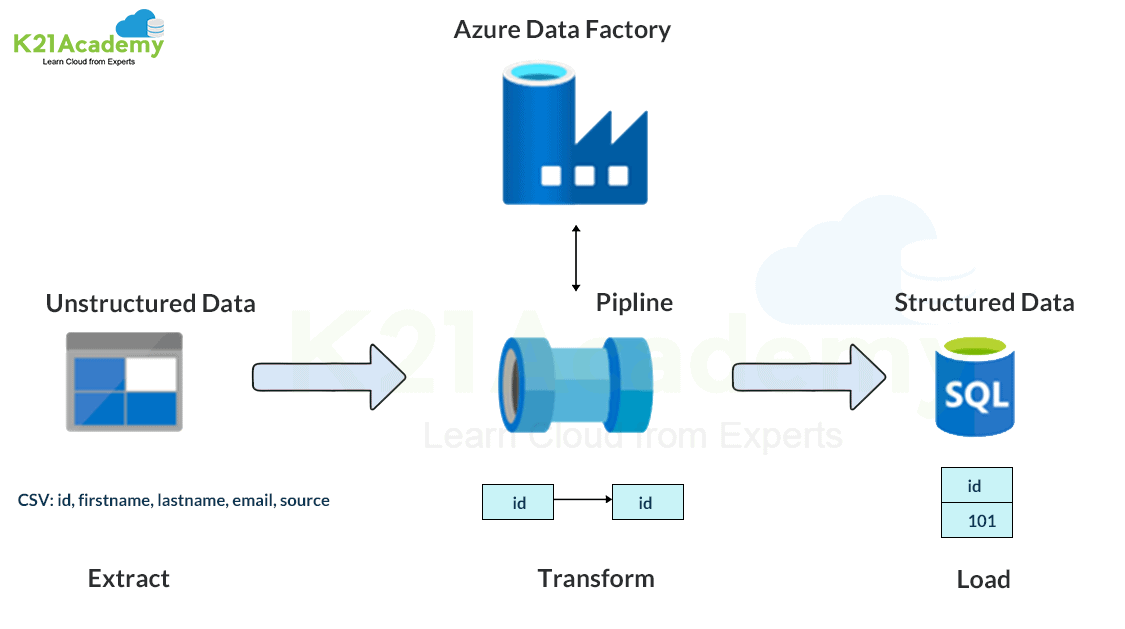
- There are straightforward steps to create an ETL process.
- We need to create a service for a linked data store which is an SQL Server Database.
- Let’s assume that we have a car dataset.
- For this car’s dataset, we can create a linked service for the destination data store which is Azure Data Lake.
- Now create a data set for Data Saving.
- Create a Pipeline and Copy Activity.
- Finally, schedule a pipeline by adding a trigger.
Related Reading: K21 Academy Free Courses: Learn Cloud Training for Free
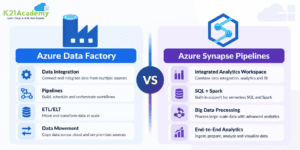
13) What is the distinction between Azure Data Factory and Azure Synapse Pipelines?
Azure Data Factory and Azure Synapse Pipelines both provide capabilities for data integration and orchestration; however, their use cases differ.
Azure Data Factory is a specific cloud-based data integration service that is used for building data pipelines, transferring data from one place to another, and performing various data transformations.
On the other hand, Azure Synapse Pipelines have the same capabilities of data integration, but they are a part of the Azure Synapse Analytics workspace, enabling users to integrate data ingestion, analytics, SQL, Spark, and big data processing.
Differences between them include:
14) What are the key differences between the Mapping data flow and Wrangling data flow transformation activities in Azure Data Factory?
In Azure Data Factory, the main dissimilarity between the Mapping data flow and the Wrangling data flow transformation activities is as follows
The Mapping data flow activity is a visually allowed data transformation activity that facilitates users to plan graphical data transformation logic. It does not need the users to be expert developers. It’s executed as an activity within the ADF pipeline on an ADF completely managed scaled-out Spark cluster.
On the other hand, the Wrangling data flow activity is a code–free data preparation activity. It’s integrated with Power Query Online to make the Power Query M functions available for data wrangling using spark execution.
Related Reading: Azure Databricks Tutorial: Architecture, Features & Use Cases
15) Is the knowledge of coding required for Azure Data Factory?
Azure Data Factory has the capability of being low-code/no-code; therefore, in-depth programming knowledge is not essential for designing basic data pipelines.
Having knowledge about SQL, data transformation principles, and programming languages such as Python could be useful in developing more sophisticated data engineering systems within an enterprise.
Data Engineers often make use of ADF in conjunction with other tools such as Azure Databricks, Azure SQL, and Synapse Analytics.
Related Reading: What is a Data Engineer? Roles, Skills & Career Path
16) How is incremental data loading done in Azure Data Factory?
Incremental data load involves loading only new or modified records between the source and target systems rather than loading the whole set every single time.
There are several ways to implement an incremental data load in Azure Data Factory. These include:
1. Watermark column technique:
– Have a column like LastModifiedDate or ID.
– Keep track of the last processed record.
– In the next run, process only records with values larger than the watermark.
2. Change Data Capture (CDC):
– Extract only new/modified/deleted records from the source system.
– Load them into the target system.
3. Lookup activity:
– Get the last successfully loaded timestamp or checkpoint value.
– Send it as part of the pipeline run.
Most common components used:
– Lookup Activity
– Copy Activity
– Stored Procedure
– Pipeline Parameter
– Variables
– Azure SQL / ADLS Gen2
Advanced ADF Interview Questions
17) How can we schedule a pipeline?
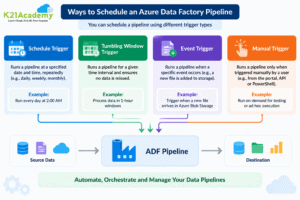
18) Can we pass parameters to a pipeline run?
Yes definitely, we can very easily pass parameters to a pipeline run. Pipeline runs are the first-class, top-level concepts in Azure Data Factory. We can define parameters at the pipeline level, and then we can pass the arguments to run a pipeline.
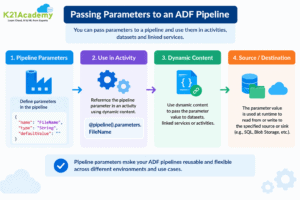
19) Can I define default values for the pipeline parameters?
You can define default values for the parameters in the pipelines.
20) Can an activity in a pipeline consume arguments that are passed to a pipeline run?
Yes, the activities within the pipeline in Azure Data Factory have the ability to use values provided via the pipeline parameters.
The pipeline parameters are declared on a pipeline level and can be utilized within the activities using the ADF expression syntax.
The expression to refer to the pipeline parameter will be:
@pipeline().parameters.parameterName
For instance, when a pipeline parameter is set up with the name “sourceFolder,” then the way to refer to this parameter will be:
@pipeline().parameters.sourceFolder
Such parameters make the pipelines more flexible because the file paths, table names, dates, or other settings specific to the environment can be provided.
21) Can an activity output property be consumed in another activity?
The output of one activity can definitely be used as an input to another activity in the same pipeline.
Azure Data Factory offers activity output expression as follows:
@activity(‘ActivityName’).output
For instance, the output of a Lookup activity can be provided to some other activity through the following expression:
@activity(‘LookupActivity’).output.value
Related Reading: Azure Data Factory: Parameters, Variables & Dynamic Content
22) How do I gracefully handle null values in an activity output?
You can use the @coalesce construct in the expressions to handle the null values gracefully.
23) Which Data Factory version do I use to create data flows?
Use the Data Factory V2 version to create data flows.
24) Does Mapping Data Flow support all of the Azure Data Factory connectors?
No, Mapping Data Flow does not offer direct support to all Azure Data Factory connectors.
In cases where there is no direct support available for connectors, we can always use the Copy Activity method and transfer data to the supported storage options like Azure Data Lake Storage Gen2, Azure Blob Storage, and Azure SQL Database, and later on transform that data with the help of Mapping Data Flow.
Copy Activity supports various connectors whereas Mapping Data Flow is used for transformations.
Related Reading: What is a Data Engineer? A Complete Guide for Career
25) Explain the two levels of security in ADLS Gen2.

- Role-Based Access Control – It includes built-in Azure rules such as reader, contributor, owner, or customer roles. It is specified for two reasons. The first is, who can manage the service itself, and the second is, to permit the reasons is to permit the users built-in data explorer tools.
- Access Control List – Azure Data Lake Storage specifies precisely which data object users may read write or execute.
26) Data Factory supports two types of computing environments to execute the transform activities. Mention them briefly.
Let’s go through the types:
- On-demand compute environment – It is a fully managed environment offered by ADF. In this compute type, a cluster is created to execute the transforming activity and removed automatically when the activity is completed.
- Bring your own environment – In this environment, you yourself manage the computing environment with the help of ADF.
27) What is Azure SSIS Integration Runtime?
Azure SSIS Integration is a fully managed cluster of virtual machines that are hosted in Azure and dedicated to running SSIS packages in the data factory. We can easily scale up the SSIS nodes by configuring the node size or scale out by configuring the number of nodes on the Virtual Machine’s cluster.
28) What is required to execute an SSIS package in the Data Factory?
We need to create an SSIS Integration Runtime, and an SSIS Database catalog hosted in the Azure SQL database or Azure SQL managed instance.
29) An Azure Data Factory Pipeline can be executed using three methods. Mention these methods.
Methods to execute Azure Data Factory Pipeline:
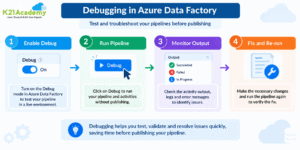
- Debug Mode
- Manual execution using trigger now
- Adding schedule, tumbling window/event trigger
30) If we need to copy data from an on-premises SQL Server instance using a data factory, which integration runtime should be used?
Self-hosted integration runtime should be installed on the on-premises machine where the SQL Server Instance is hosted.
31) What is Azure Table Storage?
The Azure Table Storage is a NoSQL database service provided by Azure Storage. This type of database system is intended for storing huge amounts of structured data, which does not require a pre-defined schema.
The data in this storage solution is stored in tables with entities and properties.
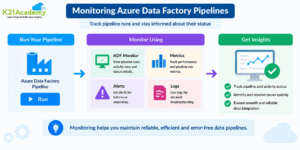
32) Can we monitor and manage Azure Data Factory Pipelines?
Yes, the pipeline within Azure Data Factory can be monitored and managed via the Monitor hub in Azure Data Factory Studio.
Here, you can:
- Check the status and history of pipeline runs
- Monitor the activity runs and execution details
- Locate errors and messages
- Rerun failed pipeline activities
- Track trigger executions
- Evaluate performance metrics such as duration and data movement details
Monitoring of the ADF can also be done through Azure Monitor and Log Analytics.
Related Reading: Azure Data Factory Pipeline: Monitoring & Troubleshooting
33) What are the steps involved in the ETL process?
The abbreviation ETL stands for Extract, Transform, and Load. It is a process which involves extracting data from different sources, transforming it to the needed format, and then loading it into the target system.
There are three basic stages involved in it:
1. Extract:
Data extraction from different sources such as databases, applications, APIs, files, etc.
2. Transform:
Cleaning, filtering, enrichment, and transformation of data into a proper format with transformation logic.
3. Load:
Loading the transformed data into target systems such as Azure SQL Database, Azure Synapse Analytics, or Azure Data Lake Storage.
These tasks are usually carried out in Azure Data Factory through activities such as Copy Activity, Mapping Data Flow, Stored Procedure Activity, and others.
FAQs Related to Azure Data Factory (ADF)
Is Azure Data Factory an ETL tool?
Yes, Azure Data Factory is a cloud-based data integration service that supports ETL and ELT processes. It helps create data pipelines to extract data from different sources, transform it based on business requirements, and load it into target systems. ADF simplifies data movement and orchestration using built-in connectors and transformation activities.
Which Microsoft certification is relevant for Azure Data Engineers?
For Azure Data Engineers, Microsoft certifications focused on modern data engineering skills are more relevant than a standalone Azure Data Factory certification. Microsoft Certified: Fabric Data Engineer Associate validates skills in data integration, transformation, analytics, and building modern data solutions. Learning Azure Data Factory concepts such as pipelines, integration runtime, and data movement remains valuable because they are widely used in enterprise data platforms.
Can we replace Synapse pipelines with other ETL tools like Talend or SSIS?
Yes, organizations can use different ETL tools based on their requirements. Azure Data Factory and Synapse Pipelines provide native Azure integration, while tools like Talend and SSIS can also be used for specific data integration scenarios. The choice depends on factors such as existing infrastructure, data sources, transformation needs, and cloud strategy.
Should ETL always happen using Azure Data Factory or Synapse Pipelines?
No, ETL processes can be implemented using multiple tools depending on business requirements. Along with Azure Data Factory and Synapse Pipelines, organizations may use Azure Databricks, SSIS, Talend, or other data integration platforms. The right tool depends on factors such as data volume, transformation complexity, scalability requirements, and existing architecture.
Can we use Azure Data Factory for running 24x7 jobs?
Yes, Azure Data Factory can run pipelines continuously and support scheduled, event-driven, and recurring data processing workloads. By using triggers, monitoring, retry mechanisms, and integration runtimes, organizations can build reliable data workflows that operate continuously based on their business requirements.
Conclusion
Azure Data Factory is a very useful cloud-based data integration platform which is being used by various organizations to create scalable data pipelines and automate data movement and transformation.
As a result of the increasing popularity of cloud data platforms, there is an increased need for professionals who can work with Azure Data Engineering skills. This guide contains various interview questions related to Azure Data Factory which will be useful in your interview preparation.
Next Task For You
Begin your career in Azure Data Engineering with our Azure Data on Cloud Job-Oriented Training Program. In this course, you’ll gain practical experience by working through 50+ labs and projects, which will help you acquire necessary skills to become an Azure Data Engineer. For more information about our FREE CLASS that helps enhance Azure Data Engineering skills and prepares for certification, visit us now.