




Building RAG on AWS as a demo is simple, but growing it to production presents difficulties. Getting the architecture right becomes crucial with millions of documents, delayed Lambda cold starts, useless search results, and growing Amazon Bedrock prices.
Using Amazon Bedrock and SageMaker AI, this post examines how to create a production-ready RAG pipeline that addresses service selection, retrieval optimisation, scalability, latency, and cost control.
Understand the RAG Architecture on AWS
A production RAG pipeline has two workflows: document ingestion and query processing.
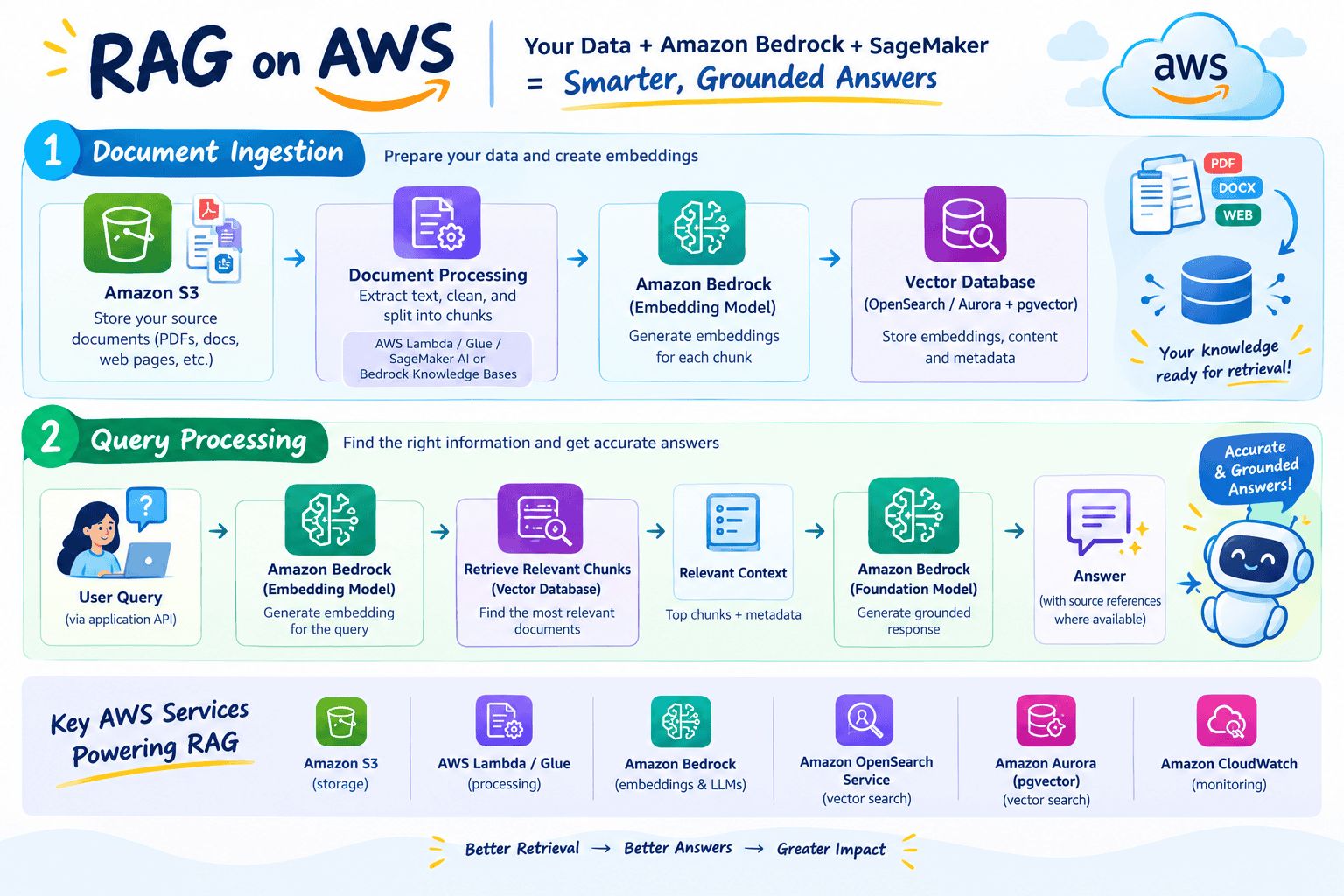
Document ingestion:
- Store source documents in Amazon S3.
- Extract text and split documents into chunks.
- Generate embeddings using an Amazon Bedrock embedding model or a custom model.
- Store the embeddings and associated content in a vector database.
Query processing:
- Receive a user question through an application API.
- Generate an embedding for the query.
- Retrieve relevant document chunks from the vector database.
- Pass the retrieved context and question to an Amazon Bedrock foundation model.
- Return the generated answer with source references where available.
Recommended architecture
Ingestion: Amazon S3 → Document Processing → Embeddings → Vector Database
Query: User Query → API → Retrieval → Relevant Context → Amazon Bedrock → Answer
Amazon Bedrock Knowledge Bases can manage much of the ingestion and retrieval workflow. A custom implementation gives you greater control over individual components.
The right architecture for RAG on AWS depends on your document volume, retrieval requirements, model choices, and operational constraints.
Amazon Bedrock vs. SageMaker AI: What Should You Use?
Amazon Bedrock and SageMaker AI serve different purposes in a RAG architecture.
| Requirement | Recommended AWS Service | Why |
|---|---|---|
| Access foundation models | Amazon Bedrock | Managed model inference |
| Build a managed RAG pipeline | Amazon Bedrock Knowledge Bases | Simplifies document ingestion and retrieval |
| Develop or train custom ML models | Amazon SageMaker AI | Supports custom ML workflows |
| Run specialized embedding or reranking models | Amazon Bedrock or SageMaker AI | Supports managed or custom model approaches |
| Store and search vector embeddings | Amazon OpenSearch Service or Amazon Aurora PostgreSQL with pgvector | Enables vector search and retrieval |
| Store source documents | Amazon S3 | Provides durable object storage |
| Monitor application performance | Amazon CloudWatch | Provides logs, metrics, and alarms |
When should you use each approach?
Choose Amazon Bedrock Knowledge Bases when:
- You want to build a RAG application quickly.
- Managed document ingestion and retrieval meet your requirements.
- You prefer less infrastructure and integration work.
Consider SageMaker AI and custom retrieval when:
- You need custom-trained embedding or reranking models.
- Your document-processing pipeline requires specialized ML.
- You need greater control over model deployment or retrieval behavior.
You do not need both services for every RAG application. Use Bedrock for managed model access and retrieval where appropriate, and introduce SageMaker AI when your ML requirements justify it.
Building the Document Ingestion Pipeline for RAG on AWS
Retrieval quality depends heavily on how your documents are prepared.
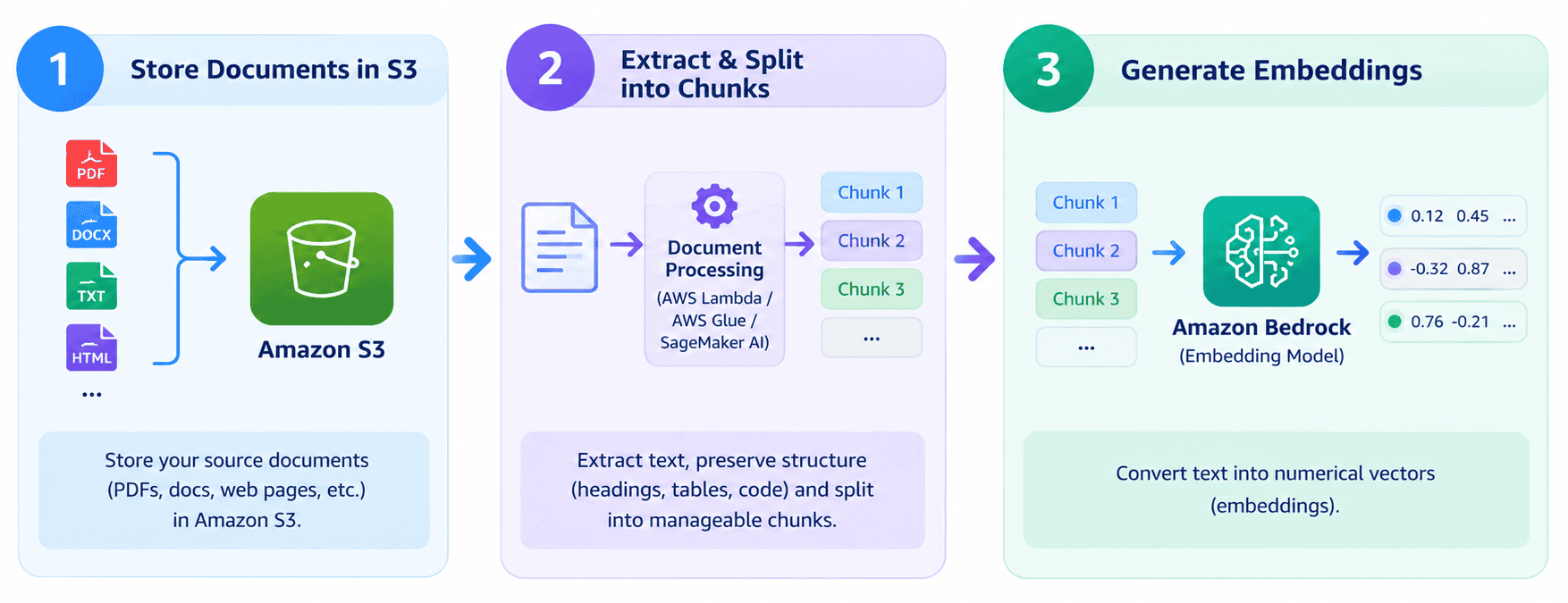
Step 1: Store and process documents
To store PDFs, technical manuals, help articles, and other source materials, use Amazon S3. Headings, tables, and code blocks are preserved when extracting text. Use OCR for scanned documents as needed.
For compatible data sources, controlled ingestion is supported by Amazon Bedrock Knowledge Bases. Depending on the workload, take into account AWS Lambda, AWS Glue, or SageMaker AI for specialised processing.
Step 2: Choose the right chunk size
Chunking determines how much information each retrieval result contains.
- Small chunks: More precise retrieval, but potentially insufficient context.
- Large chunks: More context, but potentially more irrelevant information and higher token usage.
Start by testing chunks of approximately 300–800 tokens, with modest overlap where needed. These are starting points, not universal settings. Evaluate the results using representative questions from your intended users.
Step 3: Generate embedding
Similarity search is made possible by embedding models, which transform text into numerical vectors.
Select a model according to its compatibility with your vector database, latency, cost, supported languages, and retrieval quality.
Regenerating embeddings for your current documents can be necessary if you change the embedding model. Make a reindexing plan and update your embedding configuration.
Choosing a Vector Database for RAG on AWS
Your vector database affects retrieval latency, indexing performance, operational complexity, and cost.
| Vector Store | Best Suited For | Key Consideration |
|---|---|---|
| Amazon OpenSearch Service | Large-scale vector and keyword search | Requires appropriate index and capacity tuning |
| Amazon Aurora PostgreSQL with pgvector | Applications combining relational data with vector search | Validate indexing and query performance at your expected scale |
| Amazon Bedrock Knowledge Bases with a supported vector store | Teams prioritizing managed RAG workflows | Capabilities depend on the selected configuration |
Related Readings: AWS Database Services – Amazon RDS, Aurora, DynamoDB, ElastiCache
What if you have 10 million documents?
Similarity search is made possible by embedding models, which transform text into numerical vectors. Select a model according to its compatibility with your vector database, latency, cost, supported languages, and retrieval quality.
Regenerating embeddings for your current documents can be necessary if you change the embedding model. Make a reindexing plan and update your embedding configuration.
For example, 10 million vectors with 1,024 dimensions using float32 values require approximately 41 GB of raw vector data alone. The actual infrastructure footprint will be larger.
When scaling RAG on AWS to millions of chunks, benchmark:
- Retrieval latency at expected concurrency.
- Search relevance and recall.
- Metadata-filtering performance.
- Document ingestion and update rates.
- Storage and compute costs.
Do not select a vector database based on document count alone. Test it with your actual data distribution and query patterns.
Implement Retrieval and Generation
For a managed RAG implementation, Amazon Bedrock Knowledge Bases can retrieve relevant passages and provide them to a foundation model for generation.
How do you improve retrieval quality?
If your application returns incorrect answers, inspect the retrieved documents before changing the foundation model.
- Hybrid search: Combine keyword and semantic retrieval when exact terms or technical identifiers matter.
- Metadata filtering: Restrict results by document version, product, or access permissions.
- Reranking: Reorder retrieved candidates to prioritize relevant passages.
- Context optimization: Pass only the evidence needed to answer the question.
The goal is not to retrieve the most documents. It is to retrieve the most useful evidence.
Optimizing RAG on AWS for Production Latency and Cost
A RAG request involves several operations, and optimizing only one component may not improve the overall experience.
Reduce latency:
| Problem | Practical Solution |
|---|---|
| Lambda cold starts | Keep dependencies lightweight and initialize reusable clients outside the handler. |
| Slow vector searches | Tune indexes, filters, and retrieval settings. |
| Expensive reranking | Evaluate whether improved retrieval quality justifies the additional latency and cost. |
| Long model responses | Limit unnecessary output tokens and consider streaming. |
| Repeated identical queries | Cache suitable results while accounting for authorization and data freshness. |
For production RAG on AWS, measure embedding latency, retrieval latency, model time to first token, and total response time separately. If model generation dominates the request, optimizing Lambda initialization alone will not solve the main bottleneck.
Control Amazon Bedrock costs:
Your total RAG cost includes more than model inference. It may include embedding generation, vector storage, retrieval, reranking, compute, and observability.
| Cost Driver | What You Can Do |
|---|---|
| Large prompts | Remove irrelevant and duplicated context. |
| Too many retrieved chunks | Optimize the number of retrieved chunks and apply reranking where beneficial. |
| Long responses | Set appropriate output-token limits. |
| Repeated embedding work | Process only new or updated documents instead of reprocessing everything. |
| Expensive models for simple queries | Evaluate lower-cost models against your quality requirements. |
| Unnecessary retries | Set retry limits, use exponential backoff, and configure sensible timeouts. |
Utilising actual request volume, input and output tokens, retrieval activity, and infrastructure utilisation, create a cost estimate.
Compare the cost per request to the quality of the response. If a less expensive setup leads to more wrong replies or necessitates repeated enquiries, it may not be the best option
Securing and Monitoring RAG on AWS
Production RAG applications must protect both source documents and the information returned to users.
Security Essentials
- Use IAM roles with least-privilege permissions and encrypt data at rest and in transit.
- Enforce document-level access controls through server-side authorization.
- Avoid logging sensitive prompts and retrieved content.
- Treat retrieved documents as untrusted input to mitigate prompt injection.
Never rely on the LLM alone to enforce access control.
Monitor Key Metrics
Use Amazon CloudWatch to track:
- Performance: p95/p99 latency and retrieval failures.
- Reliability: Model errors, throttling, and ingestion failures.
- Cost: Token usage and cost per request.
- Quality: Retrieval relevance, answer accuracy, and index freshness.
Related Readings: CloudWatch vs. CloudTrail
Maintain a test dataset of real questions and expected answers. Re-evaluate it whenever you change chunking, embeddings, retrieval settings, or the generation model to identify quality issues early.
A reliable RAG on AWS deployment requires consistent retrieval quality, secure access controls, and measurable performance under realistic workloads.
Learn to Build Production RAG Applications
Building production RAG applications requires practical knowledge of AWS infrastructure, embeddings, vector databases, retrieval optimization, and model evaluation.
K21 Academy’s AWS AI/ML program can help engineers develop broader cloud AI and machine learning skills, while Agentic AI Mastery explores RAG and the wider LLM application ecosystem.
Related Readings: K21 Academy: Your Ultimate Guide to AWS AI/ML Certification in 2026
Conclusion
It takes more than just linking a vector database to a foundation model to successfully build RAG on AWS.
If managed retrieval is what you require, start with Amazon Bedrock Knowledge Bases. When more control or specialised ML operations warrant the extra complexity, introduce SageMaker AI and bespoke components.
Prioritise three things: predictable expenses, dependable output performance, and pertinent retrieval. These are what transform a simple RAG demo into an application that is scalable and suitable for production.
Frequently Asked Questions
What is RAG on AWS?
Retrieval-Augmented Generation (RAG) on AWS combines vector search with foundation models to generate context-aware answers using external documents. Amazon S3, Amazon Bedrock, and vector databases help build RAG applications that retrieve relevant information before generating responses.
How do Amazon Bedrock and SageMaker AI work together in a RAG pipeline?
Amazon Bedrock provides foundation models and managed Knowledge Bases for RAG applications. Amazon SageMaker AI supports custom ML workflows, including specialized embedding and reranking models. Both services can be used together when application requirements justify additional customization.
Which vector databases can I use for RAG on AWS?
Common vector storage options for RAG on AWS include Amazon OpenSearch Service, Amazon Aurora PostgreSQL with pgvector, and supported vector stores used with Amazon Bedrock Knowledge Bases. The right choice depends on retrieval performance, scalability, filtering requirements, and operational costs.
How do I improve retrieval accuracy in an AWS RAG application?
Improve retrieval accuracy by optimizing document chunking, using hybrid search, applying metadata filters, implementing reranking, and retrieving relevant context. Evaluate retrieval quality using representative questions before changing the foundation model.
How can I scale RAG on AWS to millions of documents?
Scaling RAG to millions of documents requires efficient document ingestion, embedding generation, vector indexing, metadata filtering, and retrieval optimization. Benchmark search latency, recall, indexing performance, concurrency, and infrastructure costs using realistic workloads.
How can I reduce latency and cost in a production RAG pipeline?
Reduce RAG latency by optimizing vector searches, minimizing unnecessary context, using streaming, and managing Lambda cold starts. Control costs by processing only updated documents, limiting output tokens, selecting cost-effective foundation models, and optimizing the number of retrieved chunks.
How do I secure a production RAG application on AWS?
Secure RAG applications using IAM roles with least-privilege permissions, encryption at rest and in transit, server-side document access controls, and careful handling of sensitive prompts and retrieved content. Treat retrieved documents as untrusted input to help mitigate prompt injection.
How do I monitor a production RAG pipeline on AWS?
Use Amazon CloudWatch to monitor retrieval latency, model errors, throttling, ingestion failures, and token usage. Also evaluate answer accuracy, retrieval relevance, and index freshness using a test dataset of representative questions.