






Amazon SageMaker AI is a managed machine learning service that helps data scientists and developers build, train and deploy machine learning models efficiently. It offers built-in algorithms, for classification, regression, forecasting, clustering, text analysis and image processing.
In this 2026 guide we’ll explore Amazon SageMaker AI built-in algorithms, their applications and how they simplify machine learning development on AWS.

What Is Amazon SageMaker And How It Works?
Amazon SageMaker AI is a fully managed AWS service that enables developers and data scientists to build, train, and deploy machine learning models without managing the underlying infrastructure.
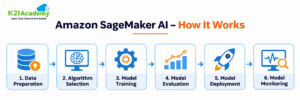
How Amazon SageMaker AI Works:
- Data Preparation: Collect, clean, and prepare datasets using Amazon S3 and Amazon SageMaker AI tools.
- Algorithm Selection: Choose a built-in algorithm, pretrained model, or custom ML framework.
- Model Training: Train machine learning models using managed compute resources.
- Model Evaluation: Evaluate model performance using appropriate metrics.
- Model Deployment: Deploy trained models for real-time or batch predictions.
- Model Monitoring: Monitor model performance and operational metrics using Amazon SageMaker AI and Amazon CloudWatch.
Amazon SageMaker Studio provides an integrated development environment for managing notebooks, experiments, training jobs, and other machine learning resources.
Read : Our Blog Post on Modeling With AWS Machine Learning.
Built-in Algorithms In Amazon SageMaker
Amazon SageMaker AI offers ready‑made algorithms. Supported machine learning methods for classification, regression, forecasting, clustering, anomaly detection, text analysis and computer vision.
These algorithms can be grouped into four categories:
- Supervised Learning
- Unsupervised Learning
- Textual Analysis
- Image Processing
Amazon SageMaker JumpStart also gives you access, to pretrained models and more machine learning algorithms. You should check the availability and support status of each algorithm before you use algorithm in a production environment.

Also Check : Our Blog On Amazon Comprehend.
1) Supervised Learning
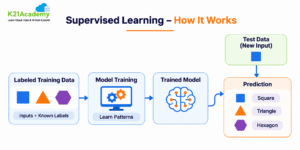
In supervised learning, the training data we feed to the machine learning algorithm includes the required solutions, called labels. Amazon SageMaker offers numerous built-in general-purpose algorithms that will be used for both classification or regression problems.
- Linear Learner Algorithm: learns a linear feature for regression or a linear threshold function for classification. It is accustomed to Predict a numeric/continuous value. The data input format is Tabular.
- Factorization Machines Algorithm: It is an updated version of a linear model that is constructed to economically grab communication between features within high-dimensional sparse datasets. It is used to predict if an item belongs to a category. The data input format is Tabular.
- XGBoost Algorithm: implementation of the gradient-boosted trees algorithm that mixes an ensemble of estimates from a fixed of easier and weaker models. It is used to predict if an item belongs to a category. The data input format is Tabular.
- AutoGluon-Tabular Algorithm: Automates machine learning tasks such as classification and regression by selecting, training, and combining multiple models for structured datasets.
- CatBoost Algorithm: A gradient-boosting algorithm used for classification and regression, particularly effective for datasets containing categorical features.
- LightGBM Algorithm: A fast and efficient gradient-boosting algorithm used for classification and regression on large structured datasets.
- TabTransformer Algorithm: Uses transformer-based deep learning techniques to understand relationships between categorical features in tabular datasets, supporting classification and regression tasks.
- K-Nearest Neighbors (k-NN) Algorithm: a non-parametric approach that creates use of k adjacent labeled points to assign a label to a new data point for classification or a forecast target value from the average of the k adjacent points for regression.
- Object2Vec Algorithm: It is a highly customizable multi-purpose machine learning algorithm made for feature engineering.
- DeepAR Forecasting Algorithm: A learning method that uses RNNs to predict what will happen in the future based on data. It helps to guess numbers, like how much something will sell, how much people will want a product and how much stock is needed.
Note: The old version of the Amazon SageMaker DeepAR tool does not get any security updates or changes. For projects AWS suggests using tools that are still being worked on and supported.
Reference: AWS SageMaker AI Container Support Policy
2) Unsupervised Learning
- Unsupervised Learning: This is a machine learning method that finds patterns and relationships in data. It works without any labels or predefined answers. It lets the system explore the data on its own.
- Amazon SageMaker AI Built-in Algorithms: Amazon SageMaker AI offers tools for clustering reducing the number of features in data recognizing patterns and spotting data points. These algorithms are useful for working with data that has no labels. They help uncover information, from the data.
- Principal Component Analysis (PCA) Algorithm: It lowers the dimensionality within a dataset by projecting data points onto the primary few principal components. The aim is to keep as much information or variation as possible.
- K-Means Algorithm: It is used to finds discrete groupings within the dataset, where members of a group are as identical as possible to one another and as non-identical as possible from members of other groups.
- IP Insights: It is used to capture associations b/w IPv4 addresses and various entities, such as account numbers or user IDs. It learns the usage patterns for IPv4 addresses.
- Random Cut Forest (RCF) Algorithm: It identifies anomalous data points within a data set that different from otherwise well-structured or patterned data.
Also Check : Our Blog Post on Deep Learning On AWS , For More Information.
Do Read : Our Blog On Amazon Lex.
3) Textual Analysis
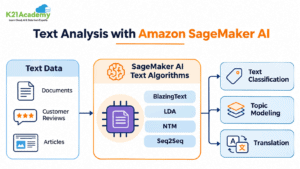
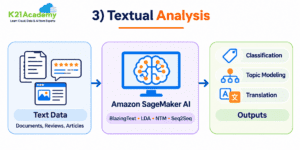
Amazon SageMaker equips with many algorithms that are tailored to the study of textual documents used in NLP, summarization or document classification, classification or topic modeling, and translation or language transcription.
- BlazingText algorithm: It is a highly advanced application of the Word2vec and text classification algorithms that simply scale to large datasets. It is helpful for many downstream NLP tasks.
- Sequence-to-Sequence Algorithm: It is a supervised algorithm generally used for neural machine translation.
- Latent Dirichlet Allocation (LDA) Algorithm: an algorithm used for determining topics in a set of documents. It is an unsupervised algorithm, which means that it doesn’t require an example dataset with answers during training.
- Neural Topic Model (NTM) Algorithm: It is also a type of unsupervised technique used for determining topics in a set of documents, using a NN approach.
- Modern Text Analysis with Amazon SageMaker AI: In addition to traditional built-in algorithms, Amazon SageMaker AI supports transformer-based models for tasks such as text classification, summarization, and natural language processing (NLP).
- Amazon SageMaker JumpStart: Provides access to pretrained models that developers can test, fine-tune, and deploy for supported NLP tasks.
Note: Some older SageMaker algorithm containers no longer receive security updates. For production applications, use actively maintained frameworks and officially supported model containers.
4) Image Processing
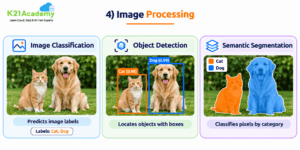
Amazon SageMaker also equips with many image processing algorithms that are designed for object detection, image classification, and computer vision.
- Image Classification Algorithm: It is a supervised algorithm using example data with answers. This algorithm used to classify images.
- Semantic Segmentation Algorithm: It’s used to developing computer vision applications using a pixel-level, fine-grained approach.
- Object Detection Algorithm: It is used to classifies and detect objects in images using a single DNN (deep neural network). It is a supervised learning algorithm that identifies all instances of objects within the image scene after taking images as input.
- Modern Computer Vision with Amazon SageMaker AI: Amazon SageMaker AI supports image classification, object detection, and semantic segmentation using built-in algorithms and deep learning frameworks such as TensorFlow and PyTorch.
- Amazon SageMaker JumpStart: Provides pretrained computer vision models that developers can fine-tune and deploy for supported image processing tasks.
Note: Some older image processing algorithm containers no longer receive security updates. For production applications, choose actively maintained frameworks and supported model containers.
Do Check : Our Blog Post On Data Engineering With AWS Machine Learning.
How to Choose the Right Amazon SageMaker AI Algorithm
Choosing the right Amazon SageMaker AI algorithm starts with understanding your data and machine learning objectives. The best algorithm depends on the type of data, the problem you want to solve, and the expected results. Different algorithms are designed for tasks such as classification, regression, clustering, anomaly detection, and text analysis.
Common Machine Learning Problems and Recommended Algorithms
| Machine Learning Task | Recommended Algorithm | Example Use Case |
|---|---|---|
| Classification | XGBoost, Linear Learner | Predict customer churn |
| Regression | XGBoost, Linear Learner | Predict house prices |
| Clustering | K-Means | Group customers based on purchasing behavior |
| Anomaly Detection | Random Cut Forest (RCF) | Detect unusual transactions |
| Dimensionality Reduction | Principal Component Analysis (PCA) | Reduce the number of dataset features |
| Text Classification | BlazingText | Classify customer reviews |
| Topic Modeling | Latent Dirichlet Allocation (LDA) | Identify topics in documents |
| Image Classification | Image Classification – TensorFlow | Classify images into categories |
Key Factors to Consider
- Data Type: Identify whether your dataset contains tabular data, text, images, or time-series information. The data type helps determine which algorithms are suitable.
- Problem Type: Determine whether you need to classify information, predict numerical values, identify patterns, or detect anomalies.
- Model Performance: Compare different algorithms using appropriate evaluation metrics, such as accuracy, precision, recall, or Root Mean Squared Error (RMSE).
- Scalability: Consider the size of your dataset and choose an algorithm that can efficiently handle your training requirements.
- Cost and Support: Evaluate training costs, compute resources, and whether the selected algorithm container is actively maintained and supported.
Selecting the right algorithm can improve model performance, reduce training costs, and simplify machine learning development on AWS. A well-informed choice also saves time and effort throughout the machine learning lifecycle.
How to Train a Built-in Algorithm in Amazon SageMaker AI
Amazon SageMaker AI simplifies machine learning model training by providing built-in algorithms and managed computing resources. Developers can train models using their own datasets without setting up or managing complex infrastructure.
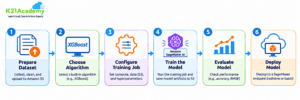
Steps to Train a Machine Learning Model
- Prepare the Dataset: Collect, clean, and organize your training data. Upload the dataset to an Amazon S3 bucket in a format supported by your selected algorithm.
- Choose an Algorithm: Select a suitable built-in algorithm, such as XGBoost for classification or regression, based on your machine learning requirements.
- Configure the Training Job: Choose an appropriate compute instance type, specify the Amazon S3 location of your training data, and configure the algorithm’s hyperparameters.
- Train the Model: Start the training job using Amazon SageMaker AI. SageMaker provisions the required infrastructure, runs the training process, and saves the trained model artifacts to Amazon S3.
- Evaluate Model Performance: Evaluate the model using relevant metrics, such as accuracy, precision, recall, or Root Mean Squared Error (RMSE), depending on the problem.
- Deploy the Model: Deploy the trained model to a SageMaker inference endpoint for real-time predictions or use batch transform for offline predictions on large datasets.
Related Readings: AWS Database Services
Example: Customer Churn Prediction Using XGBoost
A telecommunications company wants to identify customers who may stop using its services.
Using Amazon SageMaker AI, the company can prepare historical customer data, store it in Amazon S3, and train an XGBoost classification model to predict customer churn.
After evaluating the model’s performance, the company can deploy it to generate predictions. These predictions help the customer retention team identify customers who may need additional support.
This example demonstrates how Amazon SageMaker AI built-in algorithms simplify model training, evaluation, and deployment for real-world machine learning applications.
Related Readings: Amazon Kinesis Overview, Features and Benefits
Amazon SageMaker AI Built-in Algorithm Container Support and Security
Amazon SageMaker AI provides prebuilt algorithm containers that simplify machine learning model training and deployment. However, some older containers have reached their end-of-security-patching dates and no longer receive security updates.
Key Considerations for Production Workloads
- Container Support: Check whether the selected algorithm container still receives security patches and maintenance updates.
- Security Updates: Avoid using outdated containers for new production applications, especially when processing sensitive data.
- Framework Compatibility: Choose supported versions of machine learning frameworks such as TensorFlow and PyTorch.
- Model Monitoring: Monitor deployed models for performance issues, unexpected predictions, and operational failures.
- AWS Security Best Practices: Use AWS Identity and Access Management (IAM), encryption, and appropriate network configurations to protect machine learning resources.
Before deploying a built-in algorithm in production, review its current support status in the official AWS documentation. Choosing actively maintained containers helps improve security, reliability, and long-term compatibility.
Why Choose Amazon SageMaker AI?
Amazon SageMaker AI simplifies machine learning development by providing managed infrastructure, built-in algorithms, and seamless integration with AWS services.
- Faster Model Development: Use built-in algorithms and pretrained models to accelerate machine learning development.
- Scalable Training: Train machine learning models using managed compute resources that scale with your workload requirements.
- Cost Optimization: Use Managed Spot Training and suitable compute resources to help reduce training costs.
- Framework Support: Work with popular machine learning frameworks such as TensorFlow, PyTorch, and scikit-learn.
- Flexible Model Deployment: Deploy trained models for real-time, asynchronous, or batch inference.
- AWS Integration: Connect with Amazon S3, AWS Glue, and other AWS services to build end-to-end machine learning workflows.
- Security and Monitoring: Use AWS IAM, encryption, and monitoring tools to help secure and manage machine learning applications.
Related Reading: Amazon SageMaker AI Pricing – AWS
Related Reading: Data Engineering With AWS Machine Learning – K21 Academy
Frequently Asked Questions
Q1) What are built-in algorithms in Amazon SageMaker AI?
Ans: Amazon SageMaker AI provides built-in machine learning algorithms for tasks such as classification, regression, clustering, forecasting, anomaly detection, text analysis, and image processing. These algorithms help developers and data scientists train and deploy machine learning models without building every algorithm from scratch.
Q2) What is the difference between supervised and unsupervised learning in Amazon SageMaker AI?
Ans: Supervised learning uses labeled datasets to train models for tasks such as classification and regression. Examples include XGBoost, Linear Learner, and K-Nearest Neighbors. Unsupervised learning works with unlabeled datasets to discover patterns, group similar records, or detect anomalies. Examples include K-Means, Principal Component Analysis (PCA), and Random Cut Forest.
Q3) How do I choose the right built-in algorithm in Amazon SageMaker AI?
Ans: The right algorithm depends on your dataset, business problem, and expected output. For example, XGBoost can be used for customer churn prediction, Linear Learner for regression and classification, K-Means for customer segmentation, and Random Cut Forest for anomaly detection. You should also compare model performance, training costs, and the current support status of the algorithm container.
Q4) What is the difference between Amazon SageMaker AI built-in algorithms and SageMaker JumpStart?
Ans: Amazon SageMaker AI built-in algorithms provide ready-to-use machine learning implementations for tasks such as classification, regression, clustering, and forecasting. SageMaker JumpStart provides access to pretrained models and machine learning solutions that developers can evaluate, customize, and deploy. Built-in algorithms are useful for training models on your own datasets, while JumpStart can accelerate development using existing pretrained models.
Q5) How much does it cost to use Amazon SageMaker AI built-in algorithms?
Ans: Amazon SageMaker AI generally uses pay-as-you-go pricing. You pay for resources such as training instances, inference endpoints, storage, and data processing, rather than a separate fixed fee for using most built-in algorithms. Costs depend on instance types, training duration, deployment configuration, and resource usage. Managed Spot Training can help reduce eligible training costs.
Next Task For You
Begin your journey towards an AWS Cloud by joining our FREE Informative Class on Amazon AIML Free Class by clicking on the below image.