




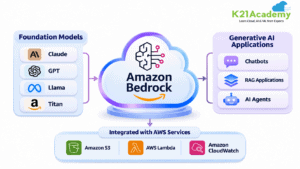
Amazon Bedrock is a managed service from AWS that helps developers create, deploy and scale generative AI applications. It gives access to foundation models from top AI companies. Developers do not have to worry about managing the infrastructure behind these models.
Using Amazon Bedrock developers can build Retrieval-Augmented Generation applications make AI agents adjust foundation models that are supported and use Amazon Bedrock Guardrails to add security controls. The service works with other AWS tools like Amazon S3, AWS Lambda and Amazon CloudWatch. This makes it easier to build AI applications that’re ready for real-world use.
In this updated guide for 2026 we will look closely at what Amazon Bedrock’s its main features how to set it up its strengths in RAG applications how to create AI agents how it connects with other AWS services and the best practices, for building AI applications that are both secure and scalable.
For more technical details, refer to the official Amazon Bedrock documentation.

Table of Contents
- What is Amazon Bedrock?
- Prerequisites for Developing with Amazon Bedrock
- Setting Up Amazon Bedrock
- Core Components of Amazon Bedrock
- Building Generative AI Applications with Bedrock
- Integrating Bedrock with Other AWS Services
- Building RAG Applications with Amazon Bedrock Knowledge Bases
- Challenges and Solutions in Using Amazon Bedrock
- Conclusion
- Frequently Asked Questions
What is Amazon Bedrock?
Amazon Bedrock is a managed generative AI service offered by Amazon Web Services (AWS). Amazon Bedrock gives developers the ability to use high‑performing foundation models (FMs) from Amazon and top AI providers through a single API. Amazon Bedrock does not ask developers to handle the underlying infrastructure.
Amazon Bedrock lets organizations build AI applications for a wide range of tasks. These tasks include text generation, summarization, question answering, content creation and intelligent automation.
Key capabilities of Amazon Bedrock are:
- Foundation Model Access: Amazon Bedrock lets you reach supported foundation models through AWS APIs and you can choose models that fit your application needs.
- Retrieval‑Augmented Generation (RAG): Amazon Bedrock helps you build apps that pull data from your enterprise using Amazon Bedrock Knowledge Bases.
- AI Agents: Amazon Bedrock enables you to create smart agents that can talk to external systems use tools and automate complex business workflows.
- Model Customization: Amazon Bedrock lets you tailor supported foundation models for example by fine‑tuning so that they perform better for your particular use case.
- Security and Responsible AI: Amazon Bedrock uses Guardrails, AWS IAM and encryption to keep sensitive data safe and to manage content that Amazon Bedrock creates.
- Scalability and Monitoring: Amazon Bedrock works with AWS services such as Amazon CloudWatch and AWS Lambda so you can build AI applications that scale and run reliably in production.
Unlike machine learning platforms Amazon Bedrock mainly focuses on integrating and running foundation models instead of training machine learning models, from the ground up. If you need to build and train custom models AWS offers Amazon SageMaker AI.
By bringing managed foundation models, RAG, AI agents and AWS security services Amazon Bedrock makes it easier for enterprises to build generative AI applications.
Related Readings: Introduction to Generative AI and Its Mechanisms
Prerequisites for Developing with Amazon Bedrock
Before you start using Amazon Bedrock it is helpful to know the basics of AWS Cloud generative AI ideas and programming fundamentals. You do not need machine learning experience.
Key prerequisites include:
- AWS Account: You need an AWS account that lets you use the AWS Management Console.
- IAM Permissions: You must have the right permissions to use Amazon Bedrock and to call foundation models.
- Model Access: You need a supported AWS Region and access to the foundation model you plan to use.
- Python and Boto3: You should know basic Python and be comfortable with AWS SDKs for API integration.
- Generative AI Fundamentals: Know the basics of LLMs, prompts, tokens, embeddings and RAG.
- AWS Services: Have an understanding of Amazon S3, AWS Lambda and Amazon CloudWatch.
Also look at Amazon Bedrock pricing before you run any models so you do not see surprise charges. With these prerequisites in place you can begin building AI applications, with Amazon Bedrock.
Setting Up Amazon Bedrock
Setting up Amazon Bedrock is straightforward. You can access foundation models directly through the AWS Management Console without managing servers or model infrastructure.
Follow these steps to get started:
- Sign in to the AWS Management Console and search for Amazon Bedrock.
- Select an AWS Region where Amazon Bedrock and your preferred foundation model are available.
- Configure IAM Permissions to access Amazon Bedrock and invoke foundation models.
- Open the Model Catalog, select a foundation model, and review its access requirements. Most models can be enabled on first use, while some may require additional permissions or provider information.
- Navigate to the Playground, select your model, and enter a prompt such as “Explain Generative AI in simple terms.”
- Run the Prompt and review the generated response. You can adjust model parameters to experiment with different outputs.
For programmatic integration, developers can use the Amazon Bedrock Converse API or InvokeModel API through AWS SDKs such as Boto3.
Once configured, Amazon Bedrock can be used to build AI chatbots, RAG applications, and AI agents.

Core Components of Amazon Bedrock
Amazon Bedrock offers features that help developers build, customize, and manage generative AI applications without having to handle complex infrastructure.
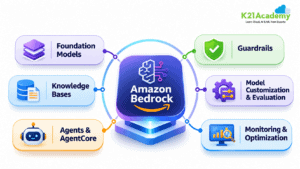
The main components of Amazon Bedrock are:
1. Foundation Models (FMs)
Amazon Bedrock provides access to foundation models from Amazon and other leading AI providers through a unified API. Developers can choose models for text generation, summarization, image generation, and other AI tasks.
Related Readings: Exploring Large Language Models (LLMs)
2. Amazon Bedrock Knowledge Bases
Knowledge Bases help developers create Retrieval-Augmented Generation (RAG) applications by connecting foundation models to enterprise data sources. This enables AI applications to generate more relevant and context-aware responses.
3. Amazon Bedrock Agents and AgentCore
Bedrock Agents help automate complex tasks by connecting foundation models with APIs, tools, and business systems. Amazon Bedrock AgentCore provides infrastructure and services for deploying and operating AI agents.
4. Amazon Bedrock Guardrails
Bedrock Guardrails help implement responsible AI practices by filtering harmful content, protecting sensitive information, and applying safety policies to generative AI applications.
5. Model Customization and Evaluation
Amazon Bedrock supports customization of selected foundation models and provides model evaluation capabilities to assess response quality, performance, and suitability for specific applications.
6. Monitoring and Optimization
Amazon Bedrock integrates with Amazon CloudWatch and other AWS monitoring services to track application performance, usage, and operational metrics.
Together, these capabilities enable developers to build secure, scalable, and production-ready generative AI applications on AWS.
Building Generative AI Applications with Bedrock
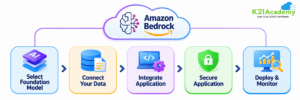
Building AI applications with Amazon Bedrock involves choosing a foundation model, connecting the right data, and deploying the application while maintaining security and monitoring.
Follow these steps to build an AI application using Amazon Bedrock:
1. Select a Foundation Model:
Select a foundation model from the Amazon Bedrock Model Catalog that fits your application’s requirements. Choose models suitable for tasks such as text generation, summarization, or question answering.
Related Readings: The Essentials of Prompt Engineering
2. Connect Your Data:
Organize your generative AI application data using services such as Amazon S3. If your application requires enterprise knowledge, use Amazon Bedrock Knowledge Bases to create a Retrieval-Augmented Generation (RAG) workflow.
3. Integrate the Application:
Integrate foundation models into your generative AI application using the Amazon Bedrock Converse API or InvokeModel API with AWS SDKs such as Boto3. You can also use Bedrock Agents to automate tasks and connect with external tools.
4. Secure the Application:
Evaluate AI-generated responses for accuracy, relevance, and reliability. Use Amazon Bedrock Guardrails and AWS IAM permissions to implement security and responsible AI controls.

5. Deploy, Monitor, and Optimize:
Deploy your AI application using services such as AWS Lambda, Amazon API Gateway, or container-based infrastructure. Monitor usage and performance with Amazon CloudWatch, and optimize model selection, latency, and costs.
By following these steps, developers can build secure, scalable, and production-ready generative AI applications using Amazon Bedrock.
Here’s a sample Python code snippet for training a simple generative model using Bedrock:
import boto3
# Create the Amazon Bedrock Runtime client
client = boto3.client(
“bedrock-runtime”,
region_name=”us-east-1″
)
# Choose a foundation model
model_id = “amazon.nova-micro-v1:0”
# Generate a response using the Converse API
response = client.converse(
modelId=model_id,
messages=[
{
“role”: “user”,
“content”: [
{“text”: “Explain Amazon Bedrock in simple terms.”}
]
}
],
inferenceConfig={“maxTokens”: 300}
)
# Display the generated response
print(response[“output”][“message”][“content”][0][“text”])
By following these steps, you can build and deploy a generative AI application using Amazon Bedrock. This process ensures that your models are trained, evaluated, and deployed efficiently, allowing you to leverage the full potential of Bedrock’s capabilities for your AI projects.
Integrating Bedrock with Other AWS Services
Amazon Bedrock works with AWS services to help developers create secure, scalable, and production-ready generative AI applications.

Here are the main AWS services that work with Amazon Bedrock:
1. Amazon S3 – Data Storage
Amazon S3 is used to store documents, datasets, and other files needed for AI applications. It can act as a data source for Amazon Bedrock Knowledge Bases, supporting Retrieval-Augmented Generation (RAG) by making relevant information available when generating responses.
To know more about Amazon S3 Click Here
2. AWS Lambda – Serverless Integration
AWS Lambda allows developers to connect Amazon Bedrock to APIs, chatbots, and automated workflows. It runs code without requiring server management, making integration faster and simpler.
To learn more about AWS Lambda Click Here
3. Amazon SageMaker AI – Model Development
Amazon SageMaker AI provides tools to build, train, and deploy custom machine learning models. It complements Amazon Bedrock when applications require specialized model development and advanced machine learning capabilities.
To learn more about Amazon SageMaker works Click Here
4. AWS Glue – Data Processing
AWS Glue helps clean, prepare, and transform data before it is used in AI applications. It can also prepare data for integration with knowledge bases, improving data quality and consistency.
To learn more about AWS Glue Click Here
5. Amazon OpenSearch Service – Vector Search
Amazon OpenSearch Service supports vector search, which helps retrieve semantically similar information. It can work with Amazon Bedrock Knowledge Bases to retrieve relevant information from large enterprise datasets.
6. Amazon CloudWatch – Monitoring
Amazon CloudWatch helps monitor Amazon Bedrock applications by tracking model invocations, response times, errors, and token usage. This allows developers to identify performance issues and optimize applications.
Building RAG Applications with Amazon Bedrock Knowledge Bases
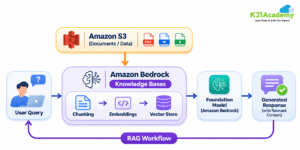
Amazon Bedrock Knowledge Bases helps developers build Retrieval-Augmented Generation (RAG) applications by connecting foundation models to enterprise data. This enables more accurate, relevant, and context-aware responses without requiring model retraining.
How RAG Works with Amazon Bedrock
- Data Storage: Store documents and enterprise information in Amazon S3 or another supported data source.
- Knowledge Base Creation: Configure Amazon Bedrock Knowledge Bases to process and index your data.
- Embeddings and Vector Search: Convert content into vector embeddings and store them in a supported vector database for efficient retrieval.
- Information Retrieval: When a user submits a question, Amazon Bedrock Knowledge Bases retrieves relevant information from the connected data sources.
- Response Generation: A foundation model uses the retrieved information to generate a context-aware response.
Amazon Bedrock provides APIs such as Retrieve and RetrieveAndGenerate to support RAG workflows and integrate them into generative AI applications.
By using Amazon Bedrock Knowledge Bases, developers can build enterprise chatbots, document-search assistants, and knowledge-based AI applications.
Agentic AI with Amazon Bedrock AgentCore
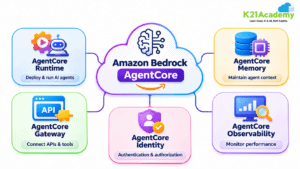
Amazon Bedrock AgentCore helps developers deploy, operate, and scale AI agents securely on AWS. Unlike traditional chatbots that mainly generate responses, AI agents can use tools, access external systems, and complete multi-step tasks to achieve specific goals.
Key Features of Amazon Bedrock AgentCore
- AgentCore Runtime: Provides a secure, serverless environment for deploying and scaling AI agents without managing infrastructure.
- AgentCore Memory: Enables AI agents to retain relevant context across interactions and provide more personalized responses.
- AgentCore Gateway: Connects AI agents to APIs, AWS Lambda functions, and external tools through secure integrations.
- AgentCore Identity: Manages authentication and authorization when AI agents access AWS resources and third-party services.
- AgentCore Observability: Monitors agent execution, tool usage, performance, and errors using Amazon CloudWatch.
Amazon Bedrock AgentCore supports popular frameworks such as LangChain, LangGraph, and Strands Agents, giving developers flexibility when building production-ready agentic AI applications.
With AgentCore, organizations can develop AI agents for customer support, workflow automation, enterprise knowledge retrieval, and other business applications.
Challenges/Solutions in Using Amazon Bedrock
Amazon Bedrock simplifies generative AI development, but developers may still encounter challenges related to response accuracy, security, performance, and cost optimization.
Here are some common challenges and their solutions:
1. Hallucinations and Inaccurate Responses
Challenge: Foundation models may generate incorrect or misleading information.
Solution: Use Amazon Bedrock Knowledge Bases with Retrieval-Augmented Generation (RAG) to ground responses in relevant data. Evaluate model outputs regularly to improve reliability.
2. Data Security and Privacy
Challenge: Generative AI applications may process sensitive business or customer information.
Solution: Implement AWS IAM permissions, encryption, and Amazon Bedrock Guardrails to help protect sensitive data and control AI-generated content.
3. High Latency and Performance Issues
Challenge: Large prompts and complex model requests can increase response times.
Solution: Select suitable foundation models, optimize prompt length, use streaming responses where appropriate, and monitor latency with Amazon CloudWatch.
4. Managing AI Application Costs
Challenge: Frequent model invocations and high token usage can increase operational costs.
Solution: Monitor token consumption, choose cost-effective models, optimize prompts, and use appropriate inference and caching options.
5. AI Agent Reliability
Challenge: AI agents may encounter errors while accessing external tools or executing multi-step workflows.
Solution: Use Amazon Bedrock AgentCore monitoring capabilities, implement error handling, and test agent workflows before production deployment.
6. Evaluating Model Responses
Challenge: Measuring the quality, relevance, and consistency of AI-generated responses can be difficult.
Solution: Use Amazon Bedrock model evaluation capabilities, predefined evaluation datasets, and human review where appropriate to assess application quality.
By addressing these challenges, developers can build more reliable, secure, and cost-efficient generative AI applications using Amazon Bedrock.
Conclusion
Amazon Bedrock simplifies the development of generative AI applications by providing access to foundation models, managed AI capabilities, and seamless integration with the AWS ecosystem. With features such as Amazon Bedrock Knowledge Bases, AgentCore, Guardrails, and model evaluation, developers can build secure, scalable, and production-ready applications using RAG, AI agents, and foundation models.
By integrating Amazon Bedrock with AWS services such as Amazon S3, AWS Lambda, and Amazon CloudWatch, organizations can automate workflows, improve customer experiences, and optimize AI application performance. As generative AI continues to evolve in 2026, learning Amazon Bedrock and gaining hands-on project experience can help developers build reliable AI solutions that address real-world business challenges.
Frequently Asked Questions
Amazon Bedrock is a fully managed AWS service that provides access to foundation models through APIs. It enables developers to build generative AI applications such as chatbots, RAG systems, and AI agents without managing the underlying model infrastructure.
Python is not mandatory for using Amazon Bedrock through the AWS Management Console. However, Python and AWS SDKs such as Boto3 are useful for integrating foundation models into applications, automating workflows, and working with Bedrock APIs.
Amazon Bedrock focuses on building generative AI applications using managed foundation models, RAG, agents, and model customization capabilities. Amazon SageMaker AI provides broader tools for building, training, and deploying custom machine learning models.
Amazon Bedrock Knowledge Bases connects foundation models to enterprise data sources. It retrieves relevant information using embeddings and vector search, allowing generative AI applications to produce more context-aware responses without retraining the foundation model.
Amazon Bedrock AgentCore provides managed infrastructure and services for deploying, operating, and scaling AI agents. It includes capabilities such as Runtime, Memory, Gateway, Identity, and Observability to support production-ready agentic AI applications.
Amazon Bedrock Guardrails helps developers apply content filtering, sensitive information protection, and safety policies to generative AI applications. It works alongside AWS IAM, encryption, and other security controls to support responsible AI development.
Amazon Bedrock pricing depends on the foundation model, inference option, input and output token usage, and additional features such as Knowledge Bases or Guardrails. Developers should review the official AWS pricing page and monitor usage to control costs.
Yes. Developers can use Amazon Bedrock Knowledge Bases to build RAG applications and Bedrock Agents or AgentCore to develop AI agents that access tools, retrieve information, and automate business workflows. What is Amazon Bedrock and how does it work?
Do I need Python knowledge to use Amazon Bedrock?
What is the difference between Amazon Bedrock and Amazon SageMaker AI?
How does RAG work with Amazon Bedrock Knowledge Bases?
What is Amazon Bedrock AgentCore?
How does Amazon Bedrock Guardrails improve AI security?
How much does Amazon Bedrock cost?
Can Amazon Bedrock be used to build AI agents and RAG applications?
Next Task For You
Ready to take your AI and machine learning skills to the next level? Our AWS AI/ML training program covers everything you need to excel, including comprehensive exam objectives, hands-on labs, and practice tests. Whether you’re aiming to become an AWS Certified AI Practitioner, an AWS Certified ML Engineer, or specialize in AWS Certified Machine Learning, we have the resources to help you succeed.
Join our waitlist today and be the first to access our training program. Click the image below to secure your spot and start your journey toward AWS certification success!