




Generative AI is transforming content creation across industries at a rapid pace. From marketing content to technical guidelines, teams are using AI to create content in minutes that previously involved hours of effort. With the advancements in AI technology, many businesses now demand an automated workflow. Once it can automatically receive requests, craft content, and publish it across multiple channels. This is where cloud platforms become essential.
Services available on AWS, Microsoft Azure, and Google Cloud allow AI engineers to build scalable automated pipelines into one production-ready AI content generation workflow.

What Is an End-to-End AI Content Generation Workflow?
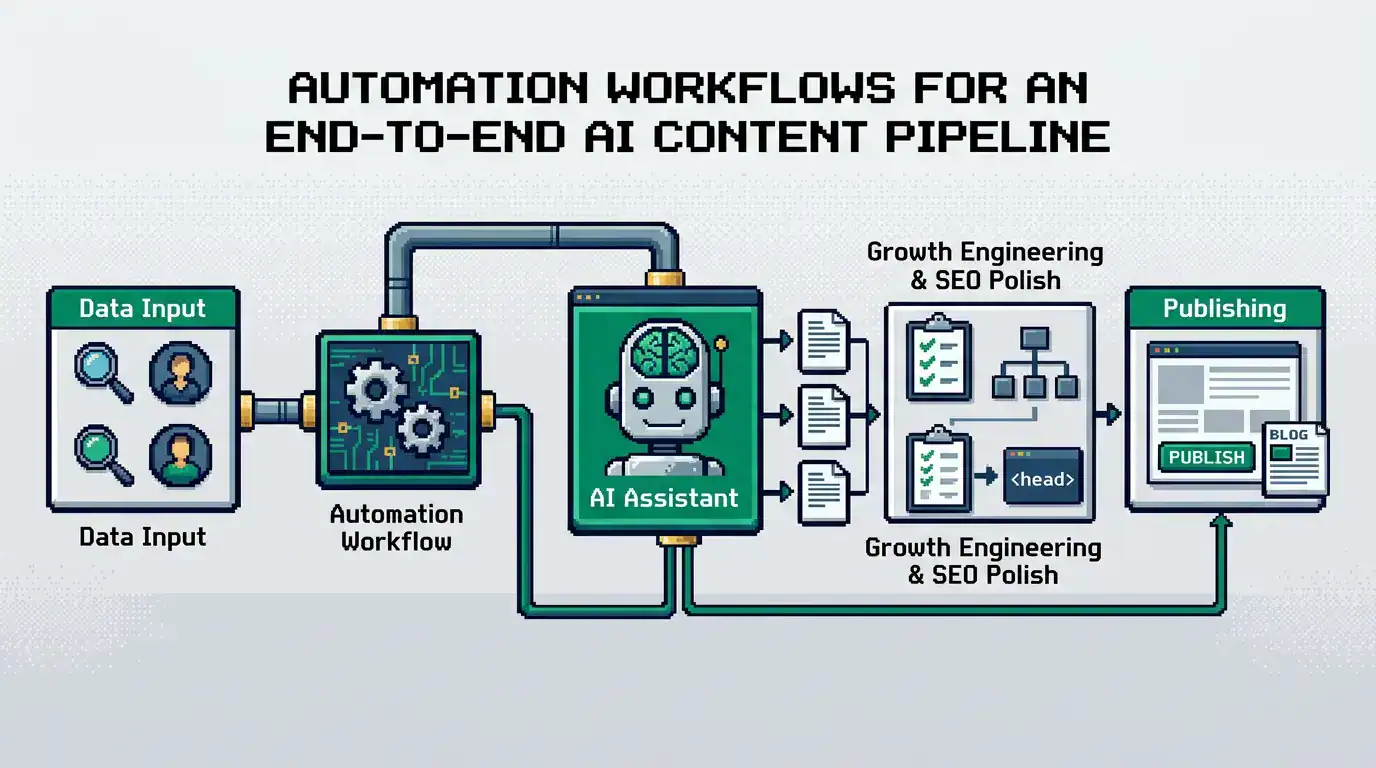
An end-to-end AI content generation workflow is an automated pipeline that manages every stage of content creation. It starts from a single request to create content and ends with publishing it as per defined rules.
Manual AI vs Enterprise AI Workflow
| Manual AI | Enterprise AI |
| User writes every prompt manually | Prompt templates automate prompt creation |
| Generates one piece of content at a time | Processes thousands of requests automatically |
| Manual editing | Automated quality checks |
| Manual publishing | Automated publishing pipelines |
Why Are Cloud Platforms Ideal for AI Content Workflows?
The demand for quality and updated content is at its peak. Running an AI workflow locally brings many challenges. Cloud platforms are the perfect solution to those challenges, offering various advantages, like:
Scalability
Many businesses today need content at scale. Let’s take the example of an e-commerce business in need of updating thousands of descriptions in a single day. Handling such a large amount locally is not that easy. However, with cloud platforms, you can make a workflow that automatically scales computing resources based on demand without requiring infrastructure changes.
Easy AI Integration
Modern cloud providers already offer services for:
- Large Language Models (LLMs)
- Vector databases
- Serverless computing
- Object storage
- Databases
- API management
- Workflow orchestration
This allows you to spend more time building business logic instead of managing servers.
Enterprise Security
Content workflows often process confidential business information. Cloud providers offer enterprise-grade security features such as the following:
- Identity and Access Management (IAM)
- Data encryption
- Secret management
- Role-based access control
- Compliance certifications
These features help organisations protect sensitive information throughout the workflow.
Cost Optimization
Many cloud AI services offer a good pricing structure. You only have to pay for the resources that are actually used.
What is Enterprise AI Content Pipeline?
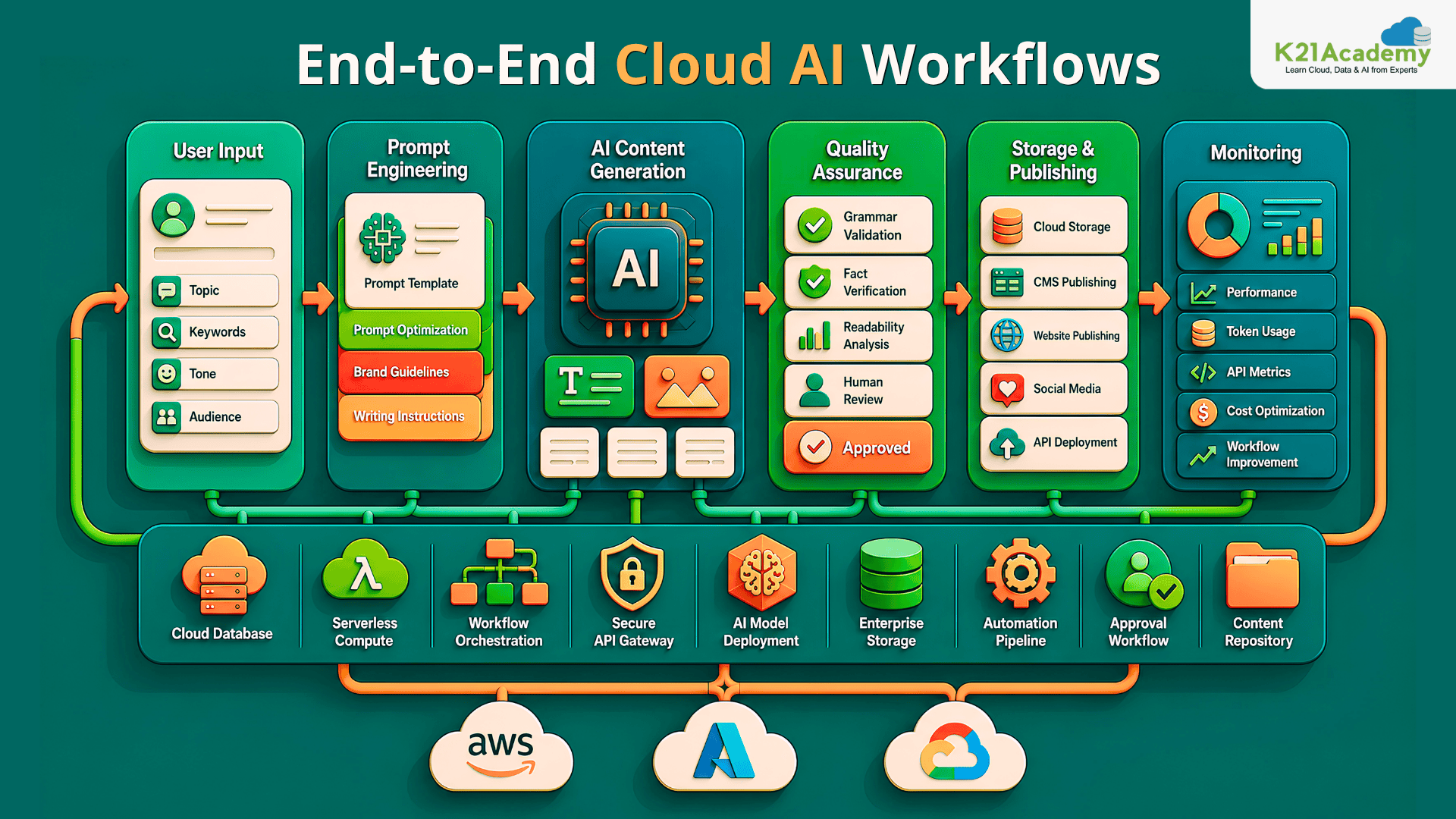
An enterprise AI content workflow consists of multiple connected layers rather than one AI model. Each layer performs a specific responsibility before passing data to the next stage. Below, we have provided a demo high-level architecture for an end-to-end AI content generation workflow in the cloud.
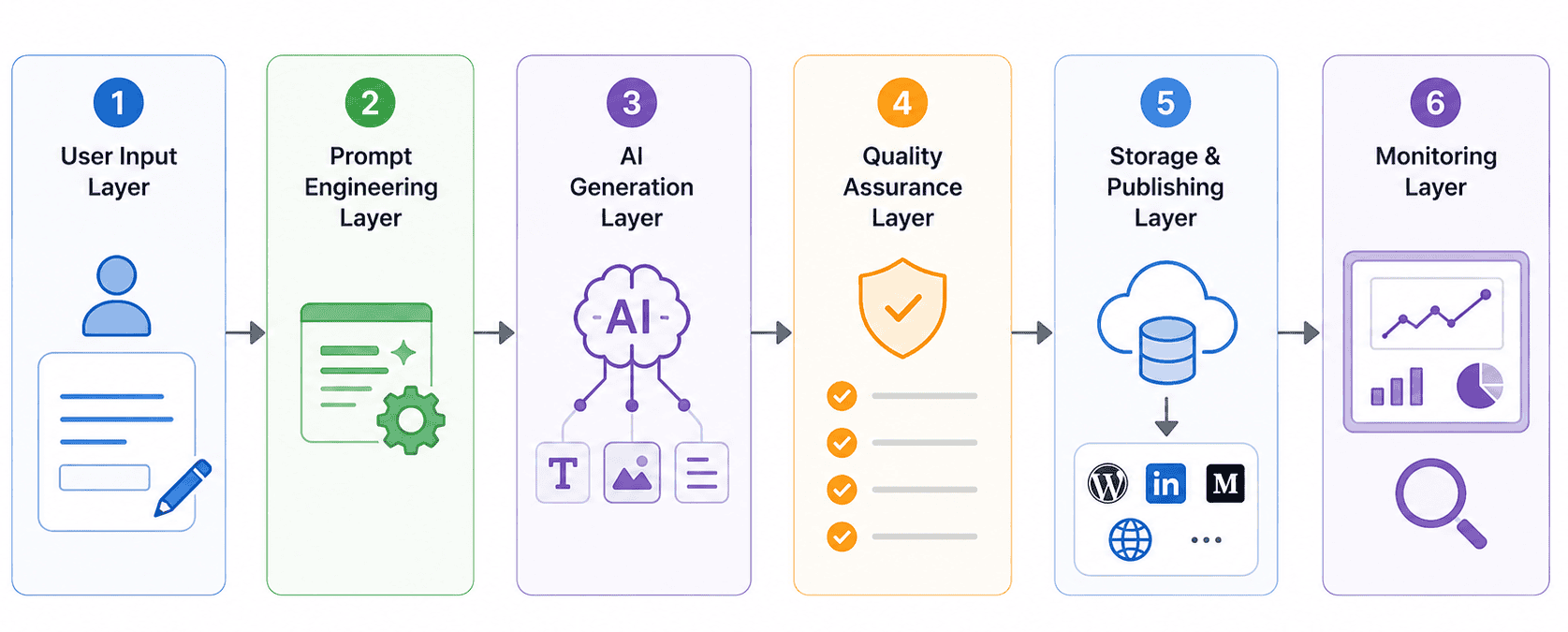
User Input Layer
The workflow begins when a request enters the system. The request might include a blog topic, product description, or any other type of content. At this layer, all the information is collected by models that are necessary for the content.
Prompt Engineering Layer
Raw user input rarely produces the best results. Instead, the AI workflow enriches the request with brand guidelines and writing instructions provided to it.
Related Readings: What is Prompt Engineering?
AI Generation Layer
Once the prompt is ready, one or more AI models generate the required assets. Depending on the workflow, this may include blog articles, technical documentation, image content, or other sorts of content.
Quality Assurance Layer
Before content reaches users, the workflow performs quality checks. Typical validation includes the following:
- Grammar review
- Fact verification
- Brand voice validation
- Readability analysis
- AI output scoring
This stage reduces the risk of publishing inaccurate or low-quality content.
Storage and Publishing Layer
Approved assets move to cloud storage before publishing. The workflow can then publish content automatically to the platforms defined for the content type.
Monitoring Layer
The final layer tracks how the workflow performs over time. Engineers monitor metrics such as:
- Content quality
- API failures
- Token consumption
- Workflow execution time
- Infrastructure cost
- User engagement
Continuous monitoring helps organisations improve both system performance and content quality.
How Can You Build an AI Content Generation Pipeline?
Now that we’ve looked at the overall architecture. Next we are going to show you how you can build an AI content generation pipeline in layers for an automated content workflow.
1. User Input Layer
AI workflows usually begin when a user submits a request to do something, e.g., create content. The request can come from different defined places. For content generation, that can be a website, CMS, or a CRM. Instead of relying on a simple prompt, most AI workflows collect more details before they start. For example, a blog request can include topic, keywords, writing tone, word count, CTAs, etc.
These details help the AI create better content. They also make the output more consistent. This is because every request has the information the AI needs. Many workflows also check user input before sending it to the AI model. They look for missing details, unsupported file types, and invalid requests, thereby reducing API calls.
2. Prompt Engineering Layer
The quality of AI content depends on the quality of the prompt. Instead of sending the user’s request directly to the AI model, AI engineers first improve the prompt. This step is called the prompt engineering layer. For example, if a marketing team asks for a blog post, the workflow can tell the AI to:
- Write for technical readers
- Use SEO-friendly headings
- Add real examples
- Keep a professional tone
- Avoid unsupported claims
We cannot ignore the prompt templates here. To avoid writing a new prompt every time, AI engineers create reusable templates for different types of content. For example, they can create templates for the following:
- Blog posts
- Product descriptions
- Technical documents
- Email campaigns
- Knowledge base articles
These templates help save time and keep the content quality the same, which is really crucial for written content.
Related Readings: Top 12 Prompt Engineering Tools for AI Projects in 2026
3. AI Content Generation Layer
Once the prompts are ready, they get connected with one or more AI models. Depending on the workflow, organizations may use specialized models for writing, image generation, or conversational applications such as AI Voice Agent solutions that automate customer interactions and voice-based experiences. Here you can add multiple layers. For example, if using one model to write blog posts, you can integrate another one to create images and insert them into blog posts.
This setup gives you more flexibility. You can update or replace a single model without changing the entire workflow. Some workflows do not stop after creating one piece of content. Instead, they create several versions.
Once multiple versions are generated, another well-trained model reviews and compares them. Based on the rules defined during training, it selects the best one and presents it as the final output. This helps in getting higher-quality content that is ready to publish.
4. AI Image and Visual Generation
Most business content needs more than text. In fact, the textual content itself demands visuals. When Google’s Nano Banana is the chosen model for the image layer of that pipeline, output quality depends heavily on how prompts are structured nano banana prompts that specify style, aspect ratio, lighting, and composition consistently produce production-ready assets that reduce the manual post-processing overhead between generation and publication. Instead of asking designers to create every image by hand, you can add AI image generation to the workflow.
For teams that need sharper, campaign-ready visuals, invideo’s GPT Image 2.0 can help generate realistic images with accurate text, flexible aspect ratios, and consistent brand style for articles, social posts, and other content assets.
For example, after writing an article, the workflow finds the main topic. Then it creates a matching prompt for an AI image model, generates an image, and adds it to the article.
5. Improve AI Content Before Publishing
Publishing AI content immediately after it is created is not advisable. Because at the time, we cannot say that an AI model is 100% perfect. Flaws are everywhere, and honestly, you should expect mistakes too. That is why it is necessary to include content checks in your workflow. This step helps you find mistakes and improve quality.
Fact Checking: AI models sometimes use outdated facts or manipulate them. It is always necessary to check important facts before publishing content. A human editor can also review the content to prevent the spread of incorrect information.
Humanizing Content: Even good AI content can sound robotic. End consumers demand content that is less robotic and easier to read. That is why you should always humanize AI text.
Check Grammar and Readability: You can integrate grammar tools to find spelling and grammar mistakes. In fact, some models can help you fix broken headings and formatting issues as well. Choose the model wisely, because the goal is to make the writing easier to read so people can understand the content.
How to Automate the Workflow with Cloud Services?
Cloud services can automate the whole workflow. This means you do not need to move content from one tool to another by hand. Instead, one step starts the next step automatically. For example:
- AI writes a blog post.
- Another tool converts AI text into human and checks grammar.
- An AI image tool creates a featured image.
- The CMS publishes the article.
Remember, automation saves time and also reduces mistakes.
Common Parts of an AI Workflow
Most AI workflows use these cloud services:
- API gateways to receive requests
- Serverless functions to process data
- Workflow tools to manage each step
- Message queues to handle many requests
- AI APIs to create text and images
- Notification services to alert reviewers
Each service does one job.
Storing and Managing AI Content
After the workflow creates the content, it needs a safe place to store it. But what information or type of content should you store? Because, as we mentioned earlier, in an AI workflow, multiple outputs are created, and the final one is shown to the user. Storing such large amounts of data can add to costs. Because of this, it is generally suggested to store:
- Final articles
- Recent drafts
- AI-generated images
- Prompt templates
- AI prompts
- Approval records
- Performance reports
Publish Content on Different Platforms
Publishing should also be automatic. Instead of downloading files and uploading them one by one, the workflow can publish content through APIs.
The content can go to:
- WordPress
- Headless CMS platforms
- Documentation websites
- Social media
The workflow can also change (repurpose) the same content for different platforms. For example, it can turn one blog post into:
- A LinkedIn post
- A newsletter
- Social media captions
- An email
- A presentation outline
This saves time and helps businesses get more value from one piece of content.
How to Monitor and Improve the AI Workflow?
Building an AI workflow is not a one-time job. You should check it often and make it better over time.
Check System Performance
These numbers show how well the workflow is working. For example, you can track API response time, check workflow speed, and monitor failed requests. Most importantly, you get to check the resources (tokens) used and how much a single request costs you. Using these numbers, you can improve the workflow and reduce costs later.
Check Content Quality
As we are talking about content generation, fast systems alone are not enough. The content also needs to be useful and easy to read. To improve the workflow output, you have to consistently monitor the following:
- Editing time
- Approval rate
- Content accuracy
- Readability score
- Content reuse
These numbers will show you if the workflow is creating good content.
Keep Improving
AI changes quickly. So your workflow should keep improving. Here are some tips to improve your AI workflow and keep it up to date.
- Test new AI models
- Improve prompt templates
- Update business rules
- Improve quality checks
- Collect user feedback
Small improvements can make a big difference over time.
Conclusion
AI can help businesses create content faster. However, a good AI workflow does much more than write text. AI workflow do everything automatically. For example, they:
- Collects the right information
- Creates better prompts
- Checks the content
- Adds images
- Publishes on defined platforms
Cloud platforms make this process easy to build and manage. They also help businesses lower costs and create content at scale. As AI keeps improving, smart workflows will become even more important. If you build your workflow the right way, you can create high-quality content. The one that is fast, reliable, and ready for your audience.